
- Posts: 266
- Thank you received: 120
A Widescreen Blender-Style Interface
- BrendaEM
- Offline
- Elite Member
-

Less
More
8 years 4 months ago - 8 years 4 months ago #112051
by BrendaEM
Replied by BrendaEM on topic A Widescreen Blender-Style Interface
* Added a status indicator, though I've tried my best that what's going on can be summed up without it. I see it mostly as an error indicator.
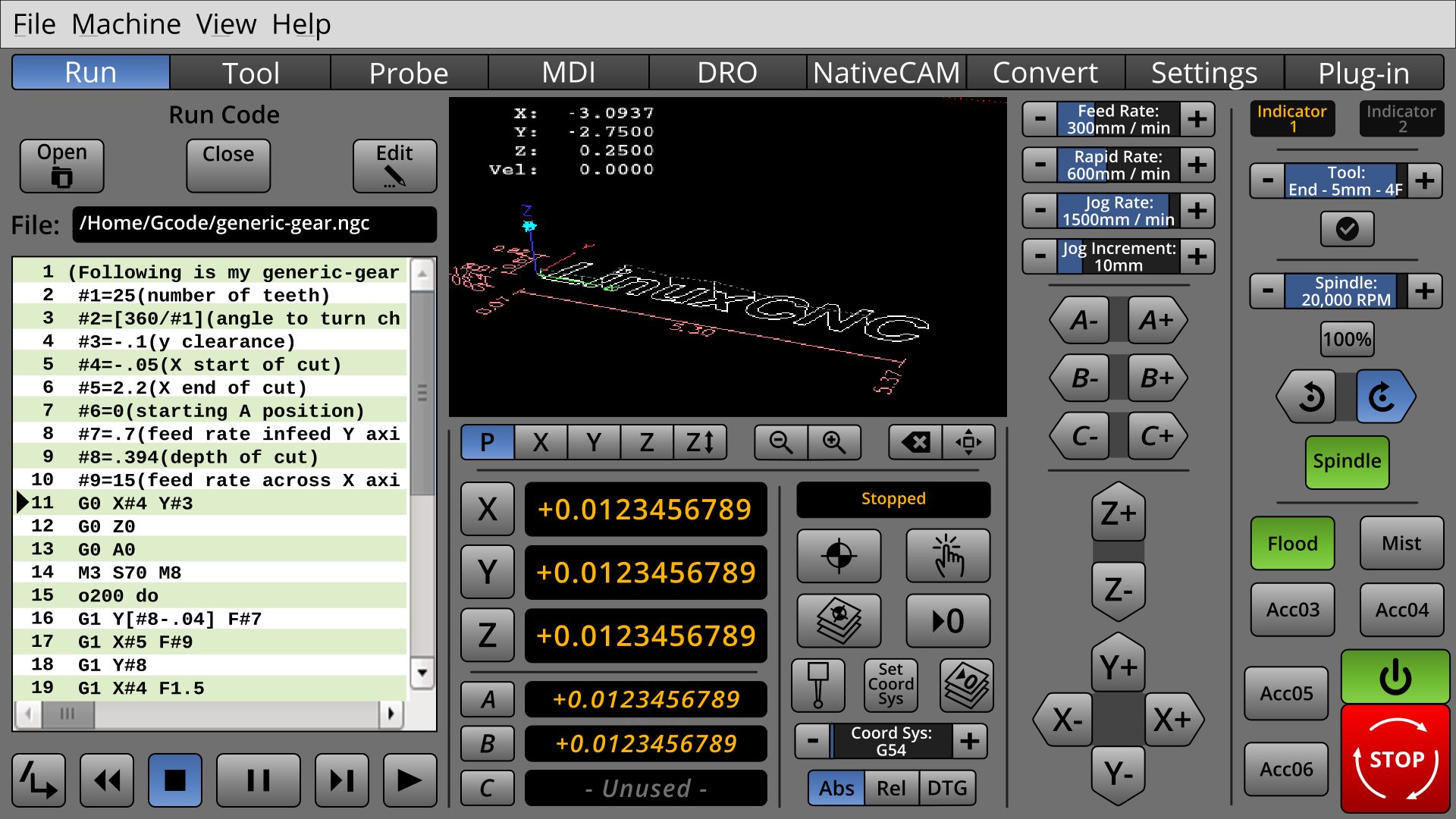
* Because of the positive feedback, the way forward is with the vertical controls, such as in the last screenshots. I'm still moving controls around.
Originally, for mills, I planned to support 5 axis, but there's little difference between 5 and six, that I figured just to add one more, I wanted the user not to feel confined, nor TMI'ed.
I've tried to put the additional axis where the user doesn't have to look at them:
When the user is looking at the 3D window, 456 are at the bottom.
When the user is jogging 456 are at the bottom of the speed controls.
The hope is that a user would not have to relearn the control placement when walking back and fourth from a 3-axis to a 5-axis machine.
* Because of the positive feedback, the way forward is with the vertical controls, such as in the last screenshots. I'm still moving controls around.
Originally, for mills, I planned to support 5 axis, but there's little difference between 5 and six, that I figured just to add one more, I wanted the user not to feel confined, nor TMI'ed.
I've tried to put the additional axis where the user doesn't have to look at them:
When the user is looking at the 3D window, 456 are at the bottom.
When the user is jogging 456 are at the bottom of the speed controls.
The hope is that a user would not have to relearn the control placement when walking back and fourth from a 3-axis to a 5-axis machine.
Last edit: 8 years 4 months ago by BrendaEM.
The following user(s) said Thank You: Roguish, tommylight, KCJ
- tommylight
- Offline
- Moderator
-

Less
More
- Posts: 22011
- Thank you received: 7491
8 years 4 months ago #112098
by tommylight
Replied by tommylight on topic A Widescreen Blender-Style Interface
I am getting the sinking sensation that this is going nowhere, it looks like we are discussing god or love, everyone is talking about it but no one has ever seen it.
It is past the time to actually upload something, anything so we can start putting it together ( i am looking at you KCJ ).
If you upload the svg files, i can export the individual png files, having something to go on while you continue to improve the looks and usability.
Thank you for a great job at designing it, it looks awesome.
It is past the time to actually upload something, anything so we can start putting it together ( i am looking at you KCJ ).
If you upload the svg files, i can export the individual png files, having something to go on while you continue to improve the looks and usability.
Thank you for a great job at designing it, it looks awesome.
The following user(s) said Thank You: KCJ
- KCJ
- Offline
- Platinum Member
-

Less
More
- Posts: 328
- Thank you received: 267
8 years 4 months ago #112104
by KCJ
Replied by KCJ on topic A Widescreen Blender-Style Interface
I agree with Tom.
Making a tweak here and there to a UI as the design evolves and improves is not a big deal. Once a reasonably workable layout has been reached and agreed upon (which I think we have at this point) it is time to start prototyping. There is little point in refining the design too much now as the prototype will almost certainly reveal some flaws in the design. Also, it might prove too difficult to implement certain parts of the design, which would then need to be changed to reflect what is realistically achievable.
Cheers,
Kurt
Making a tweak here and there to a UI as the design evolves and improves is not a big deal. Once a reasonably workable layout has been reached and agreed upon (which I think we have at this point) it is time to start prototyping. There is little point in refining the design too much now as the prototype will almost certainly reveal some flaws in the design. Also, it might prove too difficult to implement certain parts of the design, which would then need to be changed to reflect what is realistically achievable.
Cheers,
Kurt
The following user(s) said Thank You: tommylight
- BrendaEM
- Offline
- Elite Member
-
Less
More
- Posts: 266
- Thank you received: 120
8 years 4 months ago - 8 years 4 months ago #112109
by BrendaEM
Replied by BrendaEM on topic A Widescreen Blender-Style Interface
I feel a little bad because while I have the interface roughed out, I still want to have something for the lathe people.
Today, while I had my CNC computer hooked up to a 16x9 monitor, I took a screen shot to see down to the pixel how how much room the XFCE's bar takes up, and how much whatever GTK 1? controls that are on Axis takes up.
Someone has offered to at least help code it; I want to have respect for their time, in that I want to make sure that there isn't a dead end or a situation, where everything has to be moved around.
If you check this thread, you may see that I've only been working on this a few like 3 weeks (May 17th.)
Today, I also got a chance to install NativeCAM. It's great, far exceeding my expectations. It will do at least everything a manual mill DRO can, and much more, which means that the "DRO" menu can just be an extended readout display for jogging, if it even needs to exist at all.
Perhaps I am doing too many update posts. I want feedback.
[I've got some real-life stuff to do, too. In addition to working on this, I've been dumping the last few videos (80 GB) on my failed youtube channel so I can clean out my laptop computer, finishing my CNC (spindle motor will be here Monday), and packing.]
Today, while I had my CNC computer hooked up to a 16x9 monitor, I took a screen shot to see down to the pixel how how much room the XFCE's bar takes up, and how much whatever GTK 1? controls that are on Axis takes up.
Someone has offered to at least help code it; I want to have respect for their time, in that I want to make sure that there isn't a dead end or a situation, where everything has to be moved around.
If you check this thread, you may see that I've only been working on this a few like 3 weeks (May 17th.)
Today, I also got a chance to install NativeCAM. It's great, far exceeding my expectations. It will do at least everything a manual mill DRO can, and much more, which means that the "DRO" menu can just be an extended readout display for jogging, if it even needs to exist at all.
Perhaps I am doing too many update posts. I want feedback.
[I've got some real-life stuff to do, too. In addition to working on this, I've been dumping the last few videos (80 GB) on my failed youtube channel so I can clean out my laptop computer, finishing my CNC (spindle motor will be here Monday), and packing.]
Last edit: 8 years 4 months ago by BrendaEM.
The following user(s) said Thank You: KCJ
- BrendaEM
- Offline
- Elite Member
-
Less
More
- Posts: 266
- Thank you received: 120
8 years 4 months ago - 8 years 4 months ago #112433
by BrendaEM
Replied by BrendaEM on topic A Widescreen Blender-Style Interface
* First Lathe Attempt. I think the readout controls should be modular.
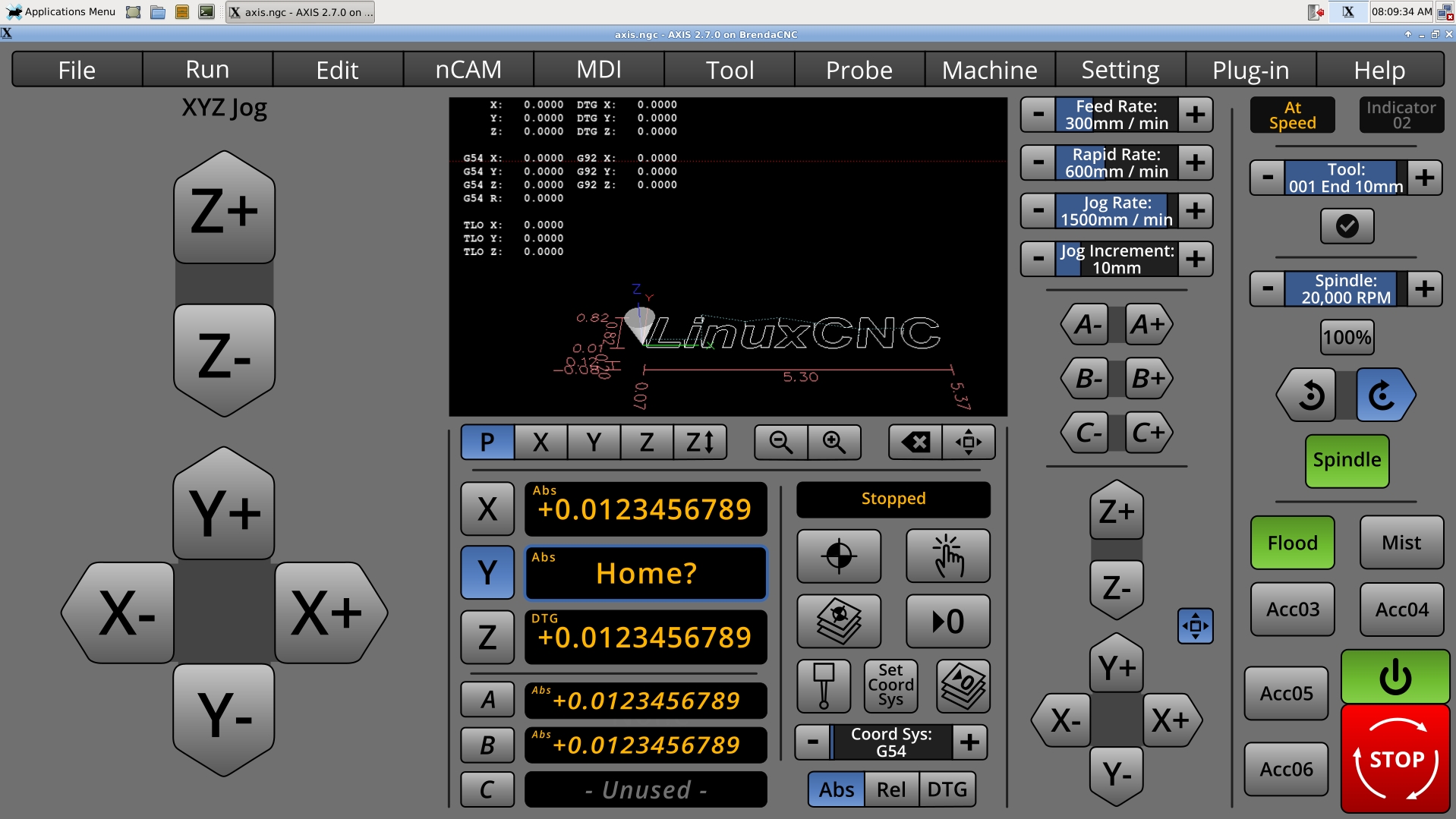
* Showing NativeCAM, which is a pretty long word. For now, I just shortened it to nCAM so it fits. Having tried NativeCAM, I feel that it does what I wanted a DRO tab to do. Perhaps the control color scheme could be made to match. I've tried making the main command bar light, like Native CAM, but it I feel it's hard to concentrate at the rest of the interface.
Perhaps someday, there could be a button in Nativecam, which make it expand and take up the left and center panel areas.
* Added Abs, Rel, DTG indicators. Earlier versions had these. They have returned out of safety considerations.
I've not known what to do with the menubar, whether or not to integrate all of Axis menus, cull them, or compromise, like this.
Most of the other things have changed little, but adjustment and refinement.
I am starting to feel that they general layout will work. I feel that it is a "reasonably workable layout" .
Do you see what you don't see? That crappy XFCE dock thing! I am not sure why they used "Applications Menu" when it's obvious that it's a menu. Just the little cute mouse would have done better. Apple has their little Apple menu. Windows has its Start menu. XFCE has two words.

* Added expand button near jogging controls to make the large like Touchy. Although the toggle button is rather small, pressing it would make the jogging control take up the left 1/3 of the screen. Because I made compromises to accomodate 4-6 axis mills, I wanted to give something back to the people with only 3 axis. Yes, the controls are quite large.
* Showing NativeCAM, which is a pretty long word. For now, I just shortened it to nCAM so it fits. Having tried NativeCAM, I feel that it does what I wanted a DRO tab to do. Perhaps the control color scheme could be made to match. I've tried making the main command bar light, like Native CAM, but it I feel it's hard to concentrate at the rest of the interface.
Perhaps someday, there could be a button in Nativecam, which make it expand and take up the left and center panel areas.
* Added Abs, Rel, DTG indicators. Earlier versions had these. They have returned out of safety considerations.
I've not known what to do with the menubar, whether or not to integrate all of Axis menus, cull them, or compromise, like this.
Most of the other things have changed little, but adjustment and refinement.
I am starting to feel that they general layout will work. I feel that it is a "reasonably workable layout" .
Do you see what you don't see? That crappy XFCE dock thing! I am not sure why they used "Applications Menu" when it's obvious that it's a menu. Just the little cute mouse would have done better. Apple has their little Apple menu. Windows has its Start menu. XFCE has two words.
* Added expand button near jogging controls to make the large like Touchy. Although the toggle button is rather small, pressing it would make the jogging control take up the left 1/3 of the screen. Because I made compromises to accomodate 4-6 axis mills, I wanted to give something back to the people with only 3 axis. Yes, the controls are quite large.
Last edit: 8 years 4 months ago by BrendaEM.
The following user(s) said Thank You: KCJ
- KCJ
- Offline
- Platinum Member
-
Less
More
- Posts: 328
- Thank you received: 267
8 years 4 months ago - 8 years 4 months ago #112435
by KCJ
Replied by KCJ on topic A Widescreen Blender-Style Interface
Looking great! Its been a while, but I think I got most of NCAM ported from Gtk2 to Gtk3. If I ever finish that up it would be pretty easy for somebody with CSS skills (i.e. not me!) to theme it so it looks more consistent.
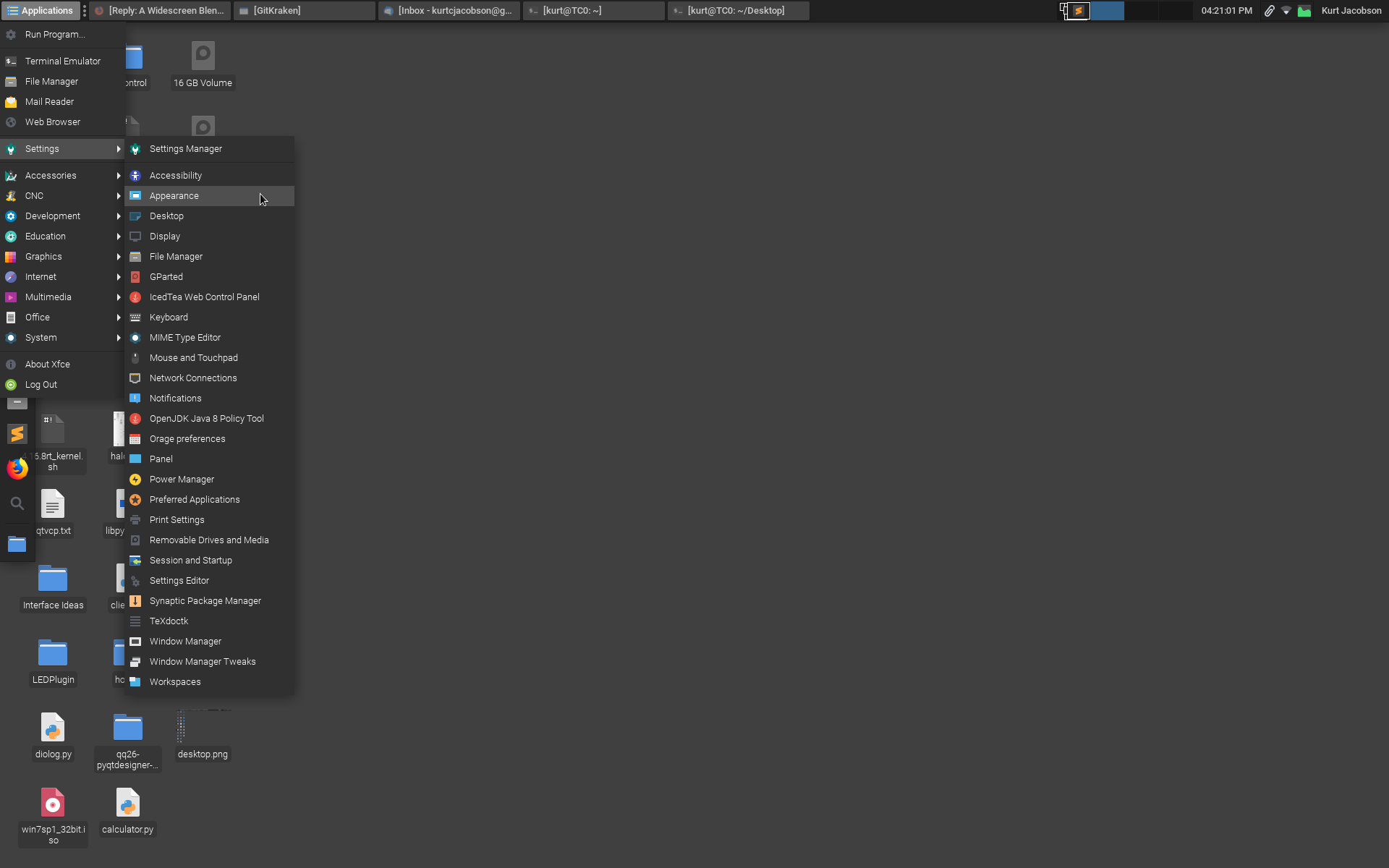
Re: The XFCE dock, panel, whatever you like to call it. It is very easy to customize its appearance however you like. Right click >> Properties and you can set the display text, icon etc. On my CNC machines I have the panel set to auto hide so I have full screen real estate for the UI.
Cheers,
Kurt
EDIT: XFCE panel auto hide demo:
Re: The XFCE dock, panel, whatever you like to call it. It is very easy to customize its appearance however you like. Right click >> Properties and you can set the display text, icon etc. On my CNC machines I have the panel set to auto hide so I have full screen real estate for the UI.
Cheers,
Kurt
EDIT: XFCE panel auto hide demo:
Last edit: 8 years 4 months ago by KCJ.
The following user(s) said Thank You: BrendaEM
Time to create page: 0.349 seconds