
- Posts: 266
- Thank you received: 120
A Widescreen Blender-Style Interface
- BrendaEM
- Offline
- Elite Member
-

Less
More
8 years 4 months ago - 8 years 4 months ago #111786
by BrendaEM
Replied by BrendaEM on topic A Widescreen Blender-Style Interface
Hi Tommylight,
The design is still young enough that I am still worried about dead-ends, design-wise, given that it's only been a few weeks. I guess I should make a to-do list.
To do list:
* Draw up an on-screen keyboard, and make sure it works well with the other panels and sections. (In progress)
* Make sure interface works with space allotted, with the bars and Linux-CNC pull-down menubar. As installed, the XFCE dock wastes a lot of space, and I have met with resistance about changing it, though I strongly feel that it will help other interfaces as well. I will have to see if my 16x9 monitor has an analog input, so it can be moved out in the garage to see how much the XFCE top bar takes up, as well as the LinuxCNC native controls, which I have just estimated. In the end, I just state that the dock's icons should be moved to the top Launch bar, and the wasteful dock eliminated to use the interface. I know a lot of Mac people who don't like the OSX dock either. Microsoft is so stupid for continually working to eliminate it's launch-bar and start button, which are arguably the best part of Windows.
* Come up with a readout and axis controls panel which will make lathe-people happy.
* Get more feedback.
I am sorry that this is taking so long, but with other people working on this, I want them to use their time efficiently.
[Aside from this I am trying to finish my CNC mill and large 3d printer before I lose my place to live.]
The design is still young enough that I am still worried about dead-ends, design-wise, given that it's only been a few weeks. I guess I should make a to-do list.
To do list:
* Draw up an on-screen keyboard, and make sure it works well with the other panels and sections. (In progress)
* Make sure interface works with space allotted, with the bars and Linux-CNC pull-down menubar. As installed, the XFCE dock wastes a lot of space, and I have met with resistance about changing it, though I strongly feel that it will help other interfaces as well. I will have to see if my 16x9 monitor has an analog input, so it can be moved out in the garage to see how much the XFCE top bar takes up, as well as the LinuxCNC native controls, which I have just estimated. In the end, I just state that the dock's icons should be moved to the top Launch bar, and the wasteful dock eliminated to use the interface. I know a lot of Mac people who don't like the OSX dock either. Microsoft is so stupid for continually working to eliminate it's launch-bar and start button, which are arguably the best part of Windows.
* Come up with a readout and axis controls panel which will make lathe-people happy.
* Get more feedback.
I am sorry that this is taking so long, but with other people working on this, I want them to use their time efficiently.
[Aside from this I am trying to finish my CNC mill and large 3d printer before I lose my place to live.]
Last edit: 8 years 4 months ago by BrendaEM.
The following user(s) said Thank You: tommylight
- BrendaEM
- Offline
- Elite Member
-
Less
More
- Posts: 266
- Thank you received: 120
8 years 4 months ago - 8 years 4 months ago #111793
by BrendaEM
Replied by BrendaEM on topic A Widescreen Blender-Style Interface
* A rough on-screen keyboard mockup.
I would rather not ever cover up the machine EStop and power controls, but the user would probably have to be prevented from turning anything on when a keyboard or editing window is up.
This is the stuff that times time: to work out if things will work out.
Arrow keys should be fitted in there somewhere.
Edit: probably should have a spacebar, too : )
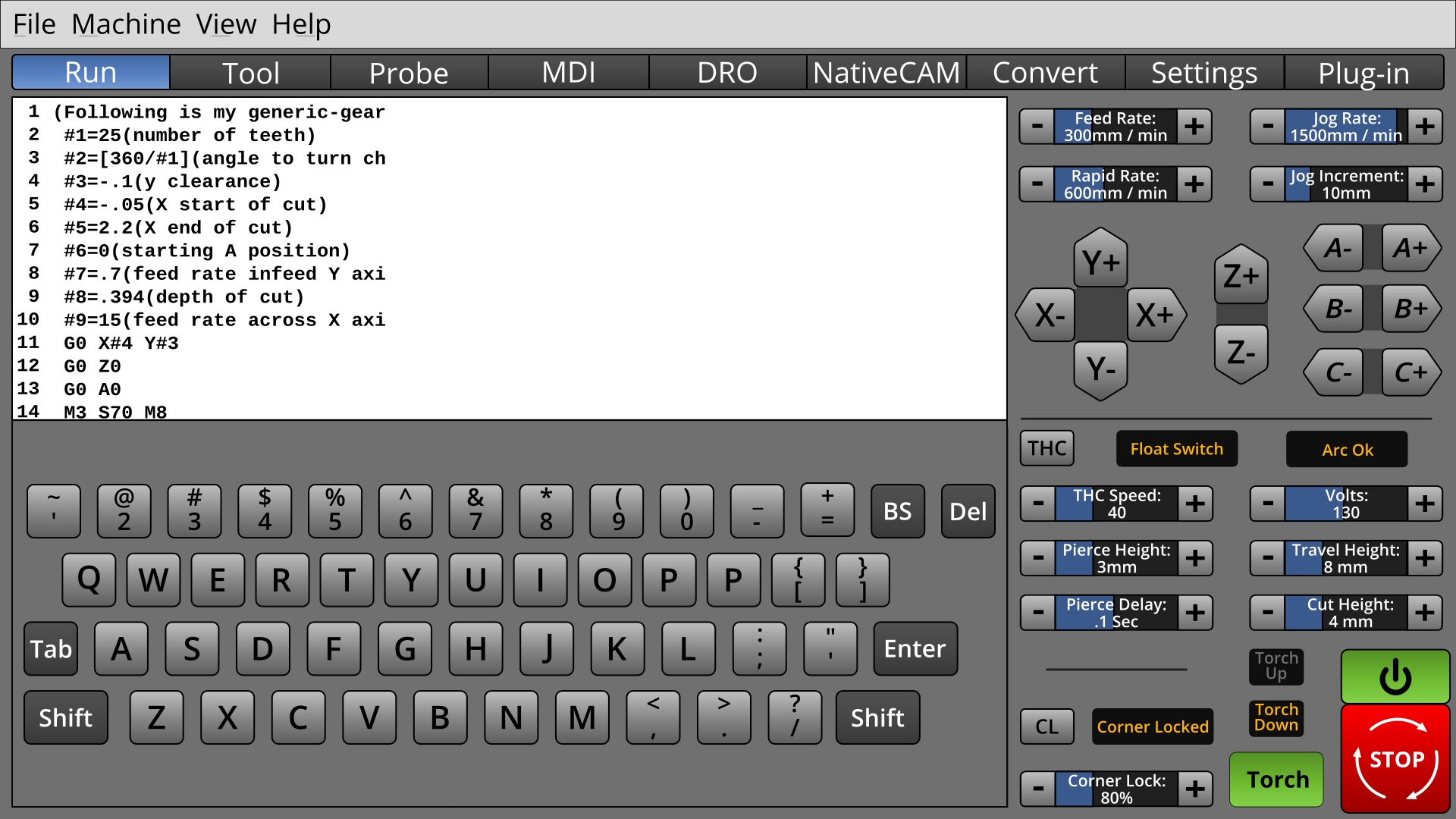
I would rather not ever cover up the machine EStop and power controls, but the user would probably have to be prevented from turning anything on when a keyboard or editing window is up.
This is the stuff that times time: to work out if things will work out.
Arrow keys should be fitted in there somewhere.
Edit: probably should have a spacebar, too : )
Last edit: 8 years 4 months ago by BrendaEM.
- andypugh
- Offline
- Moderator
-

Less
More
- Posts: 19899
- Thank you received: 4655
8 years 4 months ago #111799
by andypugh
I think "Axis" was a poor choice in retrospect, but Gscreen, Gmoccapy and Touchy are all working OK in context. If it becomes a finished GUI then I will be typing the name a lot and favour a short name.
Replied by andypugh on topic A Widescreen Blender-Style Interface
BrendaEM wrote: Just to nip this in the bud: I am against naming things with names which are difficult to document.
I think "Axis" was a poor choice in retrospect, but Gscreen, Gmoccapy and Touchy are all working OK in context. If it becomes a finished GUI then I will be typing the name a lot and favour a short name.
- andypugh
- Offline
- Moderator
-
Less
More
- Posts: 19899
- Thank you received: 4655
8 years 4 months ago #111801
by andypugh
I didn't see resistance. I saw vague agreement with the point of view and a statement that you are asking the wrong people.
Replied by andypugh on topic A Widescreen Blender-Style Interface
BrendaEM wrote: * Make sure interface works with space allotted, with the bars and Linux-CNC pull-down menubar. As installed, the XFCE dock wastes a lot of space, and I have met with resistance about changing it,
I didn't see resistance. I saw vague agreement with the point of view and a statement that you are asking the wrong people.
The following user(s) said Thank You: tommylight
- BrendaEM
- Offline
- Elite Member
-
Less
More
- Posts: 266
- Thank you received: 120
8 years 4 months ago - 8 years 4 months ago #111945
by BrendaEM
Replied by BrendaEM on topic A Widescreen Blender-Style Interface
* Keyboard mockup now has spacebar, well and arrow keys : P The spacing varies from row to row. There's no scroll bars in the text window, but they would be there.
The on-screen keyboard needs a button to return to whatever called it.
The screen is unequally split horizontally to allow more room for machine controls.
A haunting question remains: DId Axis do it right by using a vertical strip on the right for machine unique controls?
I may do a test. Unbeknownst to anyone in this thread, there have been about a dozen effort-filled dead-end, wrong turns, and experiments which didn't show up. Perhaps I will do one more, after this.
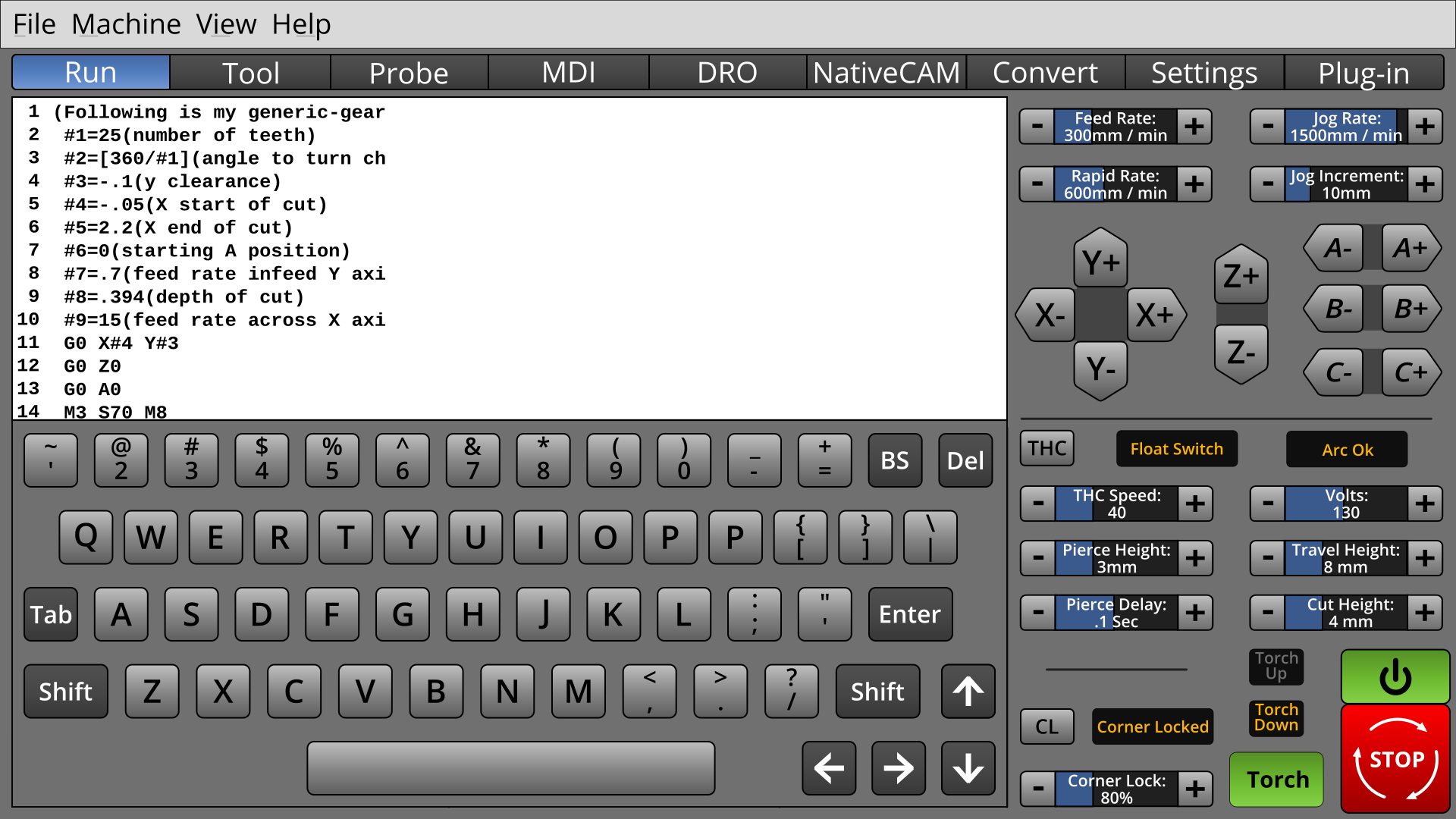
The on-screen keyboard needs a button to return to whatever called it.
The screen is unequally split horizontally to allow more room for machine controls.
A haunting question remains: DId Axis do it right by using a vertical strip on the right for machine unique controls?
I may do a test. Unbeknownst to anyone in this thread, there have been about a dozen effort-filled dead-end, wrong turns, and experiments which didn't show up. Perhaps I will do one more, after this.
Last edit: 8 years 4 months ago by BrendaEM.
- rodw
- Offline
- Platinum Member
-

Less
More
- Posts: 12170
- Thank you received: 4153
8 years 4 months ago #111958
by rodw
Replied by rodw on topic A Widescreen Blender-Style Interface
Just getting bigger than Ben Hurr.
I know one day soon you are going to have to turn this into reality and I found this Python code for keyboard emulation
github.com/boppreh/keyboard that may make your job easier...
I know one day soon you are going to have to turn this into reality and I found this Python code for keyboard emulation
github.com/boppreh/keyboard that may make your job easier...
The following user(s) said Thank You: KCJ, BrendaEM
Time to create page: 3.458 seconds