
- Posts: 328
- Thank you received: 267
A Widescreen Blender-Style Interface
- KCJ
- Offline
- Platinum Member
-

Less
More
8 years 5 months ago #111337
by KCJ
Replied by KCJ on topic A Widescreen Blender-Style Interface
That is looking really, really good!
I would defiantly be willing to help implement this screen in any way I can.
I am not any good at the graphics/human factors stuff, but I can help code.
Keep up the great work!
I would defiantly be willing to help implement this screen in any way I can.
I am not any good at the graphics/human factors stuff, but I can help code.
Keep up the great work!
- BrendaEM
- Offline
- Elite Member
-

Less
More
- Posts: 266
- Thank you received: 120
8 years 5 months ago - 8 years 5 months ago #111338
by BrendaEM
Replied by BrendaEM on topic A Widescreen Blender-Style Interface
Kcj, that sounds quite agreeable.
I am still moving around stuff, trying to get more room for the "Torch People" : )
I am trying to give this enough thought so it covers most needs. I wish I had my machine done, so I could get some better first-hand knowledge.
I want to try to lay rough out the other pages, just enough to make sure I haven't forgotten something on the main interface, which would be the tab-bar that runs across the top, and the center and right panels.
I am doing this in Inkscape, so the graphics can be output for either 1080 (or even 4k,) though I would like to keep a 16x9 aspect ratio, which may upset some people, but I want LinuxCNC to be forward-thinking and forward compatible.
I am still moving around stuff, trying to get more room for the "Torch People" : )
I am trying to give this enough thought so it covers most needs. I wish I had my machine done, so I could get some better first-hand knowledge.
I want to try to lay rough out the other pages, just enough to make sure I haven't forgotten something on the main interface, which would be the tab-bar that runs across the top, and the center and right panels.
I am doing this in Inkscape, so the graphics can be output for either 1080 (or even 4k,) though I would like to keep a 16x9 aspect ratio, which may upset some people, but I want LinuxCNC to be forward-thinking and forward compatible.
Last edit: 8 years 5 months ago by BrendaEM.
- ozzyrob
- Visitor
-

8 years 5 months ago - 8 years 5 months ago #111342
by ozzyrob
Replied by ozzyrob on topic A Widescreen Blender-Style Interface
Just out of interest what size, in mm or inch would a "standard" button on the interface be in relation to a particular screen size?
Last edit: 8 years 5 months ago by ozzyrob.
- BrendaEM
- Offline
- Elite Member
-
Less
More
- Posts: 266
- Thank you received: 120
8 years 5 months ago #111344
by BrendaEM
Replied by BrendaEM on topic A Widescreen Blender-Style Interface
With a 14" monitor:
X,Y,Z controls are 10mm square.
With the upcoming changes, the Estop is 20mm square + whatever the gutter affords.
The power 20mm x 10mm.
The Increment adjuster ends are 7.5mm square.
The view controls are 10 x 7.5mm.
The Jog directional buttons are 10 x 15mm.
I've tried to keep a touch gutter around the perimeter of the screen,
X,Y,Z controls are 10mm square.
With the upcoming changes, the Estop is 20mm square + whatever the gutter affords.
The power 20mm x 10mm.
The Increment adjuster ends are 7.5mm square.
The view controls are 10 x 7.5mm.
The Jog directional buttons are 10 x 15mm.
I've tried to keep a touch gutter around the perimeter of the screen,
The following user(s) said Thank You: ozzyrob
- BrendaEM
- Offline
- Elite Member
-
Less
More
- Posts: 266
- Thank you received: 120
8 years 5 months ago - 8 years 5 months ago #111345
by BrendaEM
Replied by BrendaEM on topic A Widescreen Blender-Style Interface
I am still working on the torch controls, but I don't know which ones need to be on the main screen.
With no feedback as to their priority, this is the mess I've made of them.
I was hoping that I would get them close enough so a Torch Person could tell me what I am doing wrong.
Until then, this is what there is : )
Note: The torch controls on the lower right are swapped for milling controls, where applicable.
Also note: Minor redesign of the Estop and Power buttons. They aren't going any smaller.
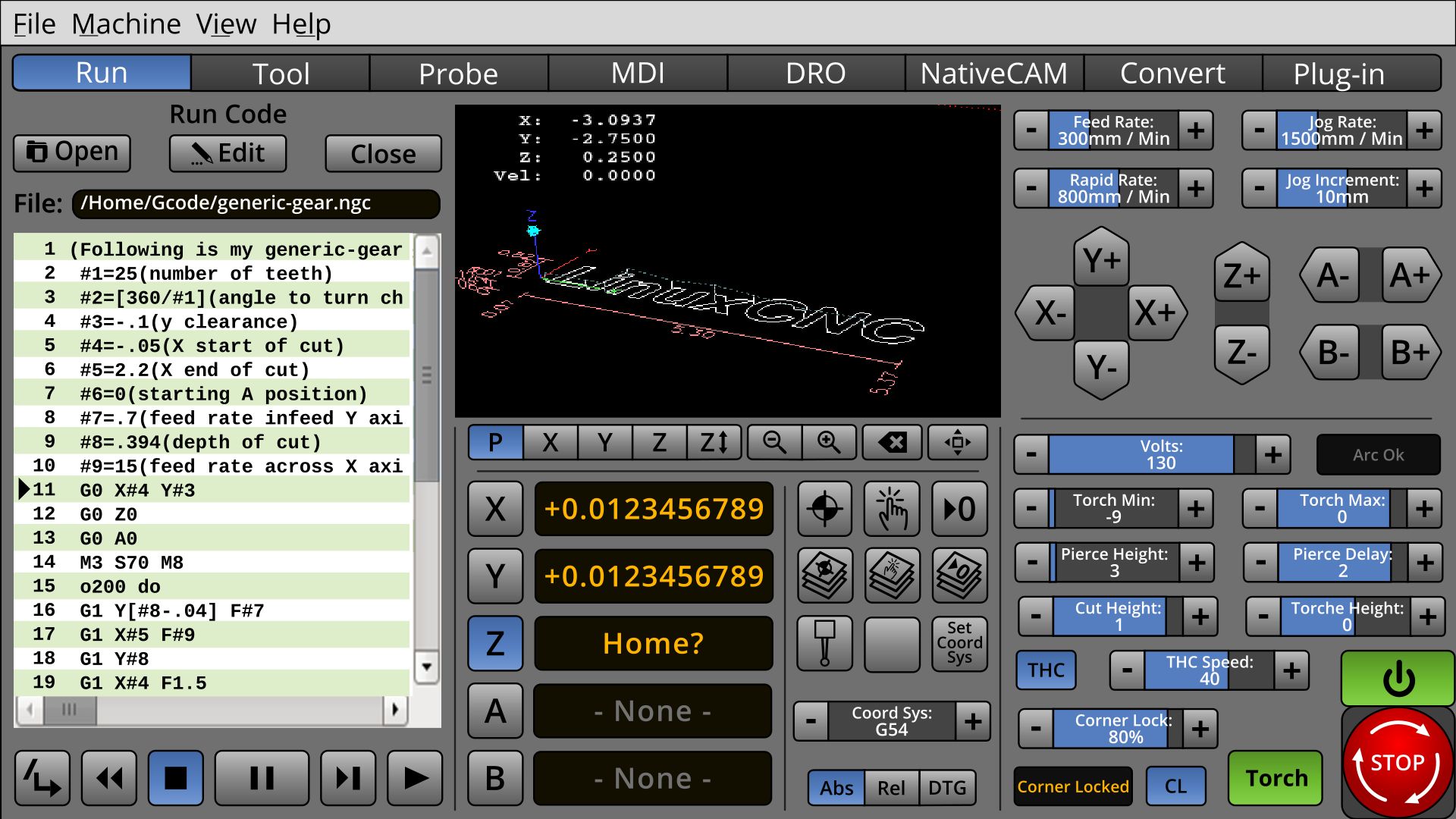
With no feedback as to their priority, this is the mess I've made of them.
I was hoping that I would get them close enough so a Torch Person could tell me what I am doing wrong.
Until then, this is what there is : )
Note: The torch controls on the lower right are swapped for milling controls, where applicable.
Also note: Minor redesign of the Estop and Power buttons. They aren't going any smaller.
Last edit: 8 years 5 months ago by BrendaEM.
- BrendaEM
- Offline
- Elite Member
-
Less
More
- Posts: 266
- Thank you received: 120
8 years 5 months ago - 8 years 5 months ago #111346
by BrendaEM
Replied by BrendaEM on topic A Widescreen Blender-Style Interface
* Changed E-Stop button shape to square. I was worried that the user might mistake the onscreen Estop for a physical one. The screen button is estop'ie enough, but not too much.
* Reworked Home/Touch controls. I am back to liking them.
* Minor change on View controls.
* Totally done with this for tonight, this time, really, I think.

* Reworked Home/Touch controls. I am back to liking them.
* Minor change on View controls.
* Totally done with this for tonight, this time, really, I think.
Last edit: 8 years 5 months ago by BrendaEM.
The following user(s) said Thank You: KCJ
Time to create page: 3.111 seconds