
- Posts: 266
- Thank you received: 120
A Widescreen Blender-Style Interface
- BrendaEM
- Offline
- Elite Member
-

Less
More
8 years 5 months ago - 8 years 5 months ago #111145
by BrendaEM
Replied by BrendaEM on topic A Widescreen Blender-Style Interface
* Changed "Main" to "Run."
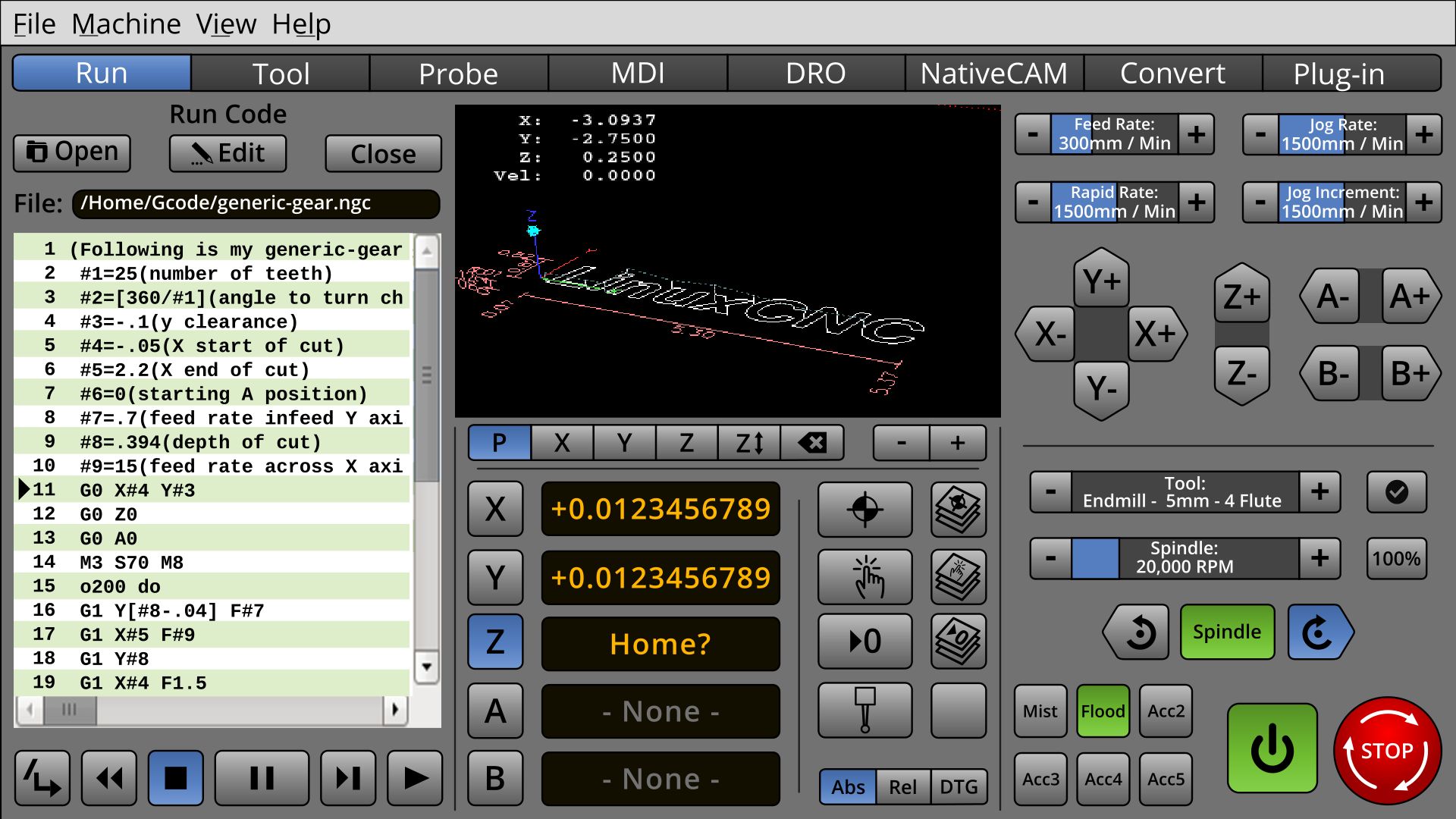
* Experimenting with adding some Faenza icons. Faenaz is a very popular icon theme. Because all the icons, so far in the mock-up are monochromatic, I just extracted part of each.
There are now several new icons.
I was worried about the Estop looking too similar to the Forward and Reverse icons, but because the color is different, it appears not to be a problem.
I've had an ulterior motive for using popular icons and fonts: I want to present a familiar interface. I've not really tried to make anything new here. In fact, I'm trying to take as much from other works, to make people comfortable.
On the Main or Run menu, I've not wanted to put the traditional probe icon, because it's not apparent what it is without adding the reddish probe tip color. I've been trying to keep red and green off the interface so they can be used for On/Off and Estop.
* Experimenting with adding some Faenza icons. Faenaz is a very popular icon theme. Because all the icons, so far in the mock-up are monochromatic, I just extracted part of each.
There are now several new icons.
I was worried about the Estop looking too similar to the Forward and Reverse icons, but because the color is different, it appears not to be a problem.
I've had an ulterior motive for using popular icons and fonts: I want to present a familiar interface. I've not really tried to make anything new here. In fact, I'm trying to take as much from other works, to make people comfortable.
On the Main or Run menu, I've not wanted to put the traditional probe icon, because it's not apparent what it is without adding the reddish probe tip color. I've been trying to keep red and green off the interface so they can be used for On/Off and Estop.
Last edit: 8 years 5 months ago by BrendaEM.
The following user(s) said Thank You: tommylight
- KCJ
- Offline
- Platinum Member
-

Less
More
- Posts: 328
- Thank you received: 267
8 years 5 months ago #111234
by KCJ
Replied by KCJ on topic A Widescreen Blender-Style Interface
That is a very nice looking screen!
I know you're not thinking about implementation yet, but what you have so far could be done in GTK3 or Qt without too much trouble. Most everything but the icons could be reproduced using CSS. It helps a lot that you have kept the shapes basic and the layout on a grid.
I know you're not thinking about implementation yet, but what you have so far could be done in GTK3 or Qt without too much trouble. Most everything but the icons could be reproduced using CSS. It helps a lot that you have kept the shapes basic and the layout on a grid.
The following user(s) said Thank You: BrendaEM
- BrendaEM
- Offline
- Elite Member
-
Less
More
- Posts: 266
- Thank you received: 120
8 years 5 months ago - 8 years 5 months ago #111237
by BrendaEM
Replied by BrendaEM on topic A Widescreen Blender-Style Interface
That's good to read. I think that the text-box with greenbar and indicator would be nonstandard. The selector boxes with text inside would also be non standard, but they save room.
I am having trouble with the torch controls. There are too many controls to fit on 1/6th of the screen. I don't have a torch, so it would be difficult to triage which controls need to be adjusted during normal running, and which ones could be put on the "Tool" menu, or a "Settings" menu. Hmmm.
I am having trouble with the torch controls. There are too many controls to fit on 1/6th of the screen. I don't have a torch, so it would be difficult to triage which controls need to be adjusted during normal running, and which ones could be put on the "Tool" menu, or a "Settings" menu. Hmmm.
Last edit: 8 years 5 months ago by BrendaEM.
- tommylight
- Offline
- Moderator
-

Less
More
- Posts: 22011
- Thank you received: 7491
8 years 5 months ago #111238
by tommylight
Finaly !!! Welcome back Kurt.
Not to point out the obvious, but, you and Brenda could do the world of Linuxcnc a big favour by making this work as soon as possible. Again pointing the obvious, but i can't wait to have this working, but i have to steal from my sleep every day 15 to 30 minutes to do some quick reading/writing here on the forum, so i have no time to help much. By some strange turn of events i got to be the General Manager of a manufacturing factory, specialized in lifting equipment like cranes and the likes.
And again, this is a very nice looking screen and would be a nice addition to already wide variety of screens for Linuxcnc.
Thank you all.
P.S.
If by any chance someone needs an idea for another screen, have a look at Mazak, their new interface looks like something from a space ship.
Replied by tommylight on topic A Widescreen Blender-Style Interface
kcj wrote: That is a very nice looking screen!
I know you're not thinking about implementation yet, but what you have so far could be done in GTK3 or Qt without too much trouble. Most everything but the icons could be reproduced using CSS. It helps a lot that you have kept the shapes basic and the layout on a grid.
Finaly !!! Welcome back Kurt.
Not to point out the obvious, but, you and Brenda could do the world of Linuxcnc a big favour by making this work as soon as possible. Again pointing the obvious, but i can't wait to have this working, but i have to steal from my sleep every day 15 to 30 minutes to do some quick reading/writing here on the forum, so i have no time to help much. By some strange turn of events i got to be the General Manager of a manufacturing factory, specialized in lifting equipment like cranes and the likes.
And again, this is a very nice looking screen and would be a nice addition to already wide variety of screens for Linuxcnc.
Thank you all.
P.S.
If by any chance someone needs an idea for another screen, have a look at Mazak, their new interface looks like something from a space ship.
The following user(s) said Thank You: KCJ
- BrendaEM
- Offline
- Elite Member
-
Less
More
- Posts: 266
- Thank you received: 120
8 years 5 months ago #111240
by BrendaEM
Replied by BrendaEM on topic A Widescreen Blender-Style Interface
I saw two Mazak interfaces, the Star Trek Next Gen one, and one with serif fonts.
As soon as a serif font makes its appearance on an interface, there is already a problem. Serifs on fonts are to lead the eye horizontally, you know, for paragraph text : P
As soon as a serif font makes its appearance on an interface, there is already a problem. Serifs on fonts are to lead the eye horizontally, you know, for paragraph text : P
- KCJ
- Offline
- Platinum Member
-
Less
More
- Posts: 328
- Thank you received: 267
8 years 5 months ago #111241
by KCJ
Replied by KCJ on topic A Widescreen Blender-Style Interface
Thank you Tommy!
I have been busy lately, but I hope to start working on LinuxCNC stuff again soon.
I'm glad you mentioned the new Mazatrols, I had not seen their new Smooth series yet. Looks like they are trying to follow the same trend as the DMG Mori CELOS controls. The CELOS control was the inspiration for Hazzy!
Cheers,
Kurt
I have been busy lately, but I hope to start working on LinuxCNC stuff again soon.
I'm glad you mentioned the new Mazatrols, I had not seen their new Smooth series yet. Looks like they are trying to follow the same trend as the DMG Mori CELOS controls. The CELOS control was the inspiration for Hazzy!
Cheers,
Kurt
The following user(s) said Thank You: tommylight
Time to create page: 0.435 seconds