
- Posts: 22011
- Thank you received: 7491
A Widescreen Blender-Style Interface
- tommylight
- Offline
- Moderator
-

Less
More
8 years 5 months ago #110931
by tommylight
Replied by tommylight on topic A Widescreen Blender-Style Interface
That is looking nice !
And that lower right part would be nice to have the THC plasma stuff, or tool changer stuff, or diagnostics or..... never mind.
And that lower right part would be nice to have the THC plasma stuff, or tool changer stuff, or diagnostics or..... never mind.
The following user(s) said Thank You: BrendaEM
- BrendaEM
- Offline
- Elite Member
-

Less
More
- Posts: 266
- Thank you received: 120
8 years 5 months ago - 8 years 5 months ago #110933
by BrendaEM
Replied by BrendaEM on topic A Widescreen Blender-Style Interface
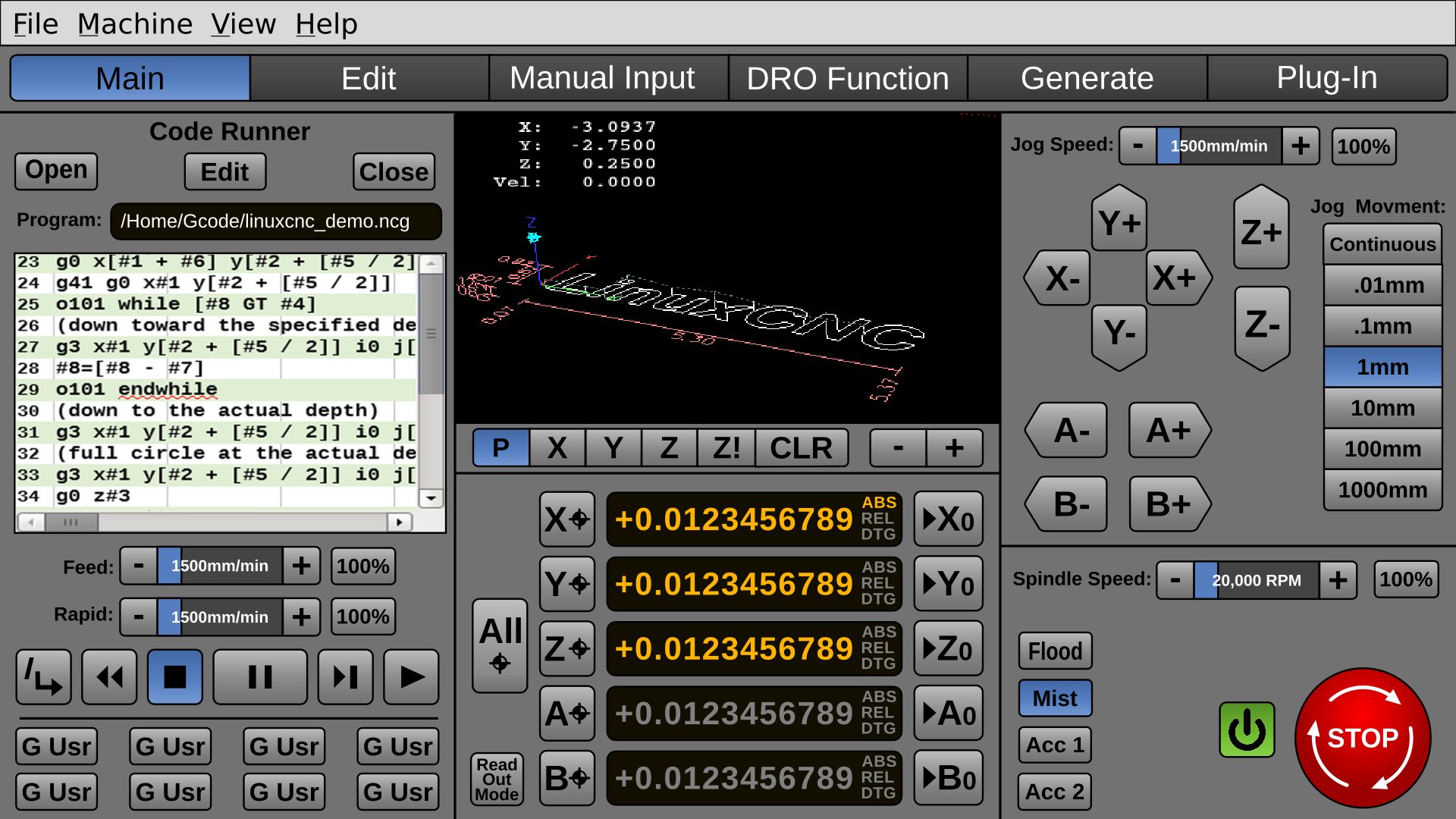
I want the entire left panel to be changeable for each mode of operation. For instance, if the user presses the "DRO Function" button, they would be able to do all the stuff they could do manually with a hardware DRO (such as dividing, bolt circles, drilling, single round or square pocket.) and the right panel "Code Runner" controls would be replaced with those DRO controls.
Many design programs have this modal panel on the right, but I wanted the Estop on the right, because most people are right handed, though, perhaps the right and left panels could be swapped for left-handed people, from an .ini file.
The Power and secondary on/offs would be on the right as well.
(No spindle (torch?) controls, yet.)
@tommylight, can you describe what's needed for a person with a plasma-cutter?
Perhaps, the on/off legends should be set up from the .ini file. I just want to make sure there are controls laid out for plasma, too.
For instance, can the "Spindle Speed" slider be used for plasma current, or "Laser Power"?
Can the "Flood" "Mist" controls be replaced with "Air" or "Co2" "Argon"
Many design programs have this modal panel on the right, but I wanted the Estop on the right, because most people are right handed, though, perhaps the right and left panels could be swapped for left-handed people, from an .ini file.
The Power and secondary on/offs would be on the right as well.
(No spindle (torch?) controls, yet.)
@tommylight, can you describe what's needed for a person with a plasma-cutter?
Perhaps, the on/off legends should be set up from the .ini file. I just want to make sure there are controls laid out for plasma, too.
For instance, can the "Spindle Speed" slider be used for plasma current, or "Laser Power"?
Can the "Flood" "Mist" controls be replaced with "Air" or "Co2" "Argon"
Last edit: 8 years 5 months ago by BrendaEM.
- BrendaEM
- Offline
- Elite Member
-
Less
More
- Posts: 266
- Thank you received: 120
8 years 5 months ago - 8 years 5 months ago #110936
by BrendaEM
Replied by BrendaEM on topic A Widescreen Blender-Style Interface
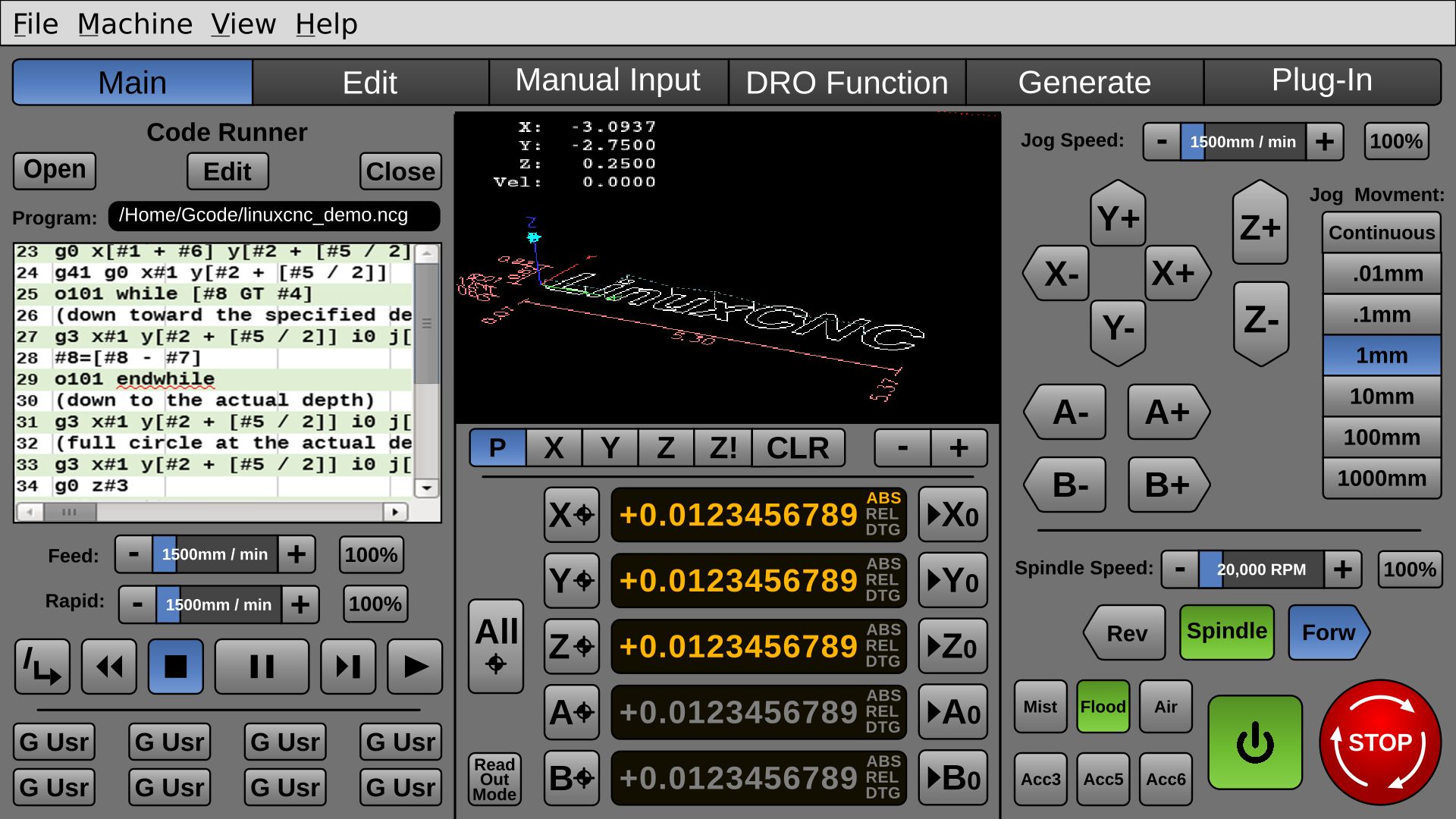
Drew spindle and accessory power buttons.
Realigned everything, keeping a consistent outer boarder for touchscreen.
Changed horizontal separator to newspaper style one.
Having more than one readout mode indicator is redundant, but I worry that the user might make a mistake. Hmmm.
Realigned everything, keeping a consistent outer boarder for touchscreen.
Changed horizontal separator to newspaper style one.
Having more than one readout mode indicator is redundant, but I worry that the user might make a mistake. Hmmm.
Last edit: 8 years 5 months ago by BrendaEM.
- BrendaEM
- Offline
- Elite Member
-
Less
More
- Posts: 266
- Thank you received: 120
8 years 5 months ago - 8 years 5 months ago #110940
by BrendaEM
Replied by BrendaEM on topic A Widescreen Blender-Style Interface
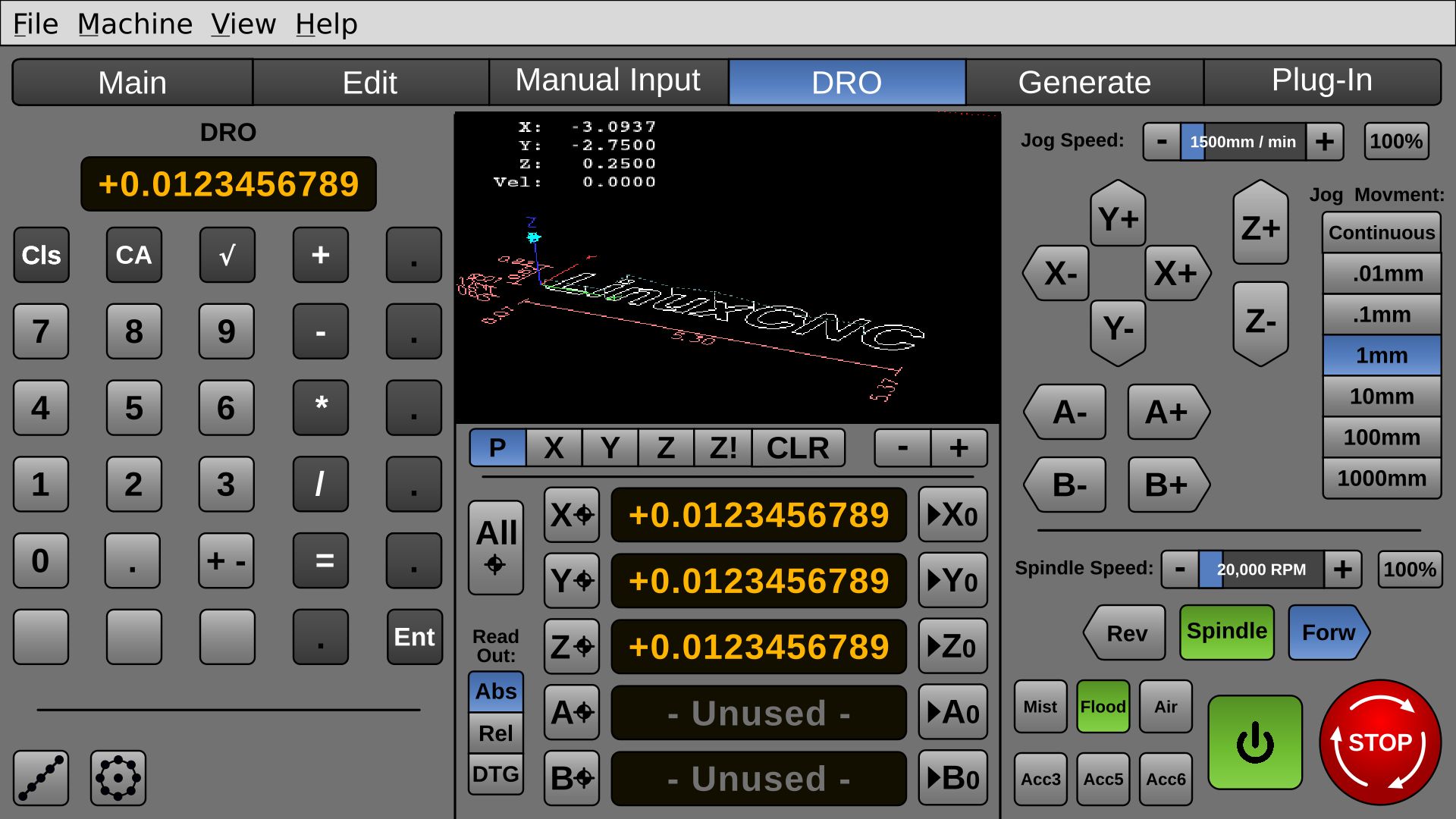
So, I thought it would be handy to have a DRO, well, like a DRO : )
I thought it would be handing to do fastener spacing and bolt circles on the fly, perhaps a round and square pocket as well.
Anyway, the Gcode Runner window would be traded out for like this very preliminary drawing:
I thought it would be handing to do fastener spacing and bolt circles on the fly, perhaps a round and square pocket as well.
Anyway, the Gcode Runner window would be traded out for like this very preliminary drawing:
Last edit: 8 years 5 months ago by BrendaEM.
- BrendaEM
- Offline
- Elite Member
-
Less
More
- Posts: 266
- Thank you received: 120
8 years 5 months ago - 8 years 5 months ago #110947
by BrendaEM
Replied by BrendaEM on topic A Widescreen Blender-Style Interface
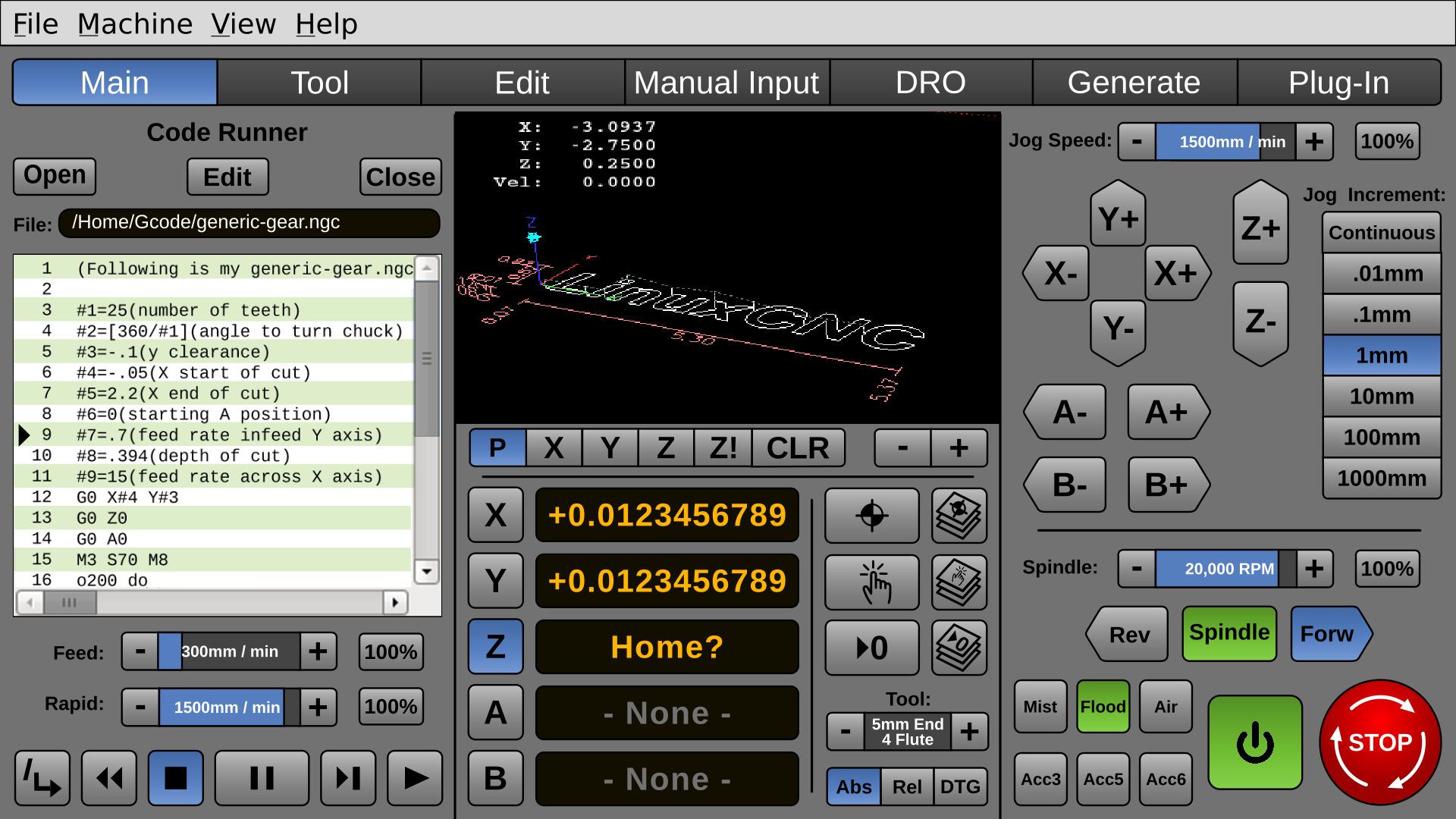
* Added Touch Buttons
* Added Tool button, but I don't like it
* Reworked Axis/Homing/Zero
* Removed Quick G-Keys for larger code view. To be moved to Manual Input
* Changed MDI to Manual Input, so new users would know what it is
I am not sure what order the items in tab menu should be?
I don't like that there are 2 "Edit"
* Added Tool button, but I don't like it
* Reworked Axis/Homing/Zero
* Removed Quick G-Keys for larger code view. To be moved to Manual Input
* Changed MDI to Manual Input, so new users would know what it is
I am not sure what order the items in tab menu should be?
I don't like that there are 2 "Edit"
Last edit: 8 years 5 months ago by BrendaEM.
- andypugh
- Offline
- Moderator
-
Less
More
- Posts: 19899
- Thank you received: 4655
8 years 5 months ago #110970
by andypugh
Replied by andypugh on topic A Widescreen Blender-Style Interface
Bolt circles are easy to MDI (not that having a GUI for it is a bad idea)
Code:
(Bolt circle 50mm radius, peck drilling, 6 holes)
M3 S600
G83 Z-20 Q3 R2 @50 ^0
^60
^120
^180
^250
^300
G80
Time to create page: 0.283 seconds