
- Posts: 266
- Thank you received: 120
A Widescreen Blender-Style Interface
- BrendaEM
- Offline
- Elite Member
-

Less
More
8 years 5 months ago - 8 years 5 months ago #110974
by BrendaEM
Replied by BrendaEM on topic A Widescreen Blender-Style Interface
Thanks Andypugh.
To a new CNC user, such as myself, I don't have Gcodes memorized.
I was hoping to also help the needs of the one-off part person, people who just generally do manual milling. For me, I would like to make the linear divider, that could evenly space bolt holes between 2 points--without drawing a CAD drawing.
Tormac now has a "Conversational" mode which does about the same thing as a DRO.
It would be neat if the DRO widgets would create Gcode that could be further edited--instead of just doing it.
So, perhaps the DRO GUI would need a [Insert Gcode] button on the bottom, and then the code would be ran as any other.
To a new CNC user, such as myself, I don't have Gcodes memorized.
I was hoping to also help the needs of the one-off part person, people who just generally do manual milling. For me, I would like to make the linear divider, that could evenly space bolt holes between 2 points--without drawing a CAD drawing.
Tormac now has a "Conversational" mode which does about the same thing as a DRO.
It would be neat if the DRO widgets would create Gcode that could be further edited--instead of just doing it.
So, perhaps the DRO GUI would need a [Insert Gcode] button on the bottom, and then the code would be ran as any other.
Last edit: 8 years 5 months ago by BrendaEM.
- andypugh
- Offline
- Moderator
-

Less
More
- Posts: 19899
- Thank you received: 4655
8 years 5 months ago - 8 years 5 months ago #110981
by andypugh
I have to check some of them, but I drill bolt circles fairly often.
I was mainly introducing you to the (slightly unusual) polar coordinates option in LinuxCNC.
Have you seen the LinuxCNC "NativeCAM: videos?
www.youtube.com/channel/UCjOe4VxKL86HyVrshTmiUBQ/videos
(Maybe incorporate those as a tab)
Replied by andypugh on topic A Widescreen Blender-Style Interface
BrendaEM wrote: To a new CNC user, such as myself, I don't have Gcodes memorized.
I have to check some of them, but I drill bolt circles fairly often.
I was mainly introducing you to the (slightly unusual) polar coordinates option in LinuxCNC.
Have you seen the LinuxCNC "NativeCAM: videos?
www.youtube.com/channel/UCjOe4VxKL86HyVrshTmiUBQ/videos
(Maybe incorporate those as a tab)
Last edit: 8 years 5 months ago by andypugh.
- BrendaEM
- Offline
- Elite Member
-
Less
More
- Posts: 266
- Thank you received: 120
8 years 5 months ago - 8 years 5 months ago #110990
by BrendaEM
Replied by BrendaEM on topic A Widescreen Blender-Style Interface
Hey, that looks cool!
I see that the latest LinuxCNC has some hooks for it, but I don't understand why that's not included in the LinuxCNC disrto?
It looks like it has the the functions I would expect on a DRO, and more.
I would still like it to appear like a real-world DRO, and also support a touchscreen.
I guess, that I will make matching icons.
I will have to watch some video, and experiment with it, to get a feel for it.
I see that the latest LinuxCNC has some hooks for it, but I don't understand why that's not included in the LinuxCNC disrto?
It looks like it has the the functions I would expect on a DRO, and more.
I would still like it to appear like a real-world DRO, and also support a touchscreen.
I guess, that I will make matching icons.
I will have to watch some video, and experiment with it, to get a feel for it.
Last edit: 8 years 5 months ago by BrendaEM.
- tommylight
- Offline
- Moderator
-
Less
More
- Posts: 22011
- Thank you received: 7491
8 years 5 months ago #110997
by tommylight
Replied by tommylight on topic A Widescreen Blender-Style Interface
Here are the pictures of two THC configs for AXIS, the first one i have in use on several machines, the second was made by someone else on this forum.
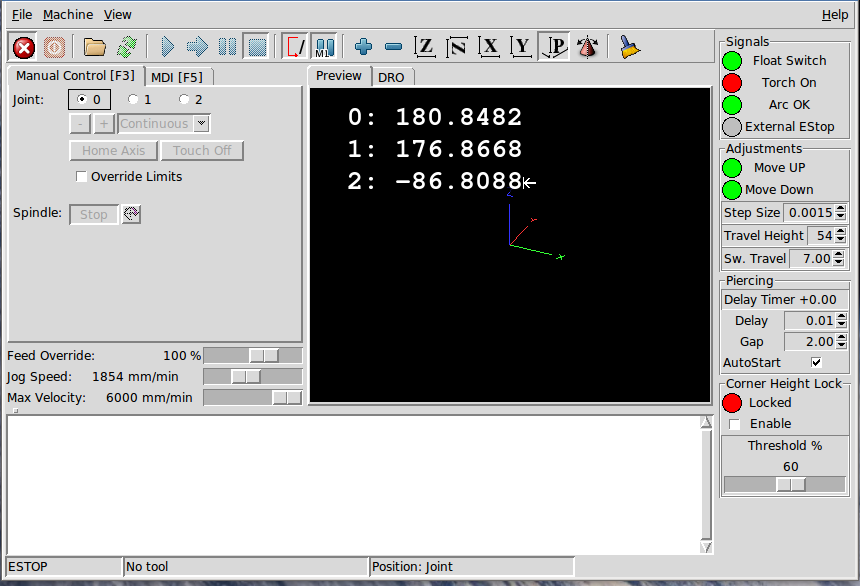
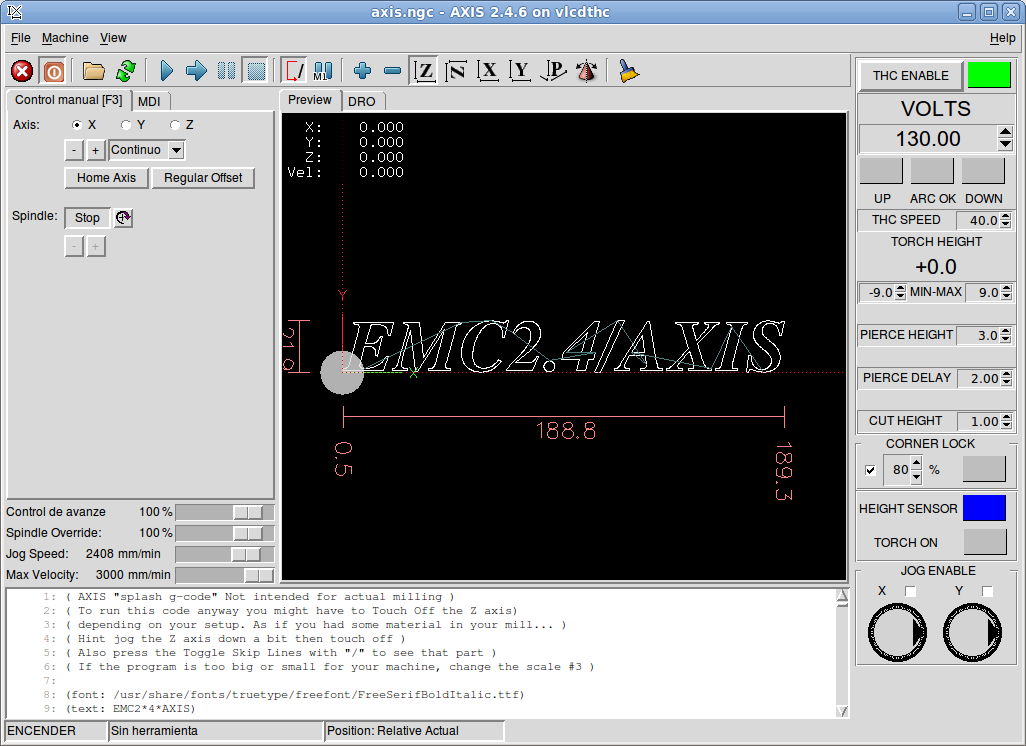
The second one has the provisions for THC voltage and that would be useful for some types of THC.
The second one has the provisions for THC voltage and that would be useful for some types of THC.
The following user(s) said Thank You: BosniaCNC, BrendaEM
- BrendaEM
- Offline
- Elite Member
-
Less
More
- Posts: 266
- Thank you received: 120
8 years 5 months ago - 8 years 5 months ago #111002
by BrendaEM
Replied by BrendaEM on topic A Widescreen Blender-Style Interface
Well, it seems that there needs to be a machine-specific control panel, which can be configured to each machine type.
...as well as rethink, on my part.
It appears that 1/5 of the screen is for the machine-specific controls.
The mockup I am making will need some indicators. Check boxes can be buttons, perhaps.
...as well as rethink, on my part.
It appears that 1/5 of the screen is for the machine-specific controls.
The mockup I am making will need some indicators. Check boxes can be buttons, perhaps.
Last edit: 8 years 5 months ago by BrendaEM.
- BrendaEM
- Offline
- Elite Member
-
Less
More
- Posts: 266
- Thank you received: 120
8 years 5 months ago - 8 years 5 months ago #111010
by BrendaEM
Replied by BrendaEM on topic A Widescreen Blender-Style Interface
* Moved the tool selector into the lower right, so all the machine specific tools are in one place. It's a start toward flexibility.
* Placed potentiometer text inside the boxes. Might make a bit smaller.
* Started on Probe buttons.
I am trying to decide if the largest buttons can be a bit smaller. I really want the interface to work safely on a 14" touchscreen, or mouse, of course.

* Placed potentiometer text inside the boxes. Might make a bit smaller.
* Started on Probe buttons.
I am trying to decide if the largest buttons can be a bit smaller. I really want the interface to work safely on a 14" touchscreen, or mouse, of course.
Last edit: 8 years 5 months ago by BrendaEM.
Time to create page: 0.304 seconds