
- Posts: 266
- Thank you received: 120
A Widescreen Blender-Style Interface
- BrendaEM
- Offline
- Elite Member
-

Less
More
8 years 5 months ago - 8 years 5 months ago #111016
by BrendaEM
Replied by BrendaEM on topic A Widescreen Blender-Style Interface
In the second torch panel. I don't want to offend anyone, but I cannot understand what is indicator, and what is button.
I was doing some experimentation to see what I can fit in the lower corner. The idea is: that corner would be machine-type specific.
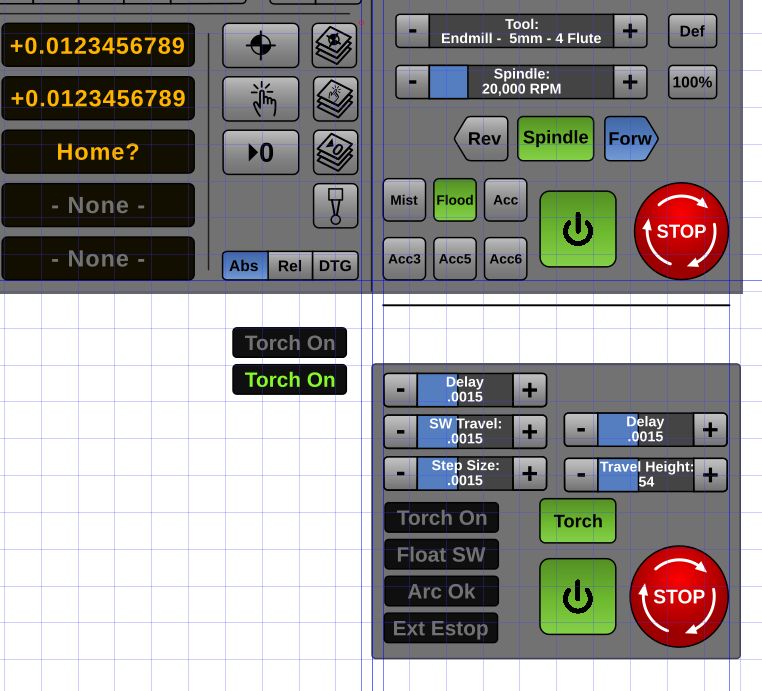
I was doing some experimentation to see what I can fit in the lower corner. The idea is: that corner would be machine-type specific.
Last edit: 8 years 5 months ago by BrendaEM.
- andypugh
- Offline
- Moderator
-

Less
More
- Posts: 19899
- Thank you received: 4655
8 years 5 months ago #111023
by andypugh
The other interfaces can embed a tab (PyVCP or GladeVCP. Possibly QT or others, I am not sure)
I don't know if any of them have a dedicated box for machine-specific things. I think that Hazzy is designed to be completely customisable?
Replied by andypugh on topic A Widescreen Blender-Style Interface
BrendaEM wrote: Well, it seems that there needs to be a machine-specific control panel, which can be configured to each machine type.
...as well as rethink, on my part.
The other interfaces can embed a tab (PyVCP or GladeVCP. Possibly QT or others, I am not sure)
I don't know if any of them have a dedicated box for machine-specific things. I think that Hazzy is designed to be completely customisable?
- persei8
- Offline
- Platinum Member
-

Less
More
- Posts: 399
- Thank you received: 133
8 years 5 months ago #111035
by persei8
Replied by persei8 on topic A Widescreen Blender-Style Interface
This is one of the nicest screen layouts I have seen. I hope you continue it's development.
The following user(s) said Thank You: BrendaEM
- BrendaEM
- Offline
- Elite Member
-
Less
More
- Posts: 266
- Thank you received: 120
8 years 5 months ago - 8 years 5 months ago #111045
by BrendaEM
Replied by BrendaEM on topic A Widescreen Blender-Style Interface
Persei8, thank you. Yes, I'm still working on it. The interface is derivative of many others.
Last edit: 8 years 5 months ago by BrendaEM.
- BrendaEM
- Offline
- Elite Member
-
Less
More
- Posts: 266
- Thank you received: 120
8 years 5 months ago - 8 years 5 months ago #111048
by BrendaEM
Replied by BrendaEM on topic A Widescreen Blender-Style Interface
I'm still trying to keep an entire 1/3 screen for special functions, or the default "Code Runner" which means that all the other controls have to live on the other 2/3 of the screen. This has been a challenge, requiring compromise.
For now, I changed the Jog Increment to a progressive control. I don't like this, but I do like having all the normal controls on 2/3 of the screen these areas won't change.
The idea, as such is, that except for the On/Off and the E-Stop, the lower right panel would be configured to a machine-type, such as Mill, Torch, Laser.
I don't have a touchscreen, so I am resizing the mockup to 14" diagonal to see if I can hit them. I tend to favor the bottoms of each area.
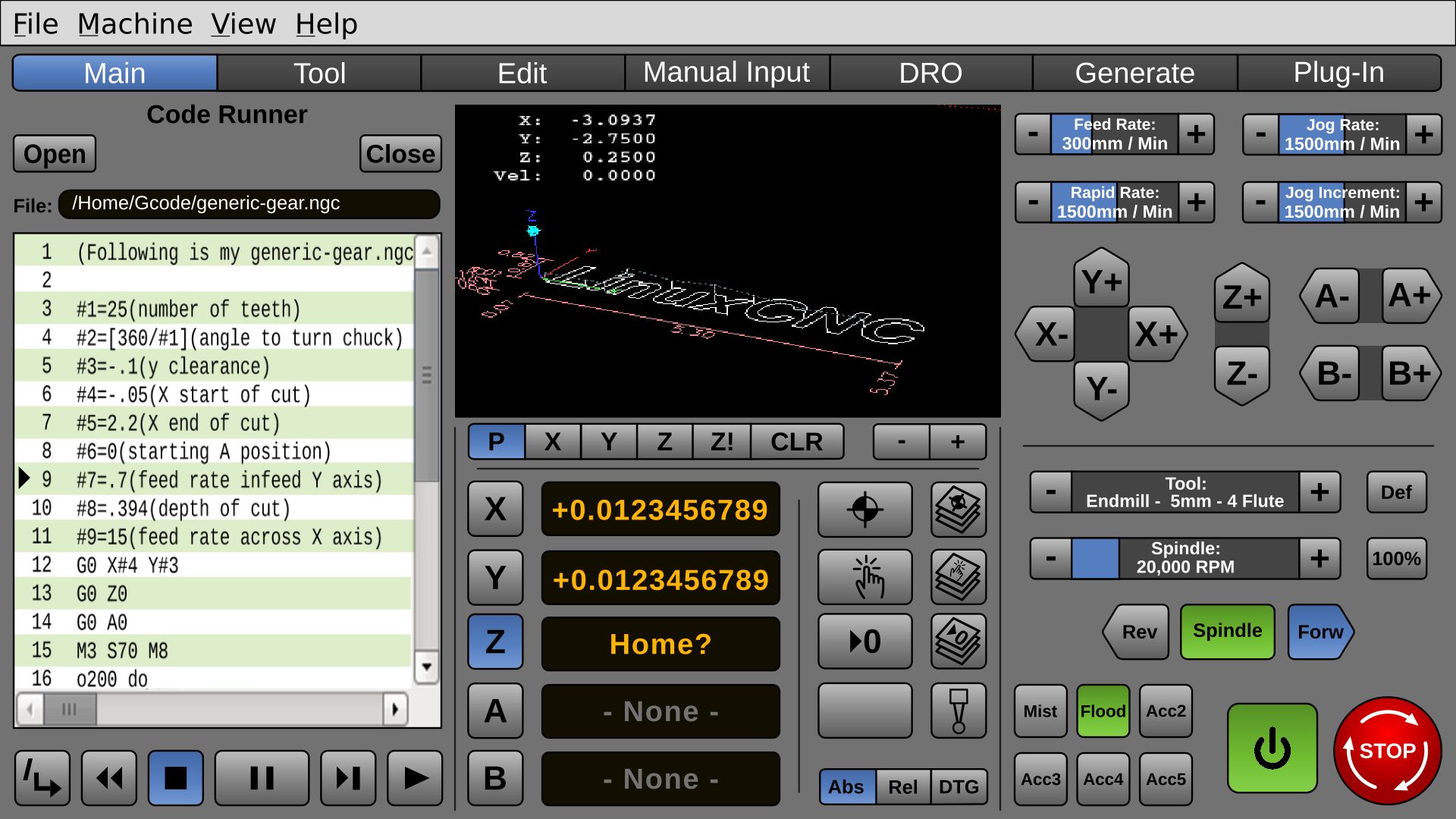
For now, I changed the Jog Increment to a progressive control. I don't like this, but I do like having all the normal controls on 2/3 of the screen these areas won't change.
The idea, as such is, that except for the On/Off and the E-Stop, the lower right panel would be configured to a machine-type, such as Mill, Torch, Laser.
I don't have a touchscreen, so I am resizing the mockup to 14" diagonal to see if I can hit them. I tend to favor the bottoms of each area.
Last edit: 8 years 5 months ago by BrendaEM.
- BrendaEM
- Offline
- Elite Member
-
Less
More
- Posts: 266
- Thank you received: 120
8 years 5 months ago - 8 years 5 months ago #111103
by BrendaEM
Replied by BrendaEM on topic A Widescreen Blender-Style Interface
* Included Probe Menu. I thought that there would be a full probe menu, and also a probe button to perform a single predefined probe function.
* Font was changed to "Open Sans," which also has a good license is also good for. I really like the look of Mint Linux. This is almost the same font but has other typeface options, such as the Semi-Bold used mostly in this screenshot.
It's kind of a funny thing. If the fonts are too light, they are hard to see, and if they are too bold, the eye becomes lost inside the blackness of the letters when you get close. I noticed that on the X,Y,Z... Buttons.
It would seem like a good idea to include NativeCAM in LinuxCNC, perhaps Pycam, though with everything called CAM, it would be confusing to a new user. I would Generate and something else for NativeCAM, but if NativeCAM was native to LinuxCNC, what would it be called?
The Readout mode is really in the wrong column. It should be nearer the readout.
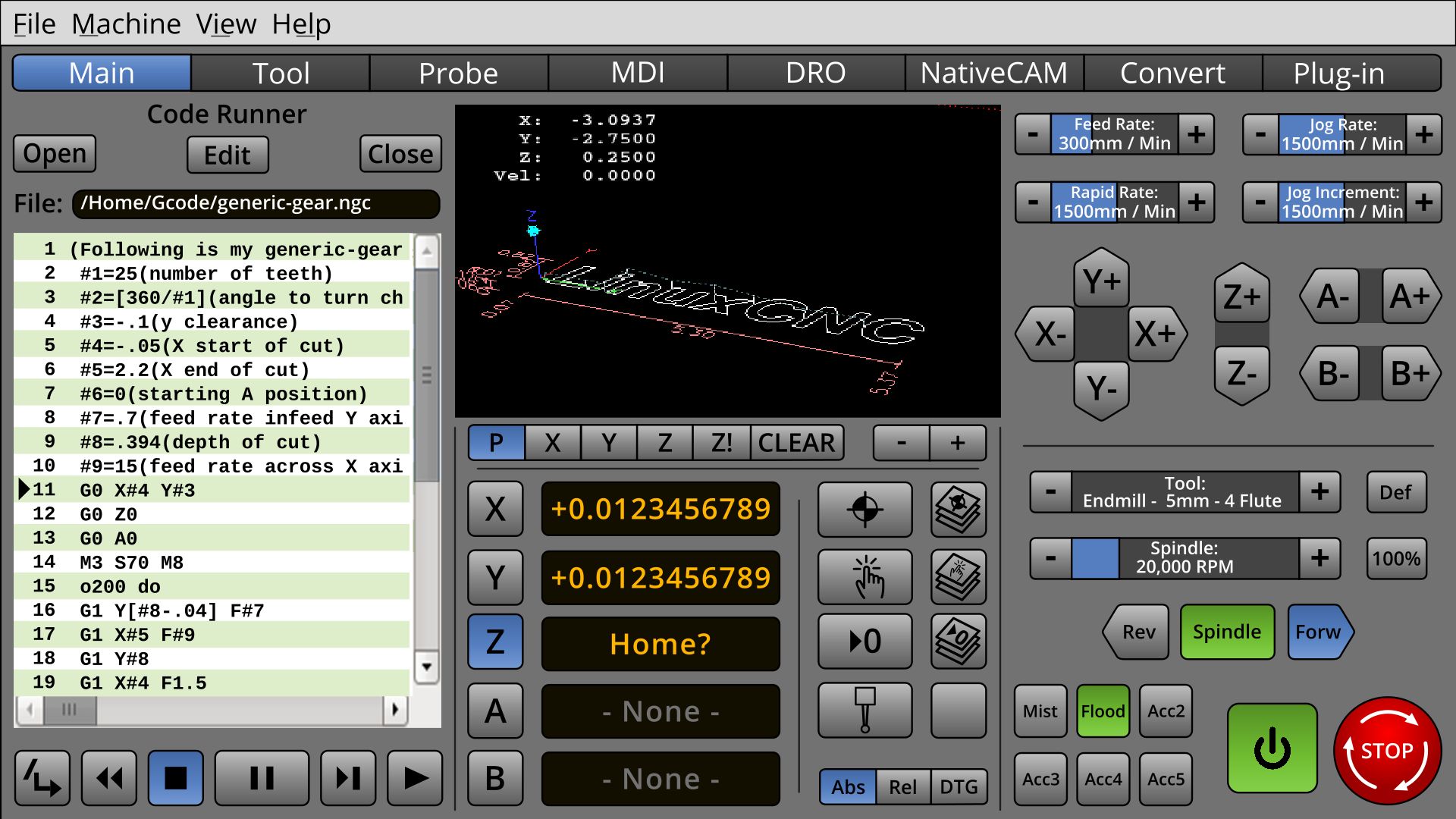
* Font was changed to "Open Sans," which also has a good license is also good for. I really like the look of Mint Linux. This is almost the same font but has other typeface options, such as the Semi-Bold used mostly in this screenshot.
It's kind of a funny thing. If the fonts are too light, they are hard to see, and if they are too bold, the eye becomes lost inside the blackness of the letters when you get close. I noticed that on the X,Y,Z... Buttons.
It would seem like a good idea to include NativeCAM in LinuxCNC, perhaps Pycam, though with everything called CAM, it would be confusing to a new user. I would Generate and something else for NativeCAM, but if NativeCAM was native to LinuxCNC, what would it be called?
The Readout mode is really in the wrong column. It should be nearer the readout.
Last edit: 8 years 5 months ago by BrendaEM.
The following user(s) said Thank You: tommylight, tivoi
Time to create page: 0.190 seconds