
- Posts: 266
- Thank you received: 120
A Widescreen Blender-Style Interface
- BrendaEM
- Offline
- Elite Member
-

Less
More
8 years 3 months ago - 8 years 3 months ago #113263
by BrendaEM
Replied by BrendaEM on topic A Widescreen Blender-Style Interface
This is only a first draft of a Tool Menu, but I am trying to accommodate the lathe people : )
Currently, the diagrams are shown 384px square. Using 512s would take up too much room and memory. I don't think 256s will work well with line art. If I made them rectangle half-of the people wouldn't be happy; now everyone will be [strike]miserable[/strike] happy. For lower spec'ed machines, I think that these can be omitted, and a "No Diagram" image would appear. The idea is: the diagrams will be reusable, and can be changed with the increment adjusters. Perhaps people could share the ones [strike]they steal from the web[/strike] create.
The user can open up the Tool Menu, and select a tool. Perhaps this should dismiss the menu, and return the user to the last menu?
The user can also move the tool up or down the list by promoting/demoting.
The user can click on the check with the circle around it to make it the default tool. The default tool can be chosen on the matching default tool machine control button.
In some ways it is a compromise from Axis's list, but in order to do touchscreen, as part of a overall system, hopefully it is an acceptable compromise.
* Made keyboard smaller.
* Updated other keyboard-related layouts.
* Changed Text Legend Bezels, for better readability. I had been trying to come up with something like this, for weeks.
I think the keyboard background should be special, perhaps a bit lighter, or perhaps a concave-looking gradient can be used.
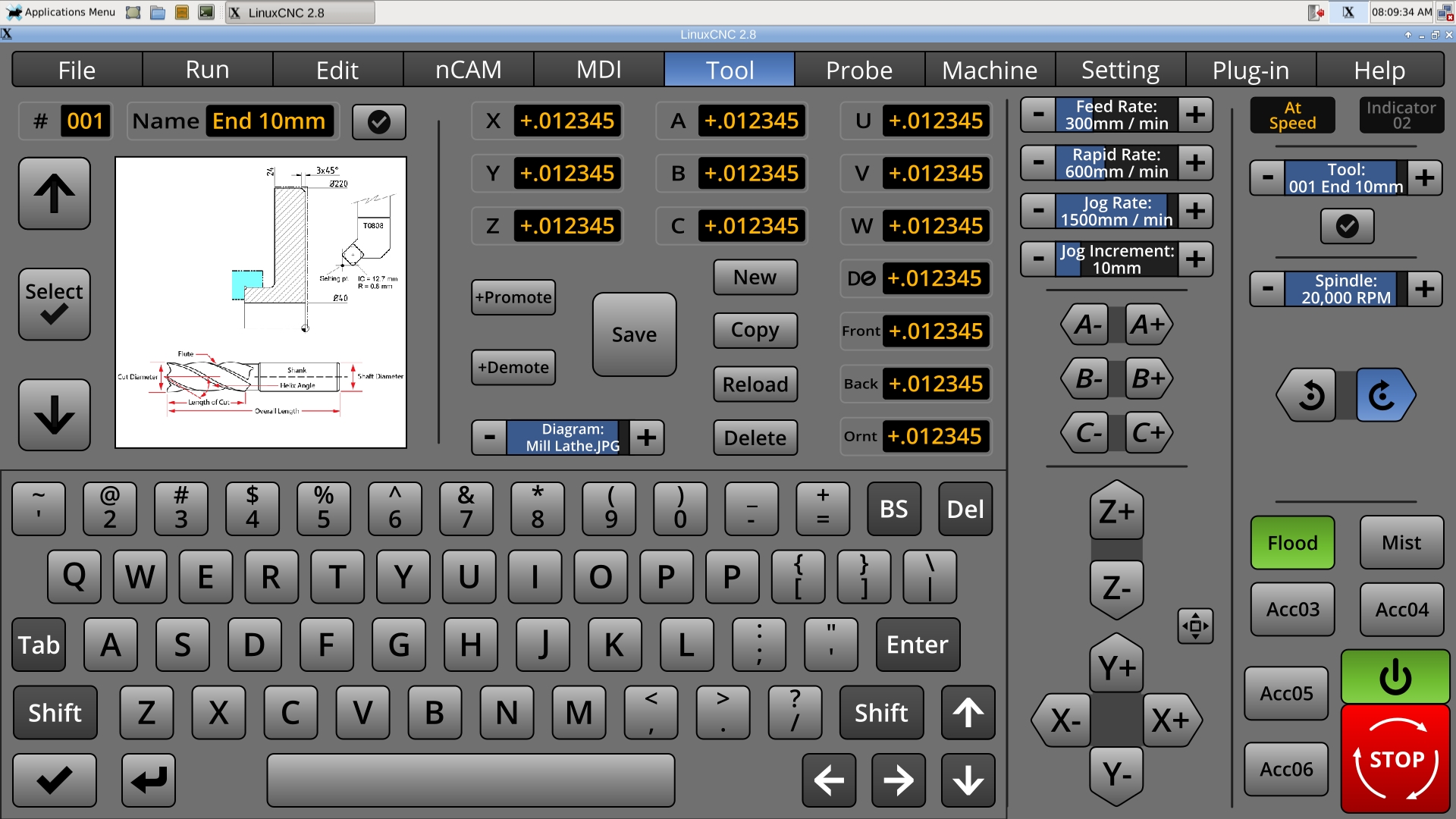
Currently, the diagrams are shown 384px square. Using 512s would take up too much room and memory. I don't think 256s will work well with line art. If I made them rectangle half-of the people wouldn't be happy; now everyone will be [strike]miserable[/strike] happy. For lower spec'ed machines, I think that these can be omitted, and a "No Diagram" image would appear. The idea is: the diagrams will be reusable, and can be changed with the increment adjusters. Perhaps people could share the ones [strike]they steal from the web[/strike] create.
The user can open up the Tool Menu, and select a tool. Perhaps this should dismiss the menu, and return the user to the last menu?
The user can also move the tool up or down the list by promoting/demoting.
The user can click on the check with the circle around it to make it the default tool. The default tool can be chosen on the matching default tool machine control button.
In some ways it is a compromise from Axis's list, but in order to do touchscreen, as part of a overall system, hopefully it is an acceptable compromise.
* Made keyboard smaller.
* Updated other keyboard-related layouts.
* Changed Text Legend Bezels, for better readability. I had been trying to come up with something like this, for weeks.
I think the keyboard background should be special, perhaps a bit lighter, or perhaps a concave-looking gradient can be used.
Last edit: 8 years 3 months ago by BrendaEM.
- grijalvap
- Offline
- Elite Member
-
Less
More
- Posts: 200
- Thank you received: 63
8 years 3 months ago #113266
by grijalvap
Replied by grijalvap on topic A Widescreen Blender-Style Interface
Hi, I have been following this thread, and just to add my 5 cents, I think QT is the future, also I think that instead of use python the better way is to use C/C++, I don't know if it is possible but I'm sure it could be more efficient and reliable.
- cmorley
- Offline
- Moderator
-

Less
More
- Posts: 7368
- Thank you received: 2181
8 years 3 months ago #113267
by cmorley
When You are talking of a program that usually takes over the whole screen - consistency with other computer program's look/control doesn't really matter.
If you target users are big OEM cnc users then consistency with big OEM controls would be useful.
If you target windows users then consistency with window ways of doing things might be important.
In general GTK and QT programs can be made to look very similar.
Maintainability is the most important after utility. This is where (for now at least) Qt has GTK beat hands down.
It's a double barrel problem right now as the transition from python (Currently the best language choice) version 2 to 3 is a big pain in the ass.
Axis actually is the hardest modern screen to modify - and it doesn't use XML at all - I believe you are referring to pyVCP, which is easily integrated into AXIS.
There is work being done on a Qt/ Python based VCP/screen system by Kurt and I.
It uses XML, It uses a drag-and-drop editor. It is easily extended with python.
We would love more people to hack on it.
Linuxcnc is working towards relatively easily modified screens.
pyVCP was a first start of simple control panels
gladeVCP was a great next step for sophisticated control panels
Gscreen was a first step toward completely customizable screens
Qtscreen/Qtvcp will hopefully be the next great step for customizable screens.
As Kurt mentioned, IMHO continue on your discovery of screen layout till you are quite happy.
Then maybe come try QTvcp to make your screen functional. - there is much docs and widgets that need to be made yet.
Chris M
Replied by cmorley on topic A Widescreen Blender-Style Interface
BrendaEM wrote:
I do like GTK+ because it adds consistency to many Linux distributions.
I wonder also if a meta button layout language like an .XML file could be used, as they are in Axis. In other words, I worry that if it's too hard for people to customize the interface, then this project might instead futher fragment LinuxCNC further instead of drawing it together.
I wonder if more than one person could help code this.
When You are talking of a program that usually takes over the whole screen - consistency with other computer program's look/control doesn't really matter.
If you target users are big OEM cnc users then consistency with big OEM controls would be useful.
If you target windows users then consistency with window ways of doing things might be important.
In general GTK and QT programs can be made to look very similar.
Maintainability is the most important after utility. This is where (for now at least) Qt has GTK beat hands down.
It's a double barrel problem right now as the transition from python (Currently the best language choice) version 2 to 3 is a big pain in the ass.
Axis actually is the hardest modern screen to modify - and it doesn't use XML at all - I believe you are referring to pyVCP, which is easily integrated into AXIS.
There is work being done on a Qt/ Python based VCP/screen system by Kurt and I.
It uses XML, It uses a drag-and-drop editor. It is easily extended with python.
We would love more people to hack on it.
Linuxcnc is working towards relatively easily modified screens.
pyVCP was a first start of simple control panels
gladeVCP was a great next step for sophisticated control panels
Gscreen was a first step toward completely customizable screens
Qtscreen/Qtvcp will hopefully be the next great step for customizable screens.
As Kurt mentioned, IMHO continue on your discovery of screen layout till you are quite happy.
Then maybe come try QTvcp to make your screen functional. - there is much docs and widgets that need to be made yet.
Chris M
The following user(s) said Thank You: KCJ
- BrendaEM
- Offline
- Elite Member
-
Less
More
- Posts: 266
- Thank you received: 120
8 years 3 months ago - 8 years 3 months ago #113270
by BrendaEM
Replied by BrendaEM on topic A Widescreen Blender-Style Interface
My lame standpoint: GTK(x) and Python are beneficial to Linux.
Perhaps I shouldn't think outloud, but most of Blender3D is written in Python, and the root page of interface has more controls on it that this entire project. The menus attack from all sides. The tabs on the left are full of widgets. The menubar slides down to reveal more controls. Only one tab of the Object menu shows. You can't even see the animation timeline controls from here--or the game engine controls--or the procedural shader layout screen. (That's not to state that programming this project would be a trivial matter.)
I chose to emulate this style because it lends it self well to complexity. Look strangely familiar? : )

Perhaps I shouldn't think outloud, but most of Blender3D is written in Python, and the root page of interface has more controls on it that this entire project. The menus attack from all sides. The tabs on the left are full of widgets. The menubar slides down to reveal more controls. Only one tab of the Object menu shows. You can't even see the animation timeline controls from here--or the game engine controls--or the procedural shader layout screen. (That's not to state that programming this project would be a trivial matter.)
I chose to emulate this style because it lends it self well to complexity. Look strangely familiar? : )
Last edit: 8 years 3 months ago by BrendaEM.
- persei8
- Offline
- Platinum Member
-

Less
More
- Posts: 399
- Thank you received: 133
8 years 3 months ago #113285
by persei8
Replied by persei8 on topic A Widescreen Blender-Style Interface
In regard to jog buttons, in my custom screen I placed invisible event boxes in a table and then placed images of buttons in the event boxes. The signals then connect to the original button handlers. This way you can make the jog buttons whatever you want. In fact, if Brenda would be so kind as to post her button graphic files, I would like to use them in my screen. Regards.
- KCJ
- Offline
- Platinum Member
-
Less
More
- Posts: 328
- Thank you received: 267
8 years 3 months ago - 8 years 3 months ago #113286
by KCJ
Replied by KCJ on topic A Widescreen Blender-Style Interface
Brenda, I'm really digging the "Text Legend Bezels"!
The tool edit section looks very good. What about a little GL widget that plots the actual tool geometry instead of the image? The Romi EzPath control has this feature and I find it prevents a lot of tool data input errors from being missed ...
persei8, you can absolutely do that, and that is exactly how the PathPilot UI works! The problem is, short of changing the image for every event, you have no visual feedback from the UI when the button is pressed/hovered/focused/disabled etc. To provide this feedback the folks at tormach shift the image 1px down and to the left when the button is pressed. It works ok, but if you have ever used PathPilot you will probably have noticed that some of the buttons are like sticky piano keys - they don't let up when you let go. This is because the images are moved back to the original position AFTER the callback has returned. I found a way to get around that, its been a while but it might have been as simple as using "connect_after" instead of "connect" when connecting the callback.
Another disadvantage of using images is that they will never look as crisp as if it were directly painted.
Cheers,
Kurt
The tool edit section looks very good. What about a little GL widget that plots the actual tool geometry instead of the image? The Romi EzPath control has this feature and I find it prevents a lot of tool data input errors from being missed ...
persei8, you can absolutely do that, and that is exactly how the PathPilot UI works! The problem is, short of changing the image for every event, you have no visual feedback from the UI when the button is pressed/hovered/focused/disabled etc. To provide this feedback the folks at tormach shift the image 1px down and to the left when the button is pressed. It works ok, but if you have ever used PathPilot you will probably have noticed that some of the buttons are like sticky piano keys - they don't let up when you let go. This is because the images are moved back to the original position AFTER the callback has returned. I found a way to get around that, its been a while but it might have been as simple as using "connect_after" instead of "connect" when connecting the callback.
Another disadvantage of using images is that they will never look as crisp as if it were directly painted.
Cheers,
Kurt
Last edit: 8 years 3 months ago by KCJ. Reason: spelling
The following user(s) said Thank You: BrendaEM
Time to create page: 1.009 seconds