
- Posts: 266
- Thank you received: 120
A Widescreen Blender-Style Interface
- BrendaEM
- Offline
- Elite Member
-

Less
More
8 years 3 months ago - 8 years 3 months ago #113529
by BrendaEM
Replied by BrendaEM on topic A Widescreen Blender-Style Interface
Also note. While I am not always the most diplomatic person, and my message is not always positive, I am having a difficult time here on the forums. : (
Last edit: 8 years 3 months ago by BrendaEM.
Please Log in or Create an account to join the conversation.
- Lcvette
- Offline
- Platinum Member
-

Less
More
- Posts: 1682
- Thank you received: 784
8 years 3 months ago #113531
by Lcvette
I have access to it and happy to use it to make graphics, I have several tool holders made up already so that's pretty easy, not sure what format is best? Let me know and I can send some examples. I can also send a nice ATC platter and BT30 type holders if you need some of those for an ATC page
As for the probe graphics, block representation are fairly generic I would think. As for the viewport idea, the probe options down there are bare minimum in the probing world. I would suspect that the ability to add probe functionality and growth would be very desirable. If what KCJ says is true and the option to add a scroll through viewport option is possible fairly easily, is a great way to increase the room for various types of probing and make buttons bigger and easier to touch for touch screens. This would be because you'd group them together in more complimentary clusters.
- Rectangular pockets, rectangular bosses
- Circular pockets, Round bosses
- Corners, Alignment
- rotary axis probing
- 5axis probing
- digitizing etc
- custom probe configs and macros etc
I think it gives the interface expandability on the probing page. I understand this is your baby, I'm just relaying some experience that has been very useful personally in other controls that I think may really benefit this design layout while your at these stages. I certainly understand not wanting to overcomplicate the first draft. But thought along the question couldn't hurt.
Chris
Replied by Lcvette on topic A Widescreen Blender-Style Interface
BrendaEM wrote: Hi,
Needless to state, I cannot copy an anything from a commercial interface because that would place not only myself but LinuxCNC at legal peril.
Anyway, In looking at the layout, the adaption of the current probe screen has less functionality, but less complexity, than the posted screenshots, though I wonder if for some of the more descriptive information a help page (which I haven't drawn up) could be brought up.
Programming a first-gen effort for a new interface will place a great demand on the programmers. I worry that if the bar is too high, it may not be reached.
In the case of the Probe screen, I feel that I can get a sense of what the controls are for, and the settings shouldn't have to be changed all that much. Though I am talking rot because I haven't made a probe yet.
By design, the interface design is contextual, in that the Probe menu item tells you that you are dealing with a probe, if we add another layer then there is no context and no breadcrumbs.
As far as drawings, at this point I would want to put more emphasis on the Tool menu, as the lathe people were asking for it, and I can see how that measurements on on carbide cutters and asymmetrical tool holders could be a challenge to describe.
If we want to support a touch interface, the buttons can't be that small. Someone has already raised a concern. I've read guides. I've also used Gmoccapy as an example of a great working definitely bring LinuxCNC forward.
A possible solution is consider modifying the Probe menu interface to expand it occupy the Jog panel as well, then there would be enough room for helping graphics... ...if our programmers can handle the additional burden.
Note: that's an older Probe menu.
O
Lcvette, you seem apologetic about only having a $7000 CAD problem : )
I have access to it and happy to use it to make graphics, I have several tool holders made up already so that's pretty easy, not sure what format is best? Let me know and I can send some examples. I can also send a nice ATC platter and BT30 type holders if you need some of those for an ATC page
As for the probe graphics, block representation are fairly generic I would think. As for the viewport idea, the probe options down there are bare minimum in the probing world. I would suspect that the ability to add probe functionality and growth would be very desirable. If what KCJ says is true and the option to add a scroll through viewport option is possible fairly easily, is a great way to increase the room for various types of probing and make buttons bigger and easier to touch for touch screens. This would be because you'd group them together in more complimentary clusters.
- Rectangular pockets, rectangular bosses
- Circular pockets, Round bosses
- Corners, Alignment
- rotary axis probing
- 5axis probing
- digitizing etc
- custom probe configs and macros etc
I think it gives the interface expandability on the probing page. I understand this is your baby, I'm just relaying some experience that has been very useful personally in other controls that I think may really benefit this design layout while your at these stages. I certainly understand not wanting to overcomplicate the first draft. But thought along the question couldn't hurt.
Chris
The following user(s) said Thank You: KCJ
Please Log in or Create an account to join the conversation.
- Lcvette
- Offline
- Platinum Member
-
Less
More
- Posts: 1682
- Thank you received: 784
8 years 3 months ago #113532
by Lcvette
Replied by Lcvette on topic A Widescreen Blender-Style Interface
As a side note as someone who probes daily for work setup, often times when flipping a part you lose reference features or are left with features that are difficult to probe using standard routines for Corners etc and must get creative to locate your zero point. Sometimes using more than one routine, possibly a web routine to find a center in one axis and an edge in another, or an angle on two sides of the perimeter to locate a convergence point that's not a perfect square corner etc.. so often times if probing is to be your only form of work coordinate offset setting, you really want some control over how you can use it. Just a thought if you are not currently an avid probe user.
The following user(s) said Thank You: KCJ
Please Log in or Create an account to join the conversation.
- BrendaEM
- Offline
- Elite Member
-
Less
More
- Posts: 266
- Thank you received: 120
8 years 3 months ago #113533
by BrendaEM
Replied by BrendaEM on topic A Widescreen Blender-Style Interface
I appreciate the respect offered by calling this interface design my baby, though when done, it is my proposal, and my attempt to return something to the LinuxCNC community.
For now, I only plot the course of the compromises : )
The cool thing about the existing Probe screen: the code is out there. Some Probe settings can live in the .ini or perhaps the setting screen.
I will revisit the Probe screen next, and let's see what can be done without going to additional sheets/panels/menus. Let's see if one picture is worth a thousand words.
There are spots left for a few more buttons as well.
For now, I only plot the course of the compromises : )
The cool thing about the existing Probe screen: the code is out there. Some Probe settings can live in the .ini or perhaps the setting screen.
I will revisit the Probe screen next, and let's see what can be done without going to additional sheets/panels/menus. Let's see if one picture is worth a thousand words.
There are spots left for a few more buttons as well.
The following user(s) said Thank You: grijalvap
Please Log in or Create an account to join the conversation.
- KCJ
- Offline
- Platinum Member
-
Less
More
- Posts: 328
- Thank you received: 267
8 years 3 months ago - 8 years 3 months ago #113628
by KCJ
Replied by KCJ on topic A Widescreen Blender-Style Interface
Some QSS style sheet and Qt dynamic property shenanigans and I was able to get something that resembles the radio button bars. This was one thing I thought might be a bit of a challenge to get looking and working right, as Qt [strike]does[/strike] did not have a button bar widget.
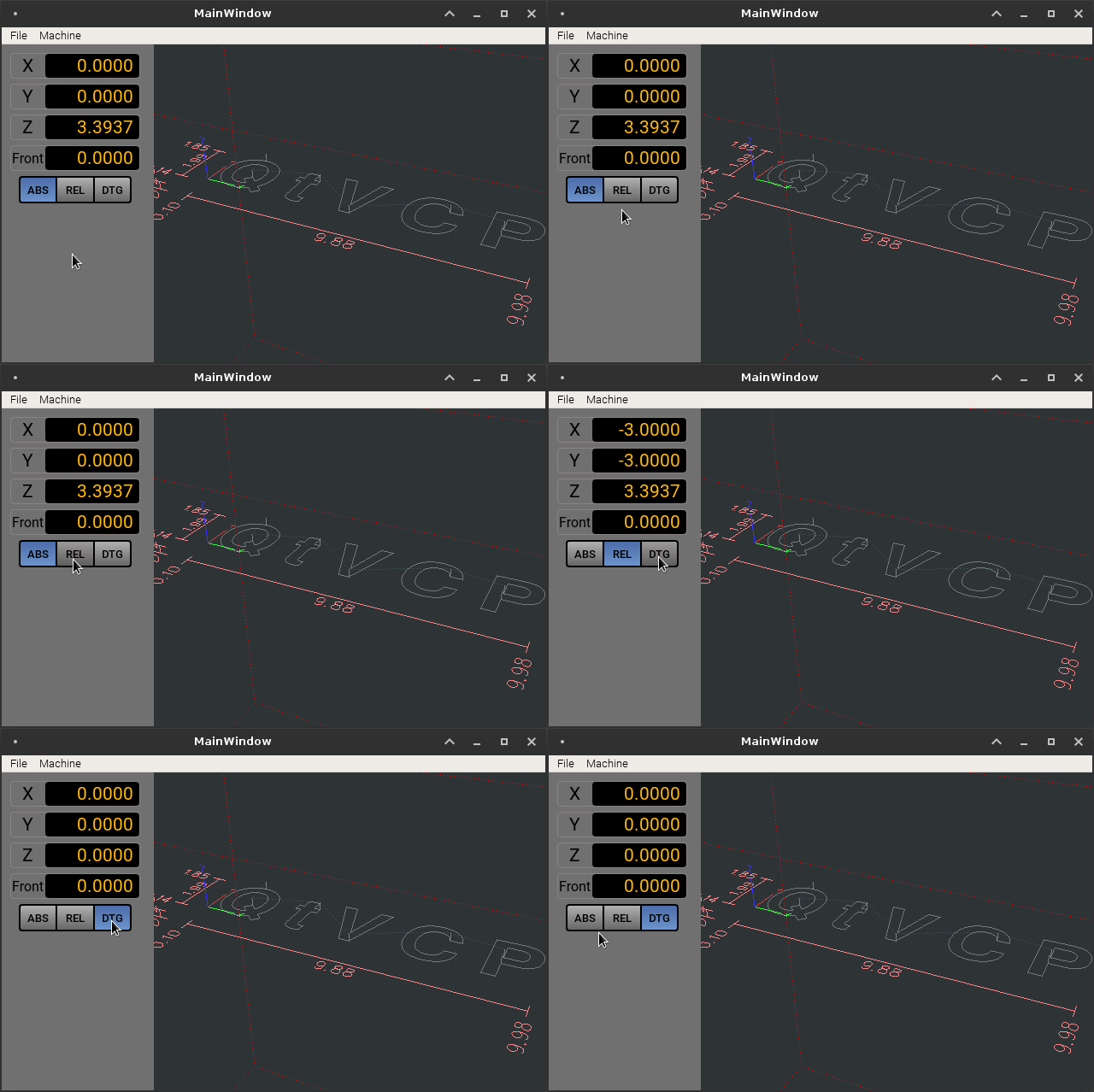
EDIT: Brenda, have you thought any about what disabled (grayed out) button states should look like?
Cheers,
Kurt
EDIT: Brenda, have you thought any about what disabled (grayed out) button states should look like?
Cheers,
Kurt
Last edit: 8 years 3 months ago by KCJ.
The following user(s) said Thank You: tommylight, rodw, Lcvette, BrendaEM
Please Log in or Create an account to join the conversation.
- Lcvette
- Offline
- Platinum Member
-
Less
More
- Posts: 1682
- Thank you received: 784
8 years 3 months ago #113630
by Lcvette
Replied by Lcvette on topic A Widescreen Blender-Style Interface
Looks awesome KCJ!
The following user(s) said Thank You: KCJ
Please Log in or Create an account to join the conversation.
Time to create page: 0.156 seconds