
- Posts: 22011
- Thank you received: 7491
A Widescreen Blender-Style Interface
- tommylight
- Offline
- Moderator
-

Less
More
8 years 3 months ago #113650
by tommylight
Replied by tommylight on topic A Widescreen Blender-Style Interface
I do concur!Lcvette wrote: Looks awesome KCJ!
The following user(s) said Thank You: KCJ
Please Log in or Create an account to join the conversation.
- BrendaEM
- Offline
- Elite Member
-

Less
More
- Posts: 266
- Thank you received: 120
8 years 3 months ago - 8 years 3 months ago #113654
by BrendaEM
Replied by BrendaEM on topic A Widescreen Blender-Style Interface
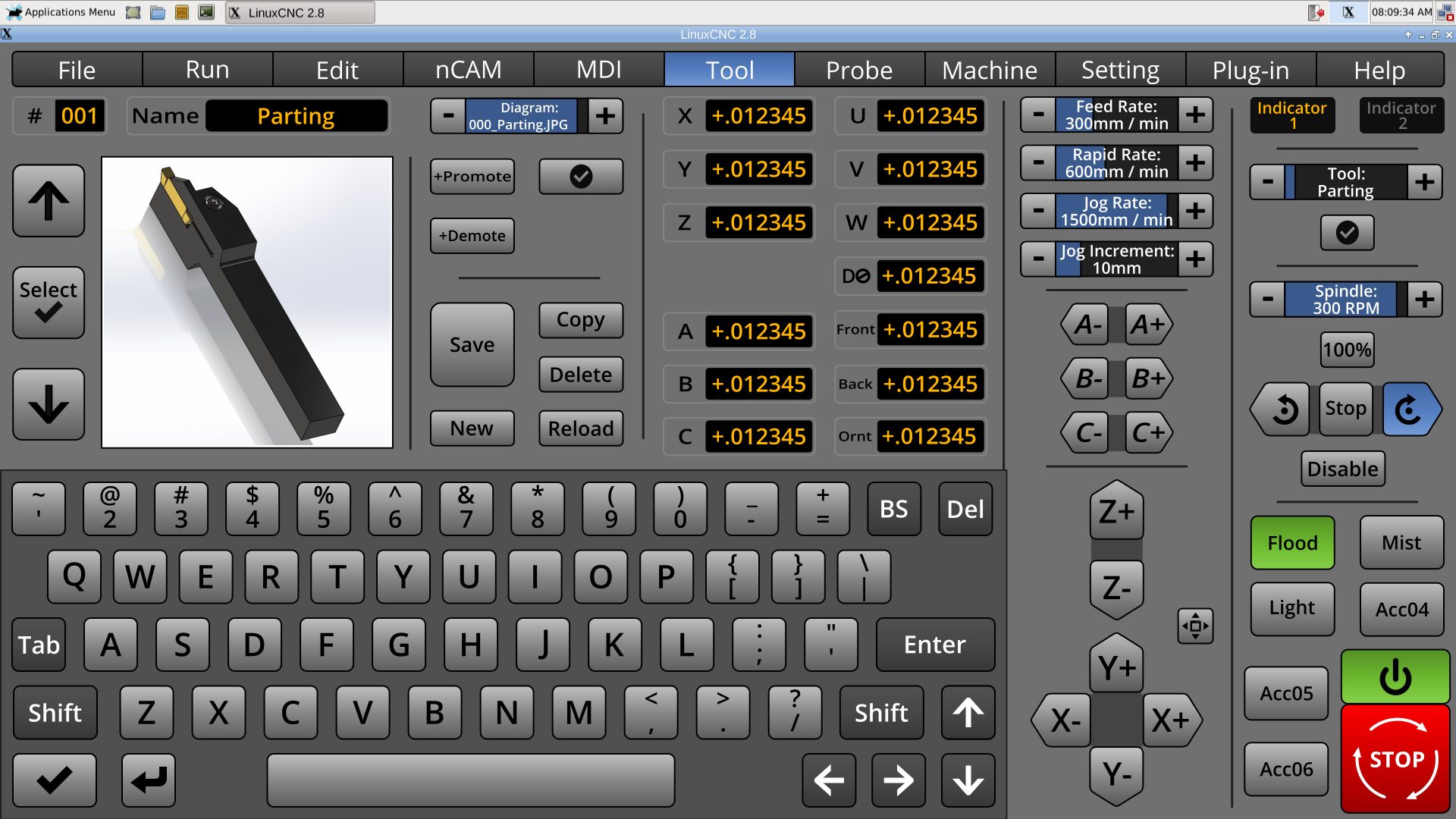
Tool by Lcvette.
Last edit: 8 years 3 months ago by BrendaEM.
Please Log in or Create an account to join the conversation.
- BrendaEM
- Offline
- Elite Member
-
Less
More
- Posts: 266
- Thank you received: 120
8 years 3 months ago - 8 years 3 months ago #113655
by BrendaEM
Replied by BrendaEM on topic A Widescreen Blender-Style Interface
Lcvette, yes, I think it would be handy to sort them by machine Mill, Lathe, Torch?, then which type of tool. The [strike]idea[/strike] hope is that the user, having set up their machine will have a choice of tools they can flip through and/or include their own, or better yet, use the same image for more than one tool.
For the mill, perhaps the images should center on the bit itself, as there are several different collect and holding methods. One of my other mantras is: make one, use mostly.
The included LinuxCNC ones might have lower image numbers, and the user ones may use higher numbers.
mill_000_end.jpg
mill_001_bullnose.jpg
mill_002_engraving.jpg
lathe_000_parting.jpg
lathe_001_threading.jpg
lathe_002_diamond.jpg
plasma_000_fine.jpg
plasma_001_shipscuttlerer.jpg
Output size does matter a little for you, because you want to make your images large enough to endure the future. 2048 x 2048 pixels or dots would be a good size for this version, and the next. I can resize them. The finished display size is only 348 x 348 pixels, which is not a lot of dots for detail, but, I would like the user to be able to use enough images--without crashing their machine. Jpeg images may have a small file size, but, but as soon as they are loaded, they will take up more memory, and there may may be a lot of them.
In the end, transparent .png's may be a good source format, but it would be better for the program to deal something that does not have an extra 8-bit channel 32-bit vs 24-bit.
I suppose the tools can have shadows, though reflection may slow the user's eye. A sample image with some leader arrows would be cool. The drawings look excellent!
For the mill, perhaps the images should center on the bit itself, as there are several different collect and holding methods. One of my other mantras is: make one, use mostly.
The included LinuxCNC ones might have lower image numbers, and the user ones may use higher numbers.
mill_000_end.jpg
mill_001_bullnose.jpg
mill_002_engraving.jpg
lathe_000_parting.jpg
lathe_001_threading.jpg
lathe_002_diamond.jpg
plasma_000_fine.jpg
plasma_001_shipscuttlerer.jpg
Output size does matter a little for you, because you want to make your images large enough to endure the future. 2048 x 2048 pixels or dots would be a good size for this version, and the next. I can resize them. The finished display size is only 348 x 348 pixels, which is not a lot of dots for detail, but, I would like the user to be able to use enough images--without crashing their machine. Jpeg images may have a small file size, but, but as soon as they are loaded, they will take up more memory, and there may may be a lot of them.
In the end, transparent .png's may be a good source format, but it would be better for the program to deal something that does not have an extra 8-bit channel 32-bit vs 24-bit.
I suppose the tools can have shadows, though reflection may slow the user's eye. A sample image with some leader arrows would be cool. The drawings look excellent!
Last edit: 8 years 3 months ago by BrendaEM.
Please Log in or Create an account to join the conversation.
- Lcvette
- Offline
- Platinum Member
-

Less
More
- Posts: 1682
- Thank you received: 784
8 years 3 months ago #113676
by Lcvette
Replied by Lcvette on topic A Widescreen Blender-Style Interface
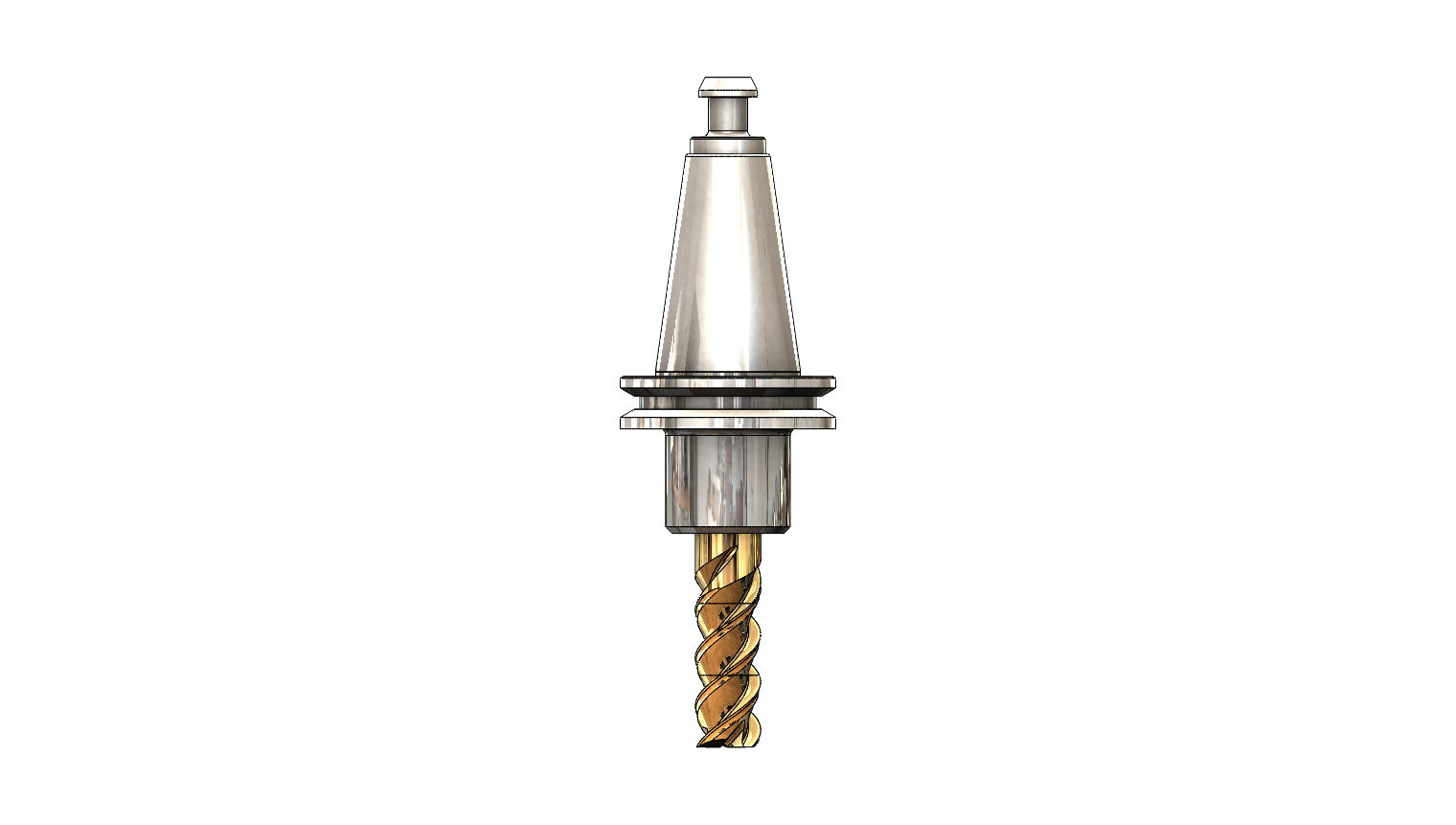
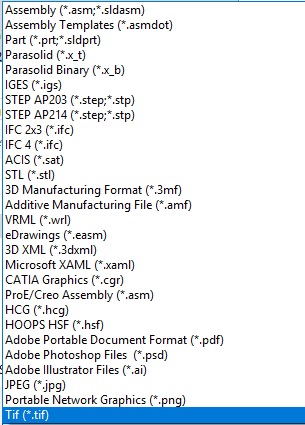
ok, I saved it with a white background and as a .png file direct inside the program, let me know if this is better? I can also save it as other formats, i made an image of the available formats below. please remember im very graphics and programming illiterate so i can help but only so far as instructed..lol
The following user(s) said Thank You: KCJ
Please Log in or Create an account to join the conversation.
- Lcvette
- Offline
- Platinum Member
-
Less
More
- Posts: 1682
- Thank you received: 784
8 years 3 months ago - 8 years 3 months ago #113678
by Lcvette
Replied by Lcvette on topic A Widescreen Blender-Style Interface
I can remove shadows, when you say reflection do you mean the shiny tool finishes? or the reflective background? I have removed the reflective background and shadowed backgrounds for clarity purposes to simplify. and I can deshine the tools and make them more dull if you prefer. i kinda like the shiny but thats just me and I know everyone has their own preference on finish. just let me know and I am happy to make the changes!
also, if you prefer to not have the whole holder, I can just have the holder snout to show the tool stickout if preferred, may make it BIGGER in the window? just let me know!
also, if you prefer to not have the whole holder, I can just have the holder snout to show the tool stickout if preferred, may make it BIGGER in the window? just let me know!
Last edit: 8 years 3 months ago by Lcvette.
Please Log in or Create an account to join the conversation.
- KCJ
- Offline
- Platinum Member
-
Less
More
- Posts: 328
- Thank you received: 267
8 years 3 months ago - 8 years 3 months ago #113681
by KCJ
Replied by KCJ on topic A Widescreen Blender-Style Interface
Lcvette, those tools look absolutely awesome! Very nice modeling.
What version of SW are you using? I have 16-17 and 17-18. If you are willing to share the original models then others could build on them and hopefully a pretty good library could be built up reasonably quickly. Even though they are binary I have had pretty good luck keeping SW models on github.
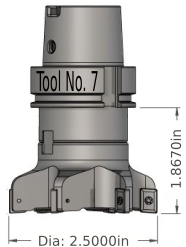
I think ideally the source 2d drawings should be vectors. With vectors we can programmatically and dynamically change text in the image, for example tool dimensions! To make this possible all one would have to do is set the ID of the item in the SVG to the ID of the tool-table value it should display. This would make it pretty easy for people to make their own quick-n-dirty sketches in Inkscape and have them update with the tool table info, or use something as nice as Chris's models. Another advantage of using vectors is that all the tools could be held in different layers of the same file. Until we get a database based tooltable, the image to display could be specified in the comment section of the tooltable.
The result could be something like this, with the dimensions and tool number being dynamic:
As i recall it is a bit of a pain getting vectors from SW, but I have had good success doing it for drawings in technical reports. I think I exported as .tiff, and then converted that to .svg, but it's been years ..
Cheers,
Kurt
What version of SW are you using? I have 16-17 and 17-18. If you are willing to share the original models then others could build on them and hopefully a pretty good library could be built up reasonably quickly. Even though they are binary I have had pretty good luck keeping SW models on github.
I think ideally the source 2d drawings should be vectors. With vectors we can programmatically and dynamically change text in the image, for example tool dimensions! To make this possible all one would have to do is set the ID of the item in the SVG to the ID of the tool-table value it should display. This would make it pretty easy for people to make their own quick-n-dirty sketches in Inkscape and have them update with the tool table info, or use something as nice as Chris's models. Another advantage of using vectors is that all the tools could be held in different layers of the same file. Until we get a database based tooltable, the image to display could be specified in the comment section of the tooltable.
The result could be something like this, with the dimensions and tool number being dynamic:
As i recall it is a bit of a pain getting vectors from SW, but I have had good success doing it for drawings in technical reports. I think I exported as .tiff, and then converted that to .svg, but it's been years ..
Cheers,
Kurt
Last edit: 8 years 3 months ago by KCJ.
The following user(s) said Thank You: Lcvette
Please Log in or Create an account to join the conversation.
Time to create page: 0.144 seconds