
- Posts: 1682
- Thank you received: 784
A Widescreen Blender-Style Interface
- Lcvette
- Offline
- Platinum Member
-

Less
More
8 years 3 months ago #113758
by Lcvette
Replied by Lcvette on topic A Widescreen Blender-Style Interface
any given tool is only going to have a few of those designators, i looked through the wiki and it seems they are dictated by where the tool is located. currently for milling the two you see are the ONLY two used.. soo.. until the tool table gets updated, it almost seems like a big waste of realestate to even have such a big tool window display...?
Please Log in or Create an account to join the conversation.
- BrendaEM
- Offline
- Elite Member
-

Less
More
- Posts: 266
- Thank you received: 120
8 years 3 months ago - 8 years 3 months ago #113759
by BrendaEM
Replied by BrendaEM on topic A Widescreen Blender-Style Interface
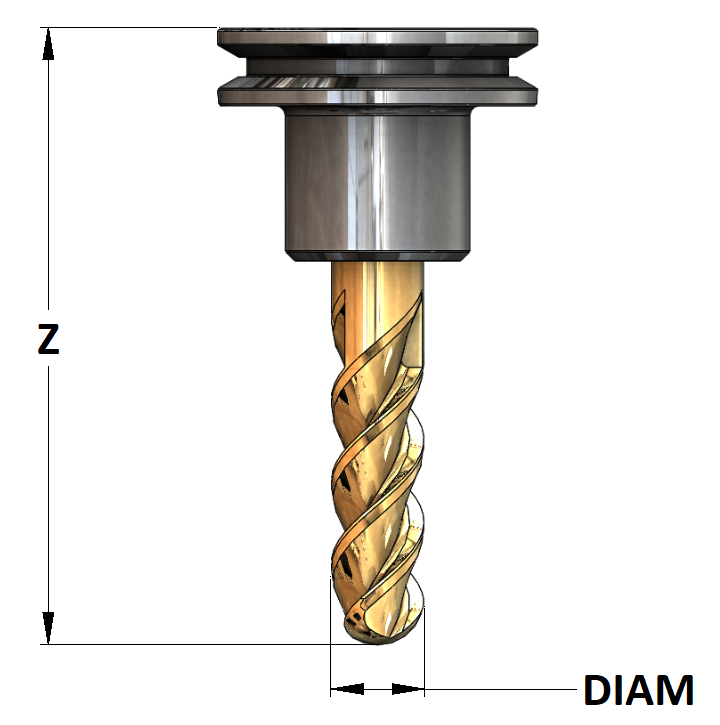
I thought to include a graphic so that the user can input the dimensions without seeking outside reference material.
In the case of the lathe, the tools vary more than mill. The lathe people wanted a depiction of the tools, and I can see why.
Still, mills have odd bits such as: T-slotting, round-over, chamfering, engraving, and so forth, which would make a graphic guide handy.
~
There is an issue, while the interface design will likely be done before then, I have to be done with the interface within two months, no matter what. I likely will not be able to work on it after that. I am pretty sure the interface design, as a proposal will be done, files uploaded, and images exported by then.
In the case of the lathe, the tools vary more than mill. The lathe people wanted a depiction of the tools, and I can see why.
Still, mills have odd bits such as: T-slotting, round-over, chamfering, engraving, and so forth, which would make a graphic guide handy.
~
There is an issue, while the interface design will likely be done before then, I have to be done with the interface within two months, no matter what. I likely will not be able to work on it after that. I am pretty sure the interface design, as a proposal will be done, files uploaded, and images exported by then.
Last edit: 8 years 3 months ago by BrendaEM.
The following user(s) said Thank You: Lcvette
Please Log in or Create an account to join the conversation.
- Lcvette
- Offline
- Platinum Member
-
Less
More
- Posts: 1682
- Thank you received: 784
8 years 3 months ago #113760
by Lcvette
Replied by Lcvette on topic A Widescreen Blender-Style Interface
ok so like this then.
Please Log in or Create an account to join the conversation.
- Lcvette
- Offline
- Platinum Member
-
Less
More
- Posts: 1682
- Thank you received: 784
8 years 3 months ago #113761
by Lcvette
Replied by Lcvette on topic A Widescreen Blender-Style Interface
and in that case, I am guessing there is really only one tool needed for the mill for representation since it is so simple. or are you going to have there be a way to select different image types to correspond to different tool type for visual coolness?
Please Log in or Create an account to join the conversation.
- Lcvette
- Offline
- Platinum Member
-
Less
More
- Posts: 1682
- Thank you received: 784
8 years 3 months ago #113765
by Lcvette
Replied by Lcvette on topic A Widescreen Blender-Style Interface
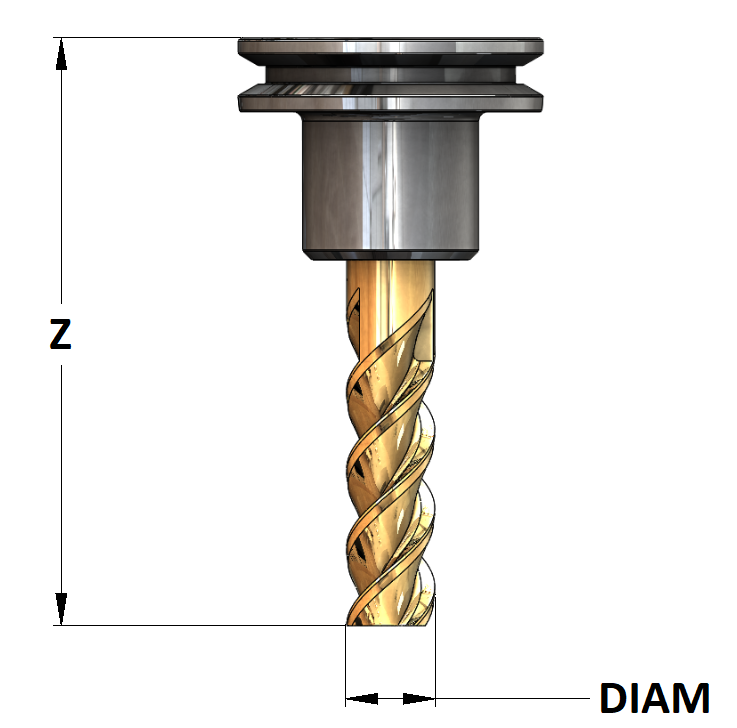
Flat Endmill looks better if only using one
The following user(s) said Thank You: BrendaEM
Please Log in or Create an account to join the conversation.
- BrendaEM
- Offline
- Elite Member
-
Less
More
- Posts: 266
- Thank you received: 120
8 years 3 months ago - 8 years 3 months ago #113766
by BrendaEM
Replied by BrendaEM on topic A Widescreen Blender-Style Interface
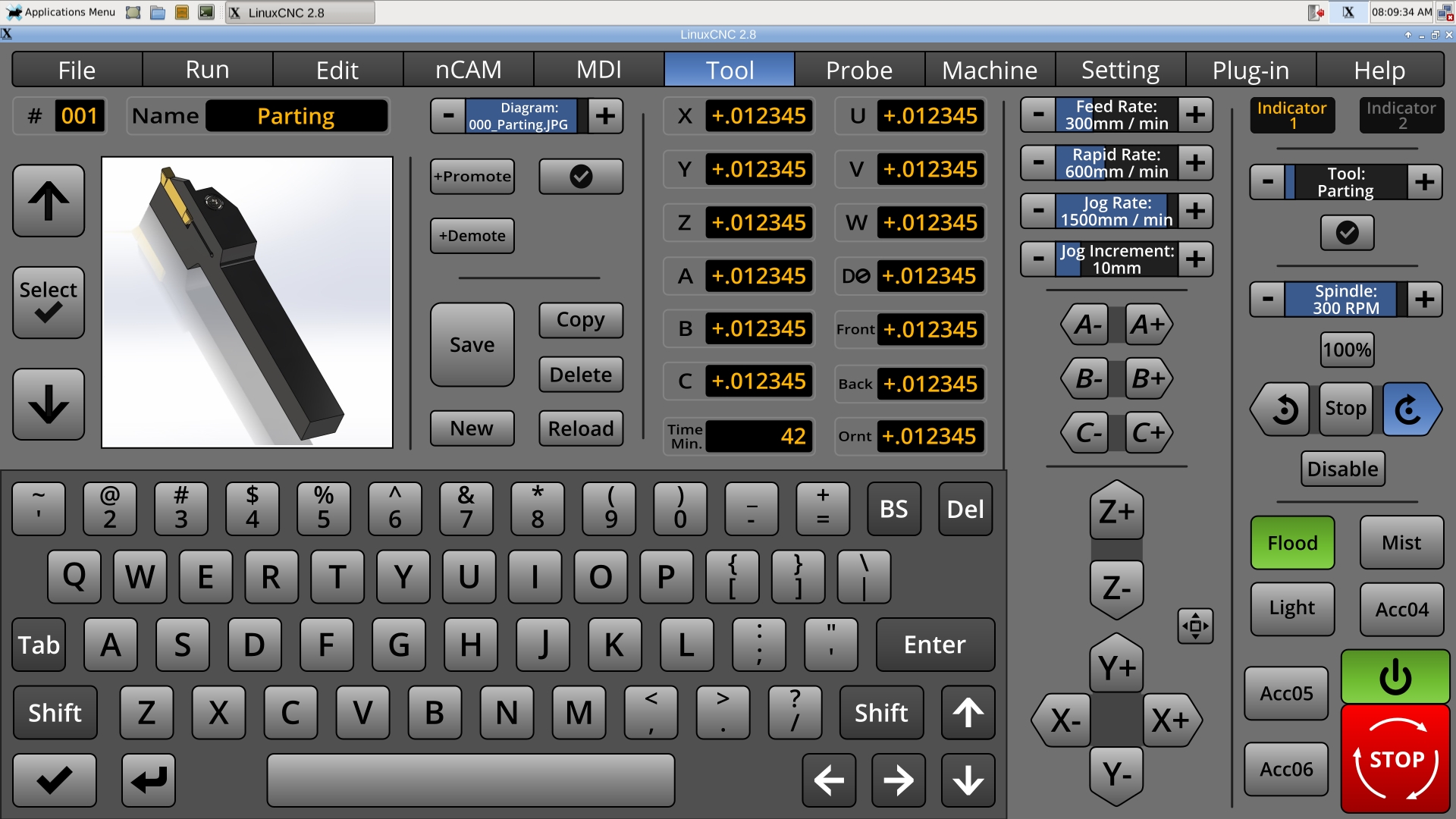
The chooser is the incremental control above the Promote and Demote buttons.
The circled check will be for setting and using a default tool. On the right, you can again see a button that in turn chooses the default tool, after having used some dusty piece of crap, you thought you would never need again : )
Is there a tool table entry for the cutting length of a milling bit?
BTW, although it's not as exciting to draw, I liked the plain tool holder. And yes, the I think the stick-out is real important.
The circled check will be for setting and using a default tool. On the right, you can again see a button that in turn chooses the default tool, after having used some dusty piece of crap, you thought you would never need again : )
Is there a tool table entry for the cutting length of a milling bit?
BTW, although it's not as exciting to draw, I liked the plain tool holder. And yes, the I think the stick-out is real important.
Last edit: 8 years 3 months ago by BrendaEM.
Please Log in or Create an account to join the conversation.
Time to create page: 0.452 seconds