
- Posts: 328
- Thank you received: 267
A Widescreen Blender-Style Interface
- KCJ
- Offline
- Platinum Member
-

Less
More
8 years 3 months ago #113815
by KCJ
Sorry, I should have been more clear! That demo shows all three types of buttons a "Toggle" an "On" and an "Off". Only the toggle button is likely to be used, but since the "On" and "Off" functionality has to be there as part of the implementation of the "Toggle" functionality, there is no point in not making those options available as well. These are pretty abstracted in their implementation (and in fact don't even needed a GUI element to function), so can be used for setting almost any boolean state within LCNC (or anywhere else for that matter). I can't think of a application at the moment, but if I don't include the "On" and "Off" functionality, somebody is sure to want it. Now that I have included it, it is almost guaranteed not to be needed. It's kinda like watering the garden, if you water it rains, if you don't water it doesn't.
I thought I explained it well enough in the description, but since the picture is worth 1000 words, and there were only ~500 words of text, I should have know it did not stand a chance! Oh wait, that calculation is based on a incorrect assumption that it was a static picture, but it was a gif! I guess the odds are even worse, but I don't know the formula for gif vs text :silly:
Cheers,
Kurt
Replied by KCJ on topic A Widescreen Blender-Style Interface
Lcvette wrote:
rodw wrote:
Lcvette wrote: Can it be set up so it's just a flood and mist button which would cancel one about it if pressed? Ie, both in off state,
press flood to turn on, and pressed again it turns off, press again it turns on, press mist, mist turns on while flood is turned off.
That was kinda my thought too. A combined button/LED which is red with text "Mist OFF" when in the off state. When you Press it, it turns green and says "Mist ON". That would save a lot of screen real estate. 3 buttons folded into 1.
I like that they turn green when active, or blue.. a mist button and a flood button I think is plenty, simple and clean and easy to understand. And like to said, safe a ton of screen space.
Sorry, I should have been more clear! That demo shows all three types of buttons a "Toggle" an "On" and an "Off". Only the toggle button is likely to be used, but since the "On" and "Off" functionality has to be there as part of the implementation of the "Toggle" functionality, there is no point in not making those options available as well. These are pretty abstracted in their implementation (and in fact don't even needed a GUI element to function), so can be used for setting almost any boolean state within LCNC (or anywhere else for that matter). I can't think of a application at the moment, but if I don't include the "On" and "Off" functionality, somebody is sure to want it. Now that I have included it, it is almost guaranteed not to be needed. It's kinda like watering the garden, if you water it rains, if you don't water it doesn't.
I thought I explained it well enough in the description, but since the picture is worth 1000 words, and there were only ~500 words of text, I should have know it did not stand a chance! Oh wait, that calculation is based on a incorrect assumption that it was a static picture, but it was a gif! I guess the odds are even worse, but I don't know the formula for gif vs text :silly:
Cheers,
Kurt
The following user(s) said Thank You: Lcvette
Please Log in or Create an account to join the conversation.
- Lcvette
- Offline
- Platinum Member
-
Less
More
- Posts: 1682
- Thank you received: 784
8 years 3 months ago - 8 years 3 months ago #113817
by Lcvette
BrendaEM,
How long have you been using your router now? I certainly understand where your head is at and it is to be expected. However, I think given time you will quickly come to realize a few things. The first is going to be that you hate changing tools in your router. That is a given, you may not care much about it now because its all fresh and new and things are moving around and you are proud of your accomplishments and still have the excitement of the build going on. We have all been there, just some of us that was 5-10-15 years ago or even more. We have evolved through the first iterations of the machine build and found the short comings and headaches you haven't come to loath yet. My guess is within the next few months of real use you will be desperately looking for a solution to your tool changing situation. this isn't to say an ATC, but looking for some way to make it faster and easier than having to get wrenches out. So you will start day dreaming about an iso20, 30 or bt30 router spindle or an add on adapter making the use of those tool holders possible. You may not think so right now but trust me given enough time it becomes a reality.
The fact is, that if you are here you are a maker and the machine you built is proof. It also means you probably will not be happy for long because your brain is wired that way, always looking for some way to improve upon it. know thy self maker. know that by catering to the router only, you alienate not the professional, but the hobbyist that is a year or to ahead of you and is taking their build to the next level and hoping for the interface to come along to make it possible.
Also understand that by widening your scope to embrace the CNC interface as it could/should be to work with many and ALL machine types you will garner more support. You posed this question:
I can't speak for everyone else, but my answer is simple, hope.. hope that a new GUI was being made to address the short comings existing in linuxcnc that wasn't pathpilot. interest in a design that had merit for getting there that looked great from what i first glanced. a nice layout that made sense. but if the functionality is lacking or the focus narrows towards one machine type, then the interface suffers.
in other words what motivation would I have going forward to want to help knowing this interface would exclude one of my machine types solely because you think routers are better? it turns this from a give back project to a personal project and while I am happy to support and help a giveback help all project move the community forward, spending time devoted to a narrowed vision is not as enticing. I was excited to get up on my weekend day off and push forward on some lathe tools, but now I just don't have the motivation after reading that post. best of luck with your router screen!
Replied by Lcvette on topic A Widescreen Blender-Style Interface
The world is changing. The CNC router is becoming a common garage tool. Everyone's doing it. While the needs of the professional should be addressed, yes, but the needs of even the home hobbyist should be addressed too, because one of them is working on this interface, and there will be more where I came from.
BrendaEM,
How long have you been using your router now? I certainly understand where your head is at and it is to be expected. However, I think given time you will quickly come to realize a few things. The first is going to be that you hate changing tools in your router. That is a given, you may not care much about it now because its all fresh and new and things are moving around and you are proud of your accomplishments and still have the excitement of the build going on. We have all been there, just some of us that was 5-10-15 years ago or even more. We have evolved through the first iterations of the machine build and found the short comings and headaches you haven't come to loath yet. My guess is within the next few months of real use you will be desperately looking for a solution to your tool changing situation. this isn't to say an ATC, but looking for some way to make it faster and easier than having to get wrenches out. So you will start day dreaming about an iso20, 30 or bt30 router spindle or an add on adapter making the use of those tool holders possible. You may not think so right now but trust me given enough time it becomes a reality.
The fact is, that if you are here you are a maker and the machine you built is proof. It also means you probably will not be happy for long because your brain is wired that way, always looking for some way to improve upon it. know thy self maker. know that by catering to the router only, you alienate not the professional, but the hobbyist that is a year or to ahead of you and is taking their build to the next level and hoping for the interface to come along to make it possible.
Also understand that by widening your scope to embrace the CNC interface as it could/should be to work with many and ALL machine types you will garner more support. You posed this question:
I will offer you another way of looking at it, and you may ask yourself this after reading this post, but if you do not trust my judgment, why are you here? What drew you to this thread?
I can't speak for everyone else, but my answer is simple, hope.. hope that a new GUI was being made to address the short comings existing in linuxcnc that wasn't pathpilot. interest in a design that had merit for getting there that looked great from what i first glanced. a nice layout that made sense. but if the functionality is lacking or the focus narrows towards one machine type, then the interface suffers.
in other words what motivation would I have going forward to want to help knowing this interface would exclude one of my machine types solely because you think routers are better? it turns this from a give back project to a personal project and while I am happy to support and help a giveback help all project move the community forward, spending time devoted to a narrowed vision is not as enticing. I was excited to get up on my weekend day off and push forward on some lathe tools, but now I just don't have the motivation after reading that post. best of luck with your router screen!
Last edit: 8 years 3 months ago by Lcvette.
The following user(s) said Thank You: tommylight, KCJ
Please Log in or Create an account to join the conversation.
- BrendaEM
- Offline
- Elite Member
-

Less
More
- Posts: 266
- Thank you received: 120
8 years 3 months ago - 8 years 3 months ago #113821
by BrendaEM
Replied by BrendaEM on topic A Widescreen Blender-Style Interface
Talk about demotivating? There is talk in this thread about countering GUI designs and forcing a particular order for tool for a device I do not even possess.
[This is the second time, it has been suggested that I remove features I will need, the first being shortening the display mantissa.]
What I've done has been inclusive of automatic tool changers, but there is no benefit in excluding people who just run one tool bit all day. What has been counter-proposed, and that is what it is, will not work for people with individual tools.
I should think that professionals would not want LinuxCNC telling them they need to load the tools in the changer in a particular order. There may be optimizations that can be made, such as placing one two or three tools closer together that might speed the creation of a part. It takes time for the changer to cycle or in a machining center, move to grab one from the rack.
In the case of the mill, I have not see an automatic tool changer that uses different tapers in the same machine, so the tools can be measured referencing the base as they would be in loaded signally. There are additional variables, which seem not to be used, so they could for an ATC.
I do find it strange that there is no cutting length variable standard.
Somehow, people made it with Axis, with less tool features than this interface design will offer. This interface design would offer pictures of all the tools for entering the measurements, buttons for reordering the tools, and a use timer--not the world, but a step in the right direction, I thought.
[This is the second time, it has been suggested that I remove features I will need, the first being shortening the display mantissa.]
What I've done has been inclusive of automatic tool changers, but there is no benefit in excluding people who just run one tool bit all day. What has been counter-proposed, and that is what it is, will not work for people with individual tools.
I should think that professionals would not want LinuxCNC telling them they need to load the tools in the changer in a particular order. There may be optimizations that can be made, such as placing one two or three tools closer together that might speed the creation of a part. It takes time for the changer to cycle or in a machining center, move to grab one from the rack.
In the case of the mill, I have not see an automatic tool changer that uses different tapers in the same machine, so the tools can be measured referencing the base as they would be in loaded signally. There are additional variables, which seem not to be used, so they could for an ATC.
I do find it strange that there is no cutting length variable standard.
Somehow, people made it with Axis, with less tool features than this interface design will offer. This interface design would offer pictures of all the tools for entering the measurements, buttons for reordering the tools, and a use timer--not the world, but a step in the right direction, I thought.
Last edit: 8 years 3 months ago by BrendaEM.
Please Log in or Create an account to join the conversation.
- Lcvette
- Offline
- Platinum Member
-
Less
More
- Posts: 1682
- Thank you received: 784
8 years 3 months ago #113822
by Lcvette
Replied by Lcvette on topic A Widescreen Blender-Style Interface
what are you talking about?
Please Log in or Create an account to join the conversation.
- Lcvette
- Offline
- Platinum Member
-
Less
More
- Posts: 1682
- Thank you received: 784
8 years 3 months ago #113823
by Lcvette
Replied by Lcvette on topic A Widescreen Blender-Style Interface
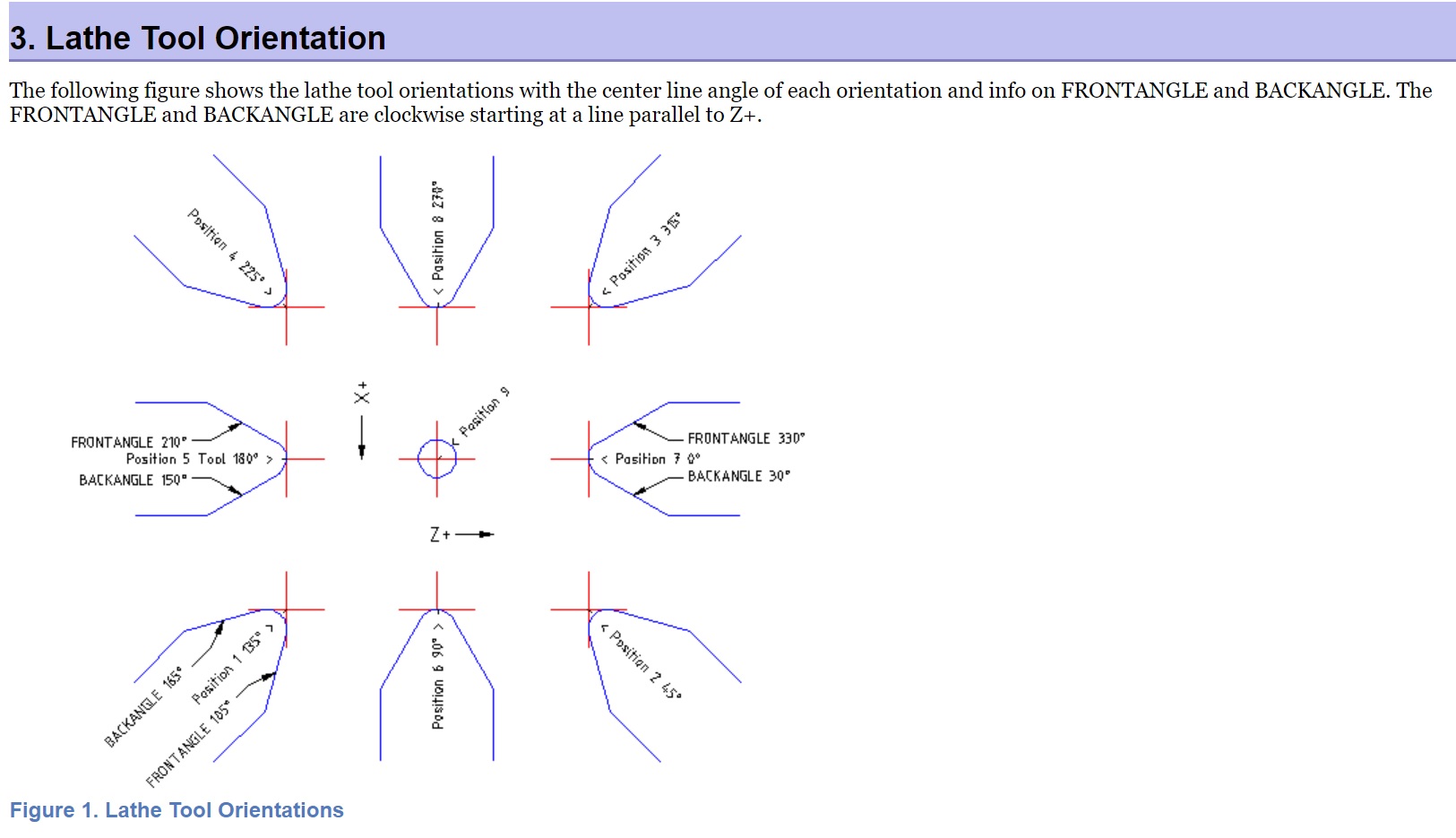
Brenda have you read the manual? or used linuxcnc for a lathe? if you have then please tell me where im going wrong because im interpereting this diagram to mean that tools located in a certain position will have that position designation so that their front and back angle numbers can be used properly and the machine knows the location of the tool in relation to the machine axis lines. it is not a tool changer position. it is the Q value.
The following user(s) said Thank You: KCJ
Please Log in or Create an account to join the conversation.
- Lcvette
- Offline
- Platinum Member
-
Less
More
- Posts: 1682
- Thank you received: 784
8 years 3 months ago #113825
by Lcvette
thats because this is a controller, it is not a CAM package, Cam is where your tooling is setup to detect collision avoidance and gouge detection. Brenda, I am not here trying to hurt your feelings, I am trying to help you understand why things are the way things are, they are a certain way because of many underlying reasons not just whimsicality. everything depends on something. the only needed measurements for a mill tool for the controller to run properly is the physical tool length in relation to the spindle gauge line in relation to the machine coordinate system and work coordinate offset and its diameter in order for it to process kinematics correctly. the rest is dictated by the cam. for a router using only one tool that never changes this may not be important as z zero is always the tool end, but when you change multiple tools, the machine controller MUST know that the z height changes in relation to the work coordinate offsets or the tool will cut air or plunge into the part after changing out the tool for the next.
Replied by Lcvette on topic A Widescreen Blender-Style Interface
I do find it strange that there is no cutting length variable standard.
thats because this is a controller, it is not a CAM package, Cam is where your tooling is setup to detect collision avoidance and gouge detection. Brenda, I am not here trying to hurt your feelings, I am trying to help you understand why things are the way things are, they are a certain way because of many underlying reasons not just whimsicality. everything depends on something. the only needed measurements for a mill tool for the controller to run properly is the physical tool length in relation to the spindle gauge line in relation to the machine coordinate system and work coordinate offset and its diameter in order for it to process kinematics correctly. the rest is dictated by the cam. for a router using only one tool that never changes this may not be important as z zero is always the tool end, but when you change multiple tools, the machine controller MUST know that the z height changes in relation to the work coordinate offsets or the tool will cut air or plunge into the part after changing out the tool for the next.
The following user(s) said Thank You: tommylight, KCJ
Please Log in or Create an account to join the conversation.
Time to create page: 0.532 seconds