
- Posts: 19899
- Thank you received: 4655
A Widescreen Blender-Style Interface
- andypugh
- Offline
- Moderator
-

Less
More
8 years 3 months ago #113874
by andypugh
This is probably true. I don't have an ATC on my mill, but I am still really glad to have the drawbar that I made . It significanlty lowers the bar to such things as popping the probe back in to make sure of something, or putting a milling cutter in to machine a counterbore by spiral cutting rather than putting something nearly the right size in the already-installed drill chuck.
Replied by andypugh on topic A Widescreen Blender-Style Interface
Lcvette wrote: My guess is within the next few months of real use you will be desperately looking for a solution to your tool changing situation. this isn't to say an ATC, but looking for some way to make it faster and easier than having to get wrenches out.
This is probably true. I don't have an ATC on my mill, but I am still really glad to have the drawbar that I made . It significanlty lowers the bar to such things as popping the probe back in to make sure of something, or putting a milling cutter in to machine a counterbore by spiral cutting rather than putting something nearly the right size in the already-installed drill chuck.
Please Log in or Create an account to join the conversation.
- andypugh
- Offline
- Moderator
-
Less
More
- Posts: 19899
- Thank you received: 4655
8 years 3 months ago #113876
by andypugh
They define offsets in all the available G-code directions. They may not be be used very much, but take this example machine where there is a permanently-mounted probe behind the spindle position. The probe will need both a tool-length and also an X and Y offset (and a diameter) to be useful.
I am not sure that the ABC offsets see much use, but you can imagine that they might be needed if using a 5-axis tool coordinate system and a robot arm. Or the C offset could be used for back-boring where the tool needs to be "fiddled" out (so the actual angular relationship with the spindle is needed)
Replied by andypugh on topic A Widescreen Blender-Style Interface
BrendaEM wrote: What are all the extra tool-table dimensions for?
They define offsets in all the available G-code directions. They may not be be used very much, but take this example machine where there is a permanently-mounted probe behind the spindle position. The probe will need both a tool-length and also an X and Y offset (and a diameter) to be useful.
I am not sure that the ABC offsets see much use, but you can imagine that they might be needed if using a 5-axis tool coordinate system and a robot arm. Or the C offset could be used for back-boring where the tool needs to be "fiddled" out (so the actual angular relationship with the spindle is needed)
The following user(s) said Thank You: KCJ, BrendaEM
Please Log in or Create an account to join the conversation.
- BrendaEM
- Offline
- Elite Member
-

Less
More
- Posts: 266
- Thank you received: 120
8 years 3 months ago - 8 years 3 months ago #113895
by BrendaEM
Replied by BrendaEM on topic A Widescreen Blender-Style Interface
Perhaps, when the drawings are done, there could be two sets of milling diagrams: one for automatic tool changers that reference what need to, and one that references the collet, or what-have-you for use in manual mills.
I am sure that it's just a newbe thought, I wondered if a user could use the extra variables in the table for something.
~
Andy, nice power draw bar setup. Is the tool held in there by a spring, and the air just opens it
I am sure that it's just a newbe thought, I wondered if a user could use the extra variables in the table for something.
~
Andy, nice power draw bar setup. Is the tool held in there by a spring, and the air just opens it
Last edit: 8 years 3 months ago by BrendaEM.
Please Log in or Create an account to join the conversation.
- andypugh
- Offline
- Moderator
-
Less
More
- Posts: 19899
- Thank you received: 4655
8 years 3 months ago #113904
by andypugh
Yes, a stack of Belleville washers in the usual way.
Replied by andypugh on topic A Widescreen Blender-Style Interface
BrendaEM wrote: Andy, nice power draw bar setup. Is the tool held in there by a spring, and the air just opens it
Yes, a stack of Belleville washers in the usual way.
The following user(s) said Thank You: BrendaEM
Please Log in or Create an account to join the conversation.
- BrendaEM
- Offline
- Elite Member
-
Less
More
- Posts: 266
- Thank you received: 120
8 years 3 months ago #113905
by BrendaEM
Replied by BrendaEM on topic A Widescreen Blender-Style Interface
Oddly, I am familiar with them. There's a few in the fine axis, a few pages pack on this thread.
It's good to see people make something other than landmines from them.
It's good to see people make something other than landmines from them.
Please Log in or Create an account to join the conversation.
- BrendaEM
- Offline
- Elite Member
-
Less
More
- Posts: 266
- Thank you received: 120
8 years 3 months ago - 8 years 3 months ago #113906
by BrendaEM
Replied by BrendaEM on topic A Widescreen Blender-Style Interface
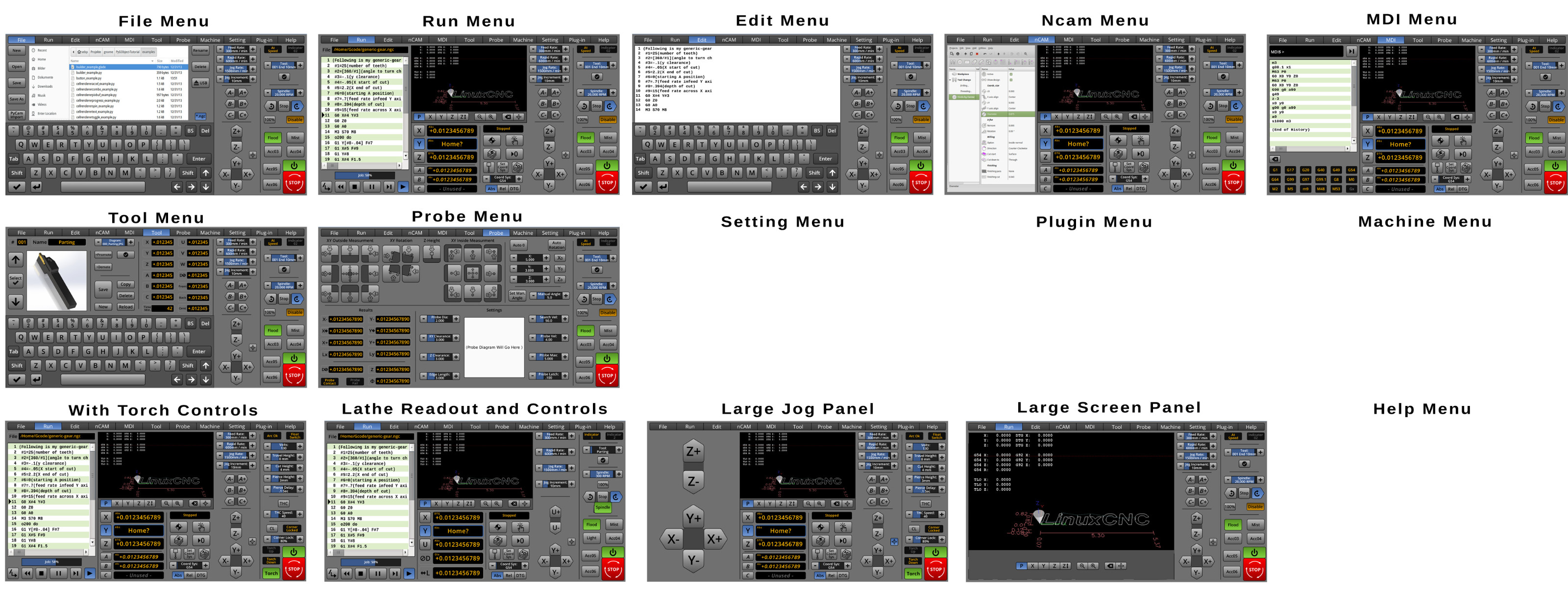
This is a progress report:
Most of the menus are laid out. There are machine controls for Torches and Mills, as well. There are overlay panels for Large Screen, Keyboard, and Large jog.
What's left to design: 2 menus and a few tweaks.
* Setting Menu: Next on the list for most user settings, such as increments, paths, and choosing a plugin. This menu will only be a rough guide as the programmer(s) will be able to include often-used settings here.
* Machine Menu, may have controls for HAL-related things, as Halscope and Halmeter.
* Plug-In, not much to do, this menu will only display whatever the plug-in will do with either 1/3 or 2/3 of the screen, not much to do.
* Help Menu, there not much to do as it will just display a help file.
Some tweaks:
* Remove PyCAM button. Too much will have to be done to Pycam for integration in this version, perhaps the next.
* Add copy/cut and paste buttons, and a few User buttons on MDI. There's room for them, might as well.
* Check Probe and Tool Menu.
Notes:
* For something like NCam, it could either 1/3 or 2/3 or, most of the screen--except the machine-specific controls on the right. The probe menu is also large, and the largest the design supports.
I've read a lot of your feedback, and am trying my best to do the best I can for LinuxCNC. Thank you to Lcvette for making the great looking lathe tool. Thank you for your patience, help, feedback, and support.
(For those with large monitors, the thumbnail image is in 4K. The interface itself was designed for 1920x1080 widescreen, and above.)

Most of the menus are laid out. There are machine controls for Torches and Mills, as well. There are overlay panels for Large Screen, Keyboard, and Large jog.
What's left to design: 2 menus and a few tweaks.
* Setting Menu: Next on the list for most user settings, such as increments, paths, and choosing a plugin. This menu will only be a rough guide as the programmer(s) will be able to include often-used settings here.
* Machine Menu, may have controls for HAL-related things, as Halscope and Halmeter.
* Plug-In, not much to do, this menu will only display whatever the plug-in will do with either 1/3 or 2/3 of the screen, not much to do.
* Help Menu, there not much to do as it will just display a help file.
Some tweaks:
* Remove PyCAM button. Too much will have to be done to Pycam for integration in this version, perhaps the next.
* Add copy/cut and paste buttons, and a few User buttons on MDI. There's room for them, might as well.
* Check Probe and Tool Menu.
Notes:
* For something like NCam, it could either 1/3 or 2/3 or, most of the screen--except the machine-specific controls on the right. The probe menu is also large, and the largest the design supports.
I've read a lot of your feedback, and am trying my best to do the best I can for LinuxCNC. Thank you to Lcvette for making the great looking lathe tool. Thank you for your patience, help, feedback, and support.
(For those with large monitors, the thumbnail image is in 4K. The interface itself was designed for 1920x1080 widescreen, and above.)
Last edit: 8 years 3 months ago by BrendaEM.
The following user(s) said Thank You: tommylight, Lcvette, KCJ
Please Log in or Create an account to join the conversation.
Time to create page: 0.448 seconds