
- Posts: 1682
- Thank you received: 784
A Widescreen Blender-Style Interface
- Lcvette
- Offline
- Platinum Member
-

Less
More
8 years 3 months ago - 8 years 3 months ago #114019
by Lcvette
Andy,
I was speaking to Kurt about this the other day and the possibility of using the G43.2 offset to possibly use the probe as the master tool in a master tool mode where it would have a true physical tool length along with all other tools to the spindle gauge line, but its offset would be used in conjunction with other tools called up to act in the same manner you described above. in this manner it could be used as a toggle perhaps turned on or off by the user which would then act so that when the probe was used to probe a corner and the "master tool mode" toggle was active, G43.2 would be used and all tool offsets would be the difference of the probe offset and tool offset. basically working the same as the lathe approach you referred to above.
the benefit to this method is that if for any reason a tool or probe tool needed to be changed or remeasured for any reason, the calculation is automatically updated without the need to remeasure all of your tooling afterwards. to those of us with large tool libraries that is very important as having to remeasure tools in the event of a broken probe tip, broken probe etc is not something you want to have to do and of course would always happen at the most inopportune time.
Brenda,
another thought from experience on other systems that may prove helpful in this blending is the use of Repeatable Holders (RH) and Non-Repeatable Holders (NRH) and a way to select between the two may be useful for displaying the way the tool is shown measured as well as for automatic measuring functionality. ie, a RH would bypass a tool length check where a NRH would be measured on a touchplate etc. this was how a previous system i used functions and it was very much loved by many both router and mill users.
the other thought I had but would be getting a bit more elaborate would be to add the "option" to display a holder the tool image display. this could be purely cosmetic and would cater to more people i suppose. or have the router gui without the holder and an er spindle nose showing and the mill interface with the holder graphic.
for the Tool Page, I would suggest adding a button for a table view, i definitely would still want access to see the whole tool library at a glance rather than having to scroll through it. I think tooling is important enough to warrant its own page for input maybe where it has no need of the jogging estop panels etc... where it is just used for data entry, this would give you plenty of room for the keyboard, the graphics and everything else needed to display anything that may be confusing regarding the tooling. for the milling folks that is much of an issue, but the lathe people...geez.. that is a whole different ball of wax, that really does need some serious pictograph representation and that tiny box in my opinion isn't enough to make it work. I would put some consideration into that. I think there should be some diagrams that bring the orientation chart into it as well as the chuck and some tooling graphics with axis lines, it really needs it to descript the offsets in a manner that is easy to interpret in my opinion. I think this would go a long ways to making the GUI more user friendly.
I started trying to draw it up in the space i thought would be legible in that box and I just don't see how I could make it sensible at a glance. and pictures being worth a thousand words, they still need some space to make their case.. im a poet!
thoughts?
Replied by Lcvette on topic A Widescreen Blender-Style Interface
andypugh wrote: The length reference isn't necessarily from the gauge line of the taper. Quite often it will be relative to the probe-tool. for example.
On my mill the reference is the machine table when the tool is in the setting hole. I don't know, or care. whether the holder gauge line is actually level with the table. It just needs to be a consistent reference.
Many lathes have a tool table relative to a "master" tool, which is always kept with zeros in the offsets. Then the G54 (etc) offset is the number needed to make that tool turn a true diameter.
Andy,
I was speaking to Kurt about this the other day and the possibility of using the G43.2 offset to possibly use the probe as the master tool in a master tool mode where it would have a true physical tool length along with all other tools to the spindle gauge line, but its offset would be used in conjunction with other tools called up to act in the same manner you described above. in this manner it could be used as a toggle perhaps turned on or off by the user which would then act so that when the probe was used to probe a corner and the "master tool mode" toggle was active, G43.2 would be used and all tool offsets would be the difference of the probe offset and tool offset. basically working the same as the lathe approach you referred to above.
the benefit to this method is that if for any reason a tool or probe tool needed to be changed or remeasured for any reason, the calculation is automatically updated without the need to remeasure all of your tooling afterwards. to those of us with large tool libraries that is very important as having to remeasure tools in the event of a broken probe tip, broken probe etc is not something you want to have to do and of course would always happen at the most inopportune time.
Brenda,
another thought from experience on other systems that may prove helpful in this blending is the use of Repeatable Holders (RH) and Non-Repeatable Holders (NRH) and a way to select between the two may be useful for displaying the way the tool is shown measured as well as for automatic measuring functionality. ie, a RH would bypass a tool length check where a NRH would be measured on a touchplate etc. this was how a previous system i used functions and it was very much loved by many both router and mill users.
the other thought I had but would be getting a bit more elaborate would be to add the "option" to display a holder the tool image display. this could be purely cosmetic and would cater to more people i suppose. or have the router gui without the holder and an er spindle nose showing and the mill interface with the holder graphic.
for the Tool Page, I would suggest adding a button for a table view, i definitely would still want access to see the whole tool library at a glance rather than having to scroll through it. I think tooling is important enough to warrant its own page for input maybe where it has no need of the jogging estop panels etc... where it is just used for data entry, this would give you plenty of room for the keyboard, the graphics and everything else needed to display anything that may be confusing regarding the tooling. for the milling folks that is much of an issue, but the lathe people...geez.. that is a whole different ball of wax, that really does need some serious pictograph representation and that tiny box in my opinion isn't enough to make it work. I would put some consideration into that. I think there should be some diagrams that bring the orientation chart into it as well as the chuck and some tooling graphics with axis lines, it really needs it to descript the offsets in a manner that is easy to interpret in my opinion. I think this would go a long ways to making the GUI more user friendly.
I started trying to draw it up in the space i thought would be legible in that box and I just don't see how I could make it sensible at a glance. and pictures being worth a thousand words, they still need some space to make their case.. im a poet!
thoughts?
Last edit: 8 years 3 months ago by Lcvette.
The following user(s) said Thank You: KCJ
Please Log in or Create an account to join the conversation.
- BrendaEM
- Offline
- Elite Member
-

Less
More
- Posts: 266
- Thank you received: 120
8 years 3 months ago #114034
by BrendaEM
Replied by BrendaEM on topic A Widescreen Blender-Style Interface
I think that creating a touch-friendly tool table may be too much work for the first version because it would be menu pages replacing others. Everything has to be kept track of.
People wanted a visual representation of the tools, but some compromises have to be made.
I appreciate the alternate techniques for discrete bits, though I indeed want support for just plain milling bits.
People wanted a visual representation of the tools, but some compromises have to be made.
I appreciate the alternate techniques for discrete bits, though I indeed want support for just plain milling bits.
Please Log in or Create an account to join the conversation.
- BrendaEM
- Offline
- Elite Member
-
Less
More
- Posts: 266
- Thank you received: 120
8 years 3 months ago - 8 years 3 months ago #114039
by BrendaEM
Replied by BrendaEM on topic A Widescreen Blender-Style Interface
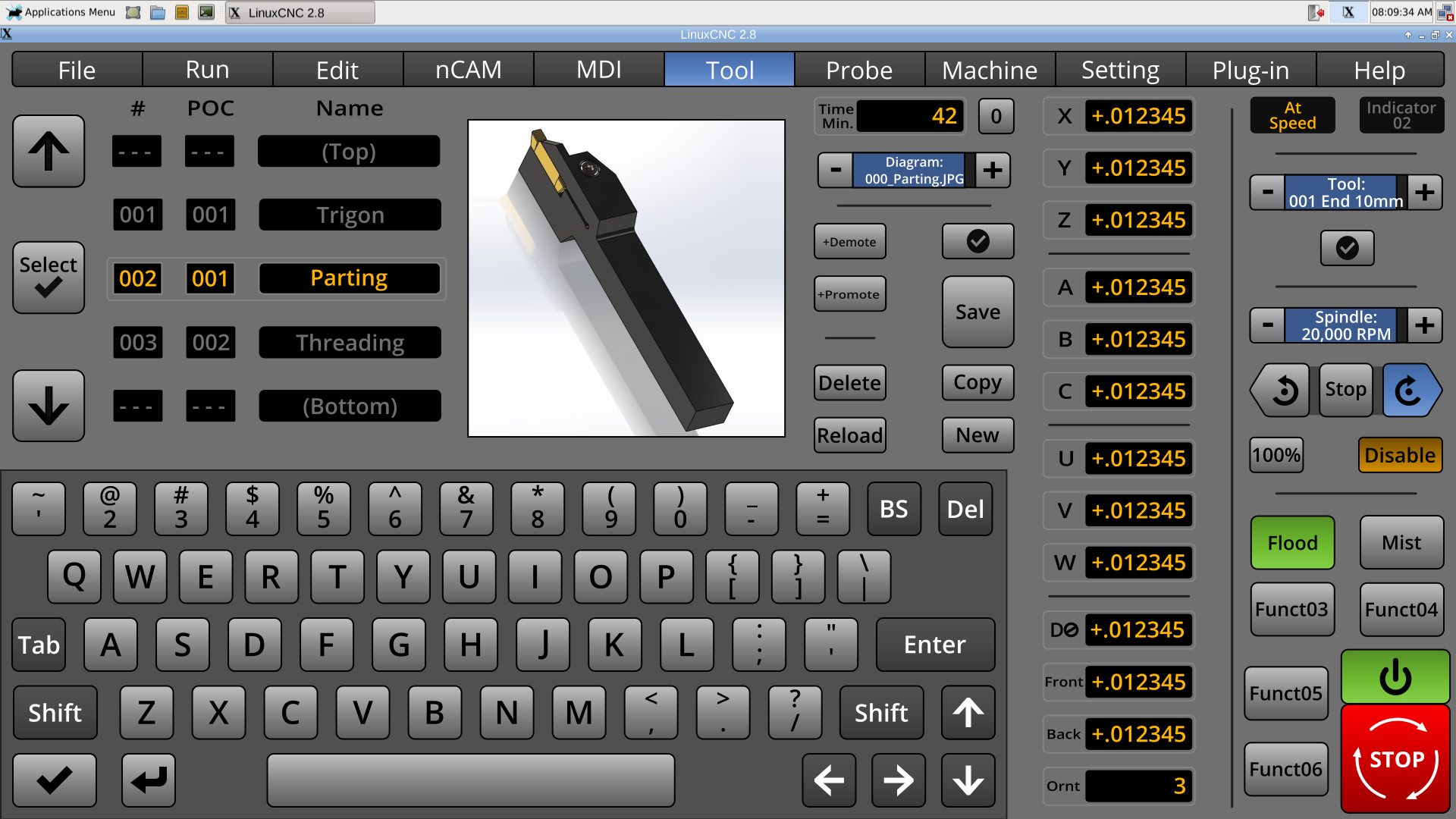
Some time ago, this is what I thought of doing for the Tool menu, but I thought it was a little too unconventional, but perhaps this might do the trick .I have tried to make the left-hand side of the menu fast to use. It's my hope that it might even be fun to use.
Note: I am still going to rework the machine-specific tool changer.
Other than a total rework of the menu...
* Added Changer Position Slot. There will be an option on the Setting menu to +Promote/Demote by # or POC.
* Added partial list of tools to give user spatial view of tools. The list would work a little like Apple's wheels, but more like those old mechanical counters.
* Increased tool pictures to 400 x 400 pixels, for clearer diagrams, if this won't be too much for the system.
This is at least the third major generation of the Tool menu. I have really tried to make people happy. Everything from the tool table is there. The user can move tool positions around. There are pictures for the lathe people, and the mill people too. There is a cutting-time readout, with zeroing. The torch people might find the cutting time indicator handy to know when the electrode/tips need replacing. The user can even chose a default tool and recall it with a touch of a button.
Note: I am still going to rework the machine-specific tool changer.
Other than a total rework of the menu...
* Added Changer Position Slot. There will be an option on the Setting menu to +Promote/Demote by # or POC.
* Added partial list of tools to give user spatial view of tools. The list would work a little like Apple's wheels, but more like those old mechanical counters.
* Increased tool pictures to 400 x 400 pixels, for clearer diagrams, if this won't be too much for the system.
This is at least the third major generation of the Tool menu. I have really tried to make people happy. Everything from the tool table is there. The user can move tool positions around. There are pictures for the lathe people, and the mill people too. There is a cutting-time readout, with zeroing. The torch people might find the cutting time indicator handy to know when the electrode/tips need replacing. The user can even chose a default tool and recall it with a touch of a button.
Last edit: 8 years 3 months ago by BrendaEM.
The following user(s) said Thank You: KCJ
Please Log in or Create an account to join the conversation.
- KCJ
- Offline
- Platinum Member
-
Less
More
- Posts: 328
- Thank you received: 267
8 years 3 months ago #114040
by KCJ
Replied by KCJ on topic A Widescreen Blender-Style Interface
Brenda, it may be difficult to fulfill everybody's needs with one tooltable layout. From a programing perspective it would be entirely possible to have multiple tooltable layouts, which could be chosen from the settings menu, or auto selected based on the machine type. For example a different layout could be loaded depending on whether the machine is a lathe or a mill, or is a plasma (is a tooltable needed for plasma?), or has an ATC etc. Lots of options to ensure everybody's needs are filled, while not having to rely on a one-size-fits-all approach.
Cheers,
Kurt
Cheers,
Kurt
Please Log in or Create an account to join the conversation.
- BrendaEM
- Offline
- Elite Member
-
Less
More
- Posts: 266
- Thank you received: 120
8 years 3 months ago - 8 years 3 months ago #114041
by BrendaEM
Replied by BrendaEM on topic A Widescreen Blender-Style Interface
I am still going for: one size fits most. I am strongly unwilling to resort to multiple page menus.
While the Tool menu is marriage of the needs for a Mill and Lathe, torch people may still use it for selecting tips.
Having this menu work well is especially important because the Torch/Plasma Machine-Specific Controls (usually on the right) take up so much room, there likely will not be a tool switcher in that panel, though changing the tip would be quick, anyway.
Throughout this interface I have tried to keep consistency from machine type to machine type for those people who have each.
While the Tool menu is marriage of the needs for a Mill and Lathe, torch people may still use it for selecting tips.
Having this menu work well is especially important because the Torch/Plasma Machine-Specific Controls (usually on the right) take up so much room, there likely will not be a tool switcher in that panel, though changing the tip would be quick, anyway.
Throughout this interface I have tried to keep consistency from machine type to machine type for those people who have each.
Last edit: 8 years 3 months ago by BrendaEM.
Please Log in or Create an account to join the conversation.
- andypugh
- Offline
- Moderator
-

Less
More
- Posts: 19899
- Thank you received: 4655
8 years 3 months ago #114046
by andypugh
I think that is the only sensible choice.
Replied by andypugh on topic A Widescreen Blender-Style Interface
BrendaEM wrote: I am still going for: one size fits most.
I think that is the only sensible choice.
The following user(s) said Thank You: BrendaEM
Please Log in or Create an account to join the conversation.
Time to create page: 0.220 seconds