
- Posts: 266
- Thank you received: 120
A Widescreen Blender-Style Interface
- BrendaEM
- Offline
- Elite Member
-

Less
More
8 years 3 months ago - 8 years 3 months ago #114083
by BrendaEM
Replied by BrendaEM on topic A Widescreen Blender-Style Interface
These are work-in-progress machine-specific tool (mini) controls for the mill, lathe, and torch, with the usual suspects menus and panels opened. I've tried to imitate the Tool menu controls. The tool mini-icon is 128 pixels square. The accessory buttons are limited to 3, now, so there is more form for the machine controls.
The torch menu is still a little crowded, but I too ignorant to prioritize the controls. Is everything in the torch panel useful? As stated, torch tips can be selected from the Tool menu, as there are a lot of community-requested torch controls to occupy the machine-specific right panel, kind of HAL like : )
I will be starting the Machine menu, trying to replicate the functionality of Axis, such as launching the HAL utilities. I wished that I had the ability to launch the rest of LinuxCNC from the UI. There are times that I want to experiment with things such as NativeCAM without a crash because RS485 couldn't start for my VFD.
Edit: Added, lathe and torch. Updated Mill for inverted spindle controls. Adjusted the spindle proportions for safety.
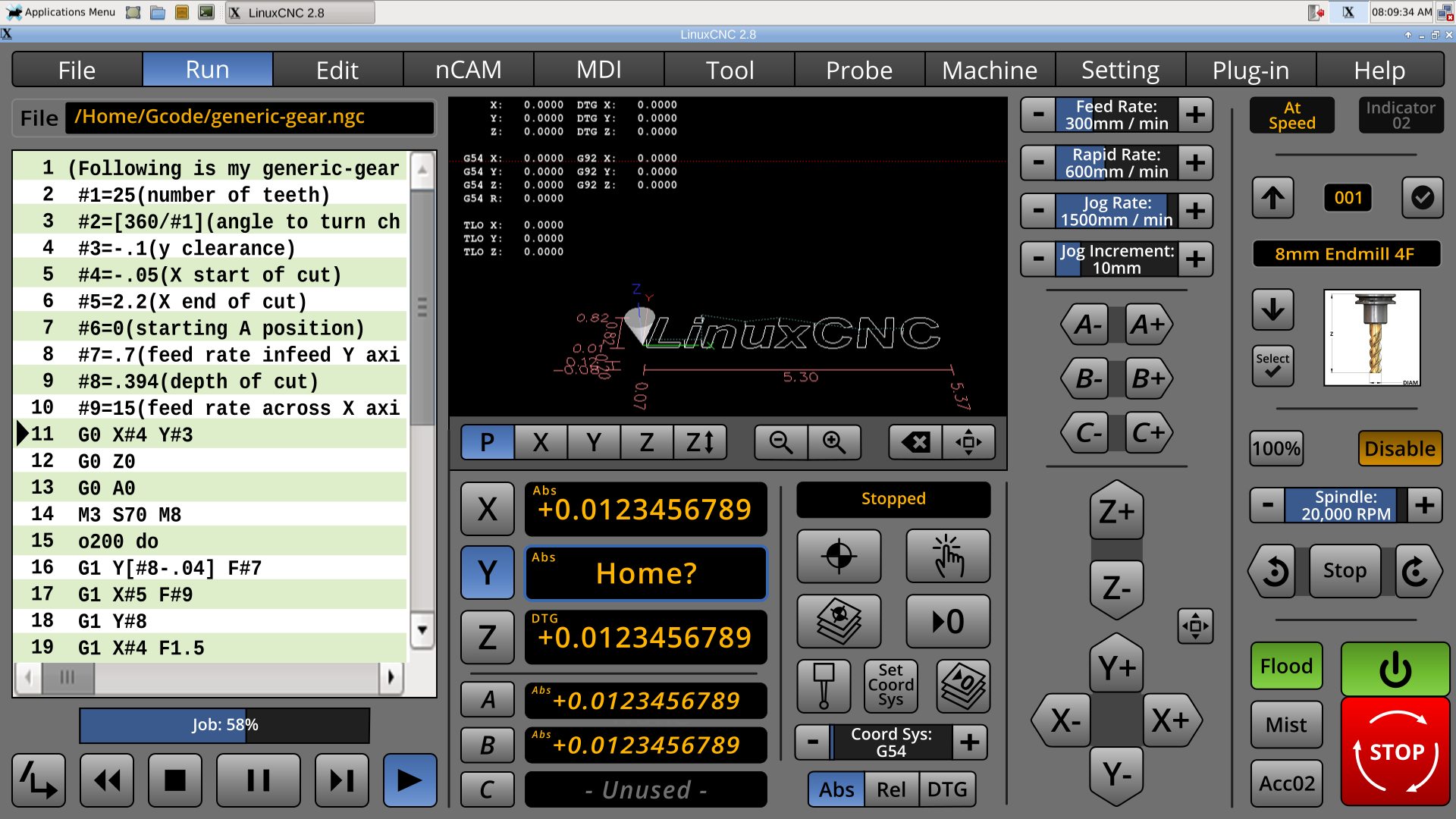
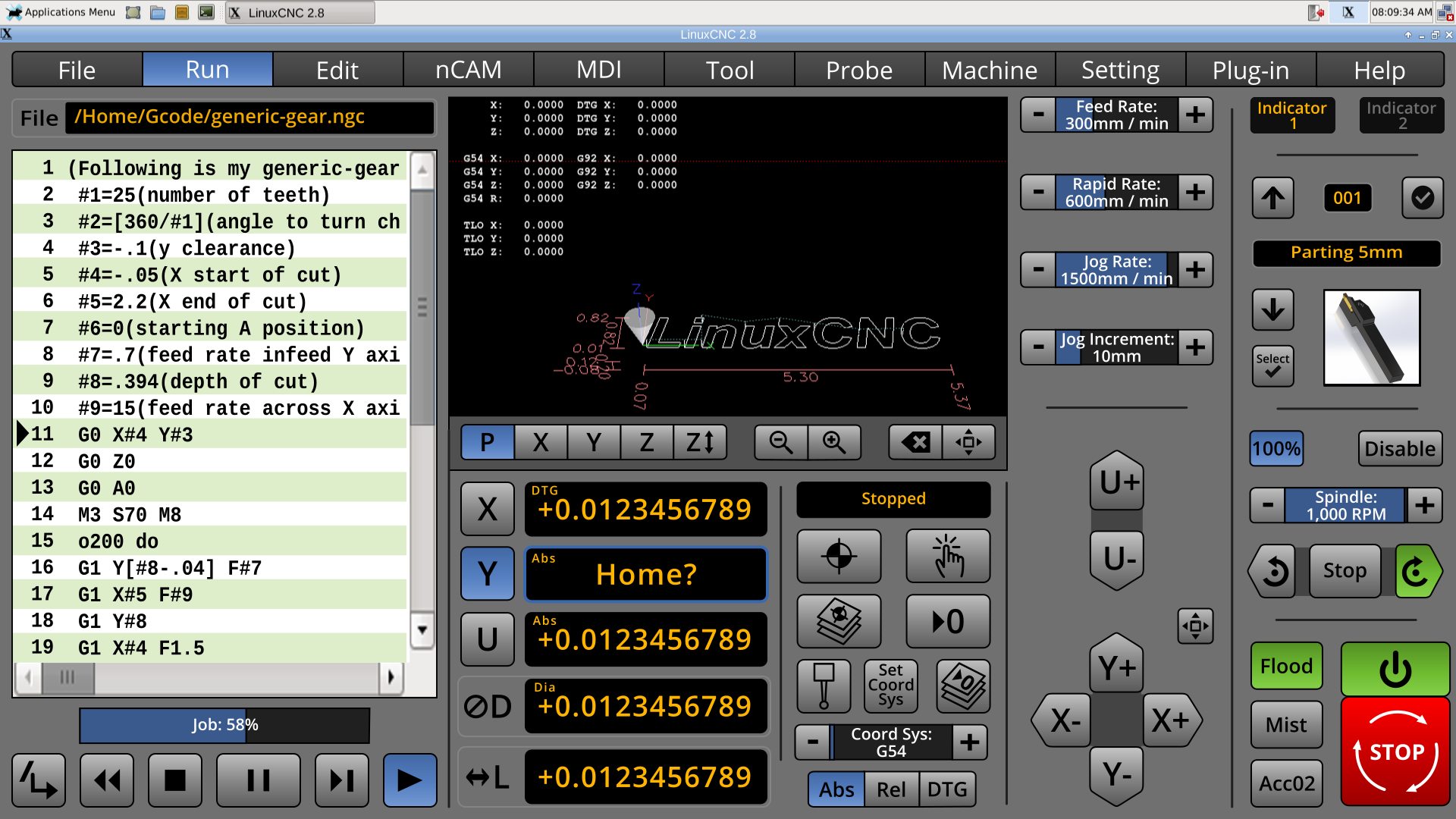
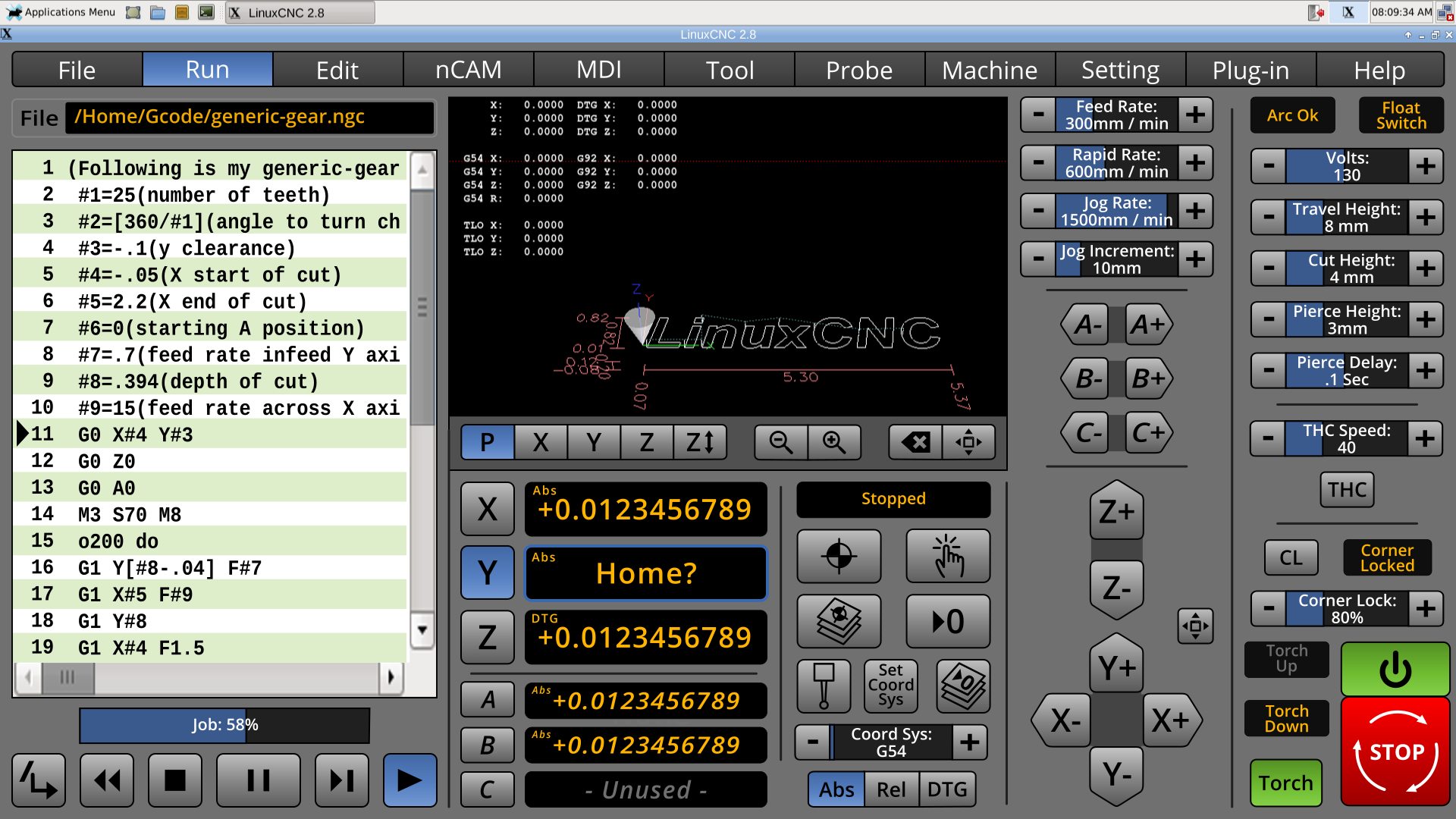
The torch menu is still a little crowded, but I too ignorant to prioritize the controls. Is everything in the torch panel useful? As stated, torch tips can be selected from the Tool menu, as there are a lot of community-requested torch controls to occupy the machine-specific right panel, kind of HAL like : )
I will be starting the Machine menu, trying to replicate the functionality of Axis, such as launching the HAL utilities. I wished that I had the ability to launch the rest of LinuxCNC from the UI. There are times that I want to experiment with things such as NativeCAM without a crash because RS485 couldn't start for my VFD.
Edit: Added, lathe and torch. Updated Mill for inverted spindle controls. Adjusted the spindle proportions for safety.
Last edit: 8 years 3 months ago by BrendaEM.
The following user(s) said Thank You: tommylight
Please Log in or Create an account to join the conversation.
- BrendaEM
- Offline
- Elite Member
-
Less
More
- Posts: 266
- Thank you received: 120
8 years 3 months ago - 8 years 3 months ago #114114
by BrendaEM
Replied by BrendaEM on topic A Widescreen Blender-Style Interface
It was too late to get out into the garage to examine Axis's menus for things needed for Machine menu, so...
* Reworked MDI to make it on-screen keyboard friendly.
* The user configurable keys return! The user will be able to define these in the .ini as a lable and command. Then the command can be inserted with a button-press. for less typing.
* Added copy, paste, and save, described using proper Oxford commas.
I am not sure how many Gcode modes can be active at once, but if's more than less than that, please mention it.
Edit: removed Cut. Added Save.
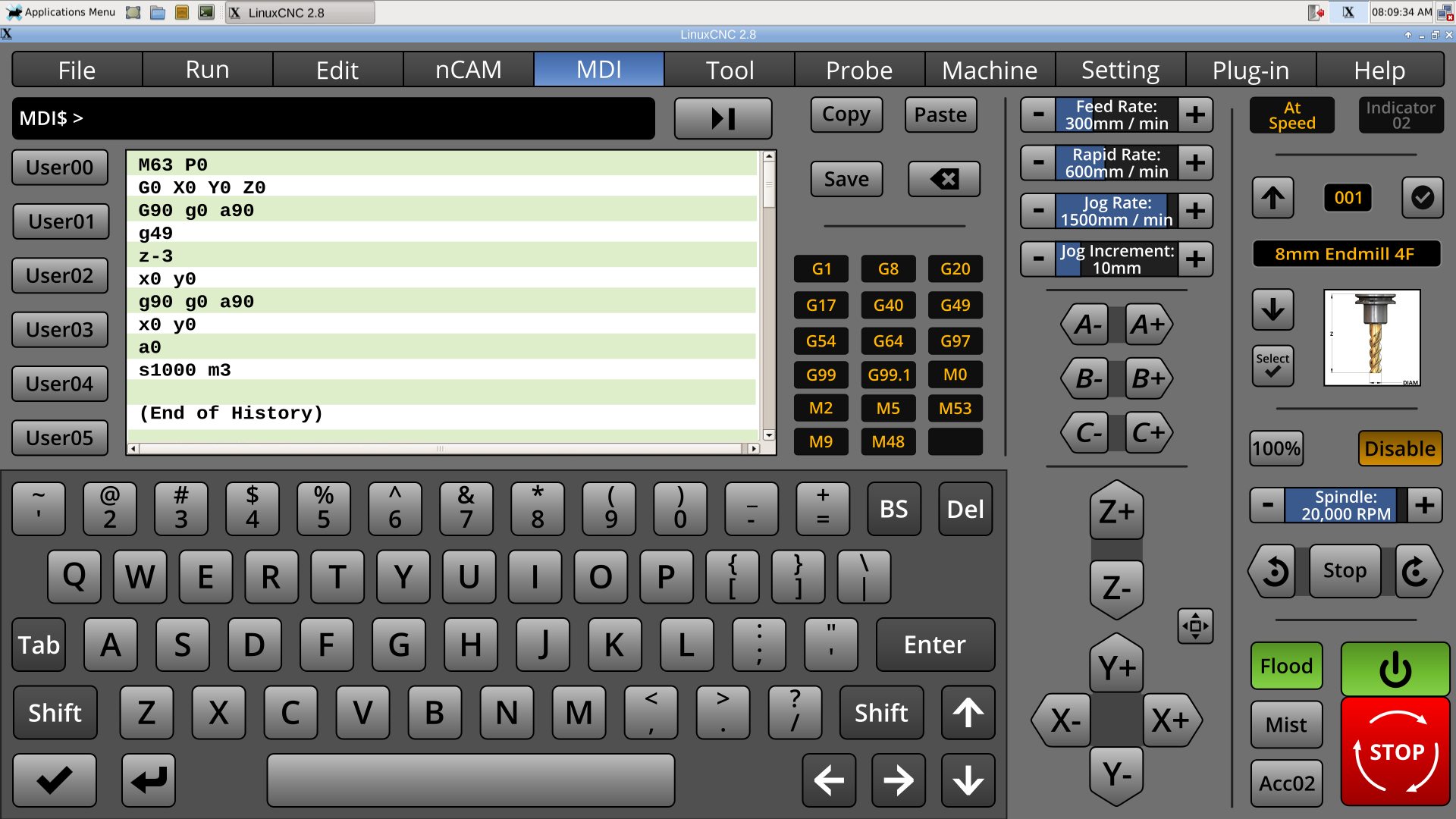
* Reworked MDI to make it on-screen keyboard friendly.
* The user configurable keys return! The user will be able to define these in the .ini as a lable and command. Then the command can be inserted with a button-press. for less typing.
* Added copy, paste, and save, described using proper Oxford commas.
I am not sure how many Gcode modes can be active at once, but if's more than less than that, please mention it.
Edit: removed Cut. Added Save.
Last edit: 8 years 3 months ago by BrendaEM.
The following user(s) said Thank You: tommylight, KCJ
Please Log in or Create an account to join the conversation.
- Lcvette
- Offline
- Platinum Member
-

Less
More
- Posts: 1682
- Thank you received: 784
8 years 3 months ago #114157
by Lcvette
Replied by Lcvette on topic A Widescreen Blender-Style Interface
I would move the mdi line between the keyboard and the screen, makes more sense there.
The following user(s) said Thank You: KCJ, BrendaEM
Please Log in or Create an account to join the conversation.
- BrendaEM
- Offline
- Elite Member
-
Less
More
- Posts: 266
- Thank you received: 120
8 years 3 months ago - 8 years 3 months ago #114158
by BrendaEM
Replied by BrendaEM on topic A Widescreen Blender-Style Interface
* Input line moved near keyboard. Thanks for the suggestion, Lcvette.
* Reversed history.
This weekend, I am going to start the Machine menu, the last unstarted menu. Work will continue on the Settings menu. I should come up with a numerical keypad panel, reusing the graphics from the canceled DRO menu, which NativeCAM superseded. Minor tweaks will continue on everything else. Polish. The lack of current feed and speed indicators really gnaw at me. I had thought that they could be put into the status indicator, which is on the (lower center-right) action-readout panel, which usually shows.
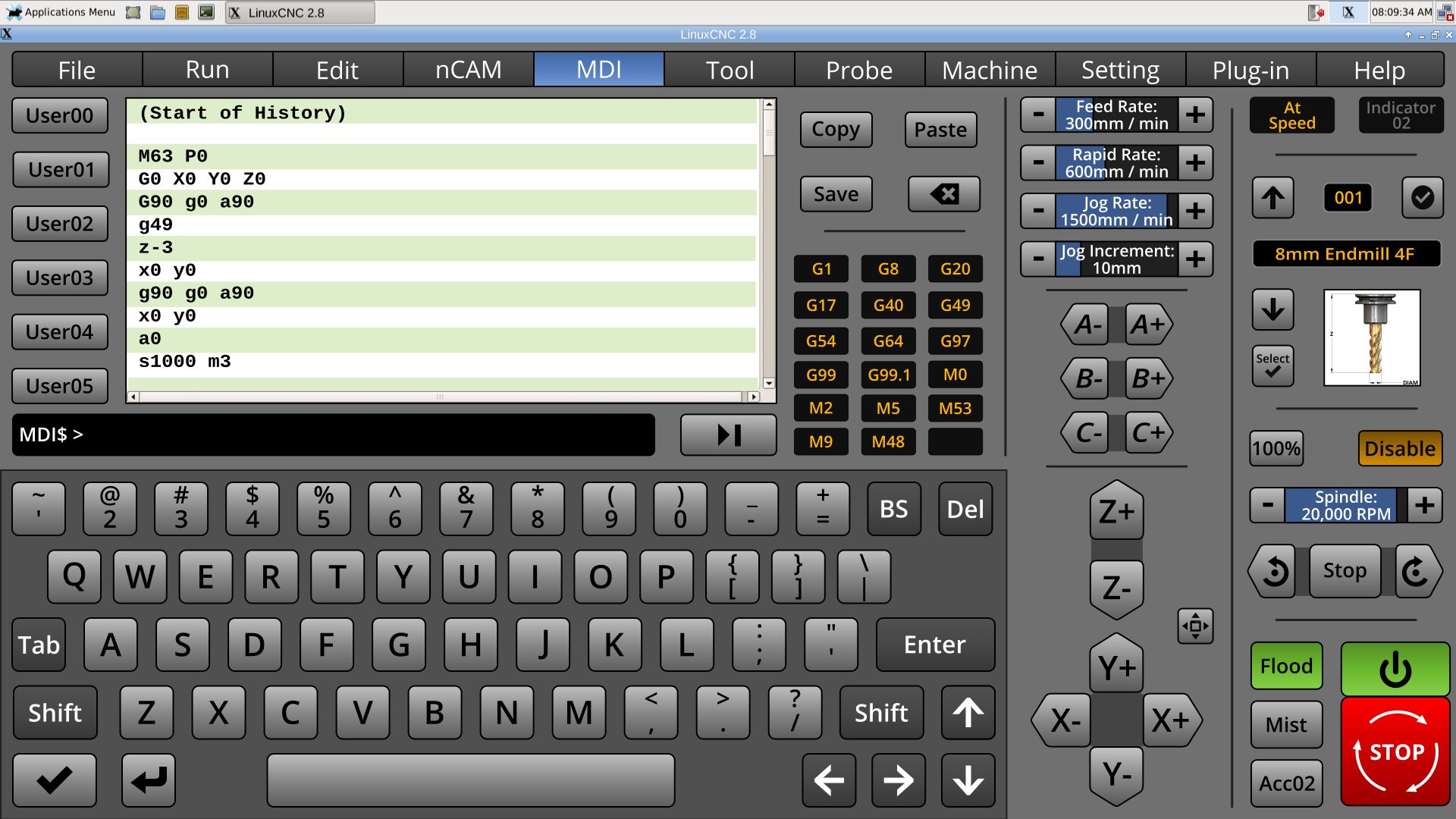
* Reversed history.
This weekend, I am going to start the Machine menu, the last unstarted menu. Work will continue on the Settings menu. I should come up with a numerical keypad panel, reusing the graphics from the canceled DRO menu, which NativeCAM superseded. Minor tweaks will continue on everything else. Polish. The lack of current feed and speed indicators really gnaw at me. I had thought that they could be put into the status indicator, which is on the (lower center-right) action-readout panel, which usually shows.
Last edit: 8 years 3 months ago by BrendaEM.
The following user(s) said Thank You: tommylight, KCJ, Grotius, Robi63
Please Log in or Create an account to join the conversation.
- BrendaEM
- Offline
- Elite Member
-
Less
More
- Posts: 266
- Thank you received: 120
8 years 3 months ago - 8 years 3 months ago #114349
by BrendaEM
Replied by BrendaEM on topic A Widescreen Blender-Style Interface
Working more on the Settings Menu. (Still looking at the Machine Menu.)
* Added Jog increments, along with the spindle and feed increments.
[This is going to sound strange, but for semi-manual milling, I would like to add favorites Feed/Speed pairs, but I don't know if anyone would like it but me, so it likely will not happen. People who exclusively run their CNC machine from gcode will likely not understand this.]
* While it's a insignificant thing to many people, I wanted the user to have a good amount of control over the colors for people with vision issues, OS integration, or just taste. Though, the color selectors can't take over the Settings menu. So, I added the last major color controls, for Text color, but removed all but one set-to-default selector. Compromise.
I looked at the Machine menu on Axis. Some of the things on the machine menu are already on the interface, some are not. I am trying to take a little time and consider: Other than launchers for Halprobe and Hal Scope, what things are too often edited in the .ini?
Other thoughts are: a little lock control that can be unlocked to adjust certain machine parameters.
Anyway....
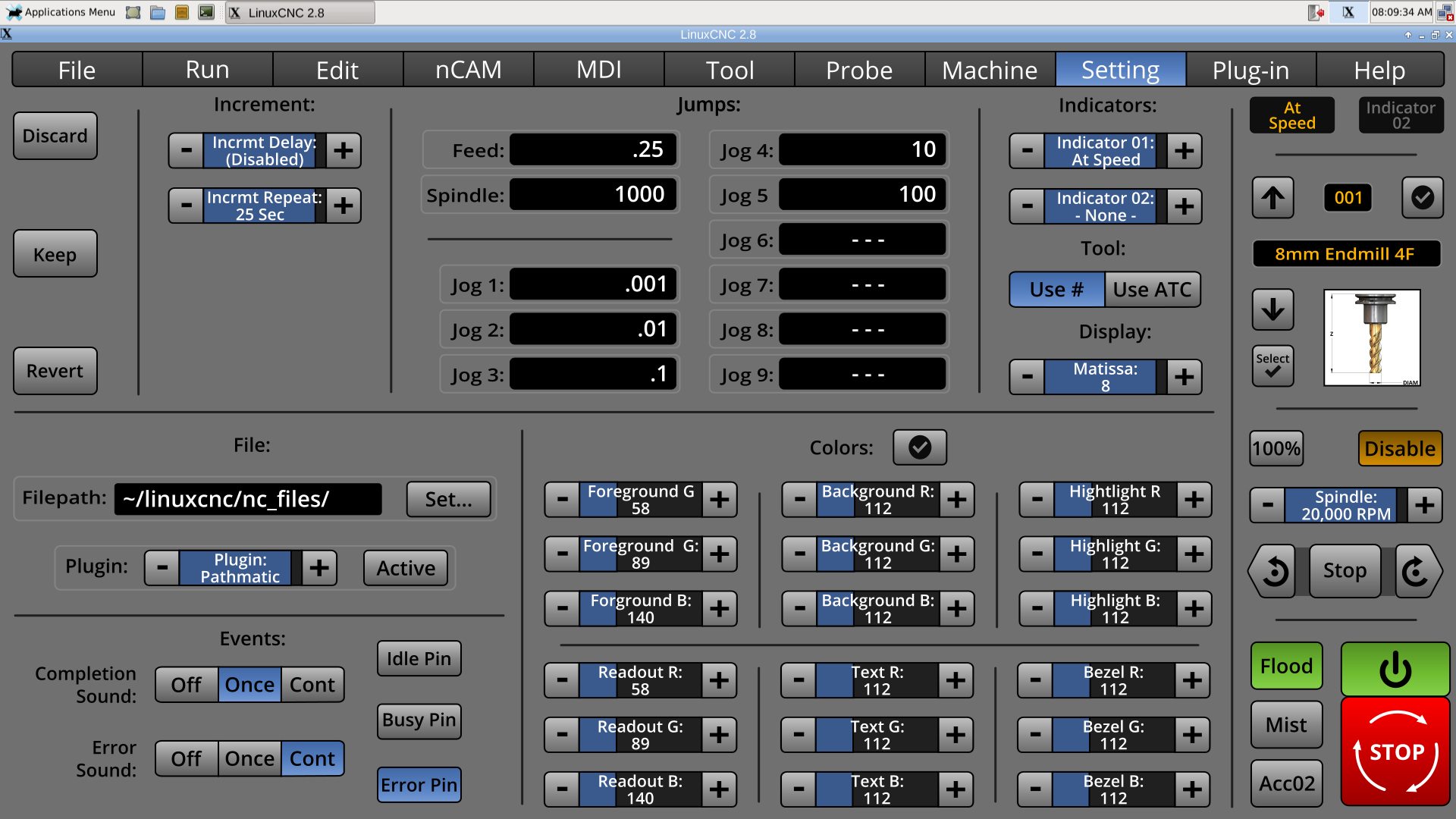
* Added Jog increments, along with the spindle and feed increments.
[This is going to sound strange, but for semi-manual milling, I would like to add favorites Feed/Speed pairs, but I don't know if anyone would like it but me, so it likely will not happen. People who exclusively run their CNC machine from gcode will likely not understand this.]
* While it's a insignificant thing to many people, I wanted the user to have a good amount of control over the colors for people with vision issues, OS integration, or just taste. Though, the color selectors can't take over the Settings menu. So, I added the last major color controls, for Text color, but removed all but one set-to-default selector. Compromise.
I looked at the Machine menu on Axis. Some of the things on the machine menu are already on the interface, some are not. I am trying to take a little time and consider: Other than launchers for Halprobe and Hal Scope, what things are too often edited in the .ini?
Other thoughts are: a little lock control that can be unlocked to adjust certain machine parameters.
Anyway....
Last edit: 8 years 3 months ago by BrendaEM.
The following user(s) said Thank You: Lcvette, farmerboy1967
Please Log in or Create an account to join the conversation.
- Lcvette
- Offline
- Platinum Member
-
Less
More
- Posts: 1682
- Thank you received: 784
8 years 3 months ago #114350
by Lcvette
Replied by Lcvette on topic A Widescreen Blender-Style Interface
Feed and speed pairs?
MDI
M3 Sxxxx
G1 Fxx
Any pair you want?
MDI
M3 Sxxxx
G1 Fxx
Any pair you want?
Please Log in or Create an account to join the conversation.
Time to create page: 0.150 seconds