
- Posts: 328
- Thank you received: 267
A Widescreen Blender-Style Interface
- KCJ
- Offline
- Platinum Member
-

Less
More
8 years 3 months ago - 8 years 3 months ago #113339
by KCJ
Replied by KCJ on topic A Widescreen Blender-Style Interface
skunkworks alpha blend simply adds some transparency to the backploted paths, literally all it does is take the RGB color and append an alpha channel to it. It is amazing how much better it makes the backplot look, especially for programs with a lot of paths like your example. I don't know why it is not the default display mode, probably some historical reason...
I've been looking into enabling anti-aliasing, it appears that the QGLWidget that Chris is using for the QtVCP backplot supports it, but I can't figure out how to enable it successfully. So far I've just got the backplot to look like TV static, but that is kinda the opposite of what I am trying to achieve.
Cheers,
Kurt
I've been looking into enabling anti-aliasing, it appears that the QGLWidget that Chris is using for the QtVCP backplot supports it, but I can't figure out how to enable it successfully. So far I've just got the backplot to look like TV static, but that is kinda the opposite of what I am trying to achieve.
Cheers,
Kurt
Last edit: 8 years 3 months ago by KCJ.
- BrendaEM
- Offline
- Elite Member
-

Less
More
- Posts: 266
- Thank you received: 120
8 years 3 months ago #113344
by BrendaEM
Replied by BrendaEM on topic A Widescreen Blender-Style Interface
Many systems woudn't have the horsepower to do this, but the window could be rendered and resampled bicubic. This is what nVidia DSR Factors does.
- BrendaEM
- Offline
- Elite Member
-
Less
More
- Posts: 266
- Thank you received: 120
8 years 3 months ago #113345
by BrendaEM
Replied by BrendaEM on topic A Widescreen Blender-Style Interface
* Rearranged file menu.
I am experimenting with making the panels a different color, so they would be recognized more easily. I tried a gradiant to simulate a keyboard concavity, but that just added confusion. This isn't bad.
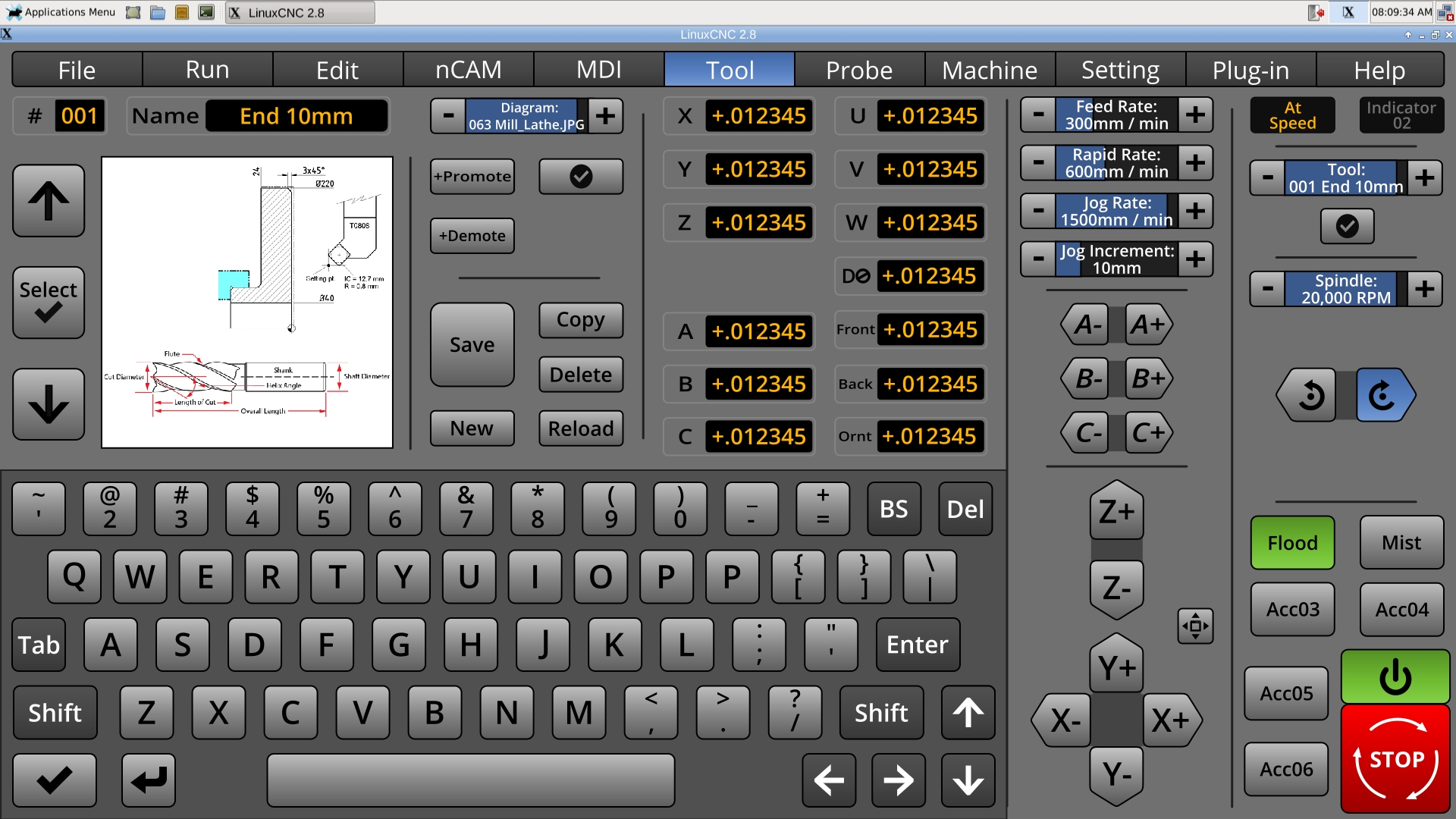
I am experimenting with making the panels a different color, so they would be recognized more easily. I tried a gradiant to simulate a keyboard concavity, but that just added confusion. This isn't bad.
- BrendaEM
- Offline
- Elite Member
-
Less
More
- Posts: 266
- Thank you received: 120
8 years 3 months ago - 8 years 3 months ago #113349
by BrendaEM
Replied by BrendaEM on topic A Widescreen Blender-Style Interface
So far, the interface is divided into:
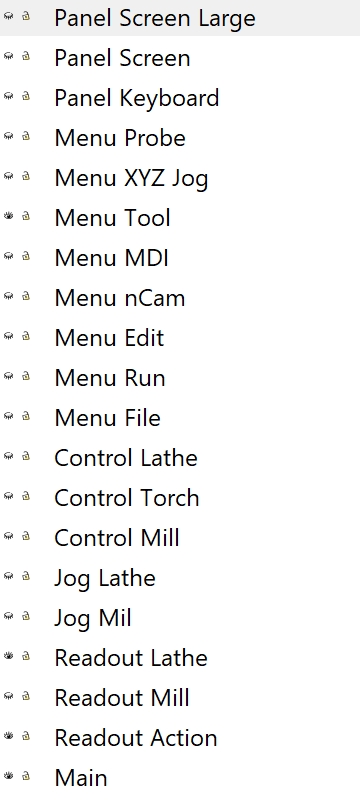
- Menus are menu sheets.
- Controls are specific machines.
- Panels are reusable widgets.
- Jogs are jogging control sets.
- Readouts are the center-left numerical displays.
Last edit: 8 years 3 months ago by BrendaEM.
- persei8
- Offline
- Platinum Member
-
Less
More
- Posts: 399
- Thank you received: 133
8 years 3 months ago #113371
by persei8
Replied by persei8 on topic A Widescreen Blender-Style Interface
Your keyboard has 2 P's. 
The following user(s) said Thank You: BrendaEM
- rodw
- Offline
- Platinum Member
-
Less
More
- Posts: 12170
- Thank you received: 4153
8 years 3 months ago #113373
by rodw
Replied by rodw on topic A Widescreen Blender-Style Interface
Thats the nuke button or is it Puke???persei8 wrote: Your keyboard has 2 P's.
The following user(s) said Thank You: BrendaEM
Time to create page: 0.543 seconds