
- Posts: 22011
- Thank you received: 7491
A Widescreen Blender-Style Interface
- tommylight
- Offline
- Moderator
-

Less
More
8 years 3 months ago #115205
by tommylight
Replied by tommylight on topic A Widescreen Blender-Style Interface
Nice one, Chris !
Please Log in or Create an account to join the conversation.
- KCJ
- Offline
- Platinum Member
-

Less
More
- Posts: 328
- Thank you received: 267
8 years 3 months ago #115234
by KCJ
Replied by KCJ on topic A Widescreen Blender-Style Interface
Chris, I just gave your Brender (Brenda + Blender  ) clone a spin, very nice indeed!
Cheers,
Kurt
) clone a spin, very nice indeed!Cheers,
Kurt
The following user(s) said Thank You: Lcvette
Please Log in or Create an account to join the conversation.
- Lcvette
- Offline
- Platinum Member
-
Less
More
- Posts: 1682
- Thank you received: 784
8 years 3 months ago #115245
by Lcvette
Replied by Lcvette on topic A Widescreen Blender-Style Interface
Cmorley, looks awesome!!! Looking forward to seeing more!!
Please Log in or Create an account to join the conversation.
- BrendaEM
- Offline
- Elite Member
-

Less
More
- Posts: 266
- Thank you received: 120
8 years 2 months ago - 8 years 2 months ago #115657
by BrendaEM
Replied by BrendaEM on topic A Widescreen Blender-Style Interface
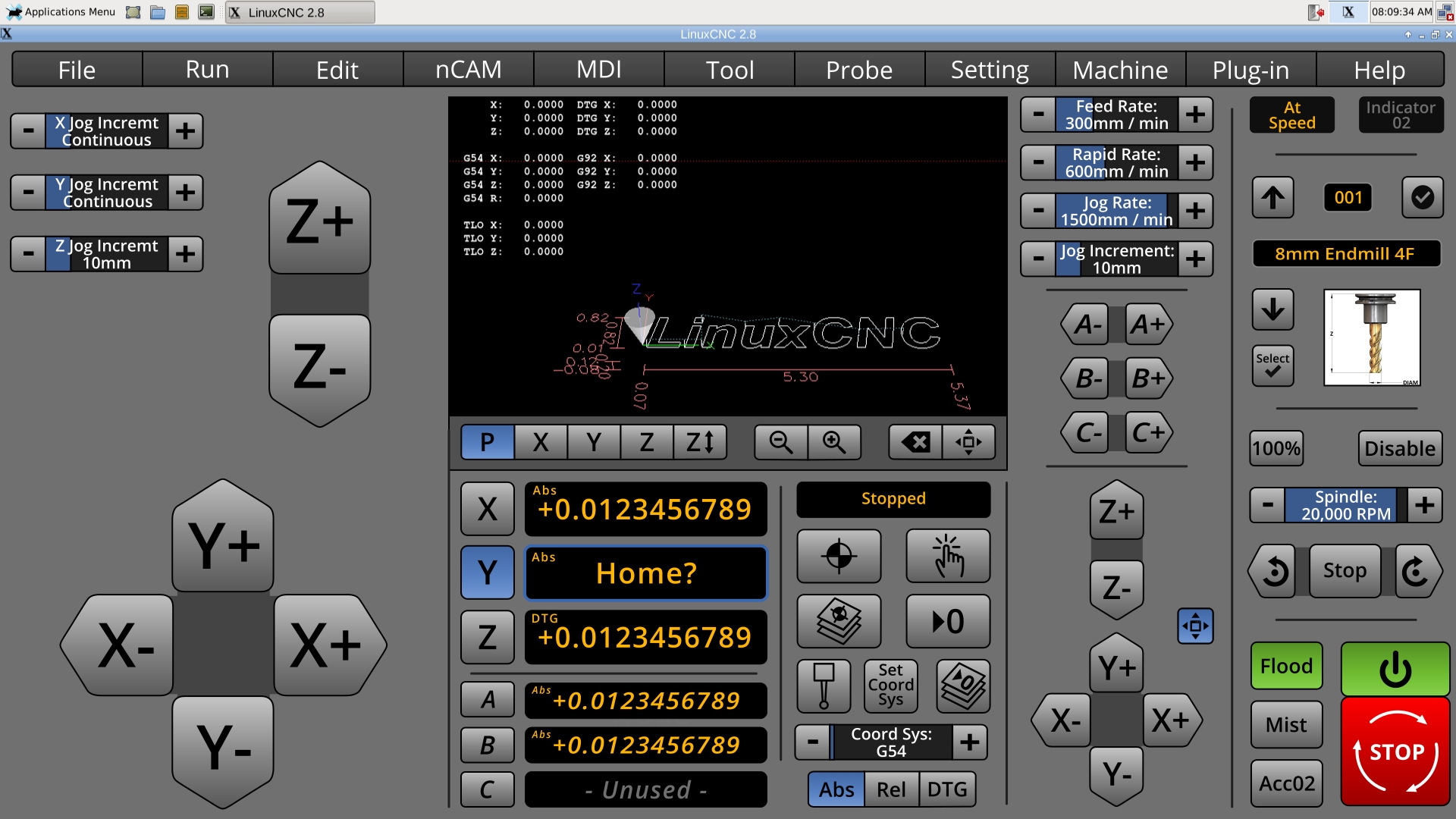
* Updated the Large Jog control panel for individualized Jog distances.
The large jog would be activated by clicking on the small button near the small jog.
Adding the individualized Jog distance controls would allow the user much easier semi-manual milling, for operations where the other axis are dimensionless, such as during facing operations and stock squaring.
The user would often set the z and y to continuous, and then set the z for the step-down. Okay, 10mm is a little much for DOC : )
I wish I had this on Axis a few weeks ago. I wonder if I can make a surface grinder attachment for my mill : O
I am sorry about the lack of updates last week.
The large jog would be activated by clicking on the small button near the small jog.
Adding the individualized Jog distance controls would allow the user much easier semi-manual milling, for operations where the other axis are dimensionless, such as during facing operations and stock squaring.
The user would often set the z and y to continuous, and then set the z for the step-down. Okay, 10mm is a little much for DOC : )
I wish I had this on Axis a few weeks ago. I wonder if I can make a surface grinder attachment for my mill : O
I am sorry about the lack of updates last week.
Last edit: 8 years 2 months ago by BrendaEM.
The following user(s) said Thank You: KCJ
Please Log in or Create an account to join the conversation.
- andypugh
- Offline
- Moderator
-
Less
More
- Posts: 19899
- Thank you received: 4655
8 years 2 months ago #115665
by andypugh
I wonder how useful and practical that is with a touch interface?
I tend to MPG jog to Z height, then do the feed moves with MDI. Then I don't have to watch (and don't need to keep my finger pressed to a touch-screen)
MDI moves can be queued, so yesterday I typed:
M3 S600
G1 F50 Y50
X32
Y-60
X45
Z-8
Y50
X32
Y-60
Then turned round to use the lathe
Replied by andypugh on topic A Widescreen Blender-Style Interface
BrendaEM wrote: Adding the individualized Jog distance controls would allow the user much easier semi-manual milling, for operations where the other axis are dimensionless, such as during facing operations and stock squaring.
I wonder how useful and practical that is with a touch interface?
I tend to MPG jog to Z height, then do the feed moves with MDI. Then I don't have to watch (and don't need to keep my finger pressed to a touch-screen)
MDI moves can be queued, so yesterday I typed:
M3 S600
G1 F50 Y50
X32
Y-60
X45
Z-8
Y50
X32
Y-60
Then turned round to use the lathe
The following user(s) said Thank You: KCJ, Robi63
Please Log in or Create an account to join the conversation.
- BrendaEM
- Offline
- Elite Member
-
Less
More
- Posts: 266
- Thank you received: 120
8 years 2 months ago - 8 years 2 months ago #115698
by BrendaEM
Replied by BrendaEM on topic A Widescreen Blender-Style Interface
Send complementary MPG jog to...
: )
For each pass, without these kind of controls the user would need to:
I know.
In the design, I've included a more-or-less copy of Axis's MDI, though, I would not want to rist a typo. Yes, I left that in there on purpose, but no, it was a real mistake.
: )
For each pass, without these kind of controls the user would need to:
- Mill off the top of the surface.
- Set jog size
- Step down
- Set to continuous again
I know.
In the design, I've included a more-or-less copy of Axis's MDI, though, I would not want to rist a typo. Yes, I left that in there on purpose, but no, it was a real mistake.
Last edit: 8 years 2 months ago by BrendaEM.
Please Log in or Create an account to join the conversation.
Time to create page: 0.135 seconds