
- Posts: 114
- Thank you received: 4
ubuntu 14.04.1 linuxcnc help
- Razor_keen
- Topic Author
- Offline
- Premium Member
-

Less
More
10 years 10 months ago #66644
by Razor_keen
Replied by Razor_keen on topic ubuntu 14.04.1 linuxcnc help
Tim
I think i read somewhere that on a 64 bit os you need a minimum of 8 gb of ram for it to act the same as a 32 bit system and where ut reakky shines is in ram intensive operations such as video and audio encoding.
i was also remembering that the rtai kernel is said to be a bit better when it comes to latency, and i wonder how much of the gains you are seeing is from the difference in os or the difference in kernels.
I plan to test this theory a little latter tonight. i found it was the altenator on my truck that triggered the warning lites.
I will let the 64 bit os run a last test while i work on my truck, then afterwards ill use the same rt kernel with a 32 bit build to see how much gain is in the os vs the kernel.
regards
jason
I think i read somewhere that on a 64 bit os you need a minimum of 8 gb of ram for it to act the same as a 32 bit system and where ut reakky shines is in ram intensive operations such as video and audio encoding.
i was also remembering that the rtai kernel is said to be a bit better when it comes to latency, and i wonder how much of the gains you are seeing is from the difference in os or the difference in kernels.
I plan to test this theory a little latter tonight. i found it was the altenator on my truck that triggered the warning lites.
I will let the 64 bit os run a last test while i work on my truck, then afterwards ill use the same rt kernel with a 32 bit build to see how much gain is in the os vs the kernel.
regards
jason
Please Log in or Create an account to join the conversation.
- Razor_keen
- Topic Author
- Offline
- Premium Member
-
Less
More
- Posts: 114
- Thank you received: 4
10 years 10 months ago #66645
by Razor_keen
Replied by Razor_keen on topic ubuntu 14.04.1 linuxcnc help
just a quick question, which rtai kernel are you using? version number wise?
Please Log in or Create an account to join the conversation.
- Razor_keen
- Topic Author
- Offline
- Premium Member
-
Less
More
- Posts: 114
- Thank you received: 4
10 years 10 months ago #66657
by Razor_keen
Replied by Razor_keen on topic ubuntu 14.04.1 linuxcnc help
this is just for personal reference between tests. 64 bit....

Please Log in or Create an account to join the conversation.
10 years 10 months ago - 10 years 10 months ago #66658
by tjmarch
Replied by tjmarch on topic ubuntu 14.04.1 linuxcnc help
Rtai kernel version is:
3.4-9-rtai-686-pae
Jason wrote
Problem with that kernels are 32 bit and 64 bit specific unless you are patching it yourself then loading it.
If you are going to use a 32 bit Rt kernel you will need to edit setupRt.sh from post:
forum.linuxcnc.org/forum/9-installing-li...-help?start=80#66528
in section where all packages are installed look for and replace:
linux-image-rt-amd64
with
linux-image-rt-686-pae
and
linux-headers-rt-amd64
with
linux-headers-rt-686-pae
and lines
wget ftp.us.debian.org/debian/pool/main/b/boo...1.49.0-3.2_amd64.deb
sudo gdebi -n libboost-python1.49.0_1.49.0-3.2_amd64.deb
with
wget ftp.us.debian.org/debian/pool/main/b/boo..._1.49.0-3.2_i386.deb
sudo gdebi -n libboost-python1.49.0_1.49.0-3.2_i386.deb
and
rm -rf libboost-python1.49.0_1.49.0-3.2_amd64.deb
with
rm -rf libboost-python1.49.0_1.49.0-3.2_i386.deb
everything else should be ok in script
To give Rtai kernel same test I reset histogram before I came to work so it will run for 11 hours also
My desktop dose have 8GB of Ram
You posted earlier about using a RC motor for spindle. I did check into it. Looked like a cool project, I do own a small lathe and will consider making one down the road, would probable be able to cut aluminum if I did. As of now I have already purchased one of these it has a 1/4" collet needed for my drag knife:
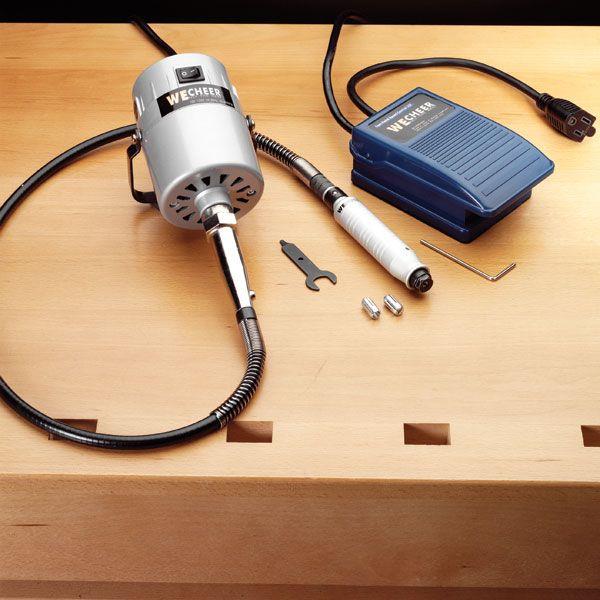
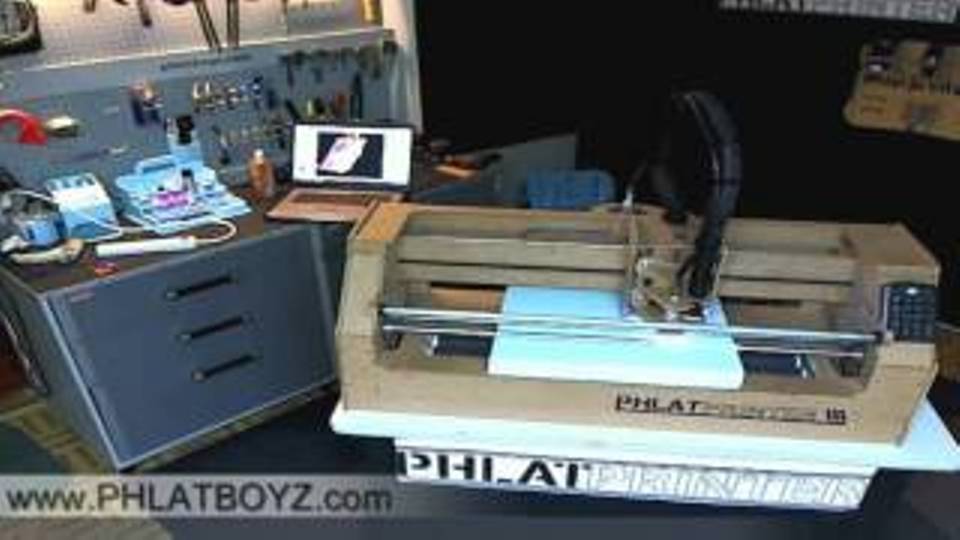
Will be setup similar as this but CNC is totally different:
3.4-9-rtai-686-pae
Jason wrote
I will let the 64 bit os run a last test while i work on my truck, then afterwards ill use the same rt kernel with a 32 bit build to see how much gain is in the os vs the kernel.
Problem with that kernels are 32 bit and 64 bit specific unless you are patching it yourself then loading it.
If you are going to use a 32 bit Rt kernel you will need to edit setupRt.sh from post:
forum.linuxcnc.org/forum/9-installing-li...-help?start=80#66528
in section where all packages are installed look for and replace:
linux-image-rt-amd64
with
linux-image-rt-686-pae
and
linux-headers-rt-amd64
with
linux-headers-rt-686-pae
and lines
wget ftp.us.debian.org/debian/pool/main/b/boo...1.49.0-3.2_amd64.deb
sudo gdebi -n libboost-python1.49.0_1.49.0-3.2_amd64.deb
with
wget ftp.us.debian.org/debian/pool/main/b/boo..._1.49.0-3.2_i386.deb
sudo gdebi -n libboost-python1.49.0_1.49.0-3.2_i386.deb
and
rm -rf libboost-python1.49.0_1.49.0-3.2_amd64.deb
with
rm -rf libboost-python1.49.0_1.49.0-3.2_i386.deb
everything else should be ok in script
To give Rtai kernel same test I reset histogram before I came to work so it will run for 11 hours also
My desktop dose have 8GB of Ram
You posted earlier about using a RC motor for spindle. I did check into it. Looked like a cool project, I do own a small lathe and will consider making one down the road, would probable be able to cut aluminum if I did. As of now I have already purchased one of these it has a 1/4" collet needed for my drag knife:
Will be setup similar as this but CNC is totally different:
Last edit: 10 years 10 months ago by tjmarch.
Please Log in or Create an account to join the conversation.
- Razor_keen
- Topic Author
- Offline
- Premium Member
-
Less
More
- Posts: 114
- Thank you received: 4
10 years 10 months ago - 10 years 10 months ago #66661
by Razor_keen
Replied by Razor_keen on topic ubuntu 14.04.1 linuxcnc help
The rc motors are really cool. the main problem is that you will need at least two motors to cut wood to aluminum. most of the tuts give a solution that hase you making a custom pillow block for each. i have a design to let you only swap the motors using couplings and the rc motors original mounting brace. so its not as graceful as an automatic swap but its just a set screw and four mount screws. its pretty easy.
the biggest problem is the power supply. the solution is modded server supplies plus the lipo batteries that are for the motors. the batteries keep the power supplies from cutting out if accidentally u make way to deep of a cut... (it happens sometimes..)
kinda like caps in car stereos.
they last a pretty good while and the occational bearing replacement and even motor replacement is really easy on the budget.
collet costed me about 12 motor 40. bad ass controller was 80. (may never replace that) power supply 50, 50 fot the pillow block machined at a shop. bearings are either 1.00 a peice or there are some awsome ones at about 8 a piece. you need two axial and one radial at min.
the biggest problem is the power supply. the solution is modded server supplies plus the lipo batteries that are for the motors. the batteries keep the power supplies from cutting out if accidentally u make way to deep of a cut... (it happens sometimes..)
kinda like caps in car stereos.
they last a pretty good while and the occational bearing replacement and even motor replacement is really easy on the budget.
collet costed me about 12 motor 40. bad ass controller was 80. (may never replace that) power supply 50, 50 fot the pillow block machined at a shop. bearings are either 1.00 a peice or there are some awsome ones at about 8 a piece. you need two axial and one radial at min.
Last edit: 10 years 10 months ago by Razor_keen.
Please Log in or Create an account to join the conversation.
10 years 10 months ago - 10 years 10 months ago #66666
by tjmarch
Replied by tjmarch on topic ubuntu 14.04.1 linuxcnc help
Jason and anyone else
My personal conclusion for results of histogram for 32 Rtai (post 66614) & 64 Rt (post 66562), bit systems on my computer. On both 32 & 64 bit systems the worst latency spikes occurred during reset and start of test. If you eliminate these spikes it leaves 20 or so spikes above 1E4, (10000us) in bin ct areas + and - during the rest of the eleven hours tested. Off chart bin ct + and - had no recorded hits over 1E4. Both 32 & 64 bit max latency were in the 60000us range. 32 bit system had less CPU load CPU1 40%, CPU2 0% than 64 bit system CPU1 90%+ CPU2 0% which resulted in lower temps for 32 bit system. 32 bit system latency was a little erratic but in low region most of the time, not as constant as 64 bit system. 64 bit system dropped pulse audio where 32 bit system did not.
The hits in latency over 30000us during 11 hour period are something to be concerned about for 32 or 64 bit system. I will just have to setup step pulse and direction control to be a little slower, I am in no hurry anyway. The materials that I will be cutting are low cost, balsa wood, hobby grade aircraft plywood, 4mm thick foam board from Dollar Tree and building grade foam insulation board. As far as 3D printer plastic that is cheap and can be recycled for other uses. If machine makes a incorrect radius cut due to latency spike I will not be out of much money. Plus here is a quote from LinuxCNC V2.7.3-5-g99ffe2d, 2015-11-30 documentation "Worst case latencies might only happen a few times a minute, and the odds of bad latency happening just as the motor is changing direction are low. So you can get very rare errors that ruin a part every once in a while and are impossible to troubleshoot."
Now for me it is important to be able to use windozes in a VM. I could go 32 bit and do a daul boot system but I have done that in the past and it is a pain to setup. Windozes requires drivers to be loaded, windozes in VM dose not only a ISO of OS instalation disk. Plus you do not have access to files on linux partition while using windozes system with a dual boot system. Then there is the grub loader which with a dual boot system at some time is bound to get buggered up and will prohibit access to windoze or linux system until fixed. Been there done that. VM also has the ability to take snap shots of VM hard drive so reverting back to a previous state of VM OS is a snap.
Could run VM on 32 bit system but VM software only allows you to dedicate half available ram of OS to VM not the 4GB allowance that pae kernel could use for a single process if available in swap area. So the results are a sluggish VM with only 2GB of ram available.
64 bit system will be the way for me to go on this computer and there will be few ram restrictions with my 8GB system. As far as audio dropping I do not need tunes the sound of this machine running will be music to my ears.
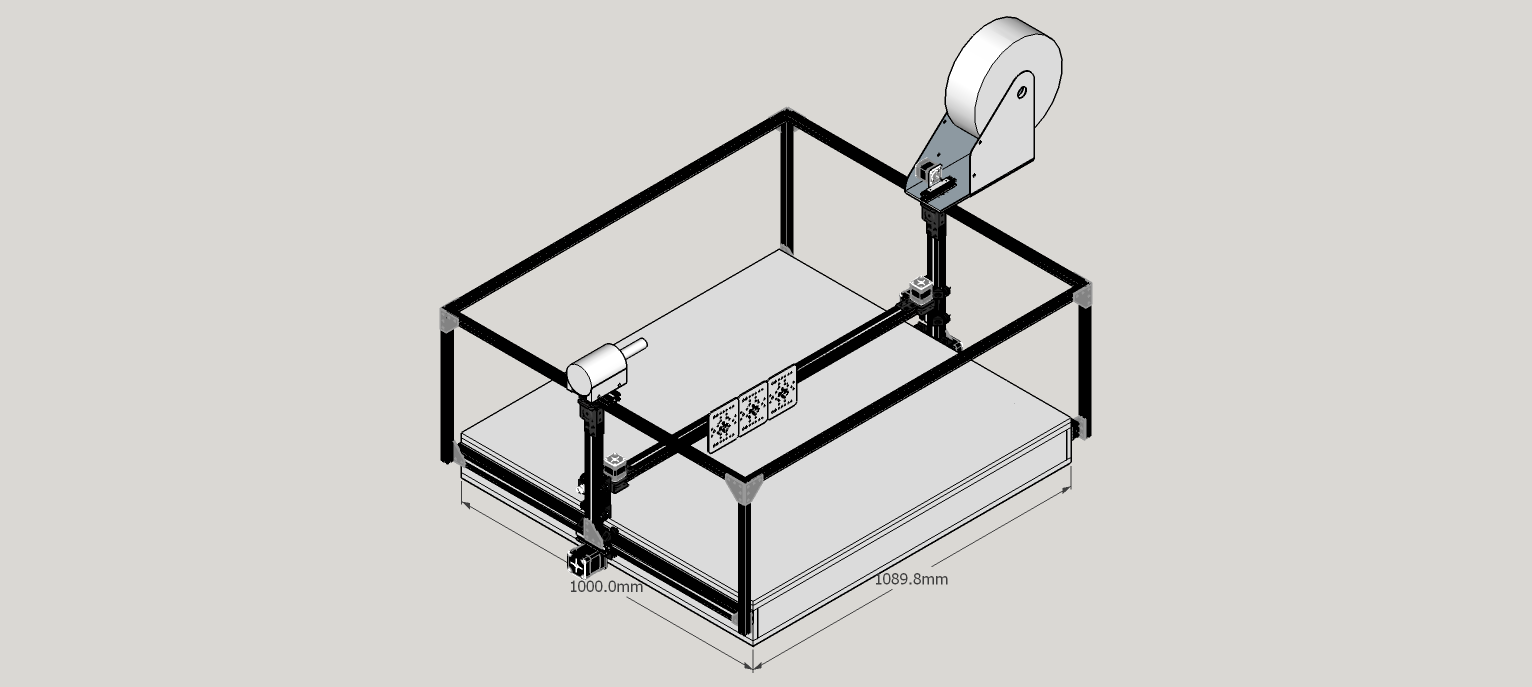
The reason for the use of windozes on my CNC is because my machine will be a multi-purpose gantry machine. I will be able to do vacuum forming on base of machine and Linuxcnc will be setup as Gantrykins, (gantry-hs) and used for 3D printing, Mill work, drag knife work and Diode Laser cutting. Gantry beam will be removable so CNC can be used as 4 axis foam cutting CNC. Foam cutting can be done with Linuxcnc but I want to use a windozes program called Jedicut, (freeware}. Jedicut dose not use gcode dose not require limit switches and will work over USB using a homemade USB to parallel port dongle that off loads timeing to arduino in dongle. VM has USB support so dongle will work. The advantage of Jedicut is there is no need for CAM software you go from drawing straight to CNC. The disadvantage of 64 bit system will be the CPU draw while running linuxcnc and heat created. I figure my CNC will not be a production machine, use will be low volume as a hobby project system with short runs. I plan to use CNC to help make RC airplane parts.
My advice to you Jason because you are using a laptop if you get the same type of results from test is to go with 32 bit Rtai system. Your Robot arm is for hobby use not much concern for the few latency spikes, accuracy is not that important and might make it more of a challenge for your kids and act like a real arcade claw machine, lol. The problem would be the heat and from my test if you get the same results 32 bit Rtai would be better choice. The 32 bit Rt kernel might also work latency would be a little higher than the Rtai.
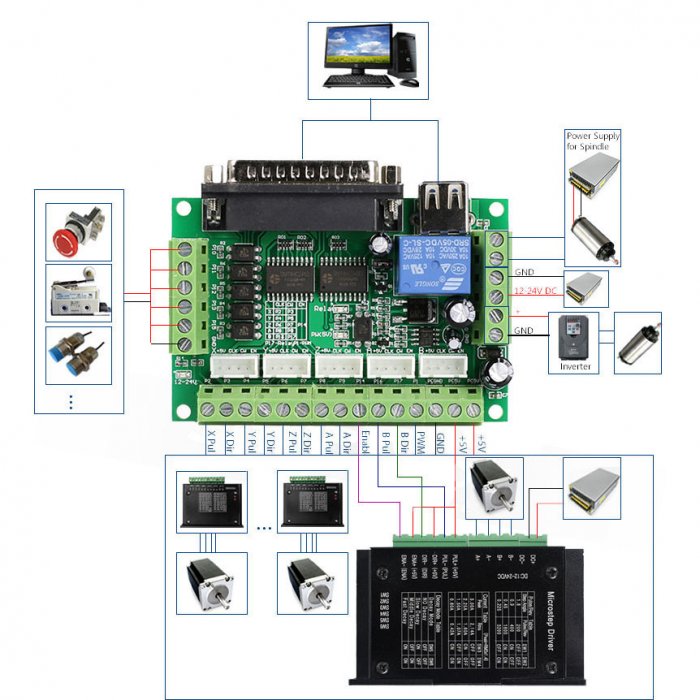
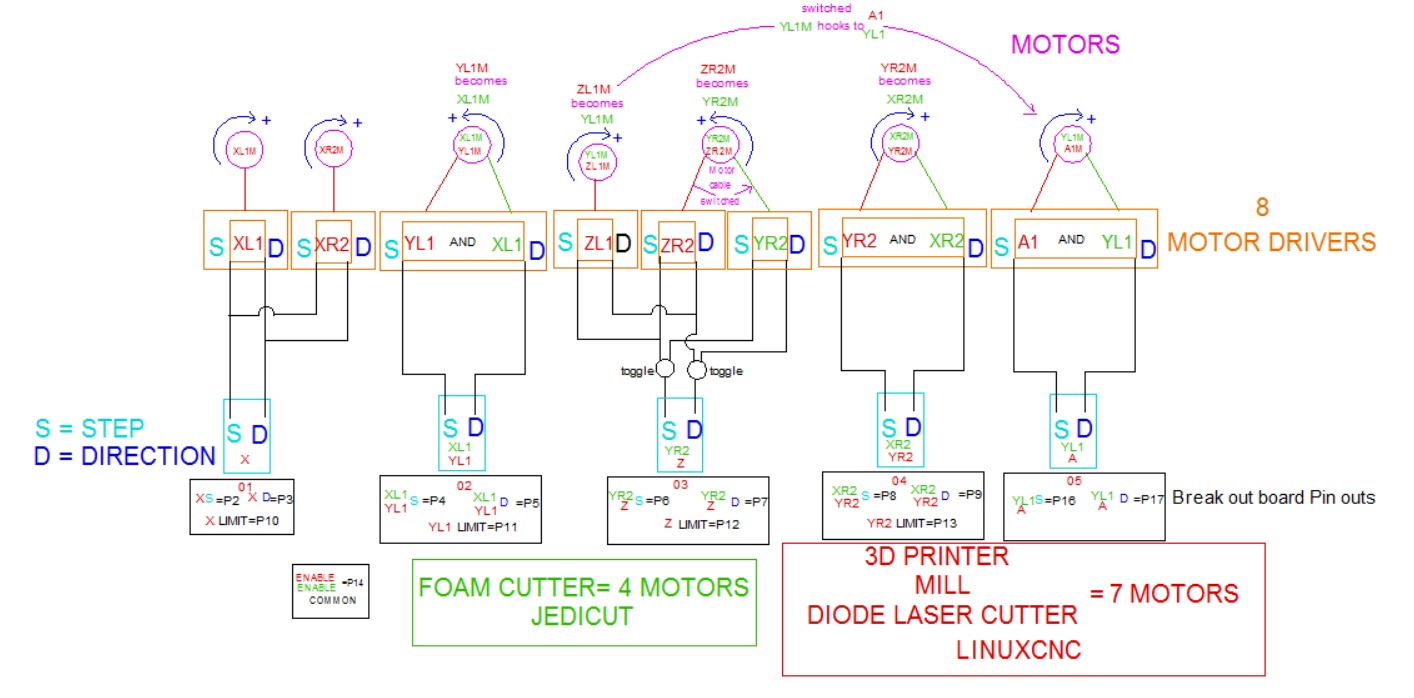
For others reading this any input would be appreciated. I have also attached a wiring schematic I drew up for my CNC and pic of B.O.B.
The following is the way I set it up in sim as Gantrykins seems to work as Mill have not tried 3D print gcode yet.
INI file
axis 5
0 X= 2 nema 17's
1 Y1= nema 23
2 Z= 2 nema 17's
3 Y2= nema 23
4 A= nema 17 (extruder)
hal file
coordinates=XYYZA
Also added extra axis nets as needed
If one of the Moderators or old time CNCers here would take a look at schematic and let me know if what I have planned will work. I know the Jedicut part will work but would like someone to give it a once over for the Linuxcnc part before I start doing the wiring. I would be grateful if someone with knowledge of linuxcnc did this for me because this is not a kit build but my own design.
Tim
Ps I have also attached schematic as PDF if one would like to to view with different program.
My personal conclusion for results of histogram for 32 Rtai (post 66614) & 64 Rt (post 66562), bit systems on my computer. On both 32 & 64 bit systems the worst latency spikes occurred during reset and start of test. If you eliminate these spikes it leaves 20 or so spikes above 1E4, (10000us) in bin ct areas + and - during the rest of the eleven hours tested. Off chart bin ct + and - had no recorded hits over 1E4. Both 32 & 64 bit max latency were in the 60000us range. 32 bit system had less CPU load CPU1 40%, CPU2 0% than 64 bit system CPU1 90%+ CPU2 0% which resulted in lower temps for 32 bit system. 32 bit system latency was a little erratic but in low region most of the time, not as constant as 64 bit system. 64 bit system dropped pulse audio where 32 bit system did not.
The hits in latency over 30000us during 11 hour period are something to be concerned about for 32 or 64 bit system. I will just have to setup step pulse and direction control to be a little slower, I am in no hurry anyway. The materials that I will be cutting are low cost, balsa wood, hobby grade aircraft plywood, 4mm thick foam board from Dollar Tree and building grade foam insulation board. As far as 3D printer plastic that is cheap and can be recycled for other uses. If machine makes a incorrect radius cut due to latency spike I will not be out of much money. Plus here is a quote from LinuxCNC V2.7.3-5-g99ffe2d, 2015-11-30 documentation "Worst case latencies might only happen a few times a minute, and the odds of bad latency happening just as the motor is changing direction are low. So you can get very rare errors that ruin a part every once in a while and are impossible to troubleshoot."
Now for me it is important to be able to use windozes in a VM. I could go 32 bit and do a daul boot system but I have done that in the past and it is a pain to setup. Windozes requires drivers to be loaded, windozes in VM dose not only a ISO of OS instalation disk. Plus you do not have access to files on linux partition while using windozes system with a dual boot system. Then there is the grub loader which with a dual boot system at some time is bound to get buggered up and will prohibit access to windoze or linux system until fixed. Been there done that. VM also has the ability to take snap shots of VM hard drive so reverting back to a previous state of VM OS is a snap.
Could run VM on 32 bit system but VM software only allows you to dedicate half available ram of OS to VM not the 4GB allowance that pae kernel could use for a single process if available in swap area. So the results are a sluggish VM with only 2GB of ram available.
64 bit system will be the way for me to go on this computer and there will be few ram restrictions with my 8GB system. As far as audio dropping I do not need tunes the sound of this machine running will be music to my ears.
The reason for the use of windozes on my CNC is because my machine will be a multi-purpose gantry machine. I will be able to do vacuum forming on base of machine and Linuxcnc will be setup as Gantrykins, (gantry-hs) and used for 3D printing, Mill work, drag knife work and Diode Laser cutting. Gantry beam will be removable so CNC can be used as 4 axis foam cutting CNC. Foam cutting can be done with Linuxcnc but I want to use a windozes program called Jedicut, (freeware}. Jedicut dose not use gcode dose not require limit switches and will work over USB using a homemade USB to parallel port dongle that off loads timeing to arduino in dongle. VM has USB support so dongle will work. The advantage of Jedicut is there is no need for CAM software you go from drawing straight to CNC. The disadvantage of 64 bit system will be the CPU draw while running linuxcnc and heat created. I figure my CNC will not be a production machine, use will be low volume as a hobby project system with short runs. I plan to use CNC to help make RC airplane parts.
My advice to you Jason because you are using a laptop if you get the same type of results from test is to go with 32 bit Rtai system. Your Robot arm is for hobby use not much concern for the few latency spikes, accuracy is not that important and might make it more of a challenge for your kids and act like a real arcade claw machine, lol. The problem would be the heat and from my test if you get the same results 32 bit Rtai would be better choice. The 32 bit Rt kernel might also work latency would be a little higher than the Rtai.
For others reading this any input would be appreciated. I have also attached a wiring schematic I drew up for my CNC and pic of B.O.B.
The following is the way I set it up in sim as Gantrykins seems to work as Mill have not tried 3D print gcode yet.
INI file
axis 5
0 X= 2 nema 17's
1 Y1= nema 23
2 Z= 2 nema 17's
3 Y2= nema 23
4 A= nema 17 (extruder)
hal file
coordinates=XYYZA
Also added extra axis nets as needed
If one of the Moderators or old time CNCers here would take a look at schematic and let me know if what I have planned will work. I know the Jedicut part will work but would like someone to give it a once over for the Linuxcnc part before I start doing the wiring. I would be grateful if someone with knowledge of linuxcnc did this for me because this is not a kit build but my own design.
Tim
Ps I have also attached schematic as PDF if one would like to to view with different program.
Last edit: 10 years 10 months ago by tjmarch.
Please Log in or Create an account to join the conversation.
Time to create page: 0.295 seconds