

LinuxCNC on Linux Mint 20 quick and nearly easy install

More
6 years 1 month ago #182747 by tommylight

dvn4life1972 wrote: Hey Tommy, I tried this on my Gigabyte BRIX S with the 4.9 kernel. uname -a shows the kernel is up. I can't get Linuxcnc to run outside of simulation though, it worked on 19.3. Any ideas?

Plenty of ideas, but start LinuxCNC from the terminal and check if it says:
Using Posix RealTime
If it does say that everything is fine regarding the kernel and LinuxCNC, so the issue would be with the config.
The following user(s) said Thank You: dvn4life1972

Please Log in or Create an account to join the conversation.

More
6 years 1 month ago #182751 by dvn4life1972

tommylight wrote:

dvn4life1972 wrote: Hey Tommy, I tried this on my Gigabyte BRIX S with the 4.9 kernel. uname -a shows the kernel is up. I can't get Linuxcnc to run outside of simulation though, it worked on 19.3. Any ideas?

Plenty of ideas, but start LinuxCNC from the terminal and check if it says:
Using Posix RealTime
If it does say that everything is fine regarding the kernel and LinuxCNC, so the issue would be with the config.


I already started down the path Beagle recommended with 19.3. Maybe it'll work right this go-round?

Please Log in or Create an account to join the conversation.

More
6 years 1 month ago #182755 by Clive S

I already started down the path Beagle recommended with 19.3. Maybe it'll work right this go-round?


This is for me the most simple and easiest path and works right out of the box. Thanks Rob :)
The following user(s) said Thank You: dvn4life1972

Please Log in or Create an account to join the conversation.
More
6 years 1 month ago #182889 by dvn4life1972
Well, 19.3 had errors about 75% of the way thru while installing. I think it's becuase the Gigabyte BRIX S that I have is UEFI only, ugh. I really don't care which version of Linux this PC is on so long as it runs my machine. Gonna try back with the Mint 20.0 again and see if I can get it right this time.

Please Log in or Create an account to join the conversation.

  • BeagleBrainz
  • New Member
  • New Member
More
6 years 1 month ago - 6 years 1 month ago #182894 by BeagleBrainz
Look it's really important that you post the error, otherwise I can't fix the issue. As much we try to provide help sometimes we need help from you to fix things.

The 19.2 & 19.3 ISOs both are able to boot and install with an UEFI system.

For 19.2
When booting with UEFI the grub boot menu should be loaded.
When booting with a legacy system a isolinux boot menu should be shown.

The kernel command line for the grub menu will have the extra command efi=runtime

The kernel command line for the isolinux menu does not.

Could you try again and once in a live session run
Code:
mount | grep efi
and run
Code:
sudo cat /proc/cmdline
and post the output

And I have said in this post don't select OEM install.
Last edit: 6 years 1 month ago by BeagleBrainz.

Please Log in or Create an account to join the conversation.

More
6 years 1 month ago - 6 years 1 month ago #182900 by dvn4life1972
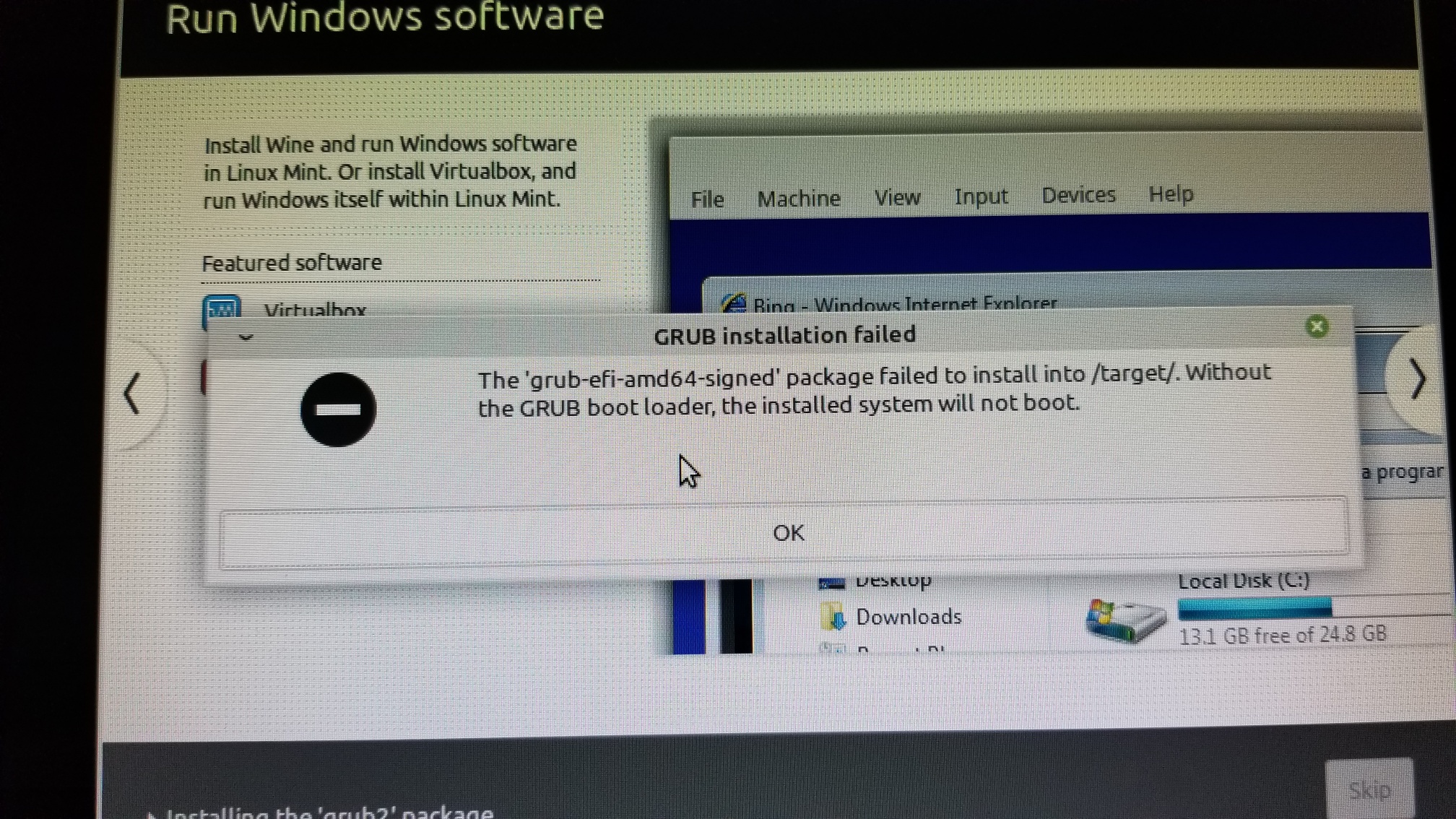
I didn't do an OEM install either time (now having tried fresh again and getting same result). I took a pic with my phone since of the error. My wifi doesn't work at all on it, and that screws up the installation (is what I believe the issue is)

Last edit: 6 years 1 month ago by dvn4life1972.

Please Log in or Create an account to join the conversation.

Time to create page: 0.389 seconds
Powered by Kunena Forum