
- Posts: 32
- Thank you received: 2
Beckhoff ethercat 64 with bit linuxcnc, How to install.
- V-max
- Offline
- Junior Member
-

Less
More
5 years 8 months ago #199468
by V-max
Replied by V-max on topic Beckhoff ethercat 64 with bit linuxcnc, How to install.
Hi all,
I'm new here, in Linux CNC and some brick-brain, but I think that I can memorize this thread completely.
I have got an AX5203 (hardware 1) servo Beckhoff and I would like to integrate it in linuxcnc.
I would like to congratulate the major contributors to this thread. Grotius, Nicolas, Chimeno......
I've been having a lot of trouble installing due to several issues, the last one that I cant solve is the headers for 4.19.0-9 or 4.19.0-11 kernels, I'm am not able to find them in any repository, in Debian webpage they are no longer available. Finally, I've installed the updated one, I mean 4.19.0.14-rt-amd64, linux-image and kernel.
First question: Did I do well?, Do you know where to find the headers for 4.19.0.09?
Following with the installatiön I've been able to have the EtherCAT Master installed, running and I can detect the slave (AX5203) , but I'm blocking with the attached linuxcnc file report.
"Debug file information:
Note: Using POSIX realtime
note: MAXV max: 5.000 units/sec 300.000 units/min
note: LJOG max: 5.000 units/sec 300.000 units/min
note: LJOG default: 0.250 units/sec 15.000 units/min
note: jog_order='XYZ'
note: jog_invert=set([])
lcec_conf: ERROR: invalid arguments
postgui.hal:2: waitpid failed /home/avc/linuxcnc-ethercat/src/lcec_conf lcec_conf
postgui.hal:2: /home/avc/linuxcnc-ethercat/src/lcec_conf exited without becoming ready
2768
2814
Stopping realtime threads
Unloading hal components
Note: Using POSIX realtime
"
Any clue, documentation, recommendation, etc..... will be welcomed.
@Chimeno , Is the ax5203 config file correct,? Any clue or documentation recommended?
I'm new here, in Linux CNC and some brick-brain, but I think that I can memorize this thread completely.
I have got an AX5203 (hardware 1) servo Beckhoff and I would like to integrate it in linuxcnc.
I would like to congratulate the major contributors to this thread. Grotius, Nicolas, Chimeno......
I've been having a lot of trouble installing due to several issues, the last one that I cant solve is the headers for 4.19.0-9 or 4.19.0-11 kernels, I'm am not able to find them in any repository, in Debian webpage they are no longer available. Finally, I've installed the updated one, I mean 4.19.0.14-rt-amd64, linux-image and kernel.
First question: Did I do well?, Do you know where to find the headers for 4.19.0.09?
Following with the installatiön I've been able to have the EtherCAT Master installed, running and I can detect the slave (AX5203) , but I'm blocking with the attached linuxcnc file report.
"Debug file information:
Note: Using POSIX realtime
note: MAXV max: 5.000 units/sec 300.000 units/min
note: LJOG max: 5.000 units/sec 300.000 units/min
note: LJOG default: 0.250 units/sec 15.000 units/min
note: jog_order='XYZ'
note: jog_invert=set([])
lcec_conf: ERROR: invalid arguments
postgui.hal:2: waitpid failed /home/avc/linuxcnc-ethercat/src/lcec_conf lcec_conf
postgui.hal:2: /home/avc/linuxcnc-ethercat/src/lcec_conf exited without becoming ready
2768
2814
Stopping realtime threads
Unloading hal components
Note: Using POSIX realtime
"
Any clue, documentation, recommendation, etc..... will be welcomed.
@Chimeno , Is the ax5203 config file correct,? Any clue or documentation recommended?
The following user(s) said Thank You: chimeno, Nico2017
Please Log in or Create an account to join the conversation.
- db1981
- Offline
- Platinum Member
-

Less
More
- Posts: 790
- Thank you received: 276
5 years 8 months ago - 5 years 8 months ago #199469
by db1981
Replied by db1981 on topic Beckhoff ethercat 64 with bit linuxcnc, How to install.
Hi,
your command for calling lcec_conf is wrong it should be like this:
loadusr -W /home/avc/linuxcnc-ethercat/src/lcec_conf /home/avc/linuxcnc/configs/sim.axis/ethercat-conf.xml
but i'm not sure at the moment if you can do this in an postgui.hal
Then in your ethercat_conf.xml your slave_idx should be "0" , because its the first device after the master .
From where did you get the initcmd's ? Format is correct. But the drive would stay in error. No Motors and encoders configured. Also for the DC-Bus there is linking enabled. (if it's only one drive, this couldn't be....) Saftycard enabled ....
your command for calling lcec_conf is wrong it should be like this:
loadusr -W /home/avc/linuxcnc-ethercat/src/lcec_conf /home/avc/linuxcnc/configs/sim.axis/ethercat-conf.xml
but i'm not sure at the moment if you can do this in an postgui.hal
Then in your ethercat_conf.xml your slave_idx should be "0" , because its the first device after the master .
From where did you get the initcmd's ? Format is correct. But the drive would stay in error. No Motors and encoders configured. Also for the DC-Bus there is linking enabled. (if it's only one drive, this couldn't be....) Saftycard enabled ....
Last edit: 5 years 8 months ago by db1981.
Please Log in or Create an account to join the conversation.
- chimeno
- Offline
- Elite Member
-

Less
More
- Posts: 295
- Thank you received: 125
5 years 8 months ago - 5 years 8 months ago #199477
by chimeno
Replied by chimeno on topic Beckhoff ethercat 64 with bit linuxcnc, How to install.
Hello @V-max,
Thank you very much for naming my name, but I have no merit, I just try to help where I can
you have to replace this (uname -r) with the version you have.
Change this setting
Change
I must also change this,
change
the
file would not be the best, it is best if you have it in a file
From here, you still need all the configuration in the motor and encoder .xml file and other options, you will have to have TWINCAT3 to make the configuration and then export it,
Here are a couple of interesting manuals.
download.beckhoff.com/download/document/...em_manual_hw2_en.pdf
download.beckhoff.com/download/document/...diag_messages_en.pdf
download.beckhoff.com/download/document/...-descriptions_en.pdf
the usury @db1981 can help you much more than me
Greeting
Chimeno
Thank you very much for naming my name, but I have no merit, I just try to help where I can
I don't know if you mean these headers, using the commandDo you know where to find the headers for 4.19.0.09?
Code:
sudo apt install linux-headers-$(uname -r)
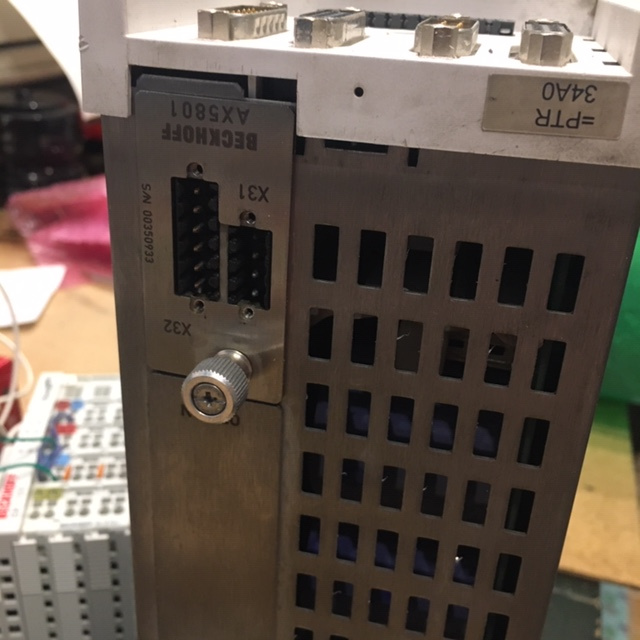
your .xml file has to bring the device to OP, if you don't have an AX5801 card installed as in the photo@Chimeno , Is the ax5203 config file correct,? Any clue or documentation recommended?
Change this setting
Code:
<InitCmd>
<Transition>PS</Transition>
<Comment>
<![CDATA[ Configured safety option ]]>
</Comment>
<Timeout>0</Timeout>
<OpCode>3</OpCode>
<DriveNo>0</DriveNo>
<IDN>34768</IDN>
<Elements>64</Elements>
<Attribute>0</Attribute>
<Data>0100</Data>
</InitCmd>
Change
Code:
<InitCmd>
<Transition>PS</Transition>
<Comment>
<![CDATA[ Configured safety option ]]>
</Comment>
<Timeout>0</Timeout>
<OpCode>3</OpCode>
<DriveNo>0</DriveNo>
<IDN>34768</IDN>
<Elements>64</Elements>
<Attribute>0</Attribute>
<Data>0000</Data>
</InitCmd>
I must also change this,
Code:
<InitCmd>
<Transition>PS</Transition>
<Comment>
<![CDATA[ DC link connection mode ]]>
</Comment>
<Timeout>0</Timeout>
<OpCode>3</OpCode>
<DriveNo>0</DriveNo>
<IDN>32982</IDN>
<Elements>64</Elements>
<Attribute>0</Attribute>
<Data>0300</Data>
</InitCmd>
Code:
<InitCmd>
<Transition>PS</Transition>
<Comment>
<![CDATA[ DC link connection mode ]]>
</Comment>
<Timeout>0</Timeout>
<OpCode>3</OpCode>
<DriveNo>0</DriveNo>
<IDN>32982</IDN>
<Elements>64</Elements>
<Attribute>0</Attribute>
<Data>0000</Data>
</InitCmd>
the
Code:
post_gui.hal
Code:
.hal
From here, you still need all the configuration in the motor and encoder .xml file and other options, you will have to have TWINCAT3 to make the configuration and then export it,
Here are a couple of interesting manuals.
download.beckhoff.com/download/document/...em_manual_hw2_en.pdf
download.beckhoff.com/download/document/...diag_messages_en.pdf
download.beckhoff.com/download/document/...-descriptions_en.pdf
the usury @db1981 can help you much more than me
Greeting
Chimeno
Last edit: 5 years 8 months ago by chimeno. Reason: add manuals
Please Log in or Create an account to join the conversation.
- V-max
- Offline
- Junior Member
-
Less
More
- Posts: 32
- Thank you received: 2
5 years 8 months ago #200184
by V-max
Replied by V-max on topic Beckhoff ethercat 64 with bit linuxcnc, How to install.
The problem which headers: typing "sudo apt install linux-headers-$(uname -r)" you are looking for a file in an external (debian) server, this headers version is obsolete for Debian and deleted it. The way recommended to solve the problem is to update the kernel but I'm not sure that the new kernel is completely supported by linuxcnc. Here(linuxcnc) the kernel seems to be important due to the rt environment.
I have a safety AX5801 card installed, enabled, and electrically bridged because I had troubles unabling it due to the driver, I think, needs a dummy card if you unmount it.
The DC-link was shit by my side.I have a safety Ax5801 card installed, enabled, and electrically bridged because I had troubles unabling it due to the driver, I think, needs a dummy card if you unmount it. Safety issues,,,
The DC-link was shit from me.
Thanks!
I have a safety AX5801 card installed, enabled, and electrically bridged because I had troubles unabling it due to the driver, I think, needs a dummy card if you unmount it.
The DC-link was shit by my side.I have a safety Ax5801 card installed, enabled, and electrically bridged because I had troubles unabling it due to the driver, I think, needs a dummy card if you unmount it. Safety issues,,,
The DC-link was shit from me.
Thanks!
Please Log in or Create an account to join the conversation.
- V-max
- Offline
- Junior Member
-
Less
More
- Posts: 32
- Thank you received: 2
5 years 8 months ago #200185
by V-max
Replied by V-max on topic Beckhoff ethercat 64 with bit linuxcnc, How to install.
..........and one week later.
Thanks a lot for giving me away your time answering rookie questions. Your answers allowed me to understand concepts and bad procedures.
Im going to increase the level of my questions.
@db1982
I don't understand what lcec_conf does then ¿what has to be inside the ethercat-conf.xml?, The whole list of idns exported from TC3? The startup list? Is it needed to do any transformation of the XML files? A new one XML within different things?
The attached files come from a TC3 configuration that works(in TC3), but I suppose that is needed to adapt some parameters related to the communication with linuxcnc-ethercat/src/lcec-ax5200 and the EtherCAT environment. Right? Which are?
Speaking about lcec-ax5000, what it do? Has the whole driver mapped, a part or nothing? Is needed any special configuration f.e control mode: velocity or position control.
And speaking about control modes the LAST QUESTION ...for today.....jejeje , I'm trying to implement PID control only because I have seen it surfing. Do you think that it is the right mode? Are there more ways? What do you recommend using EtherCAT, an AX5203 drive, and trying to use de lcec_ax5200 to simplify?[/size]
Thanks a lot
Thanks a lot for giving me away your time answering rookie questions. Your answers allowed me to understand concepts and bad procedures.
Im going to increase the level of my questions.
@db1982
Code:
loadusr -W /home/avc/linuxcnc-ethercat/src/lcec_conf /home/avc/linuxcnc/configs/sim.axis/ethercat-conf.xml
The attached files come from a TC3 configuration that works(in TC3), but I suppose that is needed to adapt some parameters related to the communication with linuxcnc-ethercat/src/lcec-ax5200 and the EtherCAT environment. Right? Which are?
Speaking about lcec-ax5000, what it do? Has the whole driver mapped, a part or nothing? Is needed any special configuration f.e control mode: velocity or position control.
And speaking about control modes the LAST QUESTION ...for today.....jejeje , I'm trying to implement PID control only because I have seen it surfing. Do you think that it is the right mode? Are there more ways? What do you recommend using EtherCAT, an AX5203 drive, and trying to use de lcec_ax5200 to simplify?[/size]
Thanks a lot
Please Log in or Create an account to join the conversation.
- V-max
- Offline
- Junior Member
-
Less
More
- Posts: 32
- Thank you received: 2
5 years 8 months ago #200186
by V-max
Replied by V-max on topic Beckhoff ethercat 64 with bit linuxcnc, How to install.
Sorry I didn't do the help request......
I have problems passing to op state in the drive, I have attached above the dmesg file printed, there are several SoE problems, I suppose related above questions.
I have done "#define EC_AL_STATE_CHANGE_TIMEOUT 5 to
+#define EC_AL_STATE_CHANGE_TIMEOUT 25
and recompiled the EtherCAT driver" as told in another thread.
The XMLs used were the startup list directly exported from TC3 and the whole list. I have more or less the same problem with both XML.
Thanks.
I have problems passing to op state in the drive, I have attached above the dmesg file printed, there are several SoE problems, I suppose related above questions.
I have done "#define EC_AL_STATE_CHANGE_TIMEOUT 5 to
+#define EC_AL_STATE_CHANGE_TIMEOUT 25
and recompiled the EtherCAT driver" as told in another thread.
The XMLs used were the startup list directly exported from TC3 and the whole list. I have more or less the same problem with both XML.
Thanks.
Please Log in or Create an account to join the conversation.
Time to create page: 0.158 seconds