
- Posts: 790
- Thank you received: 276
Beckhoff ethercat 64 with bit linuxcnc, How to install.
- db1981
- Offline
- Platinum Member
-

Less
More
5 years 2 months ago #217003
by db1981
Replied by db1981 on topic Beckhoff ethercat 64 with bit linuxcnc, How to install.
Hi,
you are able to create an config.xml for el6022, but this will give you only hardware control of the serial port (in/out buffer, status/control bits).
So you would have to implent the modbus communication layer by your own or you need an virtual com port driver which uses the halpins from the el6022 and could be used as "normal" com port for the linuxcnc modbus component. but this doesn't exists yet.
you are able to create an config.xml for el6022, but this will give you only hardware control of the serial port (in/out buffer, status/control bits).
So you would have to implent the modbus communication layer by your own or you need an virtual com port driver which uses the halpins from the el6022 and could be used as "normal" com port for the linuxcnc modbus component. but this doesn't exists yet.
Please Log in or Create an account to join the conversation.
- endian
- Offline
- Platinum Member
-
Less
More
- Posts: 339
- Thank you received: 134
5 years 2 months ago - 5 years 2 months ago #217249
by endian
Replied by endian on topic Beckhoff ethercat 64 with bit linuxcnc, How to install.
have anybody got any actual guide to install ethercat on lcnc nowdays please?
I really fighting with that installation, I managed to use several links and guides but without any success. every where something was wrong just one link from Grotius
works just as OS installation and after run script to afterinstall the ethercat but it was just with "generic" drivers supported...
I really fighting with that installation, I managed to use several links and guides but without any success. every where something was wrong just one link from Grotius
Code:
https://github.com/grotius-cnc/Skynet_Robot_Control_Rtos_Ethercat
Last edit: 5 years 2 months ago by endian.
Please Log in or Create an account to join the conversation.
- Grotius
- Offline
- Platinum Member
-
Less
More
- Posts: 2419
- Thank you received: 2349
5 years 2 months ago - 5 years 2 months ago #217329
by Grotius
Replied by Grotius on topic Beckhoff ethercat 64 with bit linuxcnc, How to install.
Hi Foxington.
I use this version after it was released:
sourceforge.net/projects/linux-11-pro/
It has a "skynet software installer" in the system menu. This will install additional software like lcnc, ethercat etc.
It uses this mirror:
github.com/grotius-cnc/Linux-Pro/releases/tag/1.0.0
If you look inside the deb package for pre-install or post-install files (scripts), you can see how it's installed.
github.com/grotius-cnc/Linux-Pro/release...inuxcnc-ethercat.deb
** works just as OS installation and after run script to afterinstall the ethercat but it was just with "generic" drivers supported...
If you are using iso's from grotius, check the crontab -e to change the generic driver in something else.
# In terminal : $ crontab -e
@reboot echo MASTER0_DEVICE="$(cat /sys/class/net/enp0s25/address)" DEVICE_MODULES=generic > /etc/sysconfig/ethercat
# Slow down the process so above line is done before the restart.
@reboot /opt/ethercat/script/init.d/ethercat start
@reboot /opt/ethercat/script/init.d/ethercat stop
@reboot /opt/ethercat/script/init.d/ethercat restart
I use this version after it was released:
sourceforge.net/projects/linux-11-pro/
It has a "skynet software installer" in the system menu. This will install additional software like lcnc, ethercat etc.
It uses this mirror:
github.com/grotius-cnc/Linux-Pro/releases/tag/1.0.0
If you look inside the deb package for pre-install or post-install files (scripts), you can see how it's installed.
github.com/grotius-cnc/Linux-Pro/release...inuxcnc-ethercat.deb
** works just as OS installation and after run script to afterinstall the ethercat but it was just with "generic" drivers supported...
If you are using iso's from grotius, check the crontab -e to change the generic driver in something else.
# In terminal : $ crontab -e
@reboot echo MASTER0_DEVICE="$(cat /sys/class/net/enp0s25/address)" DEVICE_MODULES=generic > /etc/sysconfig/ethercat
# Slow down the process so above line is done before the restart.
@reboot /opt/ethercat/script/init.d/ethercat start
@reboot /opt/ethercat/script/init.d/ethercat stop
@reboot /opt/ethercat/script/init.d/ethercat restart
Last edit: 5 years 2 months ago by Grotius.
The following user(s) said Thank You: endian
Please Log in or Create an account to join the conversation.
- endian
- Offline
- Platinum Member
-
Less
More
- Posts: 339
- Thank you received: 134
5 years 2 months ago - 5 years 2 months ago #217417
by endian
Replied by endian on topic Beckhoff ethercat 64 with bit linuxcnc, How to install.
thanks for your time, your work is briliant with lcec and skynet too... I want to know small piece from you knowledges mr. ...
1. I will install linux from your hybrid iso...
2. after I hit install ethercat installer from desktop
3. then in terminal will run
there at the end of file I will add these few lines of code sure ? I have 8139too chipset such as " enp16s0 "
I am not soo good in linux yet just learning it in free time, I like to ask twice before I something mess out ...
1. I will install linux from your hybrid iso...
2. after I hit install ethercat installer from desktop
3. then in terminal will run
Code:
crontab -e
there at the end of file I will add these few lines of code sure ? I have 8139too chipset such as " enp16s0 "
Code:
@reboot echo MASTER0_DEVICE="$(cat /sys/class/net/enp16s0/address)" DEVICE_MODULES=8139too > /etc/sysconfig/ethercat
# Slow down the process so above line is done before the restart.
@reboot /opt/ethercat/script/init.d/ethercat start
@reboot /opt/ethercat/script/init.d/ethercat stop
@reboot /opt/ethercat/script/init.d/ethercat restart
I am not soo good in linux yet just learning it in free time, I like to ask twice before I something mess out ...
Last edit: 5 years 2 months ago by endian. Reason: formating text
The following user(s) said Thank You: Grotius
Please Log in or Create an account to join the conversation.
- Grotius
- Offline
- Platinum Member
-
Less
More
- Posts: 2419
- Thank you received: 2349
5 years 2 months ago #217425
by Grotius
Replied by Grotius on topic Beckhoff ethercat 64 with bit linuxcnc, How to install.
Hi Foxington,
1. I will install linux from your hybrid iso... => sourceforge.net/projects/linux-11-pro/fi...nux-Pro.iso/download
2. after I hit install ethercat installer from desktop => In the menu click on : skynet software installer
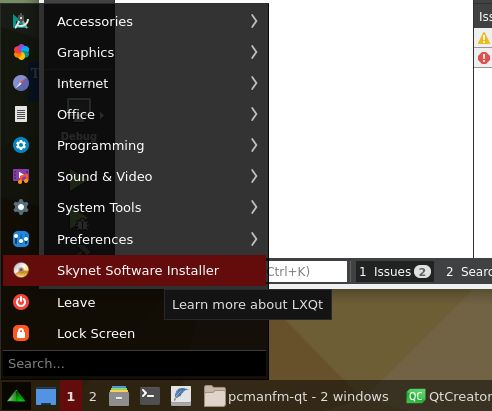
This will take a while.
3. then in terminal will run => # crontab -e ( # is as superuser "sudo" , $ is user)
Crontab is just a tiny program that is active during pc startup. I used it to start up the ethercat bus. And it set's the mac adress
at boot time. Nothing can really go wrong here. If there is a fault it will pass without you notice it.
Lets tear this down :@reboot echo MASTER0_DEVICE="$(cat /sys/class/net/enp16s0/address)" DEVICE_MODULES=8139too > /etc/sysconfig/ethercat
A specific crontab command:
@reboot
This will give you the mac adress in return, you can also replace it with another command as long it returns the mac adres :
echo MASTER0_DEVICE="$(cat /sys/class/net/enp16s0/address)"
For example, you can write a tiny script:
echo MASTER0_DEVICE="$(givemymac.sh)"
Your driver, generic, or something else like :
DEVICE_MODULES=8139too
This ">" will overwrite everything at the destiny. ">>" is for append.
> /etc/sysconfig/ethercat
The reason i mentioned you the crontab -e. Is that if you want to change the generic driver in something else, you have to
know something is done at boot time.
I am not soo good in linux yet just learning it in free time, I like to ask twice before I something mess out ...
Linux is the best. Stop using windows !
1. I will install linux from your hybrid iso... => sourceforge.net/projects/linux-11-pro/fi...nux-Pro.iso/download
2. after I hit install ethercat installer from desktop => In the menu click on : skynet software installer
This will take a while.
3. then in terminal will run => # crontab -e ( # is as superuser "sudo" , $ is user)
Crontab is just a tiny program that is active during pc startup. I used it to start up the ethercat bus. And it set's the mac adress
at boot time. Nothing can really go wrong here. If there is a fault it will pass without you notice it.
Lets tear this down :@reboot echo MASTER0_DEVICE="$(cat /sys/class/net/enp16s0/address)" DEVICE_MODULES=8139too > /etc/sysconfig/ethercat
A specific crontab command:
@reboot
This will give you the mac adress in return, you can also replace it with another command as long it returns the mac adres :
echo MASTER0_DEVICE="$(cat /sys/class/net/enp16s0/address)"
For example, you can write a tiny script:
echo MASTER0_DEVICE="$(givemymac.sh)"
Your driver, generic, or something else like :
DEVICE_MODULES=8139too
This ">" will overwrite everything at the destiny. ">>" is for append.
> /etc/sysconfig/ethercat
The reason i mentioned you the crontab -e. Is that if you want to change the generic driver in something else, you have to
know something is done at boot time.
I am not soo good in linux yet just learning it in free time, I like to ask twice before I something mess out ...
Linux is the best. Stop using windows !
The following user(s) said Thank You: pommen, endian
Please Log in or Create an account to join the conversation.
- endian
- Offline
- Platinum Member
-
Less
More
- Posts: 339
- Thank you received: 134
5 years 2 months ago - 5 years 2 months ago #217480
by endian
Replied by endian on topic Beckhoff ethercat 64 with bit linuxcnc, How to install.
Yes thank you, I understand whats going on here.
I did it but issue is still same as was
but this nice script during booting linux will not solve problem of missing ethercat drivers like as " ec_8139too or other different ethercat network card drivers" which should not be used due their disabled during instalation of ethercat on linux...
but we are still solving " the consequence " of installation. But not " source " of problem I think soo. how to solve it for next ones who will want to install it theirself like as easiest as possible... during the grotius installation are disabling every drivers just "generic" is used like "universal tool" which will work on everything but not with best performance if I am not wrong?
But I am still thinking about how to optimalize it:
1. check accessible network card and read actual value of used drivers.
2. this value should be compared of value of actual supported drivers for ethercat on linuxcnc
3. if there will be some driver which match with supported drivers it will be enabled and installed automatic
else it will be installed " generic " driver, which will work with every network card...
should is it possible do you think?
I did it but issue is still same as was
Code:
Updating EtherCAT master confiuration
modinfo: ERROR: Module ec_8139too not found.
update-initramfs: Generating /boot/initrd.img-4.19.0-11-rt-amd64
but this nice script during booting linux will not solve problem of missing ethercat drivers like as " ec_8139too or other different ethercat network card drivers" which should not be used due their disabled during instalation of ethercat on linux...
but we are still solving " the consequence " of installation. But not " source " of problem I think soo. how to solve it for next ones who will want to install it theirself like as easiest as possible... during the grotius installation are disabling every drivers just "generic" is used like "universal tool" which will work on everything but not with best performance if I am not wrong?
But I am still thinking about how to optimalize it:
1. check accessible network card and read actual value of used drivers.
2. this value should be compared of value of actual supported drivers for ethercat on linuxcnc
3. if there will be some driver which match with supported drivers it will be enabled and installed automatic
else it will be installed " generic " driver, which will work with every network card...
should is it possible do you think?
Last edit: 5 years 2 months ago by endian. Reason: text formating
Please Log in or Create an account to join the conversation.
Time to create page: 0.165 seconds