
Advanced Search

Search Results (Searched for: )

  • vre
  • vre
10 Mar 2025 01:56
halui toggle button was created by vre

halui toggle button

Category: Basic Configuration

I have an external momentary button and i want to toggle between halui.flood.on and halui.flood.off
How can do this config ?

Also i have an output pin that activates lubrication pump and an output pin that activates a solenoid hydraulic valve that releases spindle tool clamp
where in hal must connect it in iocontrol v2 ?
  • vre
  • vre
10 Mar 2025 01:49
Replied by vre on topic mesa 7i33 7i37

mesa 7i33 7i37

Category: Driver Boards

7i80hdt that is not xilinx fpga has the pullup only limitation
or can configured both pullup and pulldown with weak internal resistors ?
  • Nserega.90
  • Nserega.90
10 Mar 2025 01:47
Replied by Nserega.90 on topic Problems with vcp-template

Problems with vcp-template

Category: QtPyVCP

Thank you! Yes, everything worked out! Your instructions were easier. I'm trying to design)))
  • tommylight
  • tommylight's Avatar
10 Mar 2025 01:13
Replied by tommylight on topic Trouble getting a new configuration running.

Trouble getting a new configuration running.

Category: General LinuxCNC Questions

In the ini file, this:
[TRAJ]
COORDINATES = XYZ
Should be
[TRAJ]
COORDINATES = XXYZ
  • Lik2waterski
  • Lik2waterski
10 Mar 2025 00:56
Trouble getting a new configuration running. was created by Lik2waterski

Trouble getting a new configuration running.

Category: General LinuxCNC Questions

My old system that my machine works on is axis 2.8.0 running on linux mint 19.3 xfce with linux 4.19.106-rt46-lcnc.
My new system LMDE 6 Faye,
LINUXCNC - 2.9.0~pre1+git20230208.f1270d6ed7.
I am trying to move a current working configuration to the new computer. My main goal is to add a carousel tool changer. I have deleted all "A axis" stuff just to get the machine working before adding the new configs. My machine has tandem Xaxis for the gantry then Y,Z. but the errors I keep getting are like this
check_config: [JOINT_2]MIN_LIMIT > [AXIS_Z]MIN_LIMIT (-0.001 > -8.0) but Joint 2 isn't Axis Z. My system was set
up X1,joint 0, X2 Joint 1, Y Joint 2, Z joint 3. I will try to attach my ini, file and my Hal. If anyone could help me, I sure would appreciate it. Thank you. Travis
  • unknown
  • unknown
10 Mar 2025 00:54

Custom "MESA 7c81 Clone" PCB featuring a Raspberry Pi Compute Module 5

Category: Driver Boards

Funny thing is, the Mesa 7c81 and a stacked RPi look like a more compact solution.

NVME would be nice, the RPi5 with a NVME drive is blazingly fast.


Did you stick with the Mesa fpga pin to 7c81 layout ? Or did you change it to make routing easier ?

If you change things around, especially the clock signal, the SPI_CLK for comms is a little tricky to work out to begin with.

Sorry don't mean to add feature creep, man I wish I could design a simple board for the KSZ8851 Ethernet chip for my mesa clone thingy. So hats off to you Old Chap.
  • REAL ELETRIC
  • REAL ELETRIC
10 Mar 2025 00:47
Replied by REAL ELETRIC on topic MECHATROLINK-II interface

MECHATROLINK-II interface

Category: Driver Boards

I sent a message to your email to purchase one of these boards.
my email - This email address is being protected from spambots. You need JavaScript enabled to view it.
  • Lcvette
  • Lcvette's Avatar
10 Mar 2025 00:45

Can't succesfully release Tool (according to Probe Basic GUI)

Category: QtPyVCP
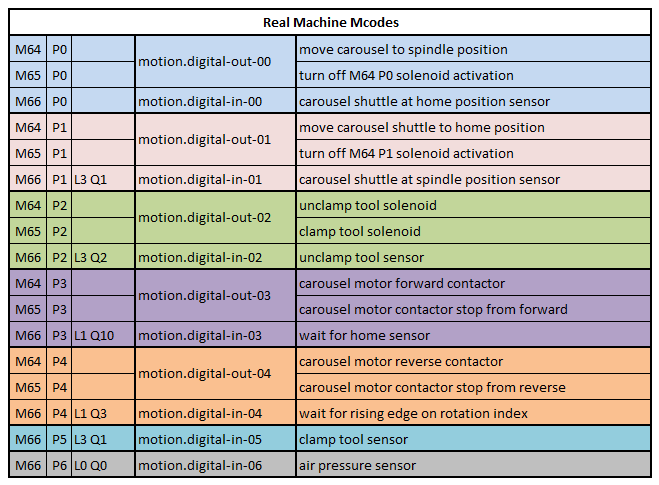
changing LT is incorrect. you should instead rewrite the portion of the macro to correctly wait for the available signal. ie use the correct M66 Pn input so the macro verifies the drawbar is in fact in the correct position.
  • unknown
  • unknown
10 Mar 2025 00:42

Raspi 5 touchscreen experience - recommendation

Category: Computers and Hardware

I have this one, used on my mill with a PC platform: Expensive
Planar Pct 2235 22" 1920X1080 Full HD Touch Screen VGA HDMI DISPLAY PORT USB

For the RPi5: Cheap
www.ebay.com.au/itm/225953008741

I would assume if the touchscreen interface is USB you should be fine. Tho the raspberry pi forums maybe a better resource, just look\ask for usb hid compatible touchscreen, stipulate USB HID is the only option.
  • Lcvette
  • Lcvette's Avatar
10 Mar 2025 00:41

Can't succesfully release Tool (according to Probe Basic GUI)

Category: QtPyVCP

I made one for my machine, but i don't recall what was changed.  you can use it as a template to create your own machines requirements and make sure the macros are correctly setup.  the docs explain the different M-codes for DIO.

linuxcnc.org/docs/stable/html/gcode/m-code.html#mcode:m62-m65

linuxcnc.org/docs/stable/html/gcode/m-code.html#mcode:m66

again these are changed to work with my machine and may not completely align with the sim macro requirements:

 
  • Philip Lydin
  • Philip Lydin
10 Mar 2025 00:32
Replied by Philip Lydin on topic CNC lathe retrofitt - Feeler FTC-280

CNC lathe retrofitt - Feeler FTC-280

Category: General LinuxCNC Questions

After a couple of hours fiddiling with my vfd to get it working using modbus my pi4 died on me... not really sure what happened it just suddenly went black so i purschased a mini pc witth a celeron j4125 with dual ethernet ports.
  • red97corvette
  • red97corvette
10 Mar 2025 00:20
Replied by red97corvette on topic Remora - Panucatt Re-Arm

Remora - Panucatt Re-Arm

Category: Computers and Hardware

Ah, good to know. Thank you for the reply (and for Remora)!
  • Lcvette
  • Lcvette's Avatar
10 Mar 2025 00:16

Can't succesfully release Tool (according to Probe Basic GUI)

Category: QtPyVCP

Those are just templates, you need to define and edit for your machines sensors and requirements. My machine uses two sensors one for clamped and one for released because it's only reporting when the plunger is actual at the released or clamped height. If you're have just one sensor that's high or low, than you may need to remove a line from the macro. The best thing to do is to map everything out and then review your sensors and the macro sensor inputs and ensure everything is accounted for.
  • tsaG
  • tsaG
10 Mar 2025 00:03 - 10 Mar 2025 00:14

Can't succesfully release Tool (according to Probe Basic GUI)

Category: QtPyVCP

Hmm.. I see. I checked the clamp tool.ngc? I see that the script waits for the sensor to be high. As I connected the "release" sensor, my sensor is high when the spindle is released and not when the tool is clamped. Could this be the issue?

Does PB use two different scripts for releasing (which works) and clamping (which fails in my case)? Anyway, it looks like I need to invert the value in the script. However, then the debug text in the script should say "(abort, Failed to clamp  tool) ; abort if the sensor does not activate in 2 seconds". Correct?

EDIT: Got it working by changing the LT to GT (waiting for it to be low). Is there a current list about the expected signals in PB? Like ATC drawbar to be connected to motion.digital-out-02, sensor to x, another sensor to y etc.
  • Lcvette
  • Lcvette's Avatar
09 Mar 2025 23:54

Can't succesfully release Tool (according to Probe Basic GUI)

Category: QtPyVCP

Then something in your hall isn't correct or in the macro. Maybe the delay time?
Displaying 17911 - 17925 out of 18592 results.
Time to create page: 0.390 seconds
Powered by Kunena Forum

