Advanced Search

Search Results (Searched for: )

  • Trihwangyudi1990
  • Trihwangyudi1990
24 Dec 2024 03:24

ESP32/S2/S3 LinuxCNC Controller (6 axis hardware step gen), USB plug-and-play

Category: Computers and Hardware

thanks tom, maybe have a lot question, wants to make custom board, i see in bottom of thoose file from sybexx and wezzhunter have option of lolin s2 mini, i thinks its would be greats if i put in my custom board's, it will drive shift register chips with 74hc595 to step and dir signal, anyone use thoose board (i mean lolin s2 mini)? are they no need w5500 board for comunication with linuxcnc i mean direct usb type C comunication?
  • PCW
  • PCW's Avatar
24 Dec 2024 02:56
Replied by PCW on topic After homing move off of limit switch

After homing move off of limit switch

Category: Basic Configuration
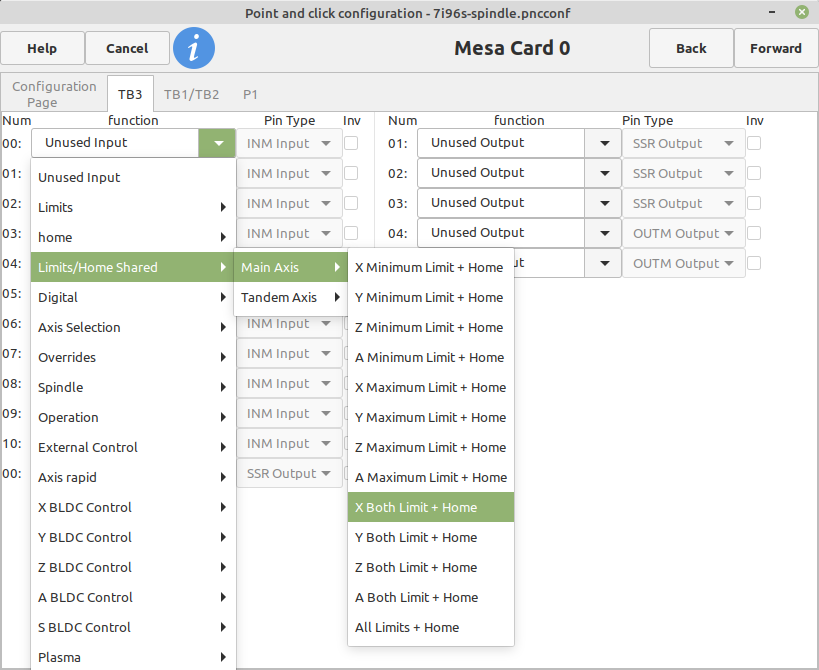
Yes, you have a duplicated signal which is not allowed

Have you tried using pncconf  and setting up combined
home/min-limit/max-limits ?

 Like this (for X) :

:
 
  • Dave2024
  • Dave2024's Avatar
24 Dec 2024 01:57 - 24 Dec 2024 02:50
Replied by Dave2024 on topic After homing move off of limit switch

After homing move off of limit switch

Category: Basic Configuration

Hey sorry but im back. So after I figured out how to get the table to move slightly forward and no longer on the limit switch after homing I went into my hal file and edited it so like so:

# --- HOME-X ---
net home-x <= [HMOT](CARD0).inm.00.input-02-not

# --- MAX-X ---
net max-x <= [HMOT](CARD0).inm.00.input-02-not


Now both home-x and max-x are pointed to the same pin with the one limit switch but when I goto run I get the error:

./BadassLinuxCNCmill.hal:49: Pin 'hm2_7i96s.0.inm.00.input-02-not' was already linked to signal 'home-x'


Does this mean that LinuxCNC will only allow you to assign one unique pin to each input signal? So like would I need to instead assign max-x to a different unused pin and then run a jumper wire across to it?


Also thanks with all the help with this
  • PCW
  • PCW's Avatar
24 Dec 2024 01:24
Replied by PCW on topic Timed delay

Timed delay

Category: Advanced Configuration

The error is because button-press is a signal, not a pin
Looks like you need to delete one signal as you have two
with the same function:


# Input and output configuration
net relay-2-control <= hm2_7i95.0.inmux.00.input-05 # Connect input pin 5 to signal button-press
net relay-1-control => hm2_7i95.0.ssr.00.out-01 # Connect signal relay-1-control to relay output 1
net relay-2-control => hm2_7i95.0.ssr.00.out-03 # Connect signal relay-2-control to relay output 3

# Load and configure timedelay
loadrt timedelay count=1
addf timedelay.0 servo-thread

setp timedelay.0.on-delay 1.0 # 1-second delay
setp timedelay.0.off-delay 0.0 # No off delay

# Timedelay connections
net relay-2-control => timedelay.0.in # Link button-press signal to timedelay input
net relay-1-control <= timedelay.0.out # Link timedelay output to relay-1-control

# Direct button connection to second relay
# Cant drive a signal from another signal:  net relay-2-control <= button-press # Relay 2 activates directly with button press
  • gardenweazel
  • gardenweazel's Avatar
24 Dec 2024 01:10
Replied by gardenweazel on topic Inconsistent values from Versaprobe

Inconsistent values from Versaprobe

Category: Qtvcp

I tried what you recommended, this time after the back-off touch, nothing happened and the spindle just sat there with no movement. Although no error.

For some crazy reason I also lost control of my WHB04B-4 MPG. Incredibly annoying!

As an FYI in versaprobe routine there is a BLOCKHEIGHT and PROBEHEIGHT which is what I suspect that you're eluding to here.

I'd like t o hear from ANYONE who's is successfully using VersaProbe successfully using the master.

Realistically, I simply want an error free manual tool change with minimal error margins.

Thanks @MaHa!
  • Sternfox
  • Sternfox
24 Dec 2024 01:09
Replied by Sternfox on topic Timed delay

Timed delay

Category: Advanced Configuration

I did try one-shot but couldn't get it to work. So I then tried timedelay and nearly have it working

# Input and output configuration
net button-press <= hm2_7i95.0.inmux.00.input-05 # Connect input pin 5 to signal button-press
net relay-1-control => hm2_7i95.0.ssr.00.out-01 # Connect signal relay-1-control to relay output 1
net relay-2-control => hm2_7i95.0.ssr.00.out-03 # Connect signal relay-2-control to relay output 3

# Load and configure timedelay
loadrt timedelay count=1
addf timedelay.0 servo-thread

setp timedelay.0.on-delay 1.0 # 1-second delay
setp timedelay.0.off-delay 0.0 # No off delay

# Timedelay connections
net button-press => timedelay.0.in # Link button-press signal to timedelay input
net relay-1-control <= timedelay.0.out # Link timedelay output to relay-1-control

# Direct button connection to second relay
net relay-2-control <= button-press # Relay 2 activates directly with button press

Problem I'm having is I'm getting the error pin button-press does not exist. Any ideas?
  • PCW
  • PCW's Avatar
24 Dec 2024 00:54 - 24 Dec 2024 01:11
Replied by PCW on topic After homing move off of limit switch

After homing move off of limit switch

Category: Basic Configuration

The settings are in the ini file, not a hal file so custom.hal won't help here,
but pncconf remembers your homing settings so you can re-edit them later
with pncconf.  To do this, select "Modify a configuration already created by this program"
when starting pncconf. Note that if you edited your ini file or hal files outside of pncconf,
you will lose those edits.

I would backup the ini  and hal files anyway once you have a working system
  • Dave2024
  • Dave2024's Avatar
24 Dec 2024 00:42
Replied by Dave2024 on topic After homing move off of limit switch

After homing move off of limit switch

Category: Basic Configuration

Ok great that worked perfect. I set HOME_OFFSET = -.07 and that makes it come perfectly a smidge back off of the switch after homing.

Another quick question though. Should I be adding these changes to the custom.hal file so if I ever run PNCconf again its going to keep my changes and not overwrite them? Or just never open PNCconf again and be sure to always make a backup copy of the Config.ini?
  • aikiaviator
  • aikiaviator
  • aikiaviator
  • aikiaviator
24 Dec 2024 00:23
Replied by aikiaviator on topic To Probe Basic from Gmoccapy

To Probe Basic from Gmoccapy

Category: QtPyVCP

Redone from Old gmoccapy and all working correctly. So will try from there.
  • PCW
  • PCW's Avatar
24 Dec 2024 00:16

7i96s Flash for additional PWM and Wiring for laser

Category: Driver Boards

I would not permanently enable the pwmgen with setp  but rather enable it by
connecting it to spindle-on as shown.

Inverting the PWM output and using the STEP- pin is needed because it guarantees that the
PWM pin is low before LinuxCNC is running, during power up, and after a fault (watchdog bite)
  • PCW
  • PCW's Avatar
24 Dec 2024 00:10
Replied by PCW on topic After homing move off of limit switch

After homing move off of limit switch

Category: Basic Configuration

This is controlled by the homing parameter settings in the ini file:


linuxcnc.org/docs/html/config/ini-homing.html
 
  • Dave2024
  • Dave2024's Avatar
23 Dec 2024 23:34
After homing move off of limit switch was created by Dave2024

After homing move off of limit switch

Category: Basic Configuration
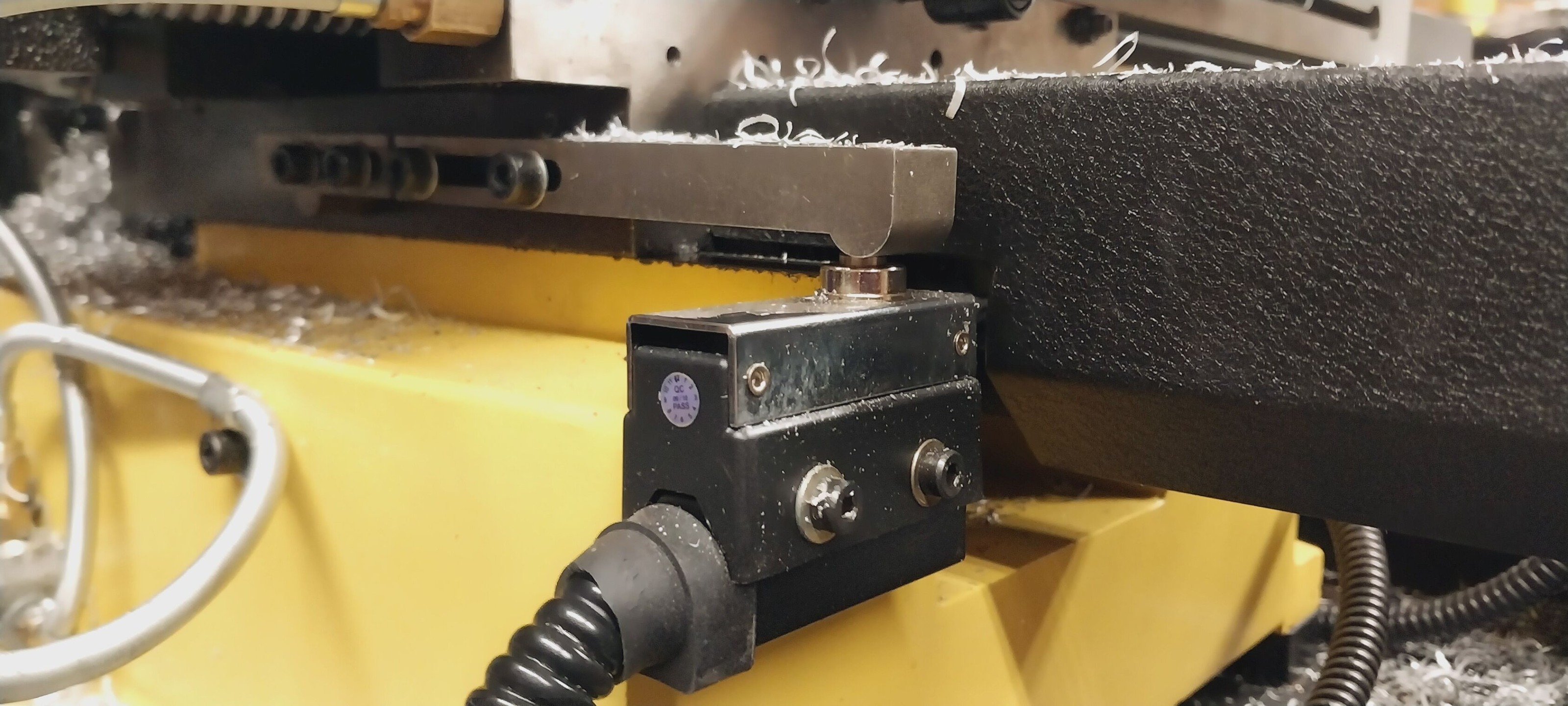
How’s it going.  So, I'm trying to make my mill use only one limit switch for both the minimum and maximum travel of the table.  Every time the machine is homed the table moves to the minimum hits the switch it then does a second shorter slower home cycle but then parks with the switch engaged.  How do I make it so after the last short slow home cycle it then parks so the switch is not engaged?  I need to have it parked off the switch so I can configure it to also serve as my max travel limit switch.  If I’m configured for the same limit switch to also be the max I can never move the table after it has been homed. 

Which setting or file do I need to modify to make this functionality so lates say immediately after homed move slowly till the switch is disengaged?

 
  • SneakyGamer
  • SneakyGamer
23 Dec 2024 23:29 - 23 Dec 2024 23:30
Replied by SneakyGamer on topic 7i96s Flash for additional PWM and Wiring for laser

7i96s Flash for additional PWM and Wiring for laser

Category: Driver Boards

ooh ok thanks

yeah oversight, should be channel 1 if im using step/dir4

# Enable PWM generator on channel 1
setp hm2_7i96s.0.pwmgen.01.enable true

or do i not need this command if im replacing it with the invert

# invert pwm output
setp hm2_7i96s.0.pwmgen.01.out0.invert_output true
  • rodw
  • rodw's Avatar
23 Dec 2024 23:27

Minimal setup for touch probe and tool setter ?

Category: General LinuxCNC Questions

to get the most out of qtdragon's tool handling, you need repeatable tooling and premeasured tools.

With Tormach TTS tooling, they sell a small granite plate
tormach.com/small-granite-surface-plate-...tool-hole-31713.html
And you use a height gauge to measure the height of your probe and your tools
en.wikipedia.org/wiki/Height_gauge

TTS can be used in R8 and MT3 spindles found on small machines, many people use at home.

This does work a treat when you have it all set up.
Displaying 21301 - 21315 out of 21848 results.
Time to create page: 0.498 seconds
Powered by Kunena Forum