Advanced Search

Search Results (Searched for: )

  • spumco
  • spumco
16 Mar 2025 18:30

caxis.comp with stepper motor / gear connection to spindle

Category: HAL

Caxis.comp was originally written by Andy Pugh to control a single motor for velocity and positioning mode (spindle & c-axis).  I don't think it was intended to control two separate motors.

It's not part of the mainline LCNC components, nor are there many people using it... so I don't think you're going to find a wealth of info on implementation.  For your situation, there may be better approaches to managing your dual-motor arrangement.

The main hurdle to overcome for any spindle/axis (dual or single motor) is how to manage the axis encoder.  Once you switch from axis to velocity mode the axis will generate a following error when LCNC sees the 'axis' encoder moving away from the commanded position.  So we have to 'trick' LCNC and adjust the encoder value somehow.
  • caxis.comp does this by intercepting the encoder output, and then subtracting the encoder change from the encoder starting value before sending that to the axis PID feedback input.
  • Another method is to disconnect the encoder output from the axis feedback in spindle mode
The problem with #2 above is that when the encoder is re-connected (switch to axis mode) there is a significant following error instantly present.  The switching scheme @Aciera came up with a while back for his lathe (using a single motor) looks like this:
  • Step 0
    • LCNC starts up with main spindle motor disabled
    • Home C-axis before any spindle moves (at start of LCNC session). 
  • Step 1
    • Command C-axis to C0
    • Disconnect spindle encoder
    • Enable spindle mode
      • in Aciera's case that means switching his drive from position to velocity mode
      • for a two-motor arrangement that means retracting the axis motor and enabling the main spindle motor via M-codes & digital inputs/outputs
  • Step 2 - Run spindle as a spindle
  • Step 3
    • Use orient.comp to orient the spindle to 0
    • Disable the spindle motor
    • Enable the axis motor
    • Reconnect the spindle encoder
If everything is adjusted properly (orient offset, C0 actual position, etc.) there should be a very small difference between Orient-0 and Caxis-0, resulting in (hopefully) a small twitch of the spindle at most.

For the past year I've been fiddling with caxis.comp and have recently come to the conclusion that it isn't going to work for me.  There are a couple of annoying things I don't like (can't disconnect the spindle easily to manually rotate the chuck), but the serious problem I found was that spindle synchronized motion wasn't working properly.

Something - and I'm not smart enough to figure out exactly what it was - in the caxis.comp scheme was causing erratic behavior (big motion jumps) during tapping and threading commands.  Once I removed caxis.comp and use the spindle as just a spindle the tapping/threading stuff started working as expected.  So now I'm re-doing a bunch of stuff in my config and will eventually wind up with something very similar to Aciera's arrangement.

So to sum up, I'd suggest abandoing caxis.comp for your dual-motor lathe and search for Aciera's config.  I know he posted his files in the past year or so, although I think he's been working on a glitch with the encoder disconnect function recently.
  • PCW
  • PCW's Avatar
16 Mar 2025 18:16

STEPLEN STEPSPACE time for Bergerda AC servo driver

Category: General LinuxCNC Questions
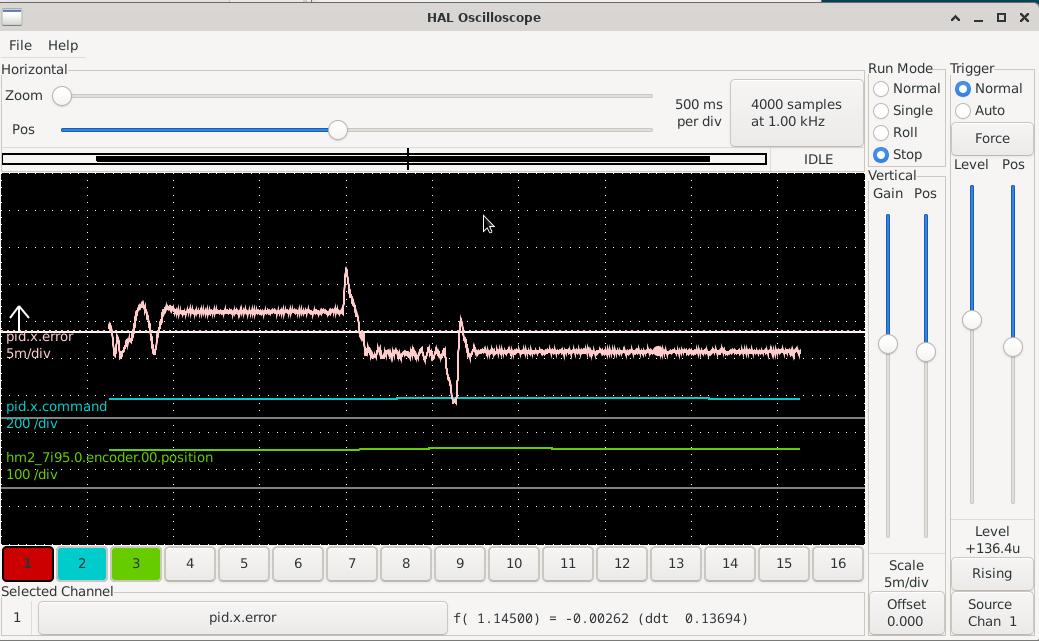
Looks like the drive is not responding to shorter step pulses (no motion at all)

Is is possible there is a digital filter in the drive so it rejects shorter than 1000 ns step pulses?
  • Wusel
  • Wusel
16 Mar 2025 17:47
Replied by Wusel on topic Motor 0 Positionsfehler

Motor 0 Positionsfehler

Category: Advanced Configuration

learning every day. Thanks again
  • papagno-source
  • papagno-source
16 Mar 2025 17:32 - 16 Mar 2025 17:41
Replied by papagno-source on topic scurve trajectory planner

scurve trajectory planner

Category: General LinuxCNC Questions
Hi i have install Debian 12 uspace , with linuxcnc 2.9.4 , image the linuxcnc.org.

I have executed :
git clone --recurse-submodules codeberg.org/skynet/linuxcnc_scurve_compact lcnc
cd lcnc/cmake
./installer

have error in terminal:
/usr/include/ceres/internal/fixed_array.h:33:10: fatal error: Eigen/Core: No such file or directory
33 | #include <Eigen/Core> // For Eigen::aligned_allocator

and


/usr/include/ceres/internal/fixed_array.h:33:10: fatal error: Eigen/Core: No such file or directory
33 | #include <Eigen/Core> // For Eigen::aligned_allocator
| ^~~~~~~~~~~~


If add in tray the file ini :
TPMOD = tpmod_scurve

and start sim/axis_9axis_mm.ini have error :

LINUXCNC - 2.10.0~pre0
Machine configuration directory is '/home/fast/lcnc/configs/sim/axis'
Machine configuration file is 'axis_9axis_mm.ini'
Starting LinuxCNC...
linuxcncsvr (23070) emcsvr: machine 'LinuxCNC-sim-9axis'  version '1.1'
linuxcnc TPMOD=tpmod_scurve HOMEMOD=homemod EMCMOT=motmod unlock_joints_mask=0x10
Note: Using POSIX realtime
tpmod_scurve: dlopen: /home/fast/lcnc/rtlib/tpmod_scurve.so: cannot open shared object file: No such file or directory
<commandline>:0: waitpid failed /home/fast/lcnc/bin/rtapi_app tpmod_scurve
<commandline>:0: /home/fast/lcnc/bin/rtapi_app exited without becoming ready
<commandline>:0: insmod for tpmod_scurve failed, returned -1
Note: Using POSIX realtime
milltask (23085) task: machine 'LinuxCNC-sim-9axis'  version '1.1'
halui (23087) halui: machine 'LinuxCNC-sim-9axis'  version '1.1'
Found file(LIB): /home/fast/lcnc/lib/hallib/basic_sim.tcl
setup_kins: cmd=loadrt trivkins
motmod: dlopen: /home/fast/lcnc/rtlib/motmod.so: undefined symbol: tpRunCycle


core_sim:unhandled emcmot<{motmod unlock_joints_mask=0x10}>
         modname=motmod
         modparm=unlock_joints_mask=0x10
     msg=waitpid failed /home/fast/lcnc/bin/rtapi_app motmod
/home/fast/lcnc/bin/rtapi_app exited without becoming ready
insmod for motmod failed, returned -1

Shutting down and cleaning up LinuxCNC...
USRMOT: ERROR: command 30 timeout
emcMotionInit: emcTrajInit failed
Note: Using POSIX realtime


  • Krulli_Fräser
  • Krulli_Fräser
16 Mar 2025 17:01
Replied by Krulli_Fräser on topic Alcor 220CNC retrofit finished!

Alcor 220CNC retrofit finished!

Category: Milling Machines

Thank you!

You are actually the one who made me think about touching a machine with a dead controller
  • RotarySMP
  • RotarySMP's Avatar
16 Mar 2025 16:38
Replied by RotarySMP on topic Alcor 220CNC retrofit finished!

Alcor 220CNC retrofit finished!

Category: Milling Machines

You made a really nice job of that.
  • tommy
  • tommy
16 Mar 2025 16:03

STEPLEN STEPSPACE time for Bergerda AC servo driver

Category: General LinuxCNC Questions

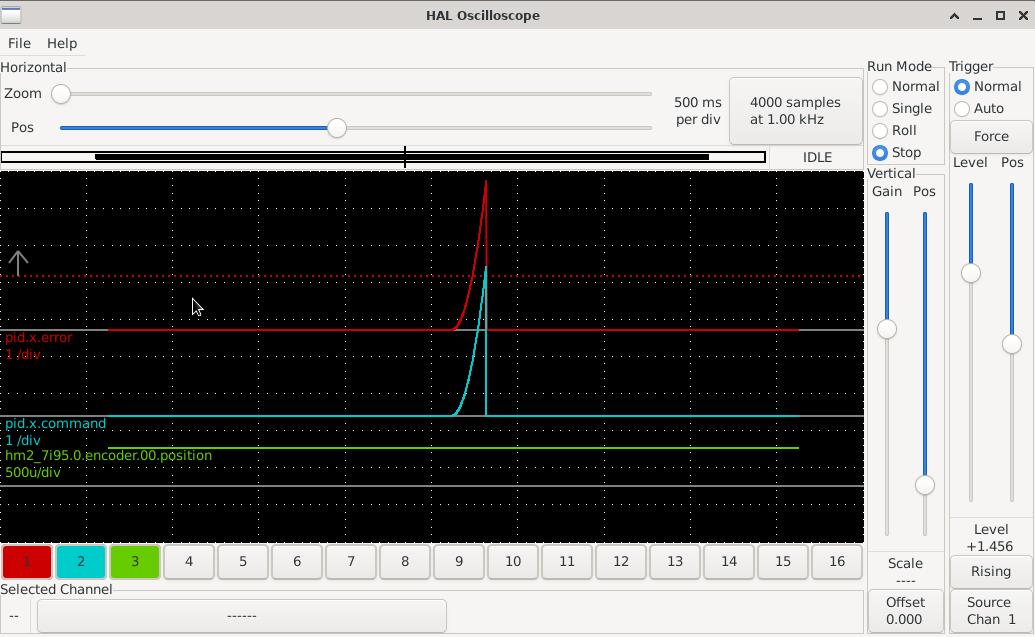
Scope reading with 1000 nanoseconds:
 

And with 900 nanoseconds and increased following error:
 
  • HansU
  • HansU's Avatar
16 Mar 2025 15:44 - 16 Mar 2025 15:47
Replied by HansU on topic LCNC 2.10 - Ask for AUTOMATIC_G43

LCNC 2.10 - Ask for AUTOMATIC_G43

Category: Gmoccapy

On a LinuxCNC 2.9.4 installation I find 'change.ngc' in '/usr/share/linuxcnc/ncfiles/remap-subroutines', so I am pretty sure everything in "nc_files/remap-subroutines" is copied there during the installation of LinuxCNC.

So we only need to move 'change_g43.ngc' from "configs/sim/gmoccapy/macros/" to "nc_files/remap-subroutines" and maybe adjust the path in the sample config(s).

 
  • Krulli_Fräser
  • Krulli_Fräser
16 Mar 2025 15:06 - 16 Mar 2025 15:07
Alcor 220CNC retrofit finished! was created by Krulli_Fräser

Alcor 220CNC retrofit finished!

Category: Milling Machines
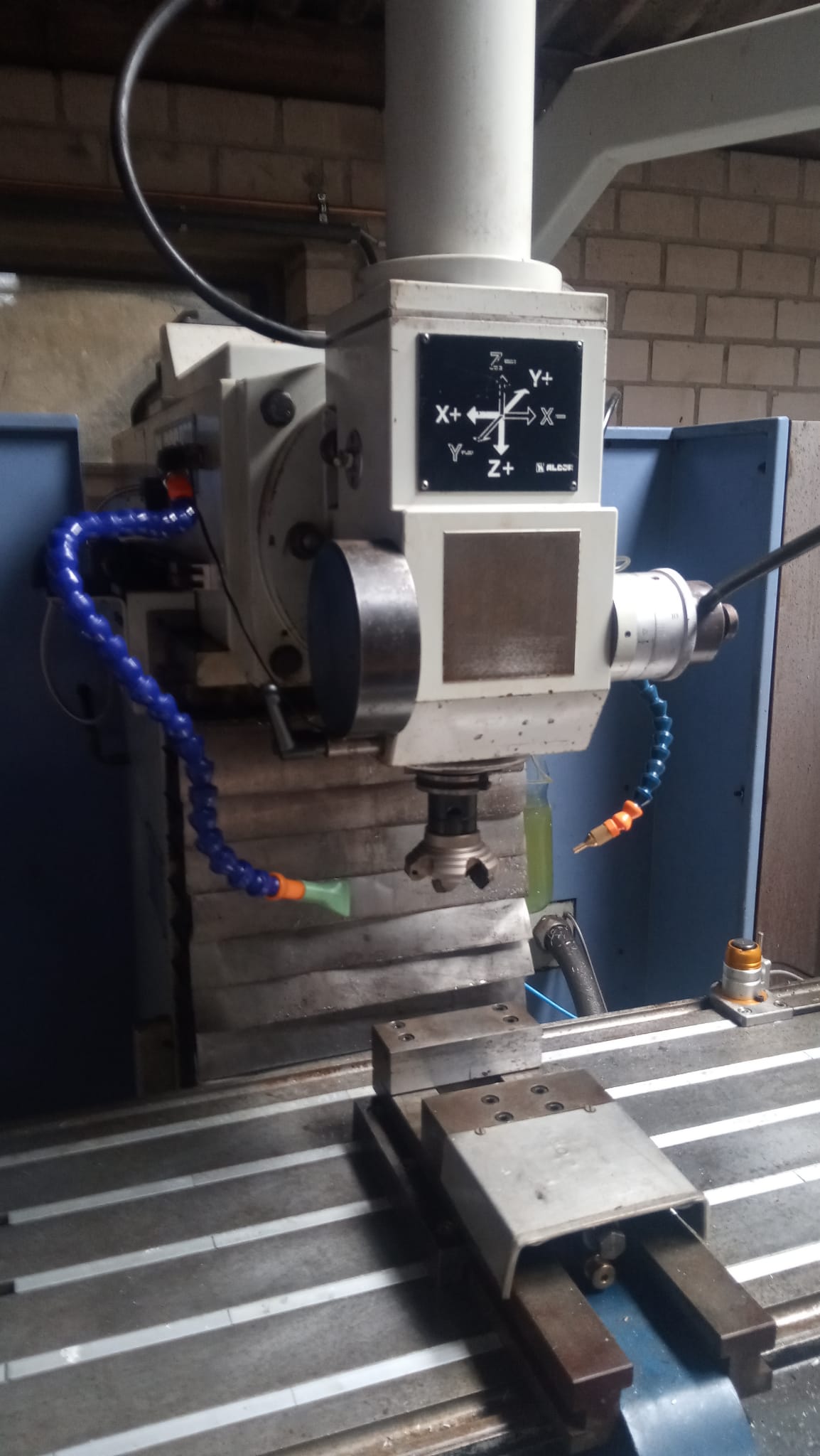
Hello everyone,

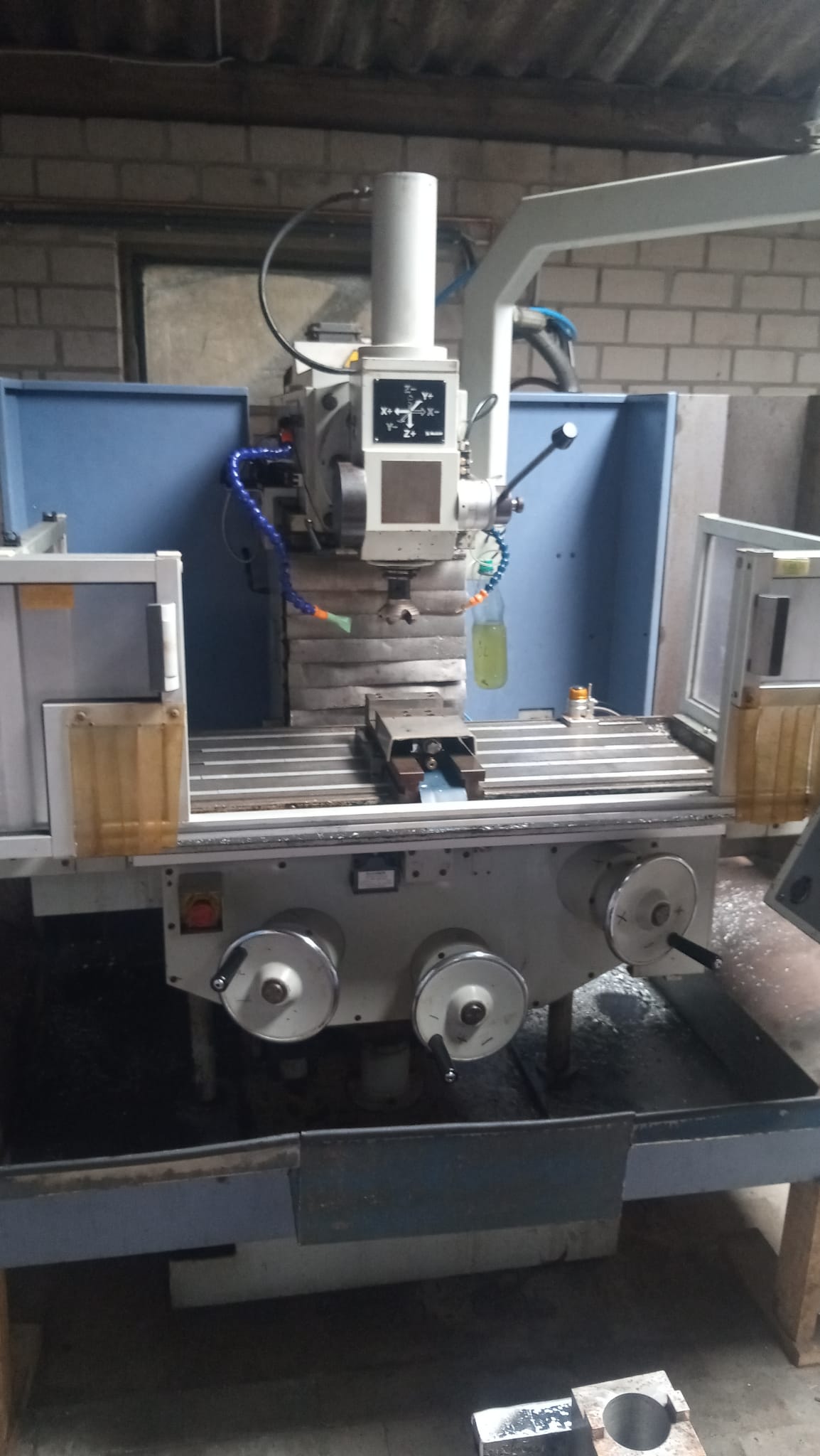
I completed the work on my milling machine and have made a video showcasing it. At the moment it´s only available in german but I already recorded an english audio track so as soon as I figure out how to add this you will also be able to watch this in english.


Once again big thank you to everyone here who made this possible, I couldnt have done it without you!!

   
  • scda
  • scda's Avatar
16 Mar 2025 15:04 - 16 Mar 2025 15:09

caxis.comp with stepper motor / gear connection to spindle

Category: HAL

Hi all,

I am trying to understand and implement the caxis.comp with my lathe. 

My setup is:

VFD with ac motor for "normal" spindle mode (analog signal --> pwmgen)
C-axis is connected via a reducing gear to the spindle, the c-axis motor is a closed loop stepper (step/dir). The c-axis drive is engaged to the spindle with a pneumatic cylinder. Normally it is disengaged

I am trying to better understand the caxis.comp and was wondering if someone can shed some light on this:

pin in float spindle-revs --> connected to spindle.0.revs
pin in float spindle-velocity-in --> connected to encoder velocity signal
pin out float spindle-velocity-out --> ? velocity signal for pwmgen and/or step/gen ?
pin out float position-fb-out --> is this position feedback calculated from encoder velocity signal ? is this connected to joint.xx.pos-fb?
pin in float pid-in; --> connected to PID output of c-axis
pin out signed state; --> what is this for?

Has anyone used this in similar setup (spindle with pwmgen, and c-axis with step/dir). Should the step/dir generator be run in velocity mode?
Would probably help to have some insight.

I have also tried a similiar thing using the mux component and connecteing the encoder signal to the c-axis feedback or not (depending on the mode). But as others have experienced there is an ussed with joint following after switching back to c-axis mode. Even when reseting the encoder position to 0, this will only work if the c-axis is also at 0.
I also could not achieve proper orientation (homing) when switching to c-axis mode.

Will keep trying ----


Regards,
Dave
  • PostavCNC
  • PostavCNC's Avatar
16 Mar 2025 15:03 - 16 Mar 2025 15:04
Replied by PostavCNC on topic Keyboard Shortcuts in Gmoccapy

Keyboard Shortcuts in Gmoccapy

Category: Gmoccapy

Hi, there,

i am trying to make a keyboard shortcut to toggle between TURTLE and RABBIT jog mode. I think that the code should have look something like this: 

        if keyname == "r":
            "some toggle event goes here"
            return True


It is shown on in the def on_key_event section in the code attached from line 3052. Can you help me which event should I use to toggle jog modes? 

 
  • PCW
  • PCW's Avatar
16 Mar 2025 15:00
Replied by PCW on topic Motor 0 Positionsfehler

Motor 0 Positionsfehler

Category: Advanced Configuration

That would be the PID deadband pin.
  • PCW
  • PCW's Avatar
16 Mar 2025 14:34

STEPLEN STEPSPACE time for Bergerda AC servo driver

Category: General LinuxCNC Questions

You may have to increase the following error limits a bit and plot the
commanded and feedback positions and joint following error with halscope
to determine why you are getting a following error:

Possibilities:

Drive does not work with shorter step signals

Encoder feedback does not work at higher speeds

Instability/tuning issues


  • tsaG
  • tsaG
16 Mar 2025 14:21 - 16 Mar 2025 21:21
Replied by tsaG on topic No parameters forwarded to M6 script?

No parameters forwarded to M6 script?

Category: QtPyVCP

Okay, it seems like the std glue.py is not called at all (I added debug messages in between) so I had to revert back to the standard linuxcnc # number variables. However, I now get the error "bad number format (conversion failed) parsing". Unfortunately, without line indication. :(
%
(MSG, --- Start of toolchange.ngc [Persistent Version] ---)

o<toolchange> sub

    ; ---------------------------------------------------------------
    ; DEBUG: Display raw numeric values passed by the M6 prolog.
    ; Typically, #100 is the requested tool and #120 is the selected pocket.
    ; ---------------------------------------------------------------
    (MSG, Debug: Received #100 = [#100], #120 = [#120])

    ; ---------------------------------------------------------------
    ; A) Reverse Assignment:
    ;    The M6 prolog passes numeric variables:
    ;      #100 = requested tool number,
    ;      #120 = selected pocket.
    ;    We use persistent variables for the current tool and pocket:
    ;      #3991 holds the current tool in the spindle.
    ;      #3990 holds the current tool pocket.
    ;    Now we set descriptive variables as follows:
    ; ---------------------------------------------------------------
    #<selected_tool>      = #100
    #<tool_in_spindle>    = #3991
    #<selected_pocket>    = #120
    #<current_pocket>     = #3990

    ; ---------------------------------------------------------------
    ; DEBUG: Display the descriptive variable values after assignment.
    ; ---------------------------------------------------------------
    (MSG, Debug: selected_tool = [#<selected_tool>])
    (MSG, Debug: tool_in_spindle = [#<tool_in_spindle>])
    (MSG, Debug: selected_pocket = [#<selected_pocket>])
    (MSG, Debug: current_pocket = [#<current_pocket>])

    ; ---------------------------------------------------------------
    ; B) Check if tool change is needed:
    ;    If the requested tool equals the tool already in the spindle,
    ;    no change is needed.
    ; ---------------------------------------------------------------
    o<if_same_tool> if [#<selected_tool> EQ #<tool_in_spindle>]
        (MSG, Tool [#<tool_in_spindle>] is already in spindle. No change needed.)
        M99
    o<if_same_tool> endif

    ; ---------------------------------------------------------------
    ; C) Stop the spindle (no M19 orientation used)
    ; ---------------------------------------------------------------
    M5

    ; ---------------------------------------------------------------
    ; D) Rack Coordinates & Z Heights (adjust as needed)
    ;    Define rack X, Y base, Y pitch.
    ;    Define Z heights if not already defined in the INI:
    ;       #<atc_z_tool_change_height> = -49.5
    ;       #<atc_z_tool_clearance_height> = 0
    ; ---------------------------------------------------------------
    #<rack_x>             = 1123
    #<rack_y_base>        = 164
    #<rack_y_pitch>       = 50
    #<atc_z_tool_change_height>    = -49.5   ; if not defined in INI
    #<atc_z_tool_clearance_height> = 0       ; if not defined in INI

    ; Move Z to clearance height.
    G53 G0 Z[#<atc_z_tool_clearance_height>]

    ; ---------------------------------------------------------------
    ; E) Drop Off Old Tool:
    ;    If a tool is currently in the spindle, drop it off in the current pocket.
    ; ---------------------------------------------------------------
    o<if_drop_old_tool> if [#<tool_in_spindle> GT 0]
        ; Calculate Y coordinate for the current pocket.
        #<old_pocket_y> = [#<rack_y_base> + ([#<current_pocket>] - 1) * #<rack_y_pitch>]
        G53 G0 X[#<rack_x>] Y[#<old_pocket_y>]
        G53 G0 Z[#<atc_z_tool_change_height>]
        (MSG, Unclamping old tool [#<tool_in_spindle>] with M64 P2)
        M64 P2
        G4 P1  ; dwell 1 second
        G53 G0 Z[#<atc_z_tool_clearance_height>]
        ; Optionally: update a pocket table (#4001..#4024) if needed.
    o<if_drop_old_tool> endif

    ; ---------------------------------------------------------------
    ; F) Pick Up New Tool:
    ;    Move to the selected pocket and clamp the new tool.
    ; ---------------------------------------------------------------
    o<if_pickup_new_tool> if [#<selected_tool> GT 0]
        ; Calculate Y coordinate for the selected pocket.
        #<new_pocket_y> = [#<rack_y_base> + ([#<selected_pocket>] - 1) * #<rack_y_pitch>]
        G53 G0 X[#<rack_x>] Y[#<new_pocket_y>]
        G53 G0 Z[#<atc_z_tool_change_height>]
        (MSG, Clamping new tool [#<selected_tool>] with M65 P2)
        M65 P2
        G4 P1  ; dwell 1 second
        G53 G0 Z[#<atc_z_tool_clearance_height>]
        ; Optionally: mark that pocket empty in your pocket table.
    o<if_pickup_new_tool> endif

    ; ---------------------------------------------------------------
    ; G) Update the Spindle:
    ;    Set the new tool as the one in the spindle.
    ; ---------------------------------------------------------------
    #<tool_in_spindle> = #<selected_tool>

    ; ---------------------------------------------------------------
    ; H) Inform LinuxCNC:
    ;    Set new tool active (M61) and load tool offset (G43).
    ; ---------------------------------------------------------------
    M61 Q[#<selected_tool>]
    G43 H[#<selected_tool>]

    ; ---------------------------------------------------------------
    ; I) Update Persistent Variables:
    ;    #3991 now holds the new tool.
    ;    #3990 is updated to the selected pocket.
    ; ---------------------------------------------------------------
    #3991 = #<selected_tool>
    #3990 = #<selected_pocket>

    (MSG, The spindle now has tool [#<selected_tool>])

    ; ---------------------------------------------------------------
    ; J) Return to caller.
    ; ---------------------------------------------------------------
    M99

o<toolchange> endsub

M2

(MSG, --- End of toolchange.ngc ---)
%
  • papagno-source
  • papagno-source
16 Mar 2025 14:12 - 16 Mar 2025 14:28
Replied by papagno-source on topic scurve trajectory planner

scurve trajectory planner

Category: General LinuxCNC Questions

Hi . i have delete std=gnu++2a'.

but have again anothers error.

too bad it would have been nice to be able to use scurve on debian 10 installations

 
Displaying 17581 - 17595 out of 18505 results.
Time to create page: 0.613 seconds
Powered by Kunena Forum