Advanced Search

Search Results (Searched for: )

  • Jdolecki
  • Jdolecki
02 Jan 2025 02:53
Lathe sub spindle m codes was created by Jdolecki

Lathe sub spindle m codes

Category: Turning

On a lathe the m codes for a Main spindle are m3,m4 and m5. Fwd,rev,stop

if I had a second sub spindle what are the m codes for those?

thanks john
  • Cant do this anymore bye all
  • Cant do this anymore bye all's Avatar
02 Jan 2025 02:32 - 02 Jan 2025 02:39
Replied by Cant do this anymore bye all on topic Pi5 MESA 7c80: mesaflash can't see the card.

Pi5 MESA 7c80: mesaflash can't see the card.

Category: Driver Boards

Could be. Looks like it could be a self built kernel, there are a couple of options relating to the real time kernel built.

Be interesting to know the origin of the installation. To get the hm2_spix driver I think you still need to build from source as the Rpi packages seem to have a July changelog.
  • PCW
  • PCW's Avatar
02 Jan 2025 02:22

Pi5 MESA 7c80: mesaflash can't see the card.

Category: Driver Boards

Note: Using POSIX non-realtime

Is it possible that this is a kernel issue?
  • VRNF
  • VRNF
02 Jan 2025 02:08
Replied by VRNF on topic Maho mh800w retrofit

Maho mh800w retrofit

Category: Milling Machines

Hello Paul,

Also have a MH600W, although mine is a bit older with the 432/10.

Did you try manually updating your version of mesaflash by downloading and compiling directly from the github repository? Instructions are directly in the readme.MD

github.com/LinuxCNC/mesaflash
  • RNJFAB
  • RNJFAB
02 Jan 2025 02:02 - 02 Jan 2025 05:57

Homemade CNC Plasma - hypertherm, Mesa, gear drives, nema 34.

Category: Show Your Stuff
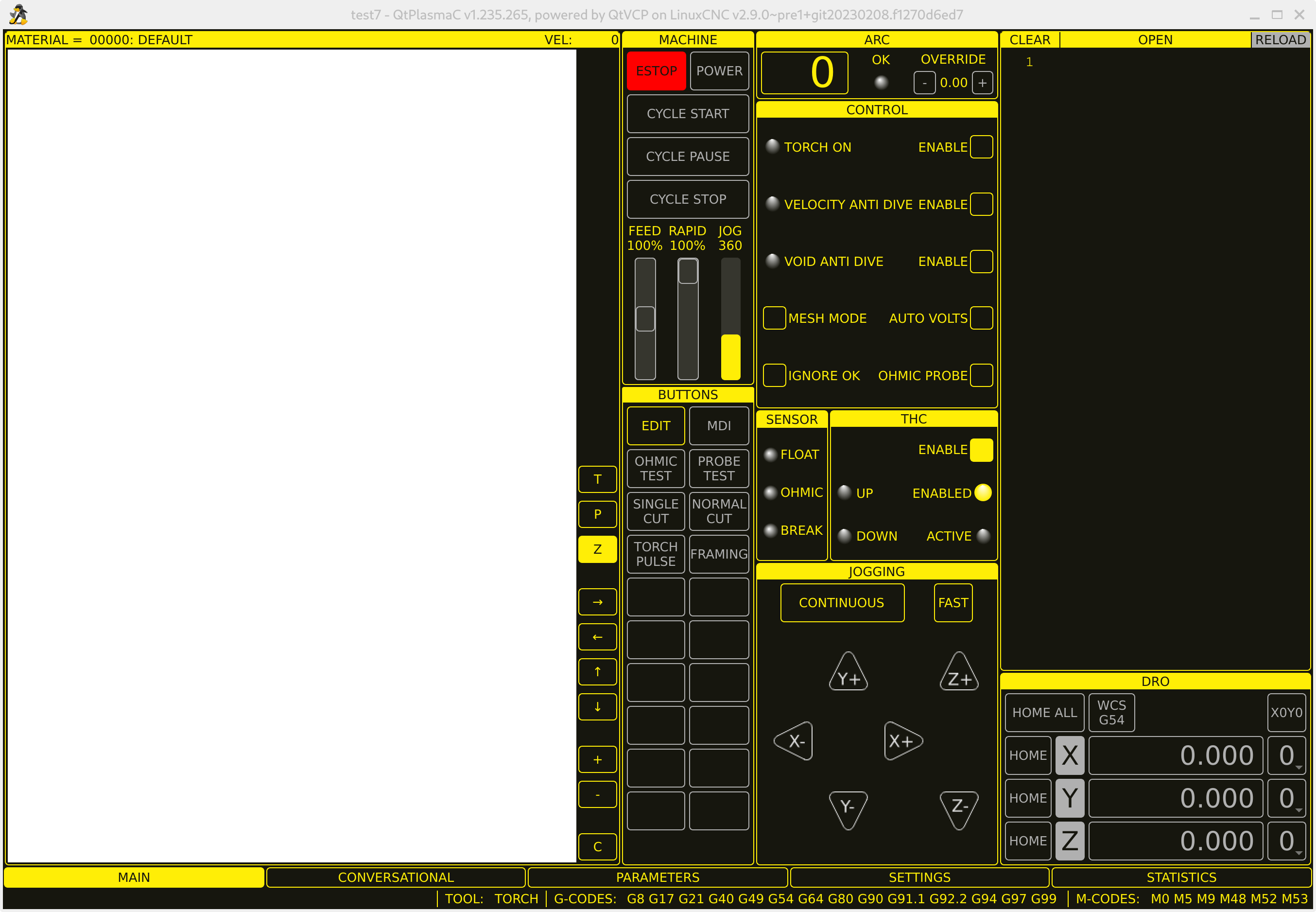
sorry guys,

I'm not sure what i'm doing at the moment. Feel like a lost sheep.

Anyway.


When i get in, this is what i see, note the plank page where there should be a drawing.

I can't get the estop to unload to engage power.

Where should I start from? wipe everything and try reloading it all again?

 
  • tommylight
  • tommylight's Avatar
02 Jan 2025 01:53
  • Cant do this anymore bye all
  • Cant do this anymore bye all's Avatar
02 Jan 2025 01:49
Replied by Cant do this anymore bye all on topic PnCConf vs. Raspberry Pi 5

PnCConf vs. Raspberry Pi 5

Category: PnCConf Wizard

run the menu-config (menu_config) and set the locale.

This page (read the whole thing) may help
forum.linuxcnc.org/forum/search?query=LC_ALL&childforums=1
  • Cant do this anymore bye all
  • Cant do this anymore bye all's Avatar
02 Jan 2025 01:43
Replied by Cant do this anymore bye all on topic Pi5 MESA 7c80: mesaflash can't see the card.

Pi5 MESA 7c80: mesaflash can't see the card.

Category: Driver Boards

I had issues with my RPi5 using SPI channel 0, dunno why, switching to SPI channel 1 resolved the issue. Not sure how you would resolve this without cobbling together a custom cable between the Pi and the 7c80.

you would have to use
loadrt hm2_spix spi_probe=2 config="insert your required config"

This is with my cobbled together 7c81 clone running hostmot2 firmware to suit the Spartan dev board.
  • ckuecker
  • ckuecker
02 Jan 2025 01:22
PnCConf vs. Raspberry Pi 5 was created by ckuecker

PnCConf vs. Raspberry Pi 5

Category: PnCConf Wizard

Hello,

I've got a home built router running a Raspberry Pi 4 with a Mesa 7196s via Ethernet. Running AXIS. Works fine.
Interested in trying the Rpi5 - loaded the image off the download page and the board can communicate with the Mesa board, but PnCConf keeps giving errors when I try to go past the first axis page - a long dump mentioning a problem with the locale.
Any suggestions? This is an 8GB RPi5 I just got from Digi-Key.
 
  • slowpoke
  • slowpoke
02 Jan 2025 01:18 - 02 Jan 2025 01:21
Replied by slowpoke on topic 7i96S MPG input

7i96S MPG input

Category: Basic Configuration

Standard 7I96S firmware has 4 built in MPG quadrature counters
overlaid on the first 8 isolated inputs. This means you do not need
to decode individual inputs (which is important since they are typically
only read at the 1 KHz servo thread rate)

The MPG counters have names like:

hm2_7i96s.0.inm.00.enc0-count
hm2_7i96s.0.inm.00.enc1-count
hm2_7i96s.0.inm.00.enc2-count
hm2_7i96s.0.inm.00.enc3-count


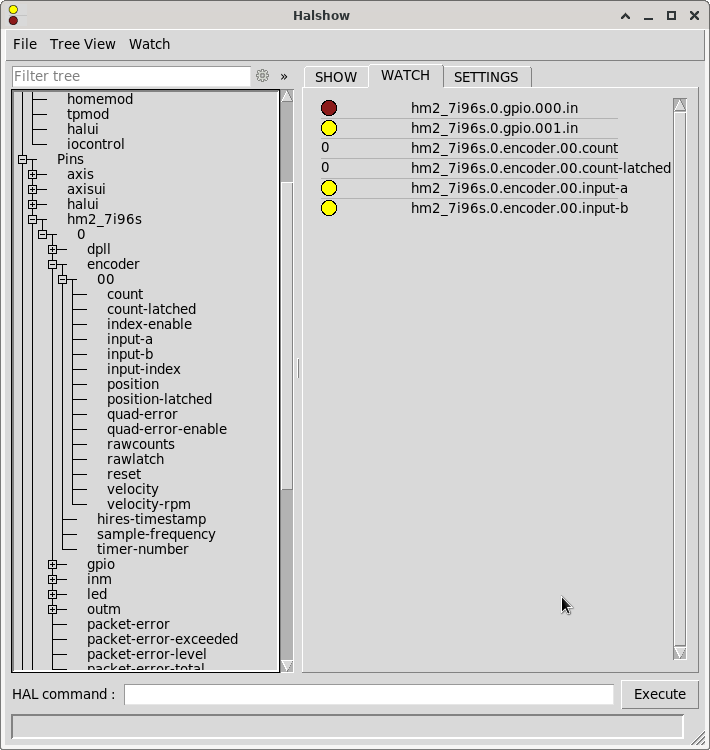
I'm trying to find these 4 overlaid quadrature encounters,
I have a glass scale connected up to inputs 0,1

I don't see them in HALshow. (I do see .encoder.00 however it does not seem to be linked to input 0,1), I think that's probably the spindle data.
How would I go about:
1) just viewing and scaling the quadrature data?
2) displaying the scaled value in axis?
 
  • RogEnk
  • RogEnk
02 Jan 2025 01:15 - 06 Jan 2025 14:55

[SOLVED] ProbeBasic NameError: name 'tool' is not defined

Category: QtPyVCP

Hi all.
Happy New Year!
Fresh install of LinuxCNC 2.9.3 (full image downloaded from wiki link) and freshly installed QtPyVCP and getting the NameError even after patching as per: github.com/LinuxCNC/linuxcnc/pull/3176/files
I have attached edited file and the qtypyvcp.log with .txt extensions.

System loads OK, homes and jogs, but as soon as I do a tool change for probing etc it throws that error.
I have also tried purge and reinstall of QtPyVCP, a reinstall of LinuxCNC as per kcjengr.github.io/probe_basic/index.html (that was a frustrating exercise, arrow keys in Putty were borked and weird permissions plus my user could not shutdown the system! So I opted for an official build).
EDIT: Should have mentioned this is the lathe config!
EDIT 2: Same behavior in the sim, log file for that now attached.
Any help much appreciated.
  • ccatlett1984
  • ccatlett1984
02 Jan 2025 00:59
Replied by ccatlett1984 on topic Pi5 MESA 7c80: mesaflash can't see the card.

Pi5 MESA 7c80: mesaflash can't see the card.

Category: Driver Boards

I have a pi4b with dead video out, connected and it's able to see the card. so we still have a config /driver issue with the pi5
halcmd: loadrt hm2_rpspi
hm2/hm2_7c80.0: Low Level init 0.15
hm2/hm2_7c80.0: Smart Serial Firmware Version 43
hm2/hm2_7c80.0: 54 I/O Pins used:
hm2/hm2_7c80.0:     IO Pin 000 (TB07-02/TB07-03): StepGen #0, pin Step (Output)
hm2/hm2_7c80.0:     IO Pin 001 (TB07-04/TB07-05): StepGen #0, pin Direction (Output)
hm2/hm2_7c80.0:     IO Pin 002 (TB08-02/TB08-03): StepGen #1, pin Step (Output)
hm2/hm2_7c80.0:     IO Pin 003 (TB08-04/TB08-05): StepGen #1, pin Direction (Output)
hm2/hm2_7c80.0:     IO Pin 004 (TB09-02/TB09-03): StepGen #2, pin Step (Output)
hm2/hm2_7c80.0:     IO Pin 005 (TB09-04/TB09-05): StepGen #2, pin Direction (Output)
hm2/hm2_7c80.0:     IO Pin 006 (TB10-02/TB10-03): StepGen #3, pin Step (Output)
hm2/hm2_7c80.0:     IO Pin 007 (TB10-04/TB10-05): StepGen #3, pin Direction (Output)
hm2/hm2_7c80.0:     IO Pin 008 (TB11-02/TB11-03): StepGen #4, pin Step (Output)
hm2/hm2_7c80.0:     IO Pin 009 (TB11-04/TB11-05): StepGen #4, pin Direction (Output)
hm2/hm2_7c80.0:     IO Pin 010 (TB12-02/TB12-03): StepGen #5, pin Step (Output)
hm2/hm2_7c80.0:     IO Pin 011 (TB12-04/TB12-05): StepGen #5, pin Direction (Output)
hm2/hm2_7c80.0:     IO Pin 012 (TB03-03/TB04-04): IOPort
hm2/hm2_7c80.0:     IO Pin 013 (TB03-05/TB04-06): IOPort
hm2/hm2_7c80.0:     IO Pin 014 (TB03-05/TB03-06): IOPort
hm2/hm2_7c80.0:     IO Pin 015 (TB04-01/TB04-02): Encoder #0, pin A (Input)
hm2/hm2_7c80.0:     IO Pin 016 (TB04-04/TB04-05): Encoder #0, pin B (Input)
hm2/hm2_7c80.0:     IO Pin 017 (TB04-07/TB04-08): Encoder #0, pin Index (Input)
hm2/hm2_7c80.0:     IO Pin 018 (TB05-02): PWMGen #0, pin Out0 (PWM or Up) (Output)
hm2/hm2_7c80.0:     IO Pin 019 (TB05-02): PWMGen #0, pin Not-Enable (Output)
hm2/hm2_7c80.0:     IO Pin 020 (TB05-05/TB05-06): IOPort
hm2/hm2_7c80.0:     IO Pin 021 (TB05-07/TB05-08): IOPort
hm2/hm2_7c80.0:     IO Pin 022 (Internal InMux0): InMux Input Mux #0, pin addr0 (Output)
hm2/hm2_7c80.0:     IO Pin 023 (Internal InMux1): InMux Input Mux #0, pin addr1 (Output)
hm2/hm2_7c80.0:     IO Pin 024 (Internal InMux2): InMux Input Mux #0, pin addr2 (Output)
hm2/hm2_7c80.0:     IO Pin 025 (Internal InMux3): InMux Input Mux #0, pin addr3 (Output)
hm2/hm2_7c80.0:     IO Pin 026 (Internal InMux4): InMux Input Mux #0, pin addr4 (Output)
hm2/hm2_7c80.0:     IO Pin 027 (Internal InMuxData): InMux Input Mux #0, pin muxdata (Input)
hm2/hm2_7c80.0:     IO Pin 028 (TB13-01/TB13-02): SSR #0, pin Out-00 (Output)
hm2/hm2_7c80.0:     IO Pin 029 (TB13-03/TB13-04): SSR #0, pin Out-01 (Output)
hm2/hm2_7c80.0:     IO Pin 030 (TB13-05/TB13-06): SSR #0, pin Out-02 (Output)
hm2/hm2_7c80.0:     IO Pin 031 (TB13-07/TB13-08): SSR #0, pin Out-03 (Output)
hm2/hm2_7c80.0:     IO Pin 032 (TB14-01/TB14-02): SSR #0, pin Out-04 (Output)
hm2/hm2_7c80.0:     IO Pin 033 (TB14-03/TB14-04): SSR #0, pin Out-05 (Output)
hm2/hm2_7c80.0:     IO Pin 034 (TB14-05/TB14-06): SSR #0, pin Out-06 (Output)
hm2/hm2_7c80.0:     IO Pin 035 (TB14-07/TB14-08): SSR #0, pin Out-07 (Output)
hm2/hm2_7c80.0:     IO Pin 036 (Internal SSR): SSR #0, pin AC Ref (internal) (Output)
hm2/hm2_7c80.0:     IO Pin 037 (P1-01/DB25-01): IOPort
hm2/hm2_7c80.0:     IO Pin 038 (P1-02/DB25-14): IOPort
hm2/hm2_7c80.0:     IO Pin 039 (P1-03/DB25-02): IOPort
hm2/hm2_7c80.0:     IO Pin 040 (P1-04/DB25-15): IOPort
hm2/hm2_7c80.0:     IO Pin 041 (P1-05/DB25-03): IOPort
hm2/hm2_7c80.0:     IO Pin 042 (P1-06/DB25-16): IOPort
hm2/hm2_7c80.0:     IO Pin 043 (P1-07/DB25-04): IOPort
hm2/hm2_7c80.0:     IO Pin 044 (P1-08/DB25-17): IOPort
hm2/hm2_7c80.0:     IO Pin 045 (P1-09/DB25-05): IOPort
hm2/hm2_7c80.0:     IO Pin 046 (P1-11/DB25-06): IOPort
hm2/hm2_7c80.0:     IO Pin 047 (P1-13/DB25-07): IOPort
hm2/hm2_7c80.0:     IO Pin 048 (P1-15/DB25-08): IOPort
hm2/hm2_7c80.0:     IO Pin 049 (P1-17/DB25-09): IOPort
hm2/hm2_7c80.0:     IO Pin 050 (P1-19/DB25-10): IOPort
hm2/hm2_7c80.0:     IO Pin 051 (P1-21/DB25-11): IOPort
hm2/hm2_7c80.0:     IO Pin 052 (P1-23/DB25-12): IOPort
hm2/hm2_7c80.0:     IO Pin 053 (P1-25/DB25-13): IOPort
hm2/hm2_7c80.0: registered
  • Cant do this anymore bye all
  • Cant do this anymore bye all's Avatar
02 Jan 2025 00:50
Replied by Cant do this anymore bye all on topic LinuxCNC on Raspberry Pi 5

LinuxCNC on Raspberry Pi 5

Category: Installing LinuxCNC

I'm going to assume model boat building, other wise I'd imagine you would have researched the larger machines required for human scale boats. If all you want to do is profile cuts, eg bulkheads and the like and you aren't using timber over 3mm or so I would suggest a 10w - 20w laser cutter might be the better choice. No need for Linuxcnc as the supplied controllers do a fine job, I have one myself. Far easier to deal with the "fumes" from a laser cutter than the sawdust you would get with a router.....and far gentler on the thinner timber components as the cutting forces are reduced to practically zero on the material being cut.
At a recent exhibition of local model boat builders I met a Hungarian gentleman who did some amazing work with a hand held rotary tool, timber was carved so thin as to be almost see thru. When asked whether he be human or magician, he puffed out his chest and proudly stated "I am Hungarian".
Tho I would suggest a honeycomb type bed and air assist to reduce scorching and a build up of residue in the cut.
  • Cant do this anymore bye all
  • Cant do this anymore bye all's Avatar
02 Jan 2025 00:38
Replied by Cant do this anymore bye all on topic raspberry pi5 requirements

raspberry pi5 requirements

Category: General LinuxCNC Questions

Proper answer would involve asking what exactly you want to run.

Easier answer, as much as you can afford.
  • ccatlett1984
  • ccatlett1984
02 Jan 2025 00:27
Replied by ccatlett1984 on topic Pi5 MESA 7c80: mesaflash can't see the card.

Pi5 MESA 7c80: mesaflash can't see the card.

Category: Driver Boards

If I'm going to do that, I'd prefer to send in my pi5, so the whole thing gets validated as a set.
Displaying 20791 - 20805 out of 21866 results.
Time to create page: 0.457 seconds
Powered by Kunena Forum