Advanced Search

Search Results (Searched for: )

  • tommylight
  • tommylight's Avatar
20 Dec 2024 02:06
Replied by tommylight on topic Some 3D printing advice to start this section

Some 3D printing advice to start this section

Category: Additive Manufacturing

3D printers seem to be the tool you didn't know you needed until after you have owned on.

I bought one as i needed a case for some electronics i built for a friend, needed it quick so had no time to build one, then i bought 11 more as i kept finding them with wrong prices on a local online store, like 3 to 4 times lower than in china!!! Gave some to friends (free), dismantled some and sold some, then built 5 more Voron 2.4R2's for me and 6 Voron Legacy's for some friends.
  • spicer
  • spicer's Avatar
20 Dec 2024 01:24
Replied by spicer on topic Linux CNC auf Virtualbox Simulation

Linux CNC auf Virtualbox Simulation

Category: Deutsch

axis_mm.ini sagt mir nichts.
  • mBender
  • mBender
20 Dec 2024 00:54

LinuxCNC-RIO - RealtimeIO for LinuxCNC based on FPGA (ICE40 / ECP5)

Category: Computers and Hardware

Ah, ok. I guess the first thing for the wiki was identified. How to help with documentation. :)
  • PCW
  • PCW's Avatar
20 Dec 2024 00:51

linuxcnc 2.9.2 (live) on the intel n100 cpu

Category: Computers and Hardware

Did you try isolcpus=3

isolcpus 1,2,3 leaves only one CPU for non-realtime tasks so
would likely be painfully slow...
  • edmarwjr
  • edmarwjr
20 Dec 2024 00:47
4 thou error on a small part was created by edmarwjr

4 thou error on a small part

Category: General LinuxCNC Questions

Hello,
I have a Precision Matheus 728, with Linuxcnc 2.9.2, Mesa cards, and gmoccapy GUI

My milling vise came with a slot key (0.5000"), that does not fit my milling machine (12mm slot).I designed a new key on FreeCAD 1.0. Generated G-code. Used it without issues.

But the new key did not fit the milling machine slot.

Using a micrometer, the base of the key measures exactly 0.5000"
But the slot side measures 0.476x (It should be 0.4724).
I am using a 3/8" end mill (carbide, new)
Sotck is 1018 steel, Spindle 1500, Horz feed = 0.5 ipm

I don't understand why the first operation produces the expected result, but the second is 4 thou thicker than it should.
Does anyone can give me an insight on what could be wrong ?

Details:
- The 3/8 endmill is loaded in the beginning of the program.
- The first operations makes a full profile around the stock and produces a dead on 0.5000 depth. (Clockwise, 3 thou depth of cut on last pass)
- All relevant operations are executed using the same tool, same speed and feeds. There are a few M codes between operations though.
- I milled a second part with exact same results (one dimension dead on, the other 4 thou off)
- For the second part I also used a "profile" operation (also Clockwise, 10 thou depth of cut on last pass). The first was done wirh an "adaptive" operation
- The attached G-code is the one I used in the second part ("profile" operation)
- As a sanity check, I run the program again cutting "air". Annotaded the DRO values for Y at the relevant moments, and everything seems correct.
DRO Y abs:
5.4375
4.5625 -> less tool -> 0.5000
and
4.5901 -> less tool -> 0.4724

Is it possible the 10 thou depth of cut on last operation (versus 3 on the first operatiion) could cause a deflection of 4 thou in the column ?
I can only measure a few tenths using my hands
Thanks in advance for any suggestions.
Edmar
 
  • itsbrian
  • itsbrian
19 Dec 2024 23:56
Replied by itsbrian on topic linuxcnc 2.9.2 (live) on the intel n100 cpu

linuxcnc 2.9.2 (live) on the intel n100 cpu

Category: Computers and Hardware
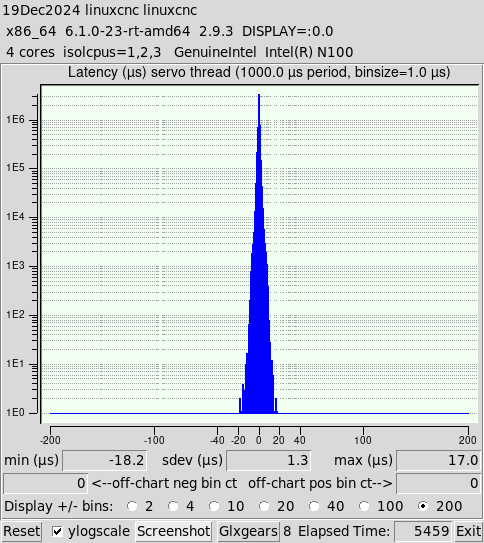
Adding my results since this is the most popular thread for 'LinuxCNC N100' on Google Search.

Hardware
  • PC: Topton 12th Gen Fanless Mini Computer Alder Lake N100 Quad Core Dual LAN 2 Industrial PC
  • Vendor: Topton Direct Store on AliExpress
  • Specs: 8GB DDR4, 128GB NVMe, WiFi, BT
  • Price: $142.60 total after some Black Friday discounts
  • Reason:
    • Old PC gave out due to overheat from dust / woodchips
    • Wanted new and cheap PC compared to the old/used stuff I've been always using.
    • I wanted an out the box, dual NIC device so that I can remote into it from my network and also have it connected to the Mesa Card. I knew about this chipset due to it being popular in the homelab space for those that run their own router (pfSense, OPNsense) since most devices that use this chipset have multiple NICs. Seeing this thread pop up in the search and the low latency results made it an easy choice for me.
    • Fanless, hopefully this prevents overheat in future as it'll be easier for me to clean. Having it now in an easily accessible area due to its small form factor will also help with that.
Latency test command
latency-histogram --nobase --sbinsize 1000 --show

Results
Lowest Latency Settings - 17.0 microseconds (μs) max
  • Test was run on an actual install of LinuxCNC 2.9.3 ISO image (not Live CD)
  • The following BIOS settings were Disabled
    • C-States
    • Virtualization
    • *Speed Shift
    • Speed Step
    • Race to Halt
  • isolcpus=1,2,3
  • *Stress tested single core by running
    yes > /dev/null
  • glxgears x 8
Notes
  • *Disabling Speed Shift gave me the best results by far, but made PC basically unusable for multi-tasking. I was going to have multiple YouTube videos playing, but trying to load it was unbearable so I decided just to stress test the CPU using the command line. With Speed Shift enabled made the PC great for multi-tasking but my latency increased to a steady 50 μs running glxgears x 8 and 2 Youtube videos. I don't intend on using this PC for anything else besides LinuxCNC, but it is cool to know I can multi-task on it while it is running as 50 μs suitable with a Mesa card.
  • Live CD proportionally gets worse results by about ~15 μs. The same test above got me 30 μs.
  • I was not able to install LinuxCNC 2.8.4 image due to a lot of driver issues. I was hoping to do a brainless PC swap, but I guess this gave me reason to upgrade.
 

Overall this is a cool little device, see attachments for pics. My biggest worry is buying a PC from an unknown OEM and future BIOS support. I guess we'll see if this stands the test of time. Otherwise, I am going back to my old, go-to, decommissioned Enterprise PCs.
  • my1987toyota
  • my1987toyota's Avatar
19 Dec 2024 23:35
Replied by my1987toyota on topic Some 3D printing advice to start this section

Some 3D printing advice to start this section

Category: Additive Manufacturing

3D printers seem to be the tool you didn't know you needed until after you have owned on.

machinedude  it's been 2 years later how has the machine held up?
  • CNC_ANDI
  • CNC_ANDI
19 Dec 2024 22:11
Replied by CNC_ANDI on topic Probe_Basic Bugs?

Probe_Basic Bugs?

Category: QtPyVCP

won´t work i´ve tried a new config with only 3 Axis... XYYZ won´t work too...
x is ref x
y is ref y
z is ref y
  • Cant do this anymore bye all
  • Cant do this anymore bye all's Avatar
19 Dec 2024 22:10
Replied by Cant do this anymore bye all on topic Raspberry Pi 5 with 7c81 WORKING!

Raspberry Pi 5 with 7c81 WORKING!

Category: Driver Boards

I doubt very much whether this would be an issue related to the hm2_spix driver. I would suggest you start another topic related to the qtdragon issue.
  • MaHa
  • MaHa
19 Dec 2024 20:36
Replied by MaHa on topic Linux CNC auf Virtualbox Simulation

Linux CNC auf Virtualbox Simulation

Category: Deutsch

In Version 2.7.15 gibts keine joints, ausser der Eintrag under TRAJ ,AXES = 4, JOINTS = 4
Im ersten post, der Screenshot, sind die Achsen schon referenziert. Nachher wird nur der Nullpunkt, zb G54 an gewünschter Stelle gesetzt. Referenziert wird nur beim Maschinenstart.

Für Simulation der eigenen Maschine, würde ich sowieso die Einträge von [TRAJ], [AXIS_0], [AXIS_1] [AXIS_2] komplett übernehmen von der Maschine, für reale Bedingungen.
Und wenns nicht mehr weitergeht, einfach die Maschinensim löschen, und neue axis_mm erstellen
  • IronManDylan
  • IronManDylan
19 Dec 2024 20:23
Replied by IronManDylan on topic Fast Hole EDM from Hacked Parts

Fast Hole EDM from Hacked Parts

Category: General LinuxCNC Questions

Update.  Want to post this before I bothered anyone with a response.  Was able to get connected.  I had 7i92 instead of 7i96. Obviously this was the problem.  I will post again when and if I hit the next sang.  Thank you. 
  • jasont64
  • jasont64
19 Dec 2024 20:06
Replied by jasont64 on topic G540 Timings (defaults too slow)

G540 Timings (defaults too slow)

Category: PnCConf Wizard

I'd like to report an experience I had with too-short timings.

All of my software/hardware is circa 2012 but mostly not used until now. I am using a g540 and 5i25 running hostmot2 from LinuxCNC.

I was using:

DIRSETUP = 2000
DIRHOLD = 2000
STEPLEN = 1500
STEPSPACE = 2500

With these settings, at very low velocities I was losing steps. I actually thought I had a backlash problem for some time. However, I eventually accidentally tried jogging at extremely low speed and noticed nothing happened at all, and after some time my position was significantly off from what LinuxCNC displayed.

Based on another thread here, I tried some more conservative timings:

DIRSETUP = 2000
DIRHOLD = 2000
STEPLEN = 5000
STEPSPACE = 5000

With these settings, my problems are gone. So if you are running at very tight settings, I recommend you try jogging at extremely low velocity and see if you get into a mode where the axis does not move, just in case you encounter the same problem.
  • PCW
  • PCW's Avatar
19 Dec 2024 19:53
Replied by PCW on topic Another joint 0 on limit switch error

Another joint 0 on limit switch error

Category: Basic Configuration

If you are using the 7I73 input for a limit switch, I would debounce it.

Also why are you not using 7I96S isolated input for the limits? These are more resistant to EMI
and have built in debouncing (set the inm "slow" attribute for the corresponding inm input pin)
 
  • agima2
  • agima2
19 Dec 2024 19:41
Replied by agima2 on topic Linux CNC auf Virtualbox Simulation

Linux CNC auf Virtualbox Simulation

Category: Deutsch

Ich habe in der axis_mm.ini geschaut. Dort gibt es kein JOINT_0, JOINT_1 usw.
 
  • vibram
  • vibram
19 Dec 2024 19:35
Replied by vibram on topic Another joint 0 on limit switch error

Another joint 0 on limit switch error

Category: Basic Configuration

Hi rod, thank you for your help. 
I manually tried both switch and they are working well. Here is what I don't understand :

If I manually push on one limit switch, my signal joint.0.pos.lim.sw in become high,I get the joint error, then the tickbox "override limit" which is normally greyed out become available 

But when I don't manually push the limit switch, bot signal pos and neg lim sw are low, the tickbox is still greyed out and I get the error. 
So I'm not sure my error is linked to the limit switch. And my homing routine works fine with a first rough touch, then a second fine touch and then come back 10mm. 
Displaying 21406 - 21420 out of 22067 results.
Time to create page: 0.419 seconds
Powered by Kunena Forum