Advanced Search

Search Results (Searched for: )

  • oodanner
  • oodanner
08 Sep 2025 15:28

Remora - Rpi Software Stepping Using External Microcontroller via SPI

Category: Computers and Hardware

Have you tried to open the HAL configuration after the axis gui comes up and add in the pins you want to monitor. I would have the SPI status and enable pins there to check and see if your SPI connection is stable. I initially had a problem with the board I was using not getting a good flash and I had to use the BTT tool they talk about in their wiki to rewrite the original firmware before I could load the Remora firmware.bin to the root of the SD card and then it finally loaded the firmware correctly. I also ran into some issues with the firmware constantly resetting itself if I tried certain settings in my config.txt file. This is what I currently have in the conifg.txt file which may not be helpful since I'm running an Octopus v1.1 board.

{
"Board": "BIGTREETECH OCTOPUS PRO V1.1 STM32F446",
"Modules": [
{
"Thread": "Servo",
"Type": "Digital Pin",
"Comment": "X-min endstop",
"Pin": "PG_9",
"Mode": "Input",
"Invert": "True",
"Data Bit": "1",
"Modifier": "Pull Up"
},
{
"Thread": "Servo",
"Type": "Digital Pin",
"Comment": "Y1-min endstop (left Y motor)",
"Pin": "PG_10",
"Mode": "Input",
"Invert": "True",
"Data Bit": "2",
"Modifier": "Pull Up"
},
{
"Thread": "Servo",
"Type": "Digital Pin",
"Comment": "Y2-min endstop (right Y motor)",
"Pin": "PG_11",
"Mode": "Input",
"Invert": "True",
"Data Bit": "3",
"Modifier": "Pull Up"
},
{
"Thread": "Servo",
"Type": "Digital Pin",
"Comment": "Z-min endstop",
"Pin": "PG_12",
"Mode": "Input",
"Invert": "True",
"Data Bit": "4",
"Modifier": "Pull Up"
},
{
"Thread": "Servo",
"Type": "Digital Pin",
"Comment": "E-stop input",
"Pin": "PG_15",
"Mode": "Input",
"Invert": "True",
"Data Bit": "5",
"Modifier": "Pull Up"
},
{
"Thread": "Servo",
"Type": "Digital Pin",
"Comment": "Probe input",
"Pin": "PB_7",
"Mode": "Input",
"Data Bit": "6",
"Modifier": "Pull Up"
},
{
"Thread": "Servo",
"Type": "Digital Pin",
"Comment": "Coolant flood",
"Pin": "PD_12",
"Mode": "Output",
"Data Bit": "1"
},
{
"Thread": "Servo",
"Type": "Digital Pin",
"Comment": "Coolant mist",
"Pin": "PD_13",
"Mode": "Output",
"Data Bit": "2"
},
{
"Thread": "Base",
"Type": "Stepgen",
"Comment": "X-axis - Stepper Driver 0",
"Joint Number": 0,
"Step Pin": "PF_13",
"Direction Pin": "PF_12",
"Enable Pin": "PF_14"
},
{
"Thread": "Base",
"Type": "Stepgen",
"Comment": "Y1-axis (left Y motor) - Stepper Driver 1",
"Joint Number": 1,
"Step Pin": "PG_0",
"Direction Pin": "PG_1",
"Enable Pin": "PF_15"
},
{
"Thread": "Base",
"Type": "Stepgen",
"Comment": "Y2-axis (right Y motor) - Stepper Driver 2",
"Joint Number": 2,
"Step Pin": "PF_11",
"Direction Pin": "PG_3",
"Enable Pin": "PG_5"
},
{
"Thread": "Base",
"Type": "Stepgen",
"Comment": "Z-axis - Stepper Driver 3",
"Joint Number": 3,
"Step Pin": "PG_4",
"Direction Pin": "PC_1",
"Enable Pin": "PA_0"
},
{
"Thread": "Servo",
"Type": "Reset Pin",
"Comment": "Reset pin",
"Pin": "PC_15"
}
]
}
  • tommylight
  • tommylight's Avatar
08 Sep 2025 15:27

Retrofitting a 3-axis VMC with DC servos - guidance needed

Category: Driver Boards

Z400, Z420, Z600, and probably Z440, Z620, Z640, Z800, Z820 should all do just fine, those 3 at the start i have tested over 20 by now. Also HP 8300 SFF are pretty good, i have maybe 6 or 7 in daily use on machines.
Dell Optiplex series are also good, 7020, 9020 and 980, these i have in daily use, several of them for several years, but they do tend to heat much more than HP ones.
  • emresensoy
  • emresensoy
08 Sep 2025 15:23

SOLVED - VNC Server problem on Raspberry Pi 5 4GB - LinuxCNC official image

Category: General LinuxCNC Questions

If you try to connect remotely via VNC after logging in with your username from the console, you'll get a gray screen. You'll need to log out from console.
  • tommylight
  • tommylight's Avatar
08 Sep 2025 15:15

How to correctly connect stepper drivers to transformer.

Category: Milling Machines

Since the drives can handle it, i would stick with PCW's advice.
Do not worry much about drives getting hot, if you can hold your hand on the cooler they are still far from what they can handle, and just in case, if you touch them and a piece of your skin remains attached to them this would be when you start to worry.
50-60 degree Celsius to us humans seems like it is burning, 80 feels like it burns the soul, not the hand. :)
  • ziggi
  • ziggi's Avatar
08 Sep 2025 15:01 - 08 Sep 2025 15:08

Troubles to get started with SD240 Retrofit

Category: Turning
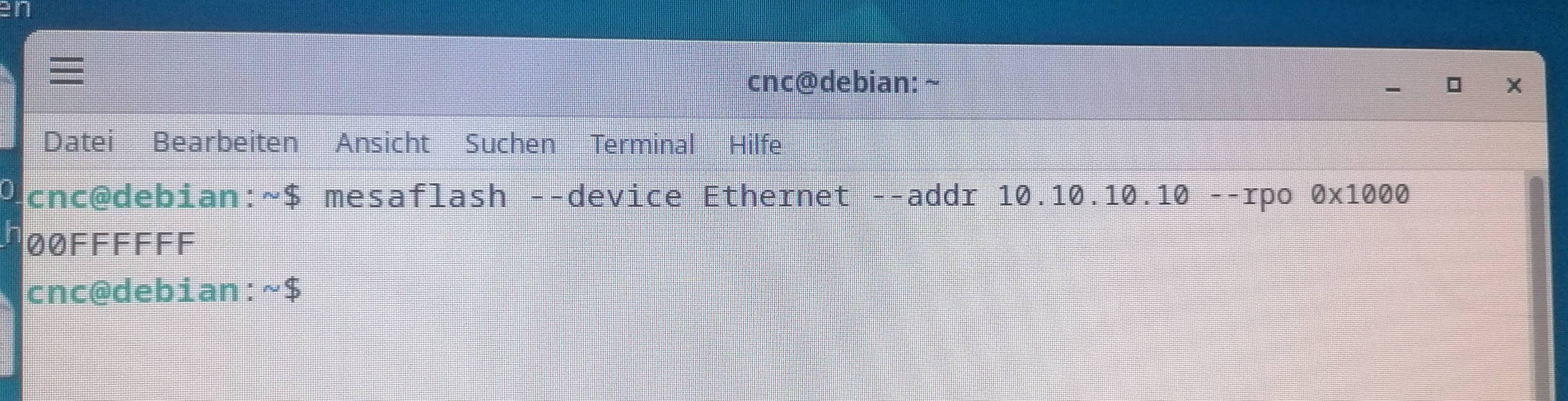
If I disconnect both cards (7i33 and 7i37) and type the command, it says nothing but OFF... 
Though Linux says connected

 
  • Japoo_Ness
  • Japoo_Ness
08 Sep 2025 14:53

Retrofitting a 3-axis VMC with DC servos - guidance needed

Category: Driver Boards

Hello, sorry for the late reply; I've been dealing with some personal matters.

I finally decided to go with the 7i97T and the 7i84U. I also bought the 7i74 and the 7i73 for future expansion. The first two boards alone are already overkill for my current needs, but I got the 7i74 so I can eventually add the 7i73 for a pendant controller with a screen.

I'm thinking of setting that up from the beginning since the PC won't be very accessible once everything is running. Having a handwheel for moving the axes and a few shortcuts or macros seems like a really good idea.

With just the first two boards, everything should be up and running. I expect that counting shipping and everything else, it should all arrive here in Argentina around the 15th of September.

So now, I'm starting to look for the PC to run it all. I saw the HP Z400 that @tommylight recommended for @andy. I can find it here for fairly cheap, refurbished. It comes with an Nvidia FX3800 for video output. Is that a good PC for this use case, or should I be looking for something else?

Thank you guys for all your help.
  • Lcvette
  • Lcvette's Avatar
08 Sep 2025 14:46

probe_basic "Latest update requires config modification"

Category: QtPyVCP

On updates, the status page becomes the splash page with important information for any changes made. It's the easiest way for us to make sure you are aware of and know to make those required changes with links of where to get additional information on them.

It is actually monumentally helpful for those who are running apt installations and who run apt update and have new releases get installed so they don't have issues and no idea why they have issues and where they are coming from.

On the same page is the error box on the right that reports actual errors in real time. If you have an issue that is affecting functionality, you will receive normal error pop up dialogs and the history of them will display in that box for trouble shooting.

I can see your perspective and will add a blurb regarding the intent of the splash page to avoid the issue for anyone in the future. You are the first to have an issue who reported it so while unfortunate, we appreciate you being it to our attention.
  • amanker
  • amanker
08 Sep 2025 14:40

Remora - Rpi Software Stepping Using External Microcontroller via SPI

Category: Computers and Hardware

I can see remora input or joint cmd in HAL Meter. But nothing happnes in GUI. If I press limit switch, I can see remora input in HAL Meter but there is no msg regarding limit switch in GUI. 
  • tommylight
  • tommylight's Avatar
08 Sep 2025 14:39

StepConf - tandem axe Y - comment configurer 2 moteurs synchrones

Category: Français

I can't connect them to the same driver because the motors are symmetrically positioned, meaning the direction of motor Y2 must be reversed.

You can, just switch places of ONE winding on the motor.
  • 3Draf
  • 3Draf
08 Sep 2025 14:02

StepConf - tandem axe Y - comment configurer 2 moteurs synchrones

Category: Français

Hello, thank you for your reply.
I can't connect them to the same driver because the motors are symmetrically positioned, meaning the direction of motor Y2 must be reversed.
In addition, I plan to install two limit switches later to correct for positioning mismatches between the two motors, which requires two independent outputs (and inputs).

P.S.: I'm using LinuxCNC 2.9.4 on an old PC with a parallel port.
Bonjour, merci pour votre réponse.
Je ne peux pas les connecter sur le même driver, car les moteurs sont placés de manière symétrique, ce qui fait que la direction du moteur Y2 dois être inversée.
De plus, je compte par la suite installer deux capteurs de fin de course pour corriger les décalages de positionnement entre les deux moteurs, si qui nécessite d'avoir deux sorties (et entrer) indépendantes.

Ps : j'utilise linuxCNC 2.9.4 sur un vieux PC avec port parallèle.
  • andypugh
  • andypugh's Avatar
08 Sep 2025 13:57
Replied by andypugh on topic Rotary Scanning

Rotary Scanning

Category: General LinuxCNC Questions

This might be as simple as setting the G54 (or similar) coordinate offset with a G10 command using the measured value.
Then leave the G-code unchanged, and based on G54 zero as the low point.
  • mBender
  • mBender
08 Sep 2025 13:33

Machine off at the end of the programm. Repeatable!

Category: Milling Machines

Consistent position errors after a long program could indicate a step timing
or polarity issue. Too low direction setup or hold times could cause a lost step
at reversals. Wrong step polarity can also cause this issue as stepping on the
trailing edge of the step pulse (rather then the expected leading edge) will
decrease the expected hold time.

It might be worth either inverting the step polarity or increasing the setup/hold times,
at least to see if it changes anything.


Polarity could very well be an issue! I changed a few things on the control unit recently and did not pay close attention to the polarity. I thought that would not matter. I will test that asap and report back. 
  • mBender
  • mBender
08 Sep 2025 13:30

Machine off at the end of the programm. Repeatable!

Category: Milling Machines

Some of the cheaper fixed bearing blocks are sold with non angular contact bearings, this is something to check.
Until you perform a backlash test, and yes this can manifest as repeatable, you can not rule out a mechanical issue.


I machined the fixed bearings myself. You can find the parts on cults, the bearing has proper angular contact bearings and the mechanical play is minimal. Keep in mind the pictures are with the old couplings!  cults3d.com/en/3d-model/various/y-achse-kus-frasteile

Let me know how exactly you want me to perform the backlash test and I will give that a try. 
  • andypugh
  • andypugh's Avatar
08 Sep 2025 13:15
LinuxCNC 2.9.5 has been released was created by andypugh

LinuxCNC 2.9.5 has been released

Category: LinuxCNC Announcements

LinuxCNC 2.9.5 has been released.

This is mainly a bugfix release, but includes a new modbus driver for
the Mesa UART (update/replacement for mesa_modbus with more
flexibility and configurability)

Packages for 2.9-uspace for amd64 (PC) for Debian Buster, Bullseye,
Bookworm and Trixie and for arm64 (Raspberry Pi 4/5) for Buster and
Bookworm have been added to the linuxcnc repository.
If you installed from one of our live images or Pi SD-card images then
the update should be available immediately.

If you  installed into a normally-installed Debian from the Debian
repositories then hopefully the new version can be queued up for the
next point release. If you can't wait then it is possible to add the
LinuxCNC repositories to the apt sources. One way to do this and
install the security keys is via the shell script here:
linuxcnc.org/docs/stable/html/getting-st...th_preempt_rt_kernel

At the moment the live-image installer and SD card images will install
2.9.4 but update should be trivial (and possibly automatic)

RTAI is still supported, but in the short term building from source is
likely to be the most expedient way to get 2.9.5 on that platform.

Highlights:

 * Backport new hm2_modbus driver to 2.9 branch.
 * Fix probe contact bounce triggering error during decel phase

Abridged list of other updates.

 * gmoccapy: change text to icons of undo/redo buttons to fit window size
 * tests: save.1 test removed. It's been skipped for 19 years.
 * halui: on startup, set the first configured axis as 'is-selected'
instead of X
 * halui: Don't create 'halui.axis.'- pins for unconfigured axes
 * qtvcp versa probe: remember setting of auto skew/zero buttons we reopened
 * PyVCP test: result file formatting fixes (#3551)
 * stepconf -fix human input names in wrong order
 * Tests: Add a test for PyVCP - Specifically Issue #3538
 * Deprecate gantry.comp
 * Fix #3538 - "halparam" tag not working in PyVCP
 * tests: Add a test for spindle INI speed limits function
 * Fix a race; add a test to ensure the 'result' and 'stderr' files
are closed before continuing to run 'checkresult'.
 * Fix command-line directories acceptance by correct expansion.
 * Fix a race between setting the signal handlers and marking hal_ready().
 * Gladevcp: Update the .ui and .glade files in the sample configs to Gtk+3.0
 * clarify documentation on stat 'gcodes' and (spindle)'speed' attributes
 * Merge pull request #3460 from
Sigma1912/2.9-Fix-preview-update-not-respecting-active-wcs
 * Don't use  RS274NGC_STARTUP_CODE when updating the preview
 * Merge pull request #3454 from Sigma1912/2.9_Fix_issue_3447
 * Gmoccapy: Fix very large numbers for spindle speed and 'Vc' in the
gui when using G96
 * Gmoccapy: Fix 'spindle.0.speed-out' pins being reset to wrong value
when using G96
 * Split declaration/assignment with label because it is not accepted
by the compiler in Debian 10 and 11.
 * Fix invalid escape sequence warnings from halcompile and hal components.
 * Fix missing parity error definition
 * Merge pull request #3412 from BsAtHome/backport_2.9_fix_update-pktuart-v3
 * Update, fix and reorganize hostmot2 PktUART to support V3.
 * debian: Updated policy standard to 4.7.2
 * orient: Commit 79c0966 had an un-noticed effect on the behaviour of
M19 reported in issue #3389
 * ServoToGo: remove old weblinks that now redirect to a spam site
 * halui -fix spindle override using direct value.
 * gmoccapy: fix setting to disable "run from line"
 * halscope: set button left and right padding to 0 to allow smaller window size
 * docs: update halscope channel off function + update images
 * qtdragon_hd_vert -add a sample config for vertical layout.
 * qtvcp -qtdragon_hd_vert: add a vertical layout version
 * Merge pull request #3339 from NTULINUX/ntulinux/2.9-fixes
 * interp_o_word.cc: Insert almost-certainly-missing "breaks" addresses #3290
 * qtvcp -vismach config cleanup: gantry_5axis, millturn, vismach_fanuc_200f

The full changelog can be seen at
github.com/LinuxCNC/linuxcnc/blob/2.9/debian/changelog

As always, we couldn't do this without the contributions from the
community, so many thanks to:

Alec Ari
andronick83
Bertho Stultiens
CMorley
DauntlessAq
David
Hans Unzner
Petter Reinholdtsen
Rene Hopf
Sigma1912
Steffen Möller
 
  • scsmith1451
  • scsmith1451's Avatar
08 Sep 2025 12:59
Replied by scsmith1451 on topic Mapping key codes to specific jog rates

Mapping key codes to specific jog rates

Category: Advanced Configuration

Sorry to keep updating this thread.  After a lot of reading this morning, I think I have a workable solution by adding two buttons to my gvcp, one for min jog rate and one for max jog rate.

Given this solution, is there a way to logically press these buttons via a mapped keyboard key?
Displaying 10156 - 10170 out of 17035 results.
Time to create page: 0.793 seconds
Powered by Kunena Forum