
Advanced Search

Search Results (Searched for: )

  • Giovanni
  • Giovanni
06 Apr 2025 17:31
Replied by Giovanni on topic NativeCam on LinuxCNC 2.9.3

NativeCam on LinuxCNC 2.9.3

Category: NativeCAM

It seems to me you (bothf you) have a problem showing up the interface.
Have you tried to run NativeCAM from the terminal?
  • Chia
  • Chia
06 Apr 2025 17:00
Replied by Chia on topic Joint1 following error

Joint1 following error

Category: General LinuxCNC Questions

Yes, it’s a RPI.
May I kindly ask how the “Max Velocity” slider affects the machine? I initially thought that all machine controls were determined solely by the .hal and .ini files. Additionally, I would like to understand why the value needs to be divided by 60 when setting the MAX_VELOCITY parameter in the .ini file.

I’m currently using GT20 20 tooth belts, and the drive is set to 8 microsteps. May I ask how to correctly calculate and set the SCALE value based on this configuration?
  • tommylight
  • tommylight's Avatar
06 Apr 2025 16:49
Replied by tommylight on topic Linux_Mint_22.1_LinuxCNC_2.10.iso

Linux_Mint_22.1_LinuxCNC_2.10.iso

Category: Installing LinuxCNC
Should be fixed now.
Sorry.
  • cakeslob
  • cakeslob
06 Apr 2025 16:32
  • gmouer
  • gmouer
06 Apr 2025 16:28 - 06 Apr 2025 16:35
Replied by gmouer on topic NativeCam on LinuxCNC 2.9.3

NativeCam on LinuxCNC 2.9.3

Category: NativeCAM

I am having the same issue as Becksvill , that is axis launches with a NativeCAM tab but that tab is empty when opened.I ran linuxcnc from terminal as suggested,   results of that terminal window  attached here.   I also attached the INI file for reference.

George 

File Attachment:

File Name: errorFile.txt
File Size:2 KB


File Attachment:

File Name: axis.ini
File Size:5 KB
              
  • cakeslob
  • cakeslob
06 Apr 2025 16:23

Remora - Rpi Software Stepping Using External Microcontroller via SPI

Category: Computers and Hardware

Hmm yeah the TMC drivers arent configuring, but that shouldnt be related to the SPI comms. Just remove the drivers until you can get it to connect.

The serial output looks good, and there is SPI stuff happening hmmm

in your halfile, try replacing this line to this line
loadrt remora-spi SPI_clk_div=32 PRU_base_freq=40000
  • gmouer
  • gmouer
06 Apr 2025 15:35
Replied by gmouer on topic NativeCam on LinuxCNC 2.9.3

NativeCam on LinuxCNC 2.9.3

Category: NativeCAM

i have a tab now with nativecam but its blank

this time i got right through the guide you did right to the end without errors

cheers

Andrew


I installed both the 2.9.4 ISO and NativeCAM using the guide posted here.
I got no error BUT I also have the NativeCAM tab showing on the axis sim screen AND mine is also a empty blank tab.

Not sure how to proceed so will watch here for updates

George
  • PCW
  • PCW's Avatar
06 Apr 2025 14:34

homing with Phase Z encoder on MESA 7i96s

Category: Advanced Configuration

Unfortunately Autotune programs do no adjust the feedforward or deadzone terms so fairly useless
in real world situations.

I suspect for the best performance of a position control (stepgen or Ethercat or whatever) with an added
linear feedback device, you would need two PID loops, the local high bandwidth position loop plus a lower bandwidth
PID loop using the linear encoder feedback. This could be done in hal with two PID components with their outputs
summed.
  • scotth
  • scotth
06 Apr 2025 13:55
Replied by scotth on topic Linux_Mint_22.1_LinuxCNC_2.10.iso

Linux_Mint_22.1_LinuxCNC_2.10.iso

Category: Installing LinuxCNC

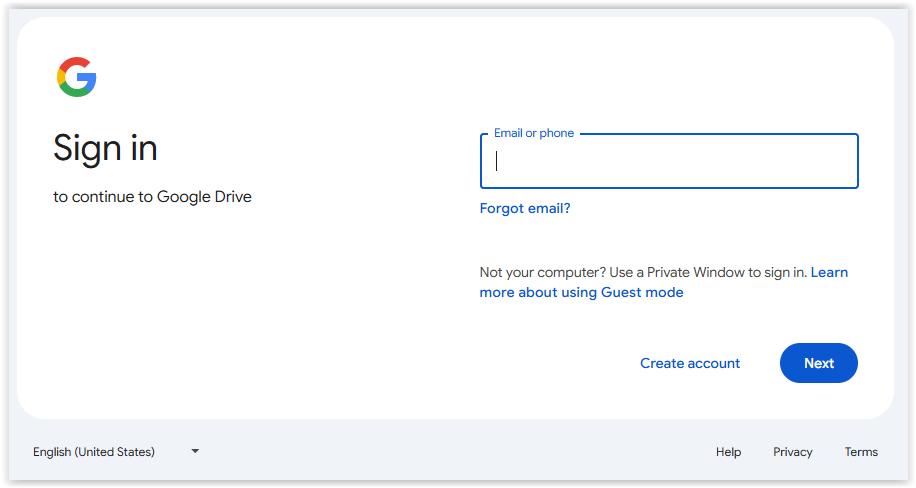
I'm having a problem, it wants me to log in to the drive.


  • Lcvette
  • Lcvette's Avatar
06 Apr 2025 12:55
Replied by Lcvette on topic Probe_basic paramters not updating.

Probe_basic paramters not updating.

Category: QtPyVCP

Are you using the mill version? I don't think I ever set up large for probing yet because I had no tool setter. Tell me more about what you're doing. The parameters are for the mill UI.
  • gmouer
  • gmouer
06 Apr 2025 12:49 - 06 Apr 2025 12:51
Replied by gmouer on topic NativeCam on LinuxCNC 2.9.3

NativeCam on LinuxCNC 2.9.3

Category: NativeCAM

Giovanni,

Can you confirm something for me? I am going to attempt installing today.

Your guide was posted here 09/feb/2025 but when I downloaded the files from the link in the guide the files are all dated 04/oct/2024. I was expecting updated files from reading this thread. I thought there were recent file updates????

Thanks much for all the work on this.
  • sajurcaju
  • sajurcaju
06 Apr 2025 12:49
Halscope trigger level grayed out was created by sajurcaju

Halscope trigger level grayed out

Category: General LinuxCNC Questions

When I started halscope, the trigger level slider worked as expected. For some reason it has become non-functional. The slider is gray, no green, no way to adjust it. I've tried restarting halscope and changing trigger channel. It doesn't matter if I'm in Normal or Auto trigger.

Thanks,
Steve
  • behai
  • behai
06 Apr 2025 12:20

4-Gang 1-Way Switch To Control 3 Power Supplies and a Router Independently

Category: Computers and Hardware

Here's an explanation of "Latching Relays", which is what my schematic shows. I made up some PCBs to make the connections easier.

www.pcbway.com/blog/PCB_Basic_Informatio...Relays_d665ce9b.html


Good evening Rob,

Thank you for the article link. In principle, I understand how it works.

Best regards,

...behai.

 
  • mark0815
  • mark0815
06 Apr 2025 12:04
Replied by mark0815 on topic EL7041-1000 configuration question

EL7041-1000 configuration question

Category: EtherCAT

Thanks for the suggestion.
It turned out the following errors not related to the acceleration but to the EtherCAT configuration.
After searching Github for other LinuxCNC configurations (which I should have done in first place) using the EL7041 I was able to create a working configuration.
I'm not 100% sure why it works now, but I suspect the "srv-scale" wasn't set correctly.

In case someone has a similar problem getting started, the config is accessible on Github .

/Mark
 
  • AMLD
  • AMLD
06 Apr 2025 11:50 - 06 Apr 2025 11:56

QtDragon_hd + Basic Probe - probing results not displayed

Category: Qtvcp

Hi guys,

after performing probing (with Basic Probe routine), the results are not displayed in the GUI immediately. The results appear only after pressing the probing button again. Additionally, the values from the previous probing are still displayed each time a new probing is performed.It seems that the GUI is not being updated properly to reflect the new probing results.I am using the QtDragon_HD GUI with the Basic Probe routine. After performing several tests, the current situation is as follows:
  • If you press the button for Z-axis height probing (probe down routine), the probe starts moving. If you change the feedrate or rapid override potentiometer value during this movement, the program does not wait for the probing to finish, but instead immediately displays the previously measured value in the table (in the case of the first probing, it shows 0).
  • If you press the button for Z-axis height probing (probe down routine), the probe starts moving. If you don’t change the feedrate or rapid override potentiometer value during this movement, the program waits for the probing to finish, and only after successful probing does the value in the table update — however, once again it shows the previously measured value (or 0 in the case of the first probing)
Can someone explain to me why, even after a successful probing, the currently measured value is not displayed, but instead the value from the previous measurement is shown?
Could this be caused by a synchronization issue between the Basic Probe widget and the measurement subroutine?

Thanks a lot!
Displaying 17101 - 17115 out of 17647 results.
Time to create page: 0.410 seconds
Powered by Kunena Forum


