Advanced Search

Search Results (Searched for: )

  • aikiaviator
  • aikiaviator
24 Dec 2024 07:07
Replied by aikiaviator on topic To Probe Basic from Gmoccapy

To Probe Basic from Gmoccapy

Category: QtPyVCP

Ok, I dont know if I have stuffed anything up, but I have cleared the errors and it is now at least running. Partially functional.

This is what I did for reference.

a) In /halib I took a copy of the probe_basic_postgui.hal, called it D_probe_basic_postgui.hal, and then proceeded to delete everything in probe_basic_postgui.hal. So basically probe_basic_postgui.hal it is a file with nothing in it. 

If this requires content for Probe Basic to function properly, please advise.

b) In the "machine name".ini file I have replicated the lines that have a "# Recommended Setting for Probe Basic". I have then deleted all of the "# Recommended Setting for Probe Basic"  comments from one of each of these lines.

e.g. 
#MAX_FEED_OVERRIDE = 2.00000                                            # Recommended Setting for Probe Basic
MAX_FEED_OVERRIDE = 2.00000

From what I can tell the error was because the number was being interpreted as a string because of the comment. So without "# Recommended Setting for Probe Basic" it now reads as a number.

This may well be the issue with the other lines like User_Tabs etc... being interpreted as a complete string and therefore being read incorrectly.

So if I have made any errors here, please let me know as I am a Newbie and NOT a programmer by any stretch. I do no programming at all and very new to Linux.... like weeks. I just follow my nose and hack. So any help/advice would be appreciated.

Thanks.
 
  • beauxnez
  • beauxnez
24 Dec 2024 06:30 - 24 Dec 2024 08:09

Remora - ethernet NVEM / EC300 / EC500 cnc board

Category: Computers and Hardware

too complicated for me, there is no video or tutorial?
thanks
  • Dave2024
  • Dave2024's Avatar
24 Dec 2024 04:27 - 24 Dec 2024 04:41
Replied by Dave2024 on topic After homing move off of limit switch

After homing move off of limit switch

Category: Basic Configuration
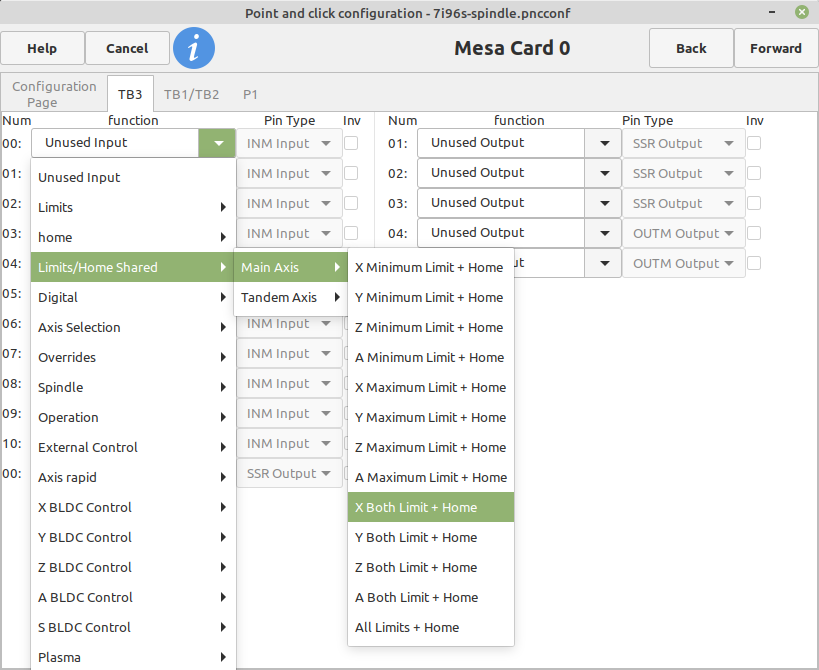
Well I’m not able to go into pncconf and have it load all the settings it only loads defaults.  I think it’s because when I switched PC’s all I did was copied the .ini and the .hal file into a quickly generated pncconf machine folder and never actually set it up on this PC.  I tried to set it up using your suggested procedure then copying the new lines and pasting them into my hal file but even with the new line: 

# --- MAX-HOME-X ---
net max-home-x     <= [HMOT](CARD0).inm.00.input-02-not
 Its still homing correctly but then when jogging the table it goes to the max and engages the switch again but its not stopping and will proceed to crash.  I did however set MAX_LIMIT in the ini file and it wont crash but it would also be nice to have the limit switch also stop the table.
I think im going to give up for now.  Thanks for the help though.  Maybe ill try again in a few weeks when I find a serious reason to have to have the same limit switch stop the table.  What I have works for now 


*Edit:  Wait never mind, I just found my origonal .xml setup file.  I see if i can get the files in the correct locations to load the pncconf data from the first time I set it all up on the first PC.  I let you know how it all goes.  Anyways thanks again for all the help*
  • aikiaviator
  • aikiaviator
24 Dec 2024 04:15
Replied by aikiaviator on topic To Probe Basic from Gmoccapy

To Probe Basic from Gmoccapy

Category: QtPyVCP

Hi, Done that from ini file re-ran: following error...

Traceback (most recent call last):
File "/usr/bin/probe_basic", line 8, in <module>
sys.exit(main())
^^^^^^
File "/usr/lib/python3/dist-packages/probe_basic/__init__.py", line 20, in main
qtpyvcp.run_vcp(opts, VCP_CONFIG_FILE)
File "/usr/lib/python3/dist-packages/qtpyvcp/__init__.py", line 26, in run_vcp
run(*args, **kwargs)
File "/usr/lib/python3/dist-packages/qtpyvcp/app/__init__.py", line 129, in run
launch_application(opts, config)
File "/usr/lib/python3/dist-packages/qtpyvcp/app/launcher.py", line 78, in launch_application
loadWindows(config)
File "/usr/lib/python3/dist-packages/qtpyvcp/app/launcher.py", line 230, in loadWindows
window = _initialize_object_from_dict(window_dict)
^^^^^^^^^^^^^^^^^^^^^^^^^^^^^^^^^^^^^^^^^
File "/usr/lib/python3/dist-packages/qtpyvcp/app/launcher.py", line 210, in _initialize_object_from_dict
return obj(*args, **kwargs)
^^^^^^^^^^^^^^^^^^^^
File "/usr/lib/python3/dist-packages/probe_basic/probe_basic.py", line 55, in __init__
self.load_user_buttons()
File "/usr/lib/python3/dist-packages/probe_basic/probe_basic.py", line 65, in load_user_buttons
user_button_folders = os.listdir(user_buttons_path)
^^^^^^^^^^^^^^^^^^^^^^^^^^^^^
FileNotFoundError: [Errno 2] No such file or directory: 'user_buttons/ # REQUIRED Setting for Probe Basic'
  • Lcvette
  • Lcvette's Avatar
24 Dec 2024 03:55 - 24 Dec 2024 03:57
Replied by Lcvette on topic To Probe Basic from Gmoccapy

To Probe Basic from Gmoccapy

Category: QtPyVCP

Comment out:

#USER_TABS
​​​​
  • aikiaviator
  • aikiaviator
24 Dec 2024 03:50
Replied by aikiaviator on topic To Probe Basic from Gmoccapy

To Probe Basic from Gmoccapy

Category: QtPyVCP

and attached ini and hal files for reference...And although not in the spec, sserial.hal looks like it was necessary given config is on a 7i76S 7i85S 7i73 based system.

File Attachment:

File Name: sserial.hal
File Size:0 KB

File Attachment:

File Name: main.hal
File Size:7 KB

File Attachment:

File Name: pm728_7i96...l_pb.ini
File Size:4 KB
  • aikiaviator
  • aikiaviator
24 Dec 2024 03:40
Replied by aikiaviator on topic To Probe Basic from Gmoccapy

To Probe Basic from Gmoccapy

Category: QtPyVCP

Ok, so installed and getting a few errors after loading and conversion. I definitely feel this is very close to working. Missing some files I believe and maybe a little version control on some config content. The files are attached.
Any help appreciated.

File Attachment:

File Name: probe_basi...rors.txt
File Size:1 KB

File Attachment:

File Name: linuxcnc_report.txt
File Size:17 KB
  • Trihwangyudi1990
  • Trihwangyudi1990
24 Dec 2024 03:24

ESP32/S2/S3 LinuxCNC Controller (6 axis hardware step gen), USB plug-and-play

Category: Computers and Hardware

thanks tom, maybe have a lot question, wants to make custom board, i see in bottom of thoose file from sybexx and wezzhunter have option of lolin s2 mini, i thinks its would be greats if i put in my custom board's, it will drive shift register chips with 74hc595 to step and dir signal, anyone use thoose board (i mean lolin s2 mini)? are they no need w5500 board for comunication with linuxcnc i mean direct usb type C comunication?
  • PCW
  • PCW's Avatar
24 Dec 2024 02:56
Replied by PCW on topic After homing move off of limit switch

After homing move off of limit switch

Category: Basic Configuration

Yes, you have a duplicated signal which is not allowed

Have you tried using pncconf  and setting up combined
home/min-limit/max-limits ?

 Like this (for X) :

:
 
  • Dave2024
  • Dave2024's Avatar
24 Dec 2024 01:57 - 24 Dec 2024 02:50
Replied by Dave2024 on topic After homing move off of limit switch

After homing move off of limit switch

Category: Basic Configuration

Hey sorry but im back. So after I figured out how to get the table to move slightly forward and no longer on the limit switch after homing I went into my hal file and edited it so like so:

# --- HOME-X ---
net home-x <= [HMOT](CARD0).inm.00.input-02-not

# --- MAX-X ---
net max-x <= [HMOT](CARD0).inm.00.input-02-not


Now both home-x and max-x are pointed to the same pin with the one limit switch but when I goto run I get the error:

./BadassLinuxCNCmill.hal:49: Pin 'hm2_7i96s.0.inm.00.input-02-not' was already linked to signal 'home-x'


Does this mean that LinuxCNC will only allow you to assign one unique pin to each input signal? So like would I need to instead assign max-x to a different unused pin and then run a jumper wire across to it?


Also thanks with all the help with this
  • PCW
  • PCW's Avatar
24 Dec 2024 01:24
Replied by PCW on topic Timed delay

Timed delay

Category: Advanced Configuration

The error is because button-press is a signal, not a pin
Looks like you need to delete one signal as you have two
with the same function:


# Input and output configuration
net relay-2-control <= hm2_7i95.0.inmux.00.input-05 # Connect input pin 5 to signal button-press
net relay-1-control => hm2_7i95.0.ssr.00.out-01 # Connect signal relay-1-control to relay output 1
net relay-2-control => hm2_7i95.0.ssr.00.out-03 # Connect signal relay-2-control to relay output 3

# Load and configure timedelay
loadrt timedelay count=1
addf timedelay.0 servo-thread

setp timedelay.0.on-delay 1.0 # 1-second delay
setp timedelay.0.off-delay 0.0 # No off delay

# Timedelay connections
net relay-2-control => timedelay.0.in # Link button-press signal to timedelay input
net relay-1-control <= timedelay.0.out # Link timedelay output to relay-1-control

# Direct button connection to second relay
# Cant drive a signal from another signal:  net relay-2-control <= button-press # Relay 2 activates directly with button press
  • gardenweazel
  • gardenweazel's Avatar
24 Dec 2024 01:10
Replied by gardenweazel on topic Inconsistent values from Versaprobe

Inconsistent values from Versaprobe

Category: Qtvcp

I tried what you recommended, this time after the back-off touch, nothing happened and the spindle just sat there with no movement. Although no error.

For some crazy reason I also lost control of my WHB04B-4 MPG. Incredibly annoying!

As an FYI in versaprobe routine there is a BLOCKHEIGHT and PROBEHEIGHT which is what I suspect that you're eluding to here.

I'd like t o hear from ANYONE who's is successfully using VersaProbe successfully using the master.

Realistically, I simply want an error free manual tool change with minimal error margins.

Thanks @MaHa!
  • Sternfox
  • Sternfox
24 Dec 2024 01:09
Replied by Sternfox on topic Timed delay

Timed delay

Category: Advanced Configuration

I did try one-shot but couldn't get it to work. So I then tried timedelay and nearly have it working

# Input and output configuration
net button-press <= hm2_7i95.0.inmux.00.input-05 # Connect input pin 5 to signal button-press
net relay-1-control => hm2_7i95.0.ssr.00.out-01 # Connect signal relay-1-control to relay output 1
net relay-2-control => hm2_7i95.0.ssr.00.out-03 # Connect signal relay-2-control to relay output 3

# Load and configure timedelay
loadrt timedelay count=1
addf timedelay.0 servo-thread

setp timedelay.0.on-delay 1.0 # 1-second delay
setp timedelay.0.off-delay 0.0 # No off delay

# Timedelay connections
net button-press => timedelay.0.in # Link button-press signal to timedelay input
net relay-1-control <= timedelay.0.out # Link timedelay output to relay-1-control

# Direct button connection to second relay
net relay-2-control <= button-press # Relay 2 activates directly with button press

Problem I'm having is I'm getting the error pin button-press does not exist. Any ideas?
  • PCW
  • PCW's Avatar
24 Dec 2024 00:54 - 24 Dec 2024 01:11
Replied by PCW on topic After homing move off of limit switch

After homing move off of limit switch

Category: Basic Configuration

The settings are in the ini file, not a hal file so custom.hal won't help here,
but pncconf remembers your homing settings so you can re-edit them later
with pncconf.  To do this, select "Modify a configuration already created by this program"
when starting pncconf. Note that if you edited your ini file or hal files outside of pncconf,
you will lose those edits.

I would backup the ini  and hal files anyway once you have a working system
  • Dave2024
  • Dave2024's Avatar
24 Dec 2024 00:42
Replied by Dave2024 on topic After homing move off of limit switch

After homing move off of limit switch

Category: Basic Configuration

Ok great that worked perfect. I set HOME_OFFSET = -.07 and that makes it come perfectly a smidge back off of the switch after homing.

Another quick question though. Should I be adding these changes to the custom.hal file so if I ever run PNCconf again its going to keep my changes and not overwrite them? Or just never open PNCconf again and be sure to always make a backup copy of the Config.ini?
Displaying 21511 - 21525 out of 21696 results.
Time to create page: 0.589 seconds
Powered by Kunena Forum