
Gmoccapy - A new screen for linuxcnc
- mariusl
- Offline
- Platinum Member
-

Less
More
11 years 10 months ago - 11 years 10 months ago #54427
by mariusl
Regards
Marius
www.bluearccnc.com
Replied by mariusl on topic Gmoccapy - A new screen for linuxcnc
Hi Norbert
I agree that we need some better touch off features. If you want to go that route with touch off then you might as well look at a lot more options like circle centres and many more.
IMHO we need a tab with touch off features and leave the run of the mill stuff as it is. Once you start down this road you will find that even the space at the bottom is not enough for what can be done.
The attached file shows what is a good set of touch off functions. That is why I think we need a tab for this.
You must also consider lathe users.

I agree that we need some better touch off features. If you want to go that route with touch off then you might as well look at a lot more options like circle centres and many more.
IMHO we need a tab with touch off features and leave the run of the mill stuff as it is. Once you start down this road you will find that even the space at the bottom is not enough for what can be done.
The attached file shows what is a good set of touch off functions. That is why I think we need a tab for this.
You must also consider lathe users.
Regards
Marius
www.bluearccnc.com
Last edit: 11 years 10 months ago by mariusl.
Please Log in or Create an account to join the conversation.
- newbynobi
- Offline
- Moderator
-

Less
More
- Posts: 1931
- Thank you received: 394
11 years 10 months ago #54429
by newbynobi
Replied by newbynobi on topic Gmoccapy - A new screen for linuxcnc
I showed a finger, and my arm is gone 
That looks lovely and nice to have, but could we begin with some simple stuff?
A new tab is no problem, but the handling behind is not so easy, as it should work with touch probe and edge finder and laser cross and......
So how can we handle that?
I was only thinking at the moment about the most commune, the edge finder with no electrical connection to probe input.
Norbert
That looks lovely and nice to have, but could we begin with some simple stuff?
A new tab is no problem, but the handling behind is not so easy, as it should work with touch probe and edge finder and laser cross and......
So how can we handle that?
I was only thinking at the moment about the most commune, the edge finder with no electrical connection to probe input.
Norbert
Please Log in or Create an account to join the conversation.
- newbynobi
- Offline
- Moderator
-
Less
More
- Posts: 1931
- Thank you received: 394
11 years 9 months ago - 11 years 9 months ago #54513
by newbynobi
Replied by newbynobi on topic Gmoccapy - A new screen for linuxcnc
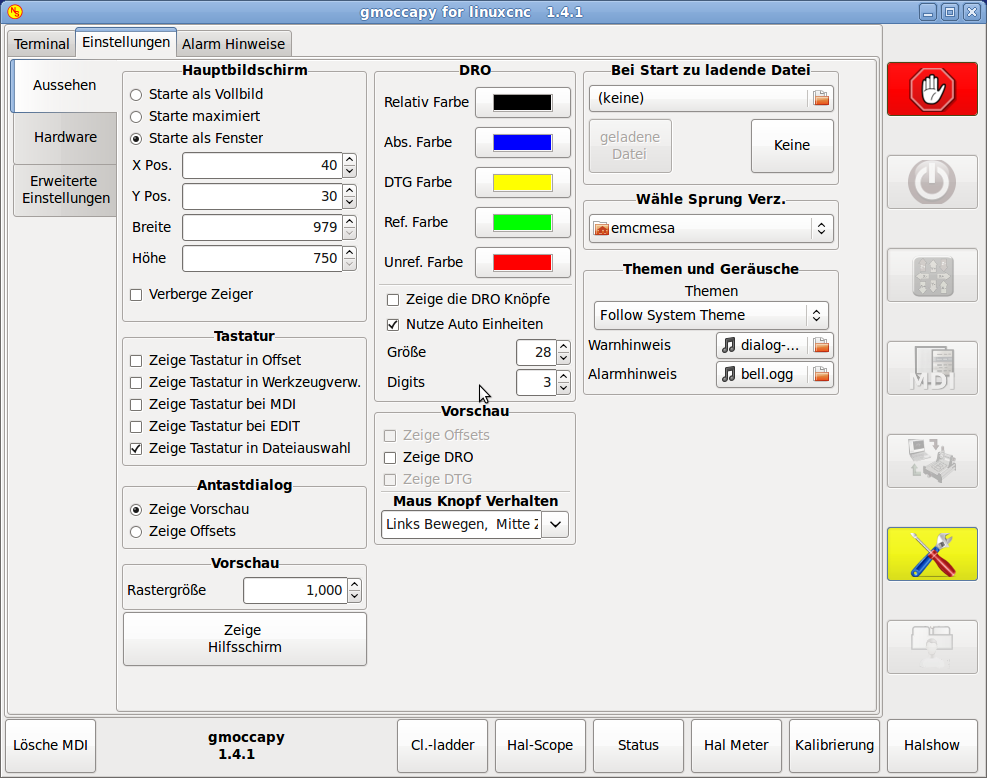
gmoccapy 1.4.1
- corrected broken layout style, as the jog-increment buttons has not
been modified to change there background color, getting only dark gray
instead of yellow, if they where active. No the follow the gmoccapy style.
- the number of digits of the DRO can now be set on the settings page, so
users of fragile machines can reduce the digits.
Norbert
- corrected broken layout style, as the jog-increment buttons has not
been modified to change there background color, getting only dark gray
instead of yellow, if they where active. No the follow the gmoccapy style.
- the number of digits of the DRO can now be set on the settings page, so
users of fragile machines can reduce the digits.
Norbert
Last edit: 11 years 9 months ago by newbynobi.
Please Log in or Create an account to join the conversation.
- DaBit
- Offline
- Elite Member
-

Less
More
- Posts: 203
- Thank you received: 19
11 years 9 months ago #54518
by DaBit
Replied by DaBit on topic Gmoccapy - A new screen for linuxcnc
Did a GIT pull, received the new gmoccapy.
Tortoise/hare button, I am seeing a reload button in the Edit screen, I can set the number of significant digits on the DRO.
Happy, happy! :laugh:
I will run to the post office today and possibly give the new gmoccapy GUI a workout.
Tortoise/hare button, I am seeing a reload button in the Edit screen, I can set the number of significant digits on the DRO.
Happy, happy! :laugh:
I will run to the post office today and possibly give the new gmoccapy GUI a workout.
Please Log in or Create an account to join the conversation.
- newbynobi
- Offline
- Moderator
-
Less
More
- Posts: 1931
- Thank you received: 394
11 years 9 months ago - 11 years 9 months ago #54526
by newbynobi
Replied by newbynobi on topic Gmoccapy - A new screen for linuxcnc
gmoccapy documentation
as not everyone build LinuxCNC with ./configure -enable-documentation I made a zip file, containing the most recent documentation as PDF, HTML and source.
Hope many of you do read the documentation and give feedback and help to make it better and more complete.
gmoccapy documentation
Norbert
P.S. Could someone please update the WIKI!!!!
as not everyone build LinuxCNC with ./configure -enable-documentation I made a zip file, containing the most recent documentation as PDF, HTML and source.
Hope many of you do read the documentation and give feedback and help to make it better and more complete.
gmoccapy documentation
Norbert
P.S. Could someone please update the WIKI!!!!
Last edit: 11 years 9 months ago by newbynobi. Reason: added link to drobbox
Please Log in or Create an account to join the conversation.
- mariusl
- Offline
- Platinum Member
-
11 years 9 months ago #54542
by mariusl
Sorry about that but you know how it goes here. We all want all the toys that we can have
I did not mean that you must do all of that. I just wanted to show what all the possibilities are and most of them are used during probing.
I would suggest that you still do it in a tab. Many other systems make use of tabs for grouped kind of functions.
Maybe move all the offset and homing stuff to a tab and have a list of most used buttons on the bottom. Even if they are duplicated.
Would it be possible to configure at start-up what buttons must be at the bottom? If so the user can specify what buttons are shown at the bottom
If I use my mill with manual DRO it works just like that.
I would suggest that you leave the buttons as they are and maybe look at defining a probing interface to expand on. It would make the effort worth a lot more in the future. After all, automatic probing is a big part of CNC machines. Especially with tool changers but certainly for most CNC machines.
Regards
Marius
www.bluearccnc.com
Replied by mariusl on topic Gmoccapy - A new screen for linuxcnc
I showed a finger, and my arm is gone
Sorry about that but you know how it goes here. We all want all the toys that we can have
I did not mean that you must do all of that. I just wanted to show what all the possibilities are and most of them are used during probing.
So how can we handle that?
I would suggest that you still do it in a tab. Many other systems make use of tabs for grouped kind of functions.
Maybe move all the offset and homing stuff to a tab and have a list of most used buttons on the bottom. Even if they are duplicated.
Would it be possible to configure at start-up what buttons must be at the bottom? If so the user can specify what buttons are shown at the bottom
I dont think that is practical as you have to do things manually anyway. Then you might as well just use the X= and Y= buttons as they are. That is their function anyway as I understand it.I was only thinking at the moment about the most commune, the edge finder with no electrical connection to probe input.
If I use my mill with manual DRO it works just like that.
I would suggest that you leave the buttons as they are and maybe look at defining a probing interface to expand on. It would make the effort worth a lot more in the future. After all, automatic probing is a big part of CNC machines. Especially with tool changers but certainly for most CNC machines.
Regards
Marius
www.bluearccnc.com
Please Log in or Create an account to join the conversation.
Moderators: newbynobi, HansU
Time to create page: 1.488 seconds