
- Posts: 197
- Thank you received: 3
Gmoccapy - A new screen for linuxcnc
- LAIR82
- Offline
- Elite Member
-

Less
More
11 years 9 months ago #54607
by LAIR82
That stinks, oh well, I guess they aren't getting there wish anytime soon then, they wanted to be able to, at a glance see what they had on the table for those offsets
That would be wonderful!!!
That's why you never hear me yelling very loudly, good things come to those who are patient!!
I am not a programmer by no means, that's why I ask politely, and wait patiently.
Rick
Replied by LAIR82 on topic Gmoccapy - A new screen for linuxcnc
newbynobi wrote: I am not doing anything to that part,
at least till now
motion.tooloffset.x
motion.tooloffset.z
are handled by linuxcnc and is taken from the tool.tbl if the user emit an G43.
gmoccapy is only displaying them till now.

That stinks, oh well, I guess they aren't getting there wish anytime soon then, they wanted to be able to, at a glance see what they had on the table for those offsets
I also want a tool wear and the linuxcnc tooltable is the worst I have ever seen! It is limited in tool numbers, not database handled and does not support wear offsets. But be aware, it is something on my to do list, unfortunately, I am running out of time, and need also some more detailed information about linuxcnc internal tool handling.
Norbert
That would be wonderful!!!
That's why you never hear me yelling very loudly, good things come to those who are patient!!
I am not a programmer by no means, that's why I ask politely, and wait patiently.
Rick
Please Log in or Create an account to join the conversation.
- ditechcnc
- Offline
- New Member
-

Less
More
- Posts: 16
- Thank you received: 2
11 years 9 months ago #54840
by ditechcnc
Replied by ditechcnc on topic Gmoccapy - A new screen for linuxcnc
Please add these option in lathe screen
and USB option in both screen
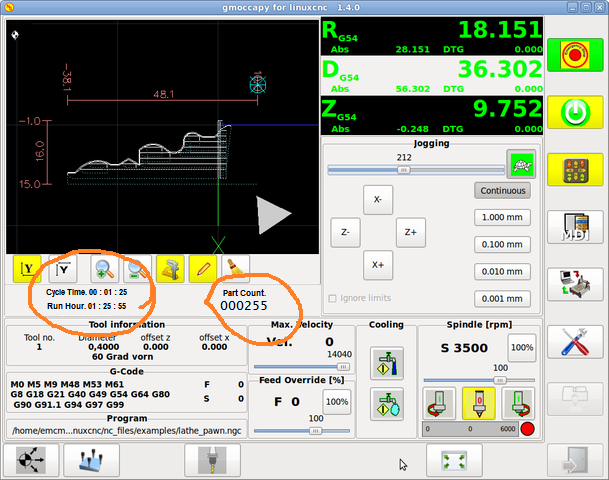
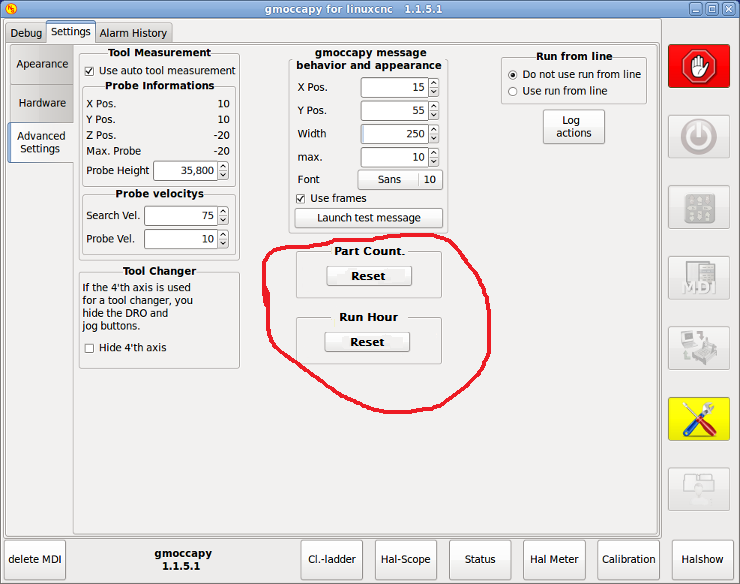
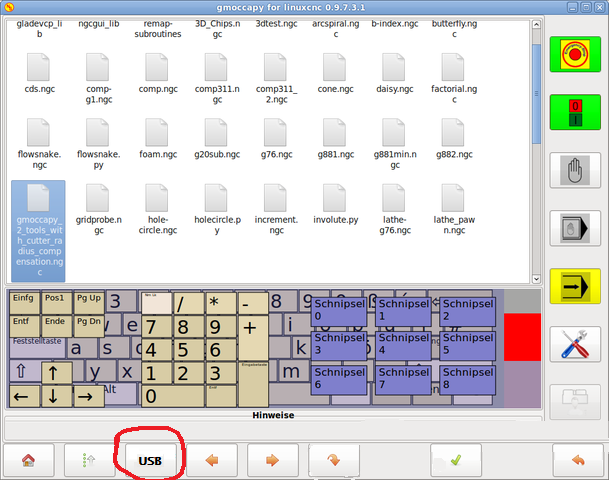
and USB option in both screen
Please Log in or Create an account to join the conversation.
- newbynobi
- Offline
- Moderator
-

Less
More
- Posts: 1931
- Thank you received: 394
11 years 9 months ago #54864
by newbynobi
Replied by newbynobi on topic Gmoccapy - A new screen for linuxcnc
@ditechcnc
have you changed already some code? Or are the images only fake?
All you like, is possible with gmoccapy, just using custom glade panels, you can embed them in several places, so it is up to you to implement them.
and please publish the result, so others can use also the panels.
If you need help, we will be pleased to do so.
Norbert
have you changed already some code? Or are the images only fake?
All you like, is possible with gmoccapy, just using custom glade panels, you can embed them in several places, so it is up to you to implement them.
and please publish the result, so others can use also the panels.
If you need help, we will be pleased to do so.
Norbert
Please Log in or Create an account to join the conversation.
- newbynobi
- Offline
- Moderator
-
Less
More
- Posts: 1931
- Thank you received: 394
11 years 9 months ago - 11 years 9 months ago #54865
by newbynobi
Replied by newbynobi on topic Gmoccapy - A new screen for linuxcnc
gmoccapy 1.5.0
ver. 1.5.0
Norbert
ver. 1.5.0
- new hal pin, and some renaming of hal pin to reflect the same names and behavior as halui-pin
- * gmoccapy.jog-speed.counts
- * gmoccapy.jog-speed.count-enable
- * gmoccapy.jog-speed.direct-value
- * gmoccapy.jog-speed.analog-enable
- * gmoccapy.feed-override.counts
- * gmoccapy.feed-override.count-enable
- * gmoccapy.feed-override.direct-value
- * gmoccapy.feed-override.analog-enable
- * gmoccapy.spindle-override.counts
- * gmoccapy.spindle-override.count-enable
- * gmoccapy.spindle-override.direct-value
- * gmoccapy.spindle-override.analog-enable
- * gmoccapy.max-velocity.counts
- * gmoccapy.max-velocity.count-enable
- * gmoccapy.max-velocity.direct-value
- * gmoccapy.max-velocity.analog-enable
- gmoccapy will now react to some halui pin as counts or direct value. Be aware, that some of this may have side affects, it is strongly recomended to use the corresponding gmoccapy hal pin.
- * halui.spindle-override.counts
- * halui.feed-override.counts
- * halui.max-velocity.counts
- * halui.abort
- * halui.spindle.start
- * halui.spindle.stop
- * halui.spindle.reverse
- * halui.spindle.increase
- * halui.spindle.decrease
- * halui.program.run
- * halui.program.stop
- * halui.program.pause
- * halui.mode.manual
- * halui.mode.mdi
- * halui.mode.auto
- * halui.mist.on
- * halui.mist.off
- * halui.flood.on
- * halui.flood.off
- * halui.machine.on
- * halui.machine.off
- * halui.home-all
- * halui.estop.activate
- * halui.estop.reset
- to reflect the new hal pin connections I introduced a new sim config gmoccapy_pendant.ini, demonstrating the connection of a remote pendant with selection switches
- deleted gmoccapy_jog_wheels.ini, as pendant.ini demonstrates it better
Norbert
Last edit: 11 years 9 months ago by newbynobi.
Please Log in or Create an account to join the conversation.
- ditechcnc
- Offline
- New Member
-
Less
More
- Posts: 16
- Thank you received: 2
11 years 9 months ago #54892
by ditechcnc
Replied by ditechcnc on topic Gmoccapy - A new screen for linuxcnc
Images are fake
Please help me
Where can i create custom glade panels
Please help me
Where can i create custom glade panels
Please Log in or Create an account to join the conversation.
- Tom_R2E3
- Offline
- Junior Member
-

Less
More
- Posts: 33
- Thank you received: 1
11 years 9 months ago #54928
by Tom_R2E3
Replied by Tom_R2E3 on topic Gmoccapy - A new screen for linuxcnc
Hi Norbert.
Seems like there are lots of updates going on at the moment. I was wondering if you could remove the maximum (tool measurement) probe height of 100mm? I have three probe heights depending on what vice config I'm using, and one of them is more than 100mm high. At the moment I'm just subtracting an arbitrary 50mm from both probe height and block height when I use it.
Also, is it possible to recall the block height anywhere? Often I cant remember if I've set the block height or not and end up setting it again.
Many thanks,
Tom
Seems like there are lots of updates going on at the moment. I was wondering if you could remove the maximum (tool measurement) probe height of 100mm? I have three probe heights depending on what vice config I'm using, and one of them is more than 100mm high. At the moment I'm just subtracting an arbitrary 50mm from both probe height and block height when I use it.
Also, is it possible to recall the block height anywhere? Often I cant remember if I've set the block height or not and end up setting it again.
Many thanks,
Tom
Please Log in or Create an account to join the conversation.
Moderators: newbynobi, HansU
Time to create page: 0.735 seconds