
- Posts: 7
- Thank you received: 0
Gmoccapy - A new screen for linuxcnc
- Johnny-Don
- Offline
- New Member
-

Less
More
11 years 9 months ago #55028
by Johnny-Don
I know exactly how to do what I need to do, I know what handler from the gmoccapy python file I want to monitor for my custom, I just can't seem to figure out the right way to reference the gmoccapy python file in my file, or maybe it's not possible.
I've tried 'from gmoccapy import gmoccapy' - which from what I've read, should reference the gmoccapy class from the gmoccapy package (python file). Trying this gives me a "cannot import name 'gmoccapy'" error. Im running in circles trying to get this figured out, an help would be most appreciated.
Replied by Johnny-Don on topic Gmoccapy - A new screen for linuxcnc
Johnny-Don wrote: User Tab integration.
I am using a custom user tab, I have a few buttons, for selecting an axis for a hand-wheel. I want the buttons to be sensitive(False) when the machine is in Auto Mode.
I already have a separate python file for my user tab (Per instructions earlier on in this topic, THANKS!!!)
My question is, how can I reference the state of things in the gmoccapy python file in my own python file. I don't know enough about python to get it just right. I know the basic idea, I just don't think I'm going about it the right way.
I know exactly how to do what I need to do, I know what handler from the gmoccapy python file I want to monitor for my custom, I just can't seem to figure out the right way to reference the gmoccapy python file in my file, or maybe it's not possible.
I've tried 'from gmoccapy import gmoccapy' - which from what I've read, should reference the gmoccapy class from the gmoccapy package (python file). Trying this gives me a "cannot import name 'gmoccapy'" error. Im running in circles trying to get this figured out, an help would be most appreciated.
Please Log in or Create an account to join the conversation.
- newbynobi
- Offline
- Moderator
-

Less
More
- Posts: 1931
- Thank you received: 394
11 years 9 months ago #55051
by newbynobi
Replied by newbynobi on topic Gmoccapy - A new screen for linuxcnc
Hallo Johnny-Don,
I can not follow completely, but why you do not use a hal container and connect the sensitive hal pin to halui.mode.is-auto?
Please post your files, so i can see what to do.
If you want to import gmoccapy to your python file, make sure gmoccapy.py is in your python path
Norbert
I can not follow completely, but why you do not use a hal container and connect the sensitive hal pin to halui.mode.is-auto?
Please post your files, so i can see what to do.
If you want to import gmoccapy to your python file, make sure gmoccapy.py is in your python path
Norbert
Please Log in or Create an account to join the conversation.
- Johnny-Don
- Offline
- New Member
-
Less
More
- Posts: 7
- Thank you received: 0
11 years 9 months ago - 11 years 9 months ago #55053
by Johnny-Don
Thank you Sir!
Maybe once you see my python file you will pick up on what I am trying to do, please disregard all of the commented out garbage, its just all of my trials and errors that I don't want to repeat.
The python file is being called from my ini file using:
EMBED_TAB_COMMAND = gladevcp -x {XID} -u ./usr/bin/paneljdj.py paneljdj.glade
it's working, as I had the other parts of the python file working before I started attempting this.
What I need to happen is, when "on_rbt_auto_pressed" handler activates from your file, I want my buttons to go NOT sensitive, so they cannot be pressed while the machine is in auto mode.
I know how to do it, I just don't know how I can get the signal from YOUR file... I hope this makes sense.
I have only included my python file, as I have not made any changes to yours.
Replied by Johnny-Don on topic Gmoccapy - A new screen for linuxcnc
newbynobi wrote: Hallo Johnny-Don,
I can not follow completely, but why you do not use a hal container and connect the sensitive hal pin to halui.mode.is-auto?
Please post your files, so i can see what to do.
If you want to import gmoccapy to your python file, make sure gmoccapy.py is in your python path
Norbert
Thank you Sir!
Maybe once you see my python file you will pick up on what I am trying to do, please disregard all of the commented out garbage, its just all of my trials and errors that I don't want to repeat.
The python file is being called from my ini file using:
EMBED_TAB_COMMAND = gladevcp -x {XID} -u ./usr/bin/paneljdj.py paneljdj.glade
it's working, as I had the other parts of the python file working before I started attempting this.
What I need to happen is, when "on_rbt_auto_pressed" handler activates from your file, I want my buttons to go NOT sensitive, so they cannot be pressed while the machine is in auto mode.
I know how to do it, I just don't know how I can get the signal from YOUR file... I hope this makes sense.
I have only included my python file, as I have not made any changes to yours.
Last edit: 11 years 9 months ago by Johnny-Don.
Please Log in or Create an account to join the conversation.
- mariusl
- Offline
- Platinum Member
-

11 years 9 months ago #55073
by mariusl
Regards
Marius
www.bluearccnc.com
Replied by mariusl on topic Gmoccapy - A new screen for linuxcnc
Johnny-Don
You have to rename the python files to .txt or something as the forum does not upload .py files for some reason.
You have to rename the python files to .txt or something as the forum does not upload .py files for some reason.
Regards
Marius
www.bluearccnc.com
The following user(s) said Thank You: Johnny-Don
Please Log in or Create an account to join the conversation.
- newbynobi
- Offline
- Moderator
-
Less
More
- Posts: 1931
- Thank you received: 394
11 years 9 months ago - 11 years 9 months ago #55074
by newbynobi
Replied by newbynobi on topic Gmoccapy - A new screen for linuxcnc
Hi Johnny-Don,
as Marius sayed, no file is attached to your post.
To do what you are trying, I would suggest:
Take a HAL_HBox or a HAL_Table and place your button in the containers. Both have an IN BIT Pin, controling if the child widgets are sensitive or not.
from GladeVCP docu
Now you only have to add a hal file to your embedded tab
EMBED_TAB_COMMAND = gladevcp -x {XID} -u ./usr/bin/paneljdj.py -H paneljdj.hal paneljdj.glade
and in this file you connect (check syntax!, as I am not on my linux computer and names are unclear):
net auto halui.mode.is_auto => not.in
net notauto not.out => hal_container.in
And it is done.
_______________________________________________________________________
If you realy want to import gmoccapy, you will have to check the following:
Is gmoccapy in your python path: In Ubuntu 10.04 it should be in
/usr/lib/pymodules/python2.6/gmoccapy
But it is not there!!!!
you will find a file named gmoccapy in /usr/bin/
copy this file to /usr/lib/pymodules/python2.6/gmoccapy/ and rename it to be gmoccapy.py
Now try again to import gmoccapy from gmoccapy and report.
All this is untested!!!
Norbert
as Marius sayed, no file is attached to your post.
To do what you are trying, I would suggest:
Take a HAL_HBox or a HAL_Table and place your button in the containers. Both have an IN BIT Pin, controling if the child widgets are sensitive or not.
6.9. Containers: HAL_HBox and HAL_Table
Compared to their Gtk counterparts they have one input BIT pin which controls if their child widgets are sensitive or not. If the pin is low then child widgets are inactive which is the default.
Tip
If you find some part of your GladeVCP application is grayed out (insensitive), see whether a container’s pin is unset.
from GladeVCP docu
Now you only have to add a hal file to your embedded tab
EMBED_TAB_COMMAND = gladevcp -x {XID} -u ./usr/bin/paneljdj.py -H paneljdj.hal paneljdj.glade
and in this file you connect (check syntax!, as I am not on my linux computer and names are unclear):
net auto halui.mode.is_auto => not.in
net notauto not.out => hal_container.in
And it is done.
_______________________________________________________________________
If you realy want to import gmoccapy, you will have to check the following:
Is gmoccapy in your python path: In Ubuntu 10.04 it should be in
/usr/lib/pymodules/python2.6/gmoccapy
But it is not there!!!!
you will find a file named gmoccapy in /usr/bin/
copy this file to /usr/lib/pymodules/python2.6/gmoccapy/ and rename it to be gmoccapy.py
Now try again to import gmoccapy from gmoccapy and report.
All this is untested!!!
Norbert
Last edit: 11 years 9 months ago by newbynobi.
The following user(s) said Thank You: Johnny-Don
Please Log in or Create an account to join the conversation.
- franstrein
- Offline
- Junior Member
-

Less
More
- Posts: 27
- Thank you received: 2
11 years 9 months ago #55147
by franstrein
Replied by franstrein on topic Gmoccapy - A new screen for linuxcnc
Hallo gmoccapy fans,
I started to use gmoccapy some weeks ago, on my converted Deckel FP1, see also the topic
www.linuxcnc.org/index.php/english/forum...increased-my-latency
All is going very nice, and I like the UI, especially after adding a touch screen to my setup !
I initially ran the "user" version of gmoccapy, v1.3.x with Linux 2.6.5, installed from the ISO and the upgrade.
That works well.
Recently I tried to do a simple upgrade to 1.5.1.1. by getting the sources from git, and copying them to my libraries. According to the instructions in the wiki:
just download
gmoccapy.py
gmoccapy.glade
notification.py
from scr/emc/usr_intf/gmoccapy of git
At git.linuxcnc.org/gitweb?p=linuxcnc.git;a...ntf/gmoccapy;hb=HEAD
2. Then replace the files on your computer, be aware that gmoccapy.py will loose its py. ending
gmoccapy.py goes to /usr/bin as gmoccapy
gmoccapy.glade goes to /usr/share/gmoccapy/
notification.py goes to /usr/share/pyshared//gmoccapy/
And also changing the appropriate permissions, etc.
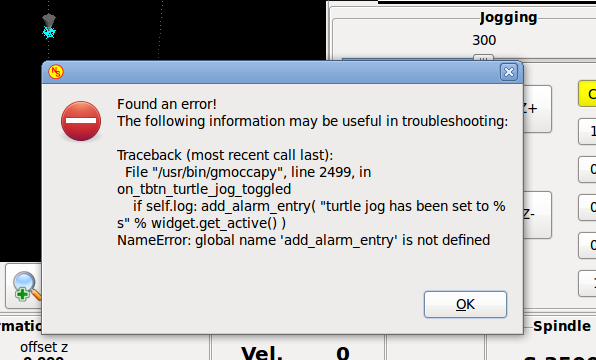
However when running gmoccapy now, I get a scripting error on the alarm entries, see attachment.
When I change the script on line 2499 to read
if self.log: self._add_alarm_entry( "turtle jog has been set to %s" % widget.get_active() )
the UI works.
I guess I am doing something wrong in the install steps, but not sure what..
Thanks for your help,
Frans
I started to use gmoccapy some weeks ago, on my converted Deckel FP1, see also the topic
www.linuxcnc.org/index.php/english/forum...increased-my-latency
All is going very nice, and I like the UI, especially after adding a touch screen to my setup !
I initially ran the "user" version of gmoccapy, v1.3.x with Linux 2.6.5, installed from the ISO and the upgrade.
That works well.
Recently I tried to do a simple upgrade to 1.5.1.1. by getting the sources from git, and copying them to my libraries. According to the instructions in the wiki:
just download
gmoccapy.py
gmoccapy.glade
notification.py
from scr/emc/usr_intf/gmoccapy of git
At git.linuxcnc.org/gitweb?p=linuxcnc.git;a...ntf/gmoccapy;hb=HEAD
2. Then replace the files on your computer, be aware that gmoccapy.py will loose its py. ending
gmoccapy.py goes to /usr/bin as gmoccapy
gmoccapy.glade goes to /usr/share/gmoccapy/
notification.py goes to /usr/share/pyshared//gmoccapy/
And also changing the appropriate permissions, etc.
However when running gmoccapy now, I get a scripting error on the alarm entries, see attachment.
When I change the script on line 2499 to read
if self.log: self._add_alarm_entry( "turtle jog has been set to %s" % widget.get_active() )
the UI works.
I guess I am doing something wrong in the install steps, but not sure what..
Thanks for your help,
Frans
Please Log in or Create an account to join the conversation.
Moderators: newbynobi, HansU
Time to create page: 0.198 seconds