
Gmoccapy - A new screen for linuxcnc
- mariusl
- Offline
- Platinum Member
-

Less
More
12 years 8 months ago #43728
by mariusl
Regards
Marius
www.bluearccnc.com
Replied by mariusl on topic Gmoccapy - A new screen for linuxcnc
Hi Norbert
I am starting to feel really stupid. Every time I try and integrate the sim config into a real machine config, I seem to screw up.
I took my working desktop mill config and applied the tool_set remap stuff from the sim config. I get these errors and the screen takes a long time to load.
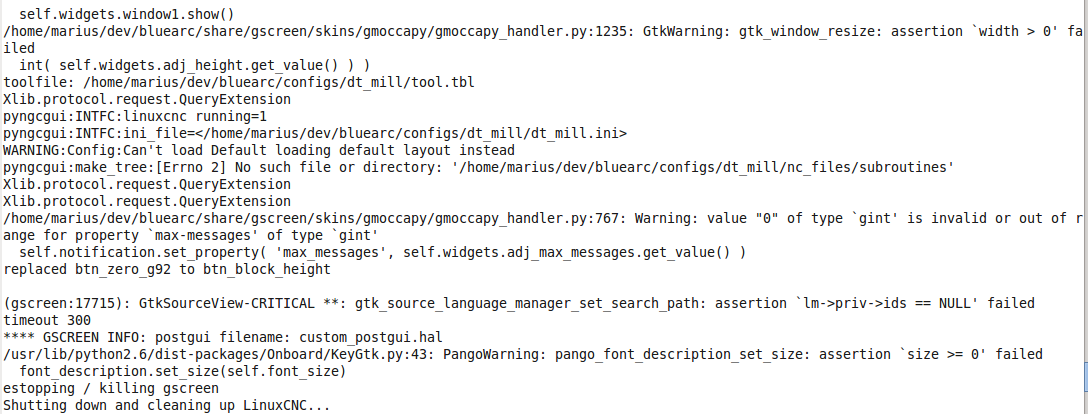
I am starting to feel really stupid. Every time I try and integrate the sim config into a real machine config, I seem to screw up.
I took my working desktop mill config and applied the tool_set remap stuff from the sim config. I get these errors and the screen takes a long time to load.
Regards
Marius
www.bluearccnc.com
- mariusl
- Offline
- Platinum Member
-
12 years 8 months ago #43739
by mariusl
Regards
Marius
www.bluearccnc.com
Replied by mariusl on topic Gmoccapy - A new screen for linuxcnc
Norbert
There was another error that I missed. It had to do with the manual tool change usage. I think it must just be mentioned that the manual tool change be removed if users want to use the remapped config.
It seem to work ok but I still have to test it on my machine later today.
Just one question please, Are the variable that you use global?
I use a sub routine to probe the block surface with the probe input and a touch off plate of 1.6mm. I need to know where to store the result and how to get it into your code please.
There was another error that I missed. It had to do with the manual tool change usage. I think it must just be mentioned that the manual tool change be removed if users want to use the remapped config.
It seem to work ok but I still have to test it on my machine later today.
Just one question please, Are the variable that you use global?
I use a sub routine to probe the block surface with the probe input and a touch off plate of 1.6mm. I need to know where to store the result and how to get it into your code please.
Regards
Marius
www.bluearccnc.com
- newbynobi
- Offline
- Moderator
-

Less
More
- Posts: 1931
- Thank you received: 394
12 years 8 months ago #43769
by newbynobi
Replied by newbynobi on topic Gmoccapy - A new screen for linuxcnc
Halo Marius,
I use INI Values and Hal pin for the remap structure, please see change.ngc from macros folder.
In the first screen shot, you are using also pyngcgui and the main error I see, that this one do not find the subroutines folder.
Please take care to set the path in the INI so the different parts you use can find them. In my sim tollmeasurement config, I placed the files in my macro folder and set the path of subroutines to that folder, that could be one point to take care off.
Norbert
I use INI Values and Hal pin for the remap structure, please see change.ngc from macros folder.
In the first screen shot, you are using also pyngcgui and the main error I see, that this one do not find the subroutines folder.
Please take care to set the path in the INI so the different parts you use can find them. In my sim tollmeasurement config, I placed the files in my macro folder and set the path of subroutines to that folder, that could be one point to take care off.
Norbert
- mariusl
- Offline
- Platinum Member
-
12 years 8 months ago #43775
by mariusl
Regards
Marius
www.bluearccnc.com
Replied by mariusl on topic Gmoccapy - A new screen for linuxcnc
Norbert
The missing file is not a problem as I have a number of paths specified on the test system. It finds the subroutines OK.
The main problem was the manual tool change pins in the HAL file. The real error was not captured by my screen shot sorry . I am using the macro folder now as well.
I have not tested on the machine just yet but hope to do it tomorrow.
I would love to see multiple INI files that can bee included into a main file. I would place the machine specific things like the AXIS setup in one file and then you can configure any screen set on top of that. The calibration and AXIS or joint setup never changes for a machine but the screen can. I also tend to keep my machine designs as standard as possible.
The missing file is not a problem as I have a number of paths specified on the test system. It finds the subroutines OK.
The main problem was the manual tool change pins in the HAL file. The real error was not captured by my screen shot sorry
. I am using the macro folder now as well.I have not tested on the machine just yet but hope to do it tomorrow.
I would love to see multiple INI files that can bee included into a main file. I would place the machine specific things like the AXIS setup in one file and then you can configure any screen set on top of that. The calibration and AXIS or joint setup never changes for a machine but the screen can. I also tend to keep my machine designs as standard as possible.
Regards
Marius
www.bluearccnc.com
- newbynobi
- Offline
- Moderator
-
Less
More
- Posts: 1931
- Thank you received: 394
12 years 8 months ago #43776
by newbynobi
Replied by newbynobi on topic Gmoccapy - A new screen for linuxcnc
Halo Marius,
just copy an existing file, leave the copy in the same directory and rename that one to your needs. Then modify the file to fit your screen or GUI or what ever you need.
IMHO that is the easiest way to get to the goal.
As example see the gmoccapy folder, containing a lot of config files.
Norbert
just copy an existing file, leave the copy in the same directory and rename that one to your needs. Then modify the file to fit your screen or GUI or what ever you need.
IMHO that is the easiest way to get to the goal.
As example see the gmoccapy folder, containing a lot of config files.
Norbert
- jlviloria
- Offline
- Elite Member
-

Less
More
- Posts: 161
- Thank you received: 9
12 years 8 months ago #43811
by jlviloria
Replied by jlviloria on topic Gmoccapy - A new screen for linuxcnc
Hello,
Greetings Norbert,
I've been watching from the outside all the progress you've applied to gmoccapy, now I want to apply it to my machine, but I have noticed that no longer goes the (. glade) in the configuration file of my machine.
I have a few different things in my gmoccapy-tailored,
as machining time, turret, but have completely integrated, not as widgets, and not want to lose.
as I can do to not lose my settings but upgrade to the new version of gmoccapy.
thanks,
Jorge Viloria
Greetings Norbert,
I've been watching from the outside all the progress you've applied to gmoccapy, now I want to apply it to my machine, but I have noticed that no longer goes the (. glade) in the configuration file of my machine.
I have a few different things in my gmoccapy-tailored,
as machining time, turret, but have completely integrated, not as widgets, and not want to lose.
as I can do to not lose my settings but upgrade to the new version of gmoccapy.
thanks,
Jorge Viloria
Moderators: newbynobi, HansU
Time to create page: 5.237 seconds