
- Posts: 1931
- Thank you received: 394
Gmoccapy - A new screen for linuxcnc
- newbynobi
- Offline
- Moderator
-

Less
More
12 years 9 months ago #43211
by newbynobi
Replied by newbynobi on topic Gmoccapy - A new screen for linuxcnc
Halo @ all,
I modified the calculator_widget to support locale settings, now all entry dialogs of gmoccapy should support the different decimal separators.
So we German users can use our num pad of the keyboard to enter values!
Please test with your locale settings and inform that everything work as expected, I tested with german settings and Chris did also a short test.
Norbert
I modified the calculator_widget to support locale settings, now all entry dialogs of gmoccapy should support the different decimal separators.
So we German users can use our num pad of the keyboard to enter values!
Please test with your locale settings and inform that everything work as expected, I tested with german settings and Chris did also a short test.
Norbert
- newbynobi
- Offline
- Moderator
-
Less
More
- Posts: 1931
- Thank you received: 394
12 years 9 months ago #43214
by newbynobi
Replied by newbynobi on topic Gmoccapy - A new screen for linuxcnc
gmoccapy 0.9.9.9.2
- The feed override slider will also reduce the max vel of the machine, so when running a program for the first time, also G0 movements will be reduced in velocity if you use the feed override slider.
Norbert
- The feed override slider will also reduce the max vel of the machine, so when running a program for the first time, also G0 movements will be reduced in velocity if you use the feed override slider.
Norbert
- jbunch
- Offline
- Senior Member
-

Less
More
- Posts: 79
- Thank you received: 3
12 years 9 months ago - 12 years 9 months ago #43216
by jbunch
Replied by jbunch on topic Gmoccapy - A new screen for linuxcnc
Norbert,
I like your touchoff video.
I have worked with the changes to tool table.
A couple of items. When touchng off a tool (Z) I need it to be ABS not G54.
I set all my tools off the face of my chuck to ABS or physical machine location.
When you enter no data into touchoff toolbox and select OK I receive an error:
It should just enter the ABS value with no offset. Default to 0.0
If I want an offset then I can enter it.
The touchoff routine for X Y Z works that way.
The other thing in going over your videos for your tool setter.
I noticed you had to measure from the table to the top of part and enter the data.
Could you not start with a touchoff to TOP (top of part) and the save that number and then touchoff to your tool setter.
You would then know what the differance is for the rest of the tools. Takes out a chance for error and improves accuracy.
Great work. This interface is quite intuitive.
Jim
I like your touchoff video.
I have worked with the changes to tool table.
A couple of items. When touchng off a tool (Z) I need it to be ABS not G54.
I set all my tools off the face of my chuck to ABS or physical machine location.
When you enter no data into touchoff toolbox and select OK I receive an error:
It should just enter the ABS value with no offset. Default to 0.0
If I want an offset then I can enter it.
The touchoff routine for X Y Z works that way.
The other thing in going over your videos for your tool setter.
I noticed you had to measure from the table to the top of part and enter the data.
Could you not start with a touchoff to TOP (top of part) and the save that number and then touchoff to your tool setter.
You would then know what the differance is for the rest of the tools. Takes out a chance for error and improves accuracy.
Great work. This interface is quite intuitive.
Jim
Last edit: 12 years 9 months ago by jbunch.
- newbynobi
- Offline
- Moderator
-
Less
More
- Posts: 1931
- Thank you received: 394
12 years 9 months ago #43217
by newbynobi
Replied by newbynobi on topic Gmoccapy - A new screen for linuxcnc
Halo Jim,
Not entering nothing: Did you get an python error or a warning dialog?
Does it work for you if you enter 0?
The Bloch height way is very easy, if you know the height of your workpiece. If you want to machine a 4 mm Aluminium Sheet mounted on your table, just enter block height =4 and you do not need to touch off z.
If you prefer your way, just ignore the block height button and change the remap file.
Open change.ngc and modify line 66, to bed G10L1 P#<tool> Z<#touch_result>
- mount the first tool of your program
- touch off your workpiece as you are used to
- start your program
Atention: this is untested.
Norbert
Not entering nothing: Did you get an python error or a warning dialog?
Does it work for you if you enter 0?
The Bloch height way is very easy, if you know the height of your workpiece. If you want to machine a 4 mm Aluminium Sheet mounted on your table, just enter block height =4 and you do not need to touch off z.
If you prefer your way, just ignore the block height button and change the remap file.
Open change.ngc and modify line 66, to bed G10L1 P#<tool> Z<#touch_result>
- mount the first tool of your program
- touch off your workpiece as you are used to
- start your program
Atention: this is untested.
Norbert
- cmorley
- Offline
- Moderator
-
Less
More
- Posts: 7368
- Thank you received: 2181
12 years 9 months ago #43221
by cmorley
I don't understand why you would want that. That's what max velocity is for.
Now if you adjust the feed override on a proven program (eg for material hardness differences) your rapids are affected, slowing cycle time.
Chris M
Replied by cmorley on topic Gmoccapy - A new screen for linuxcnc
newbynobi wrote: gmoccapy 0.9.9.9.2
- The feed override slider will also reduce the max vel of the machine, so when running a program for the first time, also G0 movements will be reduced in velocity if you use the feed override slider.
Norbert
I don't understand why you would want that. That's what max velocity is for.
Now if you adjust the feed override on a proven program (eg for material hardness differences) your rapids are affected, slowing cycle time.
Chris M
- mariusl
- Offline
- Platinum Member
-

12 years 9 months ago #43232
by mariusl
Regards
Marius
www.bluearccnc.com
Replied by mariusl on topic Gmoccapy - A new screen for linuxcnc
Hi Norbert
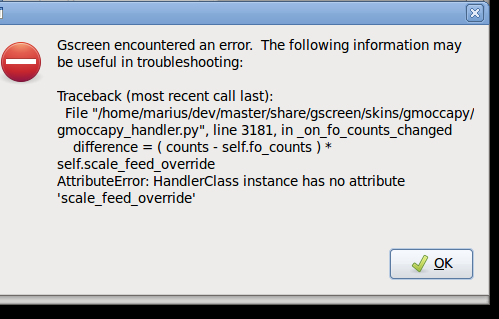
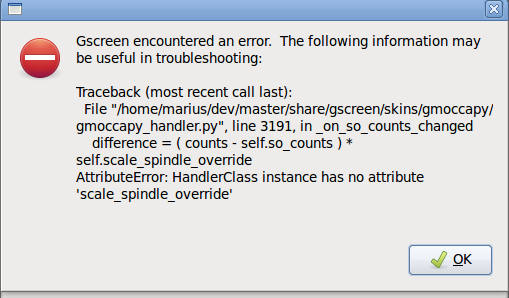
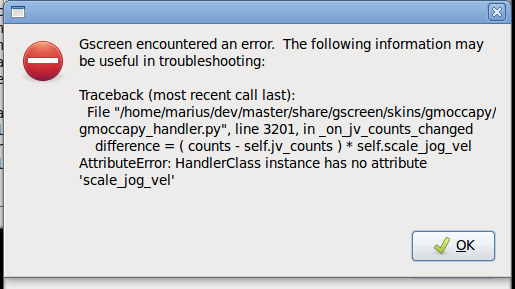
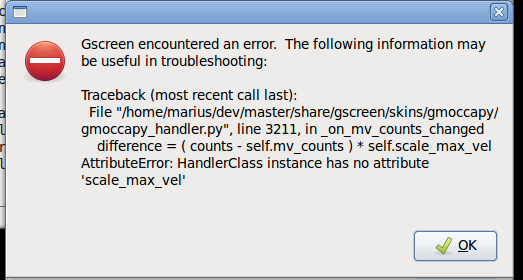
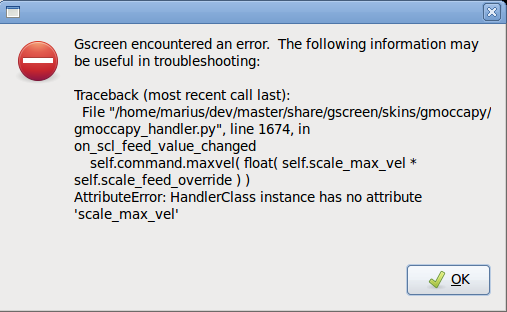
Just did a git pull from master and get this error when I run the sim for tool measurement
Just did a git pull from master and get this error when I run the sim for tool measurement
Regards
Marius
www.bluearccnc.com
Moderators: newbynobi, HansU
Time to create page: 0.756 seconds