
Gmoccapy - A new screen for linuxcnc
- mariusl
- Offline
- Platinum Member
-

Less
More
12 years 7 months ago #44335
by mariusl
Regards
Marius
www.bluearccnc.com
Replied by mariusl on topic Gmoccapy - A new screen for linuxcnc
Hi Norbert
I am trying to do a pull but get this error now.
I am trying to do a pull but get this error now.
Code:
From git://git.linuxcnc.org/git/linuxcnc
0a70d3f..ce3f0ec master -> origin/master
Updating 7897a27..ce3f0ec
error: Untracked working tree file 'lib/python/stepconf/__init__.py' would be overwritten by merge. Aborting
Regards
Marius
www.bluearccnc.com
- cmorley
- Offline
- Moderator
-

Less
More
- Posts: 7368
- Thank you received: 2181
12 years 7 months ago #44336
by cmorley
Replied by cmorley on topic Gmoccapy - A new screen for linuxcnc
as a work around :
git reset --hard origin/master
Warning this will delete any customizations of the tracked source code.
It resets your repo to whatever linuxcnc's master is.
Chris M
git reset --hard origin/master
Warning this will delete any customizations of the tracked source code.
It resets your repo to whatever linuxcnc's master is.
Chris M
- mariusl
- Offline
- Platinum Member
-
12 years 7 months ago #44337
by mariusl
Regards
Marius
www.bluearccnc.com
Replied by mariusl on topic Gmoccapy - A new screen for linuxcnc
Thanks Chris - sorted.
Regards
Marius
www.bluearccnc.com
- verser
- Offline
- Senior Member
-

Less
More
- Posts: 78
- Thank you received: 69
12 years 7 months ago - 12 years 7 months ago #44338
by verser
Replied by verser on topic Gmoccapy - A new screen for linuxcnc
Hi,
I share additions to Gmoccapy made for my own needs:
-compensation-Z (Allows auto tracking of an uneven surface by milling PCB tracks. It pre uses probe and g-code compensation_map.ngc to draw map of a surface in txt file)
-management Huanyang VFD on modbus (Control bin file "hy_vfd" should be copied in /bin )
-management wireless joystick Logitech Freedom
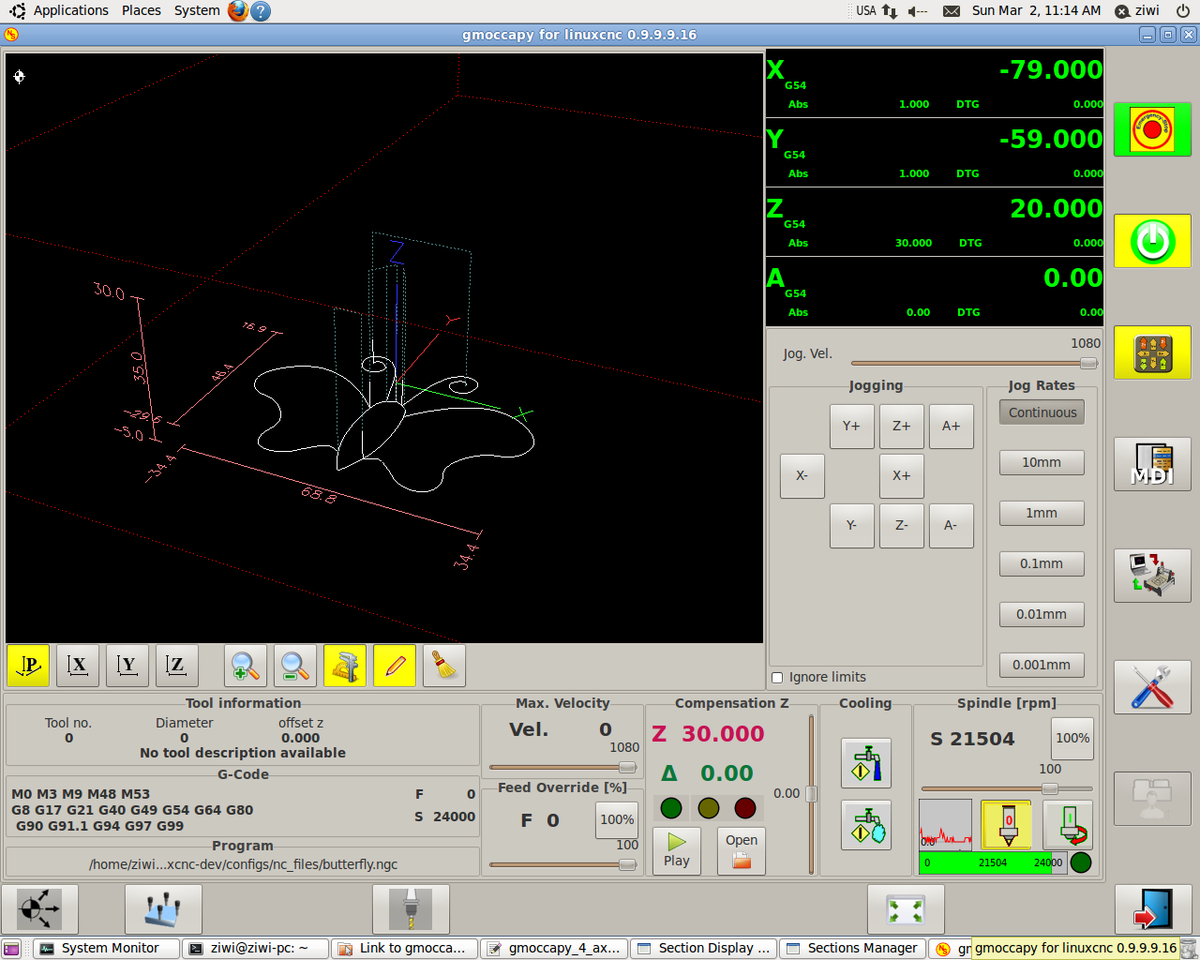
my machine - gmoccapy_4_axis.ini
I share additions to Gmoccapy made for my own needs:
-compensation-Z (Allows auto tracking of an uneven surface by milling PCB tracks. It pre uses probe and g-code compensation_map.ngc to draw map of a surface in txt file)
-management Huanyang VFD on modbus (Control bin file "hy_vfd" should be copied in /bin )
-management wireless joystick Logitech Freedom
my machine - gmoccapy_4_axis.ini
Last edit: 12 years 7 months ago by verser. Reason: add file
- verser
- Offline
- Senior Member
-
Less
More
- Posts: 78
- Thank you received: 69
12 years 7 months ago - 12 years 7 months ago #44339
by verser
Replied by verser on topic Gmoccapy - A new screen for linuxcnc
Last edit: 12 years 7 months ago by verser. Reason: add file
- newbynobi
- Offline
- Moderator
-
Less
More
- Posts: 1931
- Thank you received: 394
12 years 7 months ago #44350
by newbynobi
Halo aralel,
you log file looks fine, so I asume, that gmoccapy works fine in sim mode.
To get your config to work with gmoccapy it is just a few stepd:
Just copy your config folder (normaly it is located at <yourhomedirectory>/linuxcnc/configs/
To the new config dir, should be at <yourhomedirectory>/linuxcnc-dev/configs/
Now please start linuxcnc from a terminal and try to run your config.
If it does start without errors, then just modify your INI File avvording to the WIKI and gmoccapy should start.
Norbert
Replied by newbynobi on topic Gmoccapy - A new screen for linuxcnc
Hi guys.
At start i wanna tell you, my english is not very good ;p
I'm new with linux and linux cnc.
I have already installed up to date gmoccapy but have a problem to connect it with my maschine becose i don't know how to configure parports or import setup from linuxcnc 2.5.3 stepconf
Please if u can tell me step by step how to do it.
Thank's for responce
i send you terminal log from start gmoccapy
"linuxcnc" is the name of my computer

Halo aralel,
you log file looks fine, so I asume, that gmoccapy works fine in sim mode.
To get your config to work with gmoccapy it is just a few stepd:
Just copy your config folder (normaly it is located at <yourhomedirectory>/linuxcnc/configs/
To the new config dir, should be at <yourhomedirectory>/linuxcnc-dev/configs/
Now please start linuxcnc from a terminal and try to run your config.
If it does start without errors, then just modify your INI File avvording to the WIKI and gmoccapy should start.
Norbert
Moderators: newbynobi, HansU
Time to create page: 1.028 seconds