
- Posts: 17
- Thank you received: 3
Gmoccapy - A new screen for linuxcnc
- micges
- Offline
- Administrator
-

Less
More
12 years 6 days ago #52390
by micges
Replied by micges on topic Gmoccapy - A new screen for linuxcnc
Hi,
please pastebin.com your configuration ini file.
regards
Michael
please pastebin.com your configuration ini file.
regards
Michael
Please Log in or Create an account to join the conversation.
- microsprintbuilder
- Offline
- Premium Member
-

Less
More
- Posts: 115
- Thank you received: 4
12 years 6 days ago #52394
by microsprintbuilder
Replied by microsprintbuilder on topic Gmoccapy - A new screen for linuxcnc
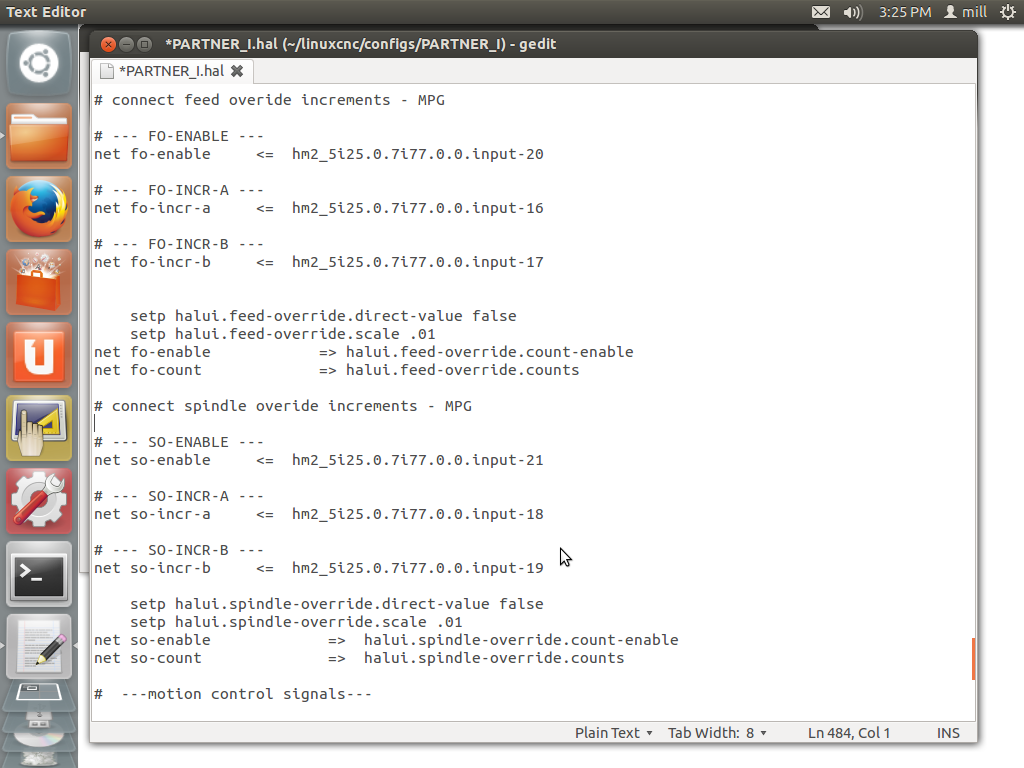
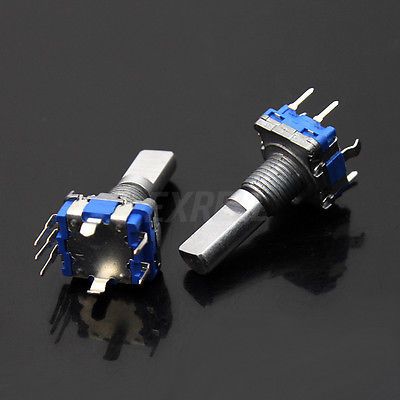
how would you go about getting external feed and spindle overrides to work in Gmoccapy. I'm using those cheep encoder switches from eBay and using the mpg inputs (16,17,18,19) on the mesa 7i77 card. I can see the enable and the a and b phases switch on in the show hal but the count does not work.
Please Log in or Create an account to join the conversation.
- Tom_R2E3
- Offline
- Junior Member
-

Less
More
- Posts: 33
- Thank you received: 1
12 years 6 days ago #52398
by Tom_R2E3
Replied by Tom_R2E3 on topic Gmoccapy - A new screen for linuxcnc
I came here to ask something else, but I see others have experienced the pause-stop behaviour. Saw that for the first time yesterday (my machine is quite new to me) I got to e-stop with about 3mm to spare before plunging my job. So yeah, if your program is paused and you then touch program-stop it jumps to the next tool change line of your program and runs from there. Wasn't expecting that!
My question was regarding coordinate systems in Gmoccapy. If you're making some moves in G54 everything is normal, the DRO shows G54 and it's also listed in the "G-code" part of the screen. If your program then changes to say G55, the machine responds correctly, but the DRO and G-code list still display G54, it's a bit confusing. If you were to complete the same exercise line by line in MDI then the DRO etc. displays coordinate systems correctly. Not sure if this has been mentioned before, this Topic is too long to read through.
Using Gmoccapy 1.2.0 as bundled with 2.6 on Debian iso.
My question was regarding coordinate systems in Gmoccapy. If you're making some moves in G54 everything is normal, the DRO shows G54 and it's also listed in the "G-code" part of the screen. If your program then changes to say G55, the machine responds correctly, but the DRO and G-code list still display G54, it's a bit confusing. If you were to complete the same exercise line by line in MDI then the DRO etc. displays coordinate systems correctly. Not sure if this has been mentioned before, this Topic is too long to read through.
Using Gmoccapy 1.2.0 as bundled with 2.6 on Debian iso.
Please Log in or Create an account to join the conversation.
- newbynobi
- Offline
- Moderator
-

Less
More
- Posts: 1931
- Thank you received: 394
12 years 6 days ago - 12 years 6 days ago #52399
by newbynobi
Replied by newbynobi on topic Gmoccapy - A new screen for linuxcnc
Hallo,
sorry for being away some time.
The Jump has been noticed also from a German user. It is a serious problem.
gmoccapy_1_3_1 - fixed PAUSE / RESUME / STOP bug
ver. 1.3.1
- fixed very serious bug PAUSE / RESUME / STOP issue
Program jumped to strange positions if STOP has been pressed
while PAUSE was active.
Thanks to Mael (papaours) for finding it.
I did find the bug! It was related to wrong PAUSE / RESUME handling from the linuxcnc python interpreter, I changed to use hal_actions instead and it do work correct now.
Please update to master to solve, until it has been merged to deb repository. Or check out the 2.6 branch and compile.
Just make sure, that you do use gmoccapy 1.3.1.
Thanks for reporting the bug.
Norbert
sorry for being away some time.
The Jump has been noticed also from a German user. It is a serious problem.
gmoccapy_1_3_1 - fixed PAUSE / RESUME / STOP bug
ver. 1.3.1
- fixed very serious bug PAUSE / RESUME / STOP issue
Program jumped to strange positions if STOP has been pressed
while PAUSE was active.
Thanks to Mael (papaours) for finding it.
I did find the bug! It was related to wrong PAUSE / RESUME handling from the linuxcnc python interpreter, I changed to use hal_actions instead and it do work correct now.
Please update to master to solve, until it has been merged to deb repository. Or check out the 2.6 branch and compile.
Just make sure, that you do use gmoccapy 1.3.1.
Thanks for reporting the bug.
Norbert
Last edit: 12 years 6 days ago by newbynobi.
Please Log in or Create an account to join the conversation.
- Tom_R2E3
- Offline
- Junior Member
-
Less
More
- Posts: 33
- Thank you received: 1
12 years 6 days ago #52400
by Tom_R2E3
Replied by Tom_R2E3 on topic Gmoccapy - A new screen for linuxcnc
Hi, thanks for looking in to it.
I'm not at my mill at the moment but the axis sim behaves as you'd expect (pause then stop stops the program). The gmoccapy sim behaves as described above, (pause then stop jumps to the next tool change). Can check them both at my physical machine later.
Many thanks, Tom
I'm not at my mill at the moment but the axis sim behaves as you'd expect (pause then stop stops the program). The gmoccapy sim behaves as described above, (pause then stop jumps to the next tool change). Can check them both at my physical machine later.
Many thanks, Tom
Please Log in or Create an account to join the conversation.
- mariusl
- Offline
- Platinum Member
-

12 years 6 days ago #52402
by mariusl
Is your 7i77 encoder input selected for digital? The default is usually set for differential input. I have some of those mpg's and will use them shortly on my lathe.
Regards
Marius
www.bluearccnc.com
Replied by mariusl on topic Gmoccapy - A new screen for linuxcnc
microsprintbuilder wrote: how would you go about getting external feed and spindle overrides to work in Gmoccapy. I'm using those cheep encoder switches from eBay and using the mpg inputs (16,17,18,19) on the mesa 7i77 card. I can see the enable and the a and b phases switch on in the show hal but the count does not work.
Is your 7i77 encoder input selected for digital? The default is usually set for differential input. I have some of those mpg's and will use them shortly on my lathe.
Regards
Marius
www.bluearccnc.com
Please Log in or Create an account to join the conversation.
Moderators: newbynobi, HansU
Time to create page: 1.349 seconds