
- Posts: 7368
- Thank you received: 2181
A Widescreen Blender-Style Interface
- cmorley
- Offline
- Moderator
-

Less
More
8 years 3 months ago #115097
by cmorley
Replied by cmorley on topic A Widescreen Blender-Style Interface
Do you have images for the button icons?
Chris M
Chris M
The following user(s) said Thank You: tommylight, KCJ
Please Log in or Create an account to join the conversation.
- cmorley
- Offline
- Moderator
-
Less
More
- Posts: 7368
- Thank you received: 2181
8 years 3 months ago #115100
by cmorley
Note the two images showing are the same, but I figured out what you did.
Can't say I'm a fan of that - you lose your DRO that way and usually adjusting the slit is difficult with a touchscreen with out a large handle.
I also noted that you do not display currently used gcodes or mcodes - is that a oversight or by design?
I've added some code to qtvcp based on you requirements so this is a good exercise for me!
Thanks
Chris M
Replied by cmorley on topic A Widescreen Blender-Style Interface
BrendaEM wrote: Chris M, well the communication miss was probably a good thing, the editor should probably be wider anyway : )
A button can be used to expand the Run menu like this.
The menu can even go over the jog controls, but not over the Persistent Machine specific controls, or the immutable Estop controls.
(The Large Log expansion button would need to be grayed out.)
Note the two images showing are the same, but I figured out what you did.
Can't say I'm a fan of that - you lose your DRO that way and usually adjusting the slit is difficult with a touchscreen with out a large handle.
I also noted that you do not display currently used gcodes or mcodes - is that a oversight or by design?
I've added some code to qtvcp based on you requirements so this is a good exercise for me!
Thanks
Chris M
Please Log in or Create an account to join the conversation.
- BrendaEM
- Offline
- Elite Member
-

Less
More
- Posts: 266
- Thank you received: 120
8 years 3 months ago - 8 years 3 months ago #115103
by BrendaEM
Replied by BrendaEM on topic A Widescreen Blender-Style Interface
Sorry about the duplicate image post. There are roughly 24 layers that need to be toggled in certain combinations in to create an image for posting.
Chris, there is a little full-screen button on both the standard Run Menu, and the expanded Run menu. It toggles it.
Well, the expanded Run menu has to cover something???
The hope is that the expanded Run toggle can be fast enough so click on/off at will whenever the Run menu is showing.
~
There are current modal G and M codes, in the MDI menu. I hadn't noticed them in Axis's G-code window. I am not even a pedestrian at G-Code.
~
The interface design is coming to last proverbial corner. As I posted, a single person, versioning multiple icon sizes, of an interface with open change requests would be a nightmare for me, and an (in)efficient use of time. Soon. And yes, I will post the .svg source file for the whole kit and cabootle, which oddly, is only 2.8MB. As if it matters, the interface version is 243.
There are only a few weeks left I can work on this, perhaps 2 at the outside before I export everything, and post a proposal.
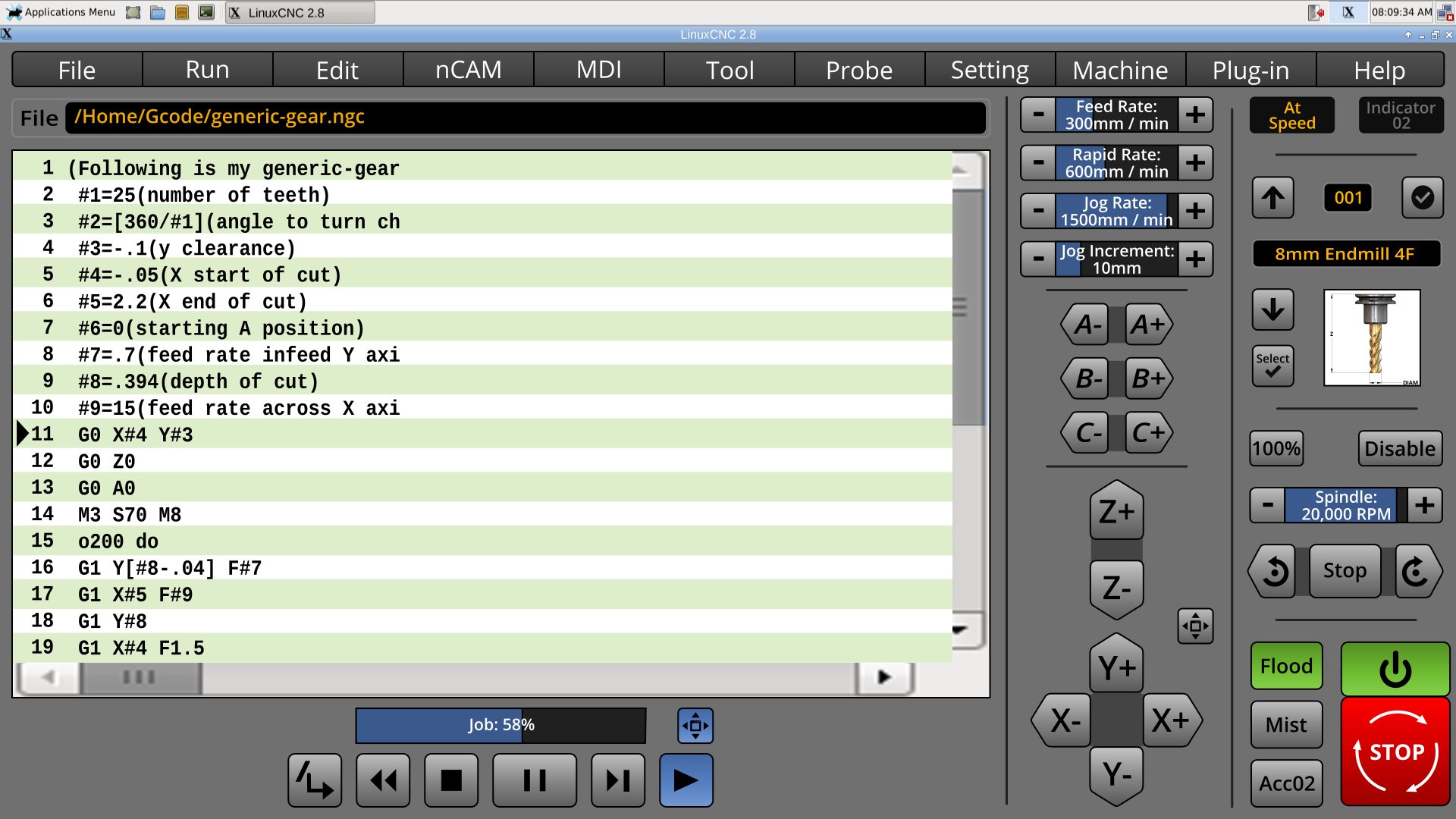
Chris, there is a little full-screen button on both the standard Run Menu, and the expanded Run menu. It toggles it.
Well, the expanded Run menu has to cover something???
The hope is that the expanded Run toggle can be fast enough so click on/off at will whenever the Run menu is showing.
~
There are current modal G and M codes, in the MDI menu. I hadn't noticed them in Axis's G-code window. I am not even a pedestrian at G-Code.
~
The interface design is coming to last proverbial corner. As I posted, a single person, versioning multiple icon sizes, of an interface with open change requests would be a nightmare for me, and an (in)efficient use of time. Soon. And yes, I will post the .svg source file for the whole kit and cabootle, which oddly, is only 2.8MB. As if it matters, the interface version is 243.
There are only a few weeks left I can work on this, perhaps 2 at the outside before I export everything, and post a proposal.
Last edit: 8 years 3 months ago by BrendaEM.
The following user(s) said Thank You: tommylight
Please Log in or Create an account to join the conversation.
- andypugh
- Offline
- Moderator
-
Less
More
- Posts: 19899
- Thank you received: 4655
8 years 3 months ago #115110
by andypugh
Inkscape uses SVG natively. And SVG can have active elements.
www.w3.org/TR/SVG/interact.html
This probably isn't the way to go, though.
Replied by andypugh on topic A Widescreen Blender-Style Interface
BrendaEM wrote: I am drawing the interface out in Inkscape because it's open and free, using open fonts.
Inkscape uses SVG natively. And SVG can have active elements.
www.w3.org/TR/SVG/interact.html
This probably isn't the way to go, though.
Please Log in or Create an account to join the conversation.
- BrendaEM
- Offline
- Elite Member
-
Less
More
- Posts: 266
- Thank you received: 120
8 years 3 months ago #115170
by BrendaEM
Replied by BrendaEM on topic A Widescreen Blender-Style Interface
Andy, I hadn't seen that before, thanks.
It would have been cool to see the interface programmed in Python because it would be easy for many people to modify it, and perhaps easier to write plug-ins for it.
It would have been cool to see the interface programmed in Python because it would be easy for many people to modify it, and perhaps easier to write plug-ins for it.
Please Log in or Create an account to join the conversation.
- andypugh
- Offline
- Moderator
-
Less
More
- Posts: 19899
- Thank you received: 4655
8 years 3 months ago #115187
by andypugh
Replied by andypugh on topic A Widescreen Blender-Style Interface
You can embed Python in an SVG file, I think. It's probably a terrible idea
Please Log in or Create an account to join the conversation.
Time to create page: 0.152 seconds