
Feature Request
- tommylight
-

- Online
- Moderator
-

snowgoer540 wrote:
Dang, good eye man! Guess that's an ohmic card all the way to the right... looks to be of their own creation.
I can make out a MosFet, a voltage regulator (5pin one) and 2 power resistors, and only 2 wires, so i have no clue.
Please Log in or Create an account to join the conversation.
- snowgoer540
- Topic Author
- Offline
- Moderator
-
- Posts: 2581
- Thank you received: 907
tommylight wrote:
snowgoer540 wrote:
Dang, good eye man! Guess that's an ohmic card all the way to the right... looks to be of their own creation.
I can make out a MosFet, a voltage regulator (5pin one) and 2 power resistors, and only 2 wires, so i have no clue.
Doesnt seem far off from what I see there.
Please Log in or Create an account to join the conversation.

Attached is the main gist of the docs, there are some links to it from other places in the docs.
You can build the docs if you wish:
Please Log in or Create an account to join the conversation.
- snowgoer540
- Topic Author
- Offline
- Moderator
-
- Posts: 2581
- Thank you received: 907
phillc54 wrote: phillc54/snowgoer540_1 is now up to date.
Attached is the main gist of the docs, there are some links to it from other places in the docs.
You can build the docs if you wish:Code:./configure --with-realtime=uspace --enable-build-documentation=html
Headed down in a few to try and break this!
Please Log in or Create an account to join the conversation.
- snowgoer540
- Topic Author
- Offline
- Moderator
-
- Posts: 2581
- Thank you received: 907
Three holes:
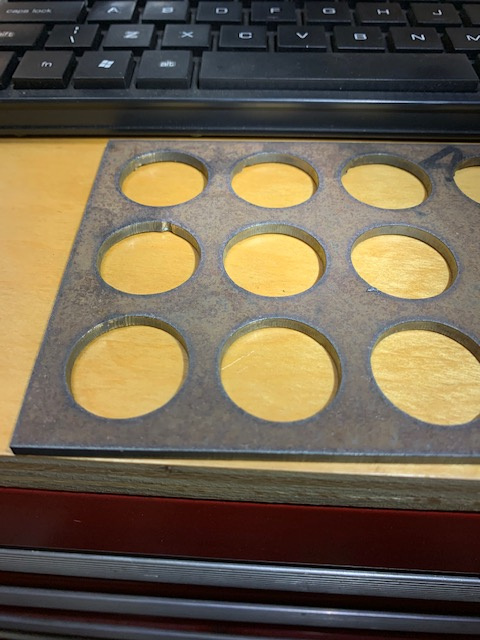
- the middle hole on the left side was paused mid-way through the cut, and then just a regular resume without bumping the torch around
- the bottom left hole was a cut recovery hole, I jogged the torch around before resuming, you can barely notice that there was a re-fire.
- the 2nd hole from the left on the bottom row is a regular no pauses hole
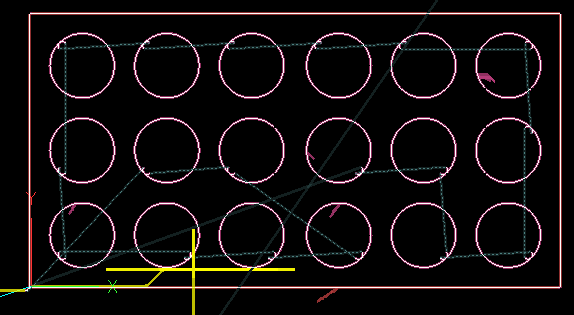
Here's the screen grab of all the places I used CR:
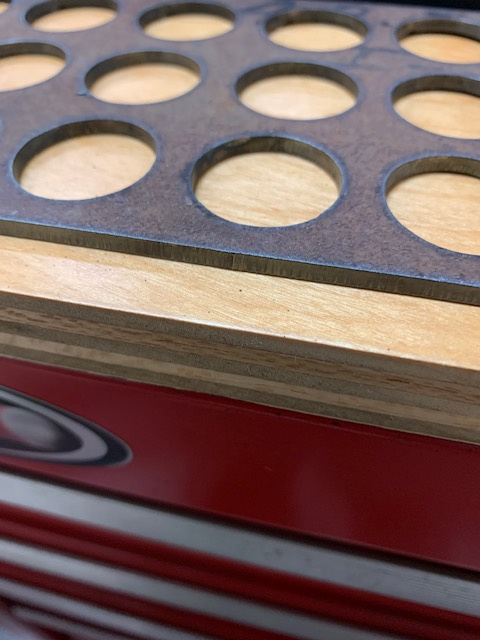
And here's the edge where I used CR. I should have done a non-CR pause here, but I didn't think of it in time.
I'm happy to do more testing if you'd like, but really I think this is ready for main stream. Seems pretty stable and well worth the effort to me.
I will word smith the doc addition a little in a bit.
Thanks again for all the hard work!
Please Log in or Create an account to join the conversation.
- snowgoer540
- Topic Author
- Offline
- Moderator
-
- Posts: 2581
- Thank you received: 907
I need you to check a few things for me:
- Does CR have to be a button in the Extras panel, or can it be a custom button on the main page as well?
- Is the X at the top left? I thought it was at the top right (so I changed it)
- Is the GUI's Resume button the Play symbol or the Pause symbol. It's tough to remember when it's not in front of you LOL
Also, editing this got me thinking... do we really need to move the torch along the cut path during a CR event? I get that sometimes you want to move forward or backward depending on where you are at in the cut. Say it flamed out at the end of the cut and you just want to move to the beginning of the next cut, for example.
That said, if you are using the CR dialog box, you are usually just wanting to move from where it failed into the scrap material, so the torch will sort of arc back into the cut. I'm not sure I can think of a reason to move forward or backward before doing that, as it would leave a little tang of metal (moving forward), or attempt to cut something it's already cut (moving backward). But I'm open to debate..
At any rate, see attached for my edits.
Edit: see other post for attachment.
Please Log in or Create an account to join the conversation.