
Error in tool_offsetview.py
- cmorley
- Offline
- Moderator
-

Less
More
- Posts: 7368
- Thank you received: 2181
10 Jun 2026 02:10 #347005
by cmorley
Replied by cmorley on topic Error in tool_offsetview.py
Pushed.
Thank you!
Thank you!
The following user(s) said Thank You: MarkoPolo
Please Log in or Create an account to join the conversation.
- MarkoPolo
- Offline
- Elite Member
-

Less
More
- Posts: 319
- Thank you received: 90
07 Jul 2026 17:30 #347580
by MarkoPolo
Replied by MarkoPolo on topic Error in tool_offsetview.py
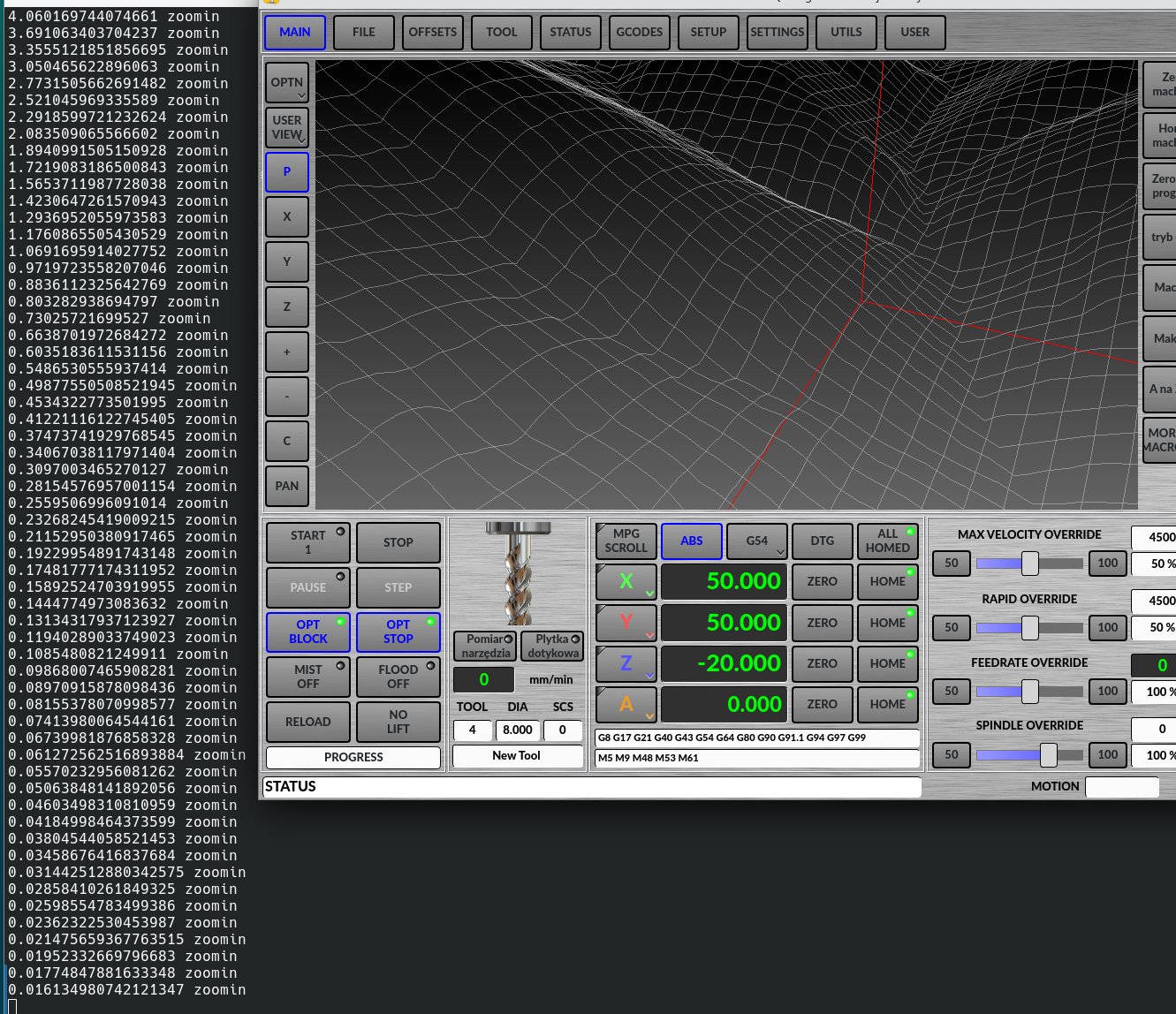
The preview window has a similar problem to the Vismach. There's no limit at all to the maximum and minimum zoom. You can zoom in infinitely without any visual effect, and the same applies to zooming out. There's also a tweak to the s value, which doesn't work linearly with zooming in and out, and at certain zoom levels, moving left, right, and up is difficult.
I'm uploading the corrected glnav.py.
Please try it out.
I'm uploading the corrected glnav.py.
Please try it out.
Please Log in or Create an account to join the conversation.
- cmorley
- Offline
- Moderator
-
Less
More
- Posts: 7368
- Thank you received: 2181
08 Jul 2026 05:19 #347592
by cmorley
Replied by cmorley on topic Error in tool_offsetview.py
Works great for me.
Pushed.
Thanks
Pushed.
Thanks
The following user(s) said Thank You: tommylight, MarkoPolo
Please Log in or Create an account to join the conversation.
- MarkoPolo
- Offline
- Elite Member
-
Less
More
- Posts: 319
- Thank you received: 90
25 Jul 2026 17:30 #348058
by MarkoPolo
Replied by MarkoPolo on topic Error in tool_offsetview.py
There are a few minor things that could be improved, of course in qtdragon.
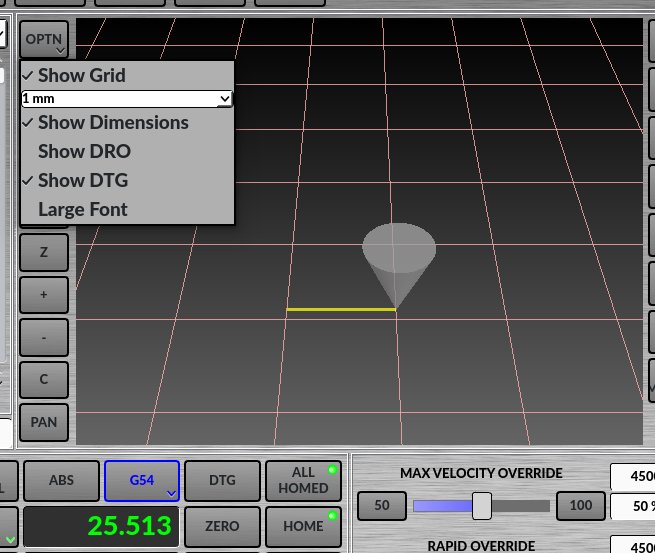
1. The grid in the preview is in inches; it doesn't switch to millimeters when the machine is running in metric mode.
2. The "run time" window freezes when paused, but when resumed, the time is set as if it weren't paused. Shouldn't that be the case?
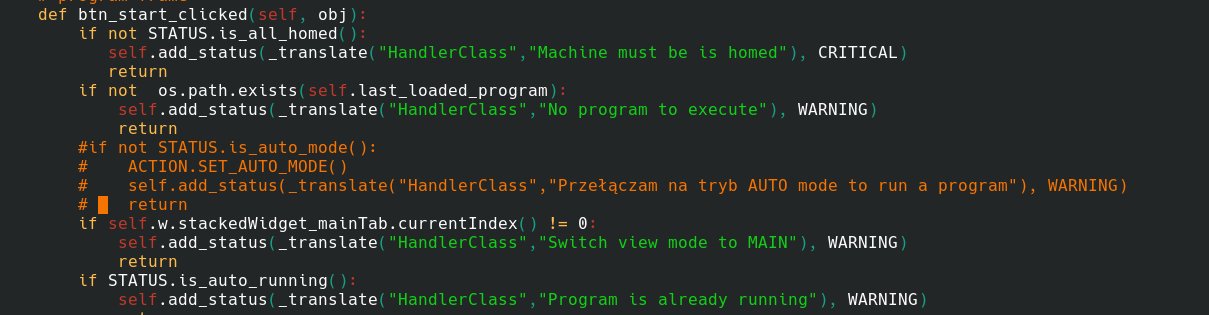
3. Manually switching between MANUAL MDI and AUTO modes is unnecessary in many cases and sometimes annoying.
For a long time, I've been using the "btn_start_clicked" function without checking if the machine is in the "auto" state. After pressing start, the machine switches to auto mode automatically, and it works very well.
I'd like the "file" button to work similarly.
After pressing "file," switch the machine to manual mode and open files.
4. The physical keyboard's pause key only works in "auto" mode, so if the program is run from a macro, the machine is in MDI and pause doesn't work.
In the "on_keycall_pause" function, simply remove the appropriate condition.
The "btn_pause_clicked" function probably also needs to be corrected, because if the "spindle lift" button is active, then after resuming work, the spindle starts and lowers, but doesn't continue. In other cases, everything works correctly.
1. The grid in the preview is in inches; it doesn't switch to millimeters when the machine is running in metric mode.
2. The "run time" window freezes when paused, but when resumed, the time is set as if it weren't paused. Shouldn't that be the case?
3. Manually switching between MANUAL MDI and AUTO modes is unnecessary in many cases and sometimes annoying.
For a long time, I've been using the "btn_start_clicked" function without checking if the machine is in the "auto" state. After pressing start, the machine switches to auto mode automatically, and it works very well.
I'd like the "file" button to work similarly.
After pressing "file," switch the machine to manual mode and open files.
4. The physical keyboard's pause key only works in "auto" mode, so if the program is run from a macro, the machine is in MDI and pause doesn't work.
In the "on_keycall_pause" function, simply remove the appropriate condition.
The "btn_pause_clicked" function probably also needs to be corrected, because if the "spindle lift" button is active, then after resuming work, the spindle starts and lowers, but doesn't continue. In other cases, everything works correctly.
Please Log in or Create an account to join the conversation.
- cmorley
- Offline
- Moderator
-
Less
More
- Posts: 7368
- Thank you received: 2181
31 Jul 2026 18:17 #348302
by cmorley
Replied by cmorley on topic Error in tool_offsetview.py
1) grid
It was never intended to switch sizes on g20/21.
But I see in the metric sim the mm sizes are not metric at all.
strangely in the inch sim, metric and imperial sizes work properly.
This seems to be in the glcannon code, so is not fixed yet.
2) paused runtime
ya that's not right and I think its fixed now.
3) mode switching
I created a hidden 'auto mode switch' option - enabled in the preference file only.
I think it does what you want. please try it out and if it is I will make it a settings option. (if running a program, the file tab will still not change to the file page FYI)
4) keyboard pausing
ok I removed the mode check so it should work everywhere.
I could not get the spindle lowering to fail with the pause button after this.
please advise if there is more to look at.
All just pushed to master
It was never intended to switch sizes on g20/21.
But I see in the metric sim the mm sizes are not metric at all.
strangely in the inch sim, metric and imperial sizes work properly.
This seems to be in the glcannon code, so is not fixed yet.
2) paused runtime
ya that's not right and I think its fixed now.
3) mode switching
I created a hidden 'auto mode switch' option - enabled in the preference file only.
I think it does what you want. please try it out and if it is I will make it a settings option. (if running a program, the file tab will still not change to the file page FYI)
4) keyboard pausing
ok I removed the mode check so it should work everywhere.
I could not get the spindle lowering to fail with the pause button after this.
please advise if there is more to look at.
All just pushed to master
Please Log in or Create an account to join the conversation.
- MarkoPolo
- Offline
- Elite Member
-
Less
More
- Posts: 319
- Thank you received: 90
01 Aug 2026 19:51 #348355
by MarkoPolo
Replied by MarkoPolo on topic Error in tool_offsetview.py
Thanks for the changes.
"Run time" now works correctly.
"Auto mode switching = True" works perfectly; it could definitely be added to the GUI.
Regarding issue number 4, I've found the problem.
The auto mode check condition in the "external_offset_state_changed" function also needs to be removed. After this change, everything works correctly.
Another issue with the stop button: after pressing stop, the machine stops, but the spindle doesn't turn off. You have to press stop again to turn the spindle off.
The stop button status displays "error process aborted."
This doesn't seem to be related to the recent changes.
"Run time" now works correctly.
"Auto mode switching = True" works perfectly; it could definitely be added to the GUI.
Regarding issue number 4, I've found the problem.
The auto mode check condition in the "external_offset_state_changed" function also needs to be removed. After this change, everything works correctly.
Another issue with the stop button: after pressing stop, the machine stops, but the spindle doesn't turn off. You have to press stop again to turn the spindle off.
The stop button status displays "error process aborted."
This doesn't seem to be related to the recent changes.

Please Log in or Create an account to join the conversation.
- MarkoPolo
- Offline
- Elite Member
-
Less
More
- Posts: 319
- Thank you received: 90
07 Aug 2026 18:46 #348543
by MarkoPolo
Replied by MarkoPolo on topic Error in tool_offsetview.py
Hi Cmorley
I've tested it some more, and I don't need to touch "def external_offset_state_changed(self, data):"; it works fine without any changes. I don't know why I had the problem before, but the stop button is still a problem.
To stop the spindle, I have to press stop a second time.
I've tested it some more, and I don't need to touch "def external_offset_state_changed(self, data):"; it works fine without any changes. I don't know why I had the problem before, but the stop button is still a problem.
To stop the spindle, I have to press stop a second time.
Please Log in or Create an account to join the conversation.
- cmorley
- Offline
- Moderator
-
Less
More
- Posts: 7368
- Thank you received: 2181
09 Aug 2026 01:37 #348579
by cmorley
Replied by cmorley on topic Error in tool_offsetview.py
Can you make the spindle stop fail in a sim config?
Please Log in or Create an account to join the conversation.
- MarkoPolo
- Offline
- Elite Member
-
Less
More
- Posts: 319
- Thank you received: 90
09 Aug 2026 20:13 #348614
by MarkoPolo
Replied by MarkoPolo on topic Error in tool_offsetview.py
Yes. You can observe this in the default configuration, e.g., sim.qtdragon.qtdragon_xyz45/qtdragon_xyza.ini.
I've checked it several different ways, both in a virtual machine and in a real one.
You press stop, the machine stops, but to turn off the spindle, you have to press stop again.
auto mode switching = True works fine.
If you want, add it to the GUI.
I've checked it several different ways, both in a virtual machine and in a real one.
You press stop, the machine stops, but to turn off the spindle, you have to press stop again.
auto mode switching = True works fine.
If you want, add it to the GUI.
Please Log in or Create an account to join the conversation.
- cmorley
- Offline
- Moderator
-
Less
More
- Posts: 7368
- Thank you received: 2181
14 Aug 2026 12:44 #348738
by cmorley
Replied by cmorley on topic Error in tool_offsetview.py
Can you give details on the procedure you are using to test the sim?
I can't see this behavior on my system but maybe I am doing it wrong.
Thanks
I can't see this behavior on my system but maybe I am doing it wrong.
Thanks
Please Log in or Create an account to join the conversation.
Moderators: cmorley
Time to create page: 0.211 seconds