
- Posts: 492
- Thank you received: 297
5 Axis ParPort Stepper Setup with RTCP
- dgarrett
- Offline
- Platinum Member
-

Less
More
11 years 1 month ago #62817
by dgarrett
Replied by dgarrett on topic 5 Axis ParPort Stepper Setup with RTCP
An example shell session using linuxcnc installed from deb packages follows.
A run-in-place (RIP) environment is not required when using linuxcnc installed from
deb packages.
In this example, linuxcnc-uspace packages from the buildbot are used but instructions
are similar for any package install
A run-in-place (RIP) environment is not required when using linuxcnc installed from
deb packages.
In this example, linuxcnc-uspace packages from the buildbot are used but instructions
are similar for any package install
Code:
$ # verify required packages (the -dev package provides the halcompile utility)
$ dpkg -l linuxcnc\*|grep ii
ii linuxcnc-uspace 1:2.8.0~pre1.1082.gaa37cb0 amd64 PC based motion controller for real-time Linux
ii linuxcnc-uspace-dev 1:2.8.0~pre1.1082.gaa37cb0 amd64 PC based motion controller for real-time Linux
$
$ # verify halcompile is in standard path:
$ which halcompile
/usr/bin/halcompile
$
$ # -h shows usage
$ halcompile -h
halcompile: Build, compile, and install LinuxCNC HAL components
Usage:
halcompile [--compile|--preprocess|--document|--view-doc] compfile...
[sudo] halcompile [--install|--install-doc] compfile...
halcompile --compile --userspace cfile...
[sudo] halcompile --install --userspace cfile...
[sudo] halcompile --install --userspace pyfile...
halcompile --print-modinc
$
$ # examine current directory:
$ ls -gG
total 4
-rw-r--r-- 1 3029 Sep 11 03:21 5axiskins.c
$
$ # try compiling:
$ halcompile --compile 5axiskins.c
Compiling realtime 5axiskins.c
Linking 5axiskins.so
$ ls -gG
total 20
-rw-r--r-- 1 3029 Sep 11 03:21 5axiskins.c
-rwxr-xr-x 1 15232 Sep 20 07:45 5axiskins.so
$
$ # try installing:
$ touch now
$ sudo halcompile --install 5axiskins.c
Compiling realtime 5axiskins.c
Linking 5axiskins.so
cp 5axiskins.so /usr/lib/linuxcnc/modules/
$
$ find /usr/lib/ -newer ./now -ls
166767 16 -rw-r--r-- 1 root root 15232 Sep 20 07:46 /usr/lib/linuxcnc/modules/5axiskins.so
$
The following user(s) said Thank You: marq_torque
- marq_torque
- Offline
- Elite Member
-

Less
More
- Posts: 171
- Thank you received: 3
11 years 1 month ago #62950
by marq_torque
Replied by marq_torque on topic 5 Axis ParPort Stepper Setup with RTCP
Hello Mods and Members 
After many days i am back to track, played with new config and found its working working .... now its time to integrate tools with Rotary B axis. i will ask for that later on. but at present i found one weird problem. when switching from MDI to Manual Mode or vice versa... X and Z axis values change automatically ... means it keep increasing... increasing... by some fixed amount nearby 250 or something. and whenever i need to give MDI it says all axis must be homed. when its already set to some offset for work... confused what ... why... how... !!
:dry:
After many days i am back to track, played with new config and found its working working .... now its time to integrate tools with Rotary B axis. i will ask for that later on. but at present i found one weird problem. when switching from MDI to Manual Mode or vice versa... X and Z axis values change automatically ... means it keep increasing... increasing... by some fixed amount nearby 250 or something. and whenever i need to give MDI it says all axis must be homed. when its already set to some offset for work... confused what ... why... how... !!
:dry:
- marq_torque
- Offline
- Elite Member
-
Less
More
- Posts: 171
- Thank you received: 3
11 years 1 month ago #62954
by marq_torque
Replied by marq_torque on topic 5 Axis ParPort Stepper Setup with RTCP
Okay okay it was my Mistake in 5Axiskin.c file in line 45 and 66 i solved that error
so only one thing i left questioned is. why its not moving from tool tip ?? i have tested in default kinematics file and modified also.
and also one thing how to use touch probe to measure automatic and save in W tool length ??
Hello Mods and Members
After many days i am back to track, played with new config and found its working working .... now its time to integrate tools with Rotary B axis. i will ask for that later on. but at present i found one weird problem. when switching from MDI to Manual Mode or vice versa... X and Z axis values change automatically ... means it keep increasing... increasing... by some fixed amount nearby 250 or something. and whenever i need to give MDI it says all axis must be homed. when its already set to some offset for work... confused what ... why... how... !!
:dry:
so only one thing i left questioned is. why its not moving from tool tip ?? i have tested in default kinematics file and modified also.
and also one thing how to use touch probe to measure automatic and save in W tool length ??
- andypugh
- Offline
- Moderator
-

Less
More
- Posts: 19899
- Thank you received: 4655
11 years 1 month ago #62973
by andypugh
Is the tool length linked to a pin of the kinematics?
The kinematics is unaware of tool length, so the has to be passed in from HAL.
Replied by andypugh on topic 5 Axis ParPort Stepper Setup with RTCP
Does the kinematics take account of the tool length?marq_torque wrote: so only one thing i left questioned is. why its not moving from tool tip ??
Is the tool length linked to a pin of the kinematics?
The kinematics is unaware of tool length, so the has to be passed in from HAL.
That is normally done with a remapping of M6, look at the sample config in sim/axis/remap/{ somethig about tool length}and also one thing how to use touch probe to measure automatic and save in W tool length ??
The following user(s) said Thank You: marq_torque
- marq_torque
- Offline
- Elite Member
-
Less
More
- Posts: 171
- Thank you received: 3
11 years 1 month ago #62974
by marq_torque
Replied by marq_torque on topic 5 Axis ParPort Stepper Setup with RTCP
Hello Andypugh,
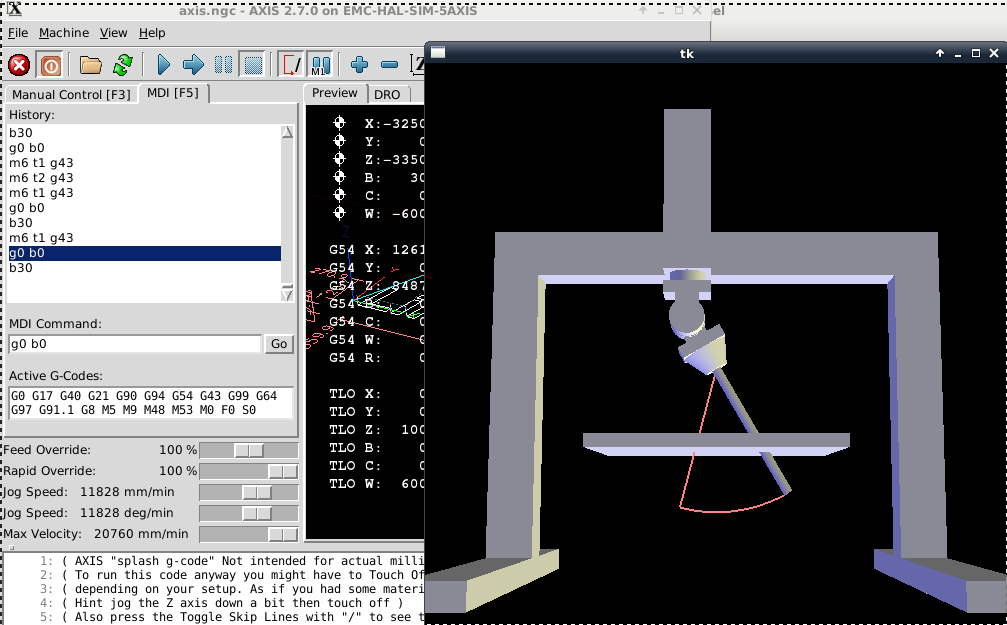
yes its already linked. bt there is also on more thing coming wrong.... is whenever i rotate C axis ... XZ B movement is totally unpredictable ..and goes wrong ... if i command XZB when C at 0° it moves fine but still tool length is question. but when i first try to move C then try to move XZB it moves very awkwardly... i am trying to post screenshot from computer.
yes its already linked. bt there is also on more thing coming wrong.... is whenever i rotate C axis ... XZ B movement is totally unpredictable ..and goes wrong ... if i command XZB when C at 0° it moves fine but still tool length is question. but when i first try to move C then try to move XZB it moves very awkwardly... i am trying to post screenshot from computer.
- andypugh
- Offline
- Moderator
-
Less
More
- Posts: 19899
- Thank you received: 4655
11 years 1 month ago #62975
by andypugh
Replied by andypugh on topic 5 Axis ParPort Stepper Setup with RTCP
I thought that the C-axis was not involved in the kinematics calculations?
Maybe this is just a Vismach problem? You probably shouldn't have the C-axis connected to Vismach.
Does the tool length shown in Vismachmatch the tool length shown at the bottom of the Axis window?
Does the Vismach picture change when you change tools?
Maybe this is just a Vismach problem? You probably shouldn't have the C-axis connected to Vismach.
Does the tool length shown in Vismachmatch the tool length shown at the bottom of the Axis window?
Does the Vismach picture change when you change tools?
The following user(s) said Thank You: marq_torque
Time to create page: 0.844 seconds