
- Posts: 171
- Thank you received: 3
5 Axis ParPort Stepper Setup with RTCP
- marq_torque
- Offline
- Elite Member
-

Less
More
11 years 1 month ago #62624
by marq_torque
Replied by marq_torque on topic 5 Axis ParPort Stepper Setup with RTCP
Hello Andypugh,
greetings of the day,
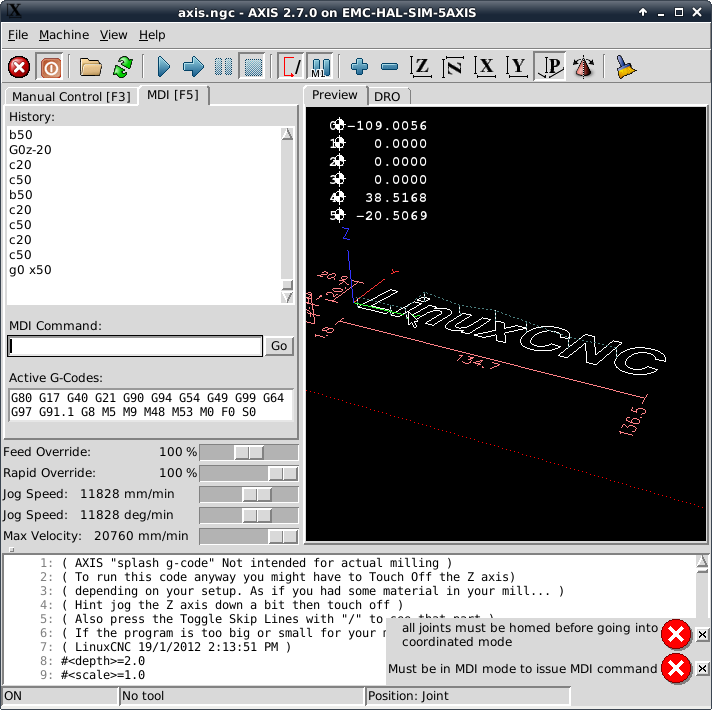
I have checked math.... i am so noob ... BTW do you have idea why it shows error like, "Must be in MDI mode to issue MDI command."
??
Also ... totally blank again ... how to break link of C from 5axiskin ...
greetings of the day,
I have checked math.... i am so noob ... BTW do you have idea why it shows error like, "Must be in MDI mode to issue MDI command."
??
Also ... totally blank again ... how to break link of C from 5axiskin ...
Please Log in or Create an account to join the conversation.
- andypugh
- Offline
- Moderator
-

Less
More
- Posts: 19899
- Thank you received: 4655
11 years 1 month ago #62626
by andypugh
Replied by andypugh on topic 5 Axis ParPort Stepper Setup with RTCP
It means what it says. What are you doing to prompt it?marq_torque wrote: "Must be in MDI mode to issue MDI command."
I thought you said that you had checked the maths? If so, That's what you do, put that maths in the kinematics file and recompile.totally blank again ... how to break link of C from 5axiskin ...
The following user(s) said Thank You: marq_torque
Please Log in or Create an account to join the conversation.
- marq_torque
- Offline
- Elite Member
-
Less
More
- Posts: 171
- Thank you received: 3
11 years 1 month ago #62627
by marq_torque
After changing Value of C in line 44 and 65 ...
Replied by marq_torque on topic 5 Axis ParPort Stepper Setup with RTCP
andypugh wrote:
It means what it says. What are you doing to prompt it?marq_torque wrote: "Must be in MDI mode to issue MDI command."
I thought you said that you had checked the maths? If so, That's what you do, put that maths in the kinematics file and recompile.totally blank again ... how to break link of C from 5axiskin ...
After changing Value of C in line 44 and 65 ...
Please Log in or Create an account to join the conversation.
- andypugh
- Offline
- Moderator
-
Less
More
- Posts: 19899
- Thank you received: 4655
11 years 1 month ago #62630
by andypugh
Replied by andypugh on topic 5 Axis ParPort Stepper Setup with RTCP
All the axes do seem to be homed, can you actually go into World mode?
I assume you just typed G0 X50? That's an MDI command, but you can't do that because at the moment you don't have an X axis, you are in Joint mode, and have Joints 0,1,2,3,4,5.
You need to switch to World mode, then G0 X50 will be valid (but might not work, for other reasons)
I assume you just typed G0 X50? That's an MDI command, but you can't do that because at the moment you don't have an X axis, you are in Joint mode, and have Joints 0,1,2,3,4,5.
You need to switch to World mode, then G0 X50 will be valid (but might not work, for other reasons)
The following user(s) said Thank You: marq_torque
Please Log in or Create an account to join the conversation.
- marq_torque
- Offline
- Elite Member
-
Less
More
- Posts: 171
- Thank you received: 3
11 years 1 month ago #62656
by marq_torque
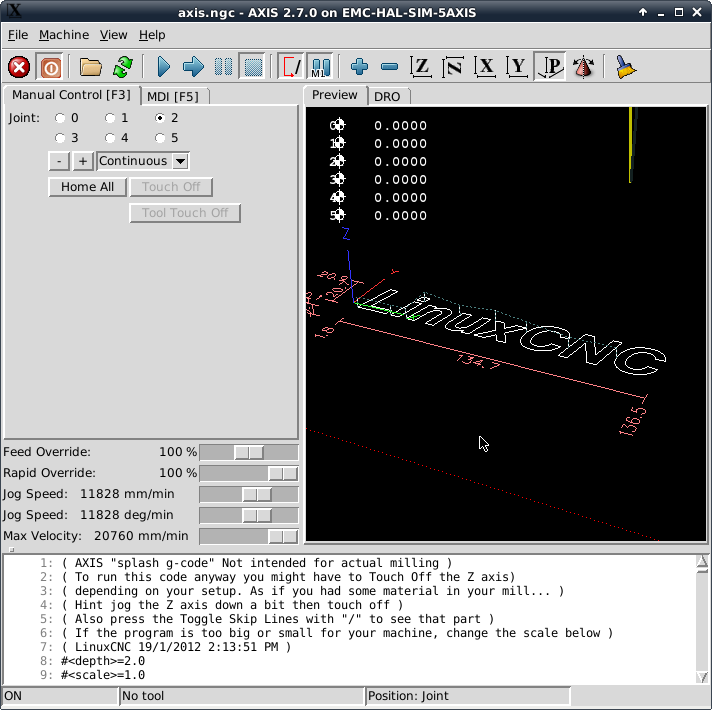
 finally i am successful to break link with C axis .... youhuuuuu !! soooooo much thanks to AndyPugh i have won the war
now coming to next step how to touchoff too ?? i mean how to add tool offset ?? because this screen has locked tool touch button ... any ideas ??
Regards,
Ankit
Replied by marq_torque on topic 5 Axis ParPort Stepper Setup with RTCP
finally i am successful to break link with C axis .... youhuuuuu !! soooooo much thanks to AndyPugh i have won the war now coming to next step how to touchoff too ?? i mean how to add tool offset ?? because this screen has locked tool touch button ... any ideas ??
Regards,
Ankit
Please Log in or Create an account to join the conversation.
- andypugh
- Offline
- Moderator
-
Less
More
- Posts: 19899
- Thank you received: 4655
11 years 1 month ago #62659
by andypugh
Replied by andypugh on topic 5 Axis ParPort Stepper Setup with RTCP
You can't touch-off until you are in World Mode.
(then the coordinates XYZ etc mean something, and that is what the DRO shows.)
The keyboard shortcut is $ but you can also do it from the Axis menus (Machine? I can't recall)
(then the coordinates XYZ etc mean something, and that is what the DRO shows.)
The keyboard shortcut is $ but you can also do it from the Axis menus (Machine? I can't recall)
The following user(s) said Thank You: marq_torque
Please Log in or Create an account to join the conversation.
Time to create page: 0.233 seconds