
- Posts: 711
- Thank you received: 9
Prototrak Plus Retrofit with Mesa 7i77 & 5i25 cards
- new2linux
- Offline
- Platinum Member
-

Less
More
9 years 6 months ago - 9 years 6 months ago #91693
by new2linux
Replied by new2linux on topic Prototrak Plus Retrofit with Mesa 7i77 & 5i25 cards
Many thanks for the encouraging words!
So negative values are acceptable, (as in "I" in the 1st pic) as well? My system is set up as "torque mode" not velocity mode, so my hope is I can refine the tuning more w/o great difficulty, to get a hal trace similar to the one in bottom pic.
Thanks for all the great help!
So negative values are acceptable, (as in "I" in the 1st pic) as well? My system is set up as "torque mode" not velocity mode, so my hope is I can refine the tuning more w/o great difficulty, to get a hal trace similar to the one in bottom pic.
Thanks for all the great help!
Last edit: 9 years 6 months ago by new2linux. Reason: clearify
Please Log in or Create an account to join the conversation.
- PCW
- Offline
- Moderator
-

Less
More
- Posts: 18115
- Thank you received: 5334
9 years 6 months ago #91700
by PCW
Replied by PCW on topic Prototrak Plus Retrofit with Mesa 7i77 & 5i25 cards
Negative I does not work safely with the PID component
(nor does it make any sense for a velocity or torque mode servo)
Velocity mode servos are tuned chiefly with P and FF1
Torque mode servo need mainly P,I,D and FF2
Torque mode servo tuning will benefit from running the servo loop faster than
LinuxCNCs default 1KHz and using a dual PID loop (position loop around a velocity loop)
(nor does it make any sense for a velocity or torque mode servo)
Velocity mode servos are tuned chiefly with P and FF1
Torque mode servo need mainly P,I,D and FF2
Torque mode servo tuning will benefit from running the servo loop faster than
LinuxCNCs default 1KHz and using a dual PID loop (position loop around a velocity loop)
The following user(s) said Thank You: new2linux
Please Log in or Create an account to join the conversation.
- Todd Zuercher
- Offline
- Platinum Member
-
Less
More
- Posts: 4793
- Thank you received: 1480
9 years 6 months ago - 9 years 6 months ago #91702
by Todd Zuercher
Replied by Todd Zuercher on topic Prototrak Plus Retrofit with Mesa 7i77 & 5i25 cards
No, negative numbers for those are not cool and at the time that I tried that I did not know any better, and I was getting frustrated, and was trying anything. That pic is quite old (from way back when Linuxcnc v2.5 was new)
The biggest trick I did to tune those particular torque mode servos was to use two PID loops. The first one just uses P and D, its out put is the torque command that is fed to the drive. It closes the velocity loop and I have it running in a floating point base thread, running as fast as I can read/write to the Mesa 5i25 without errors. It's feed back is the velocity feed back from the Mesa card.
The 2nd PID loop is the position loop and is set up like a "normal" PID for commanding a velocity drive. It runs in the servo thread, and it's output is the velocity command that is sent to the 1st PID loop.
My set up seemed to be unusually poorly behaved, and you may not need to go to such lengths to get acceptable motion.
If you are using torque mode servos, I would suggest starting by trying to run the servo-thread as fast as you can without getting latency errors. Then try tuning the servos using a single PID loop. When using a single PID loop for torque mode, some things don't behave quite like advertised in all of the servo tuning tutorials especially the FF1 and FF2.
Here are two screen shots I just made on the same machine running 1st a single PID loop and 2nd two loops.
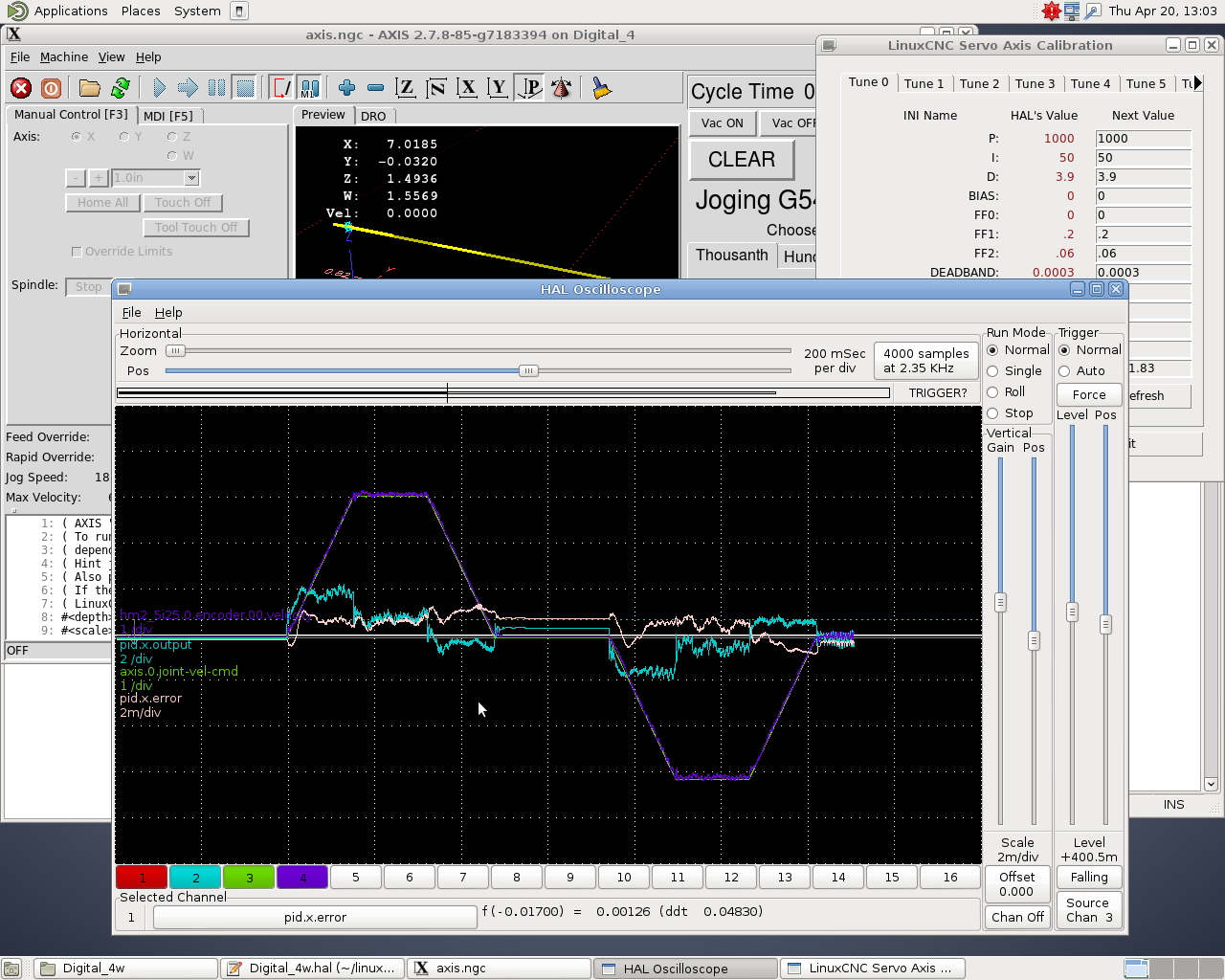

The biggest trick I did to tune those particular torque mode servos was to use two PID loops. The first one just uses P and D, its out put is the torque command that is fed to the drive. It closes the velocity loop and I have it running in a floating point base thread, running as fast as I can read/write to the Mesa 5i25 without errors. It's feed back is the velocity feed back from the Mesa card.
The 2nd PID loop is the position loop and is set up like a "normal" PID for commanding a velocity drive. It runs in the servo thread, and it's output is the velocity command that is sent to the 1st PID loop.
My set up seemed to be unusually poorly behaved, and you may not need to go to such lengths to get acceptable motion.
If you are using torque mode servos, I would suggest starting by trying to run the servo-thread as fast as you can without getting latency errors. Then try tuning the servos using a single PID loop. When using a single PID loop for torque mode, some things don't behave quite like advertised in all of the servo tuning tutorials especially the FF1 and FF2.
Here are two screen shots I just made on the same machine running 1st a single PID loop and 2nd two loops.
Last edit: 9 years 6 months ago by Todd Zuercher. Reason: Added pics
The following user(s) said Thank You: new2linux
Please Log in or Create an account to join the conversation.
- new2linux
- Offline
- Platinum Member
-
Less
More
- Posts: 711
- Thank you received: 9
9 years 6 months ago - 9 years 6 months ago #91967
by new2linux
Replied by new2linux on topic Prototrak Plus Retrofit with Mesa 7i77 & 5i25 cards
Many thanks Todd for your screenshots!! I am thinking you are getting close to the 2017 garden season, and wish you the very best with your planting.
I have tweaked the (heaviest load) "y" axes and attached is the screenshot. I have not compared it to the other posts yet, this is at 60"/min. If I can get a stable trace on the hal scope I may not need to incorporate 2 PID loops, is that correct? The "x" axes did not seem to be as sensitive as the "y" axes during this tuning, I may try swapping servo locations, just to see how much of difference the load makes to tuning. Please any suggestions are warmly welcomed.
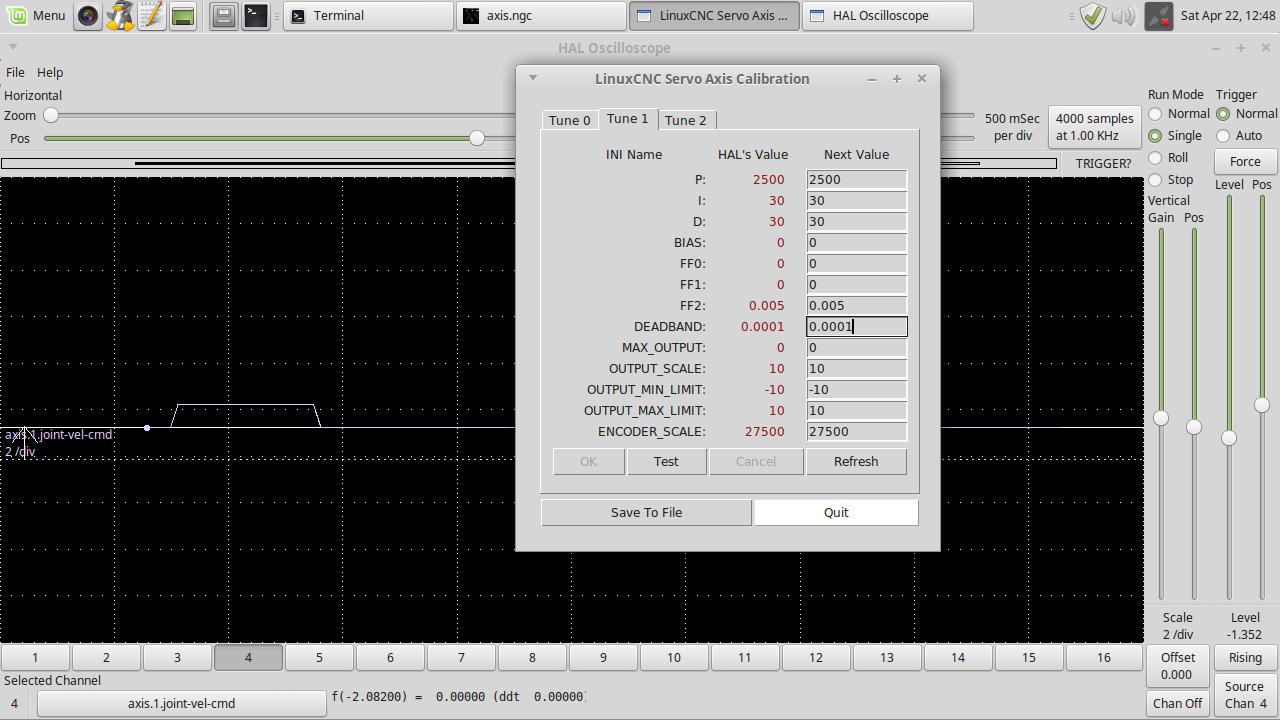
many thanks!!
Edit: I tried to "run" the sample code (linuxcnc) have a "" emc/task/taskintf.cc 6171 Error on axes 2, command number 280 "" this line comes up in the "terminal" window. This is in "terminal" after linuxcnc is running, "Z" axes moves up a small amount then "error on axes 2 shows". I think axes 2 needs to be "edited out" because there is no "z" for the near future.
many thanks!!
I have tweaked the (heaviest load) "y" axes and attached is the screenshot. I have not compared it to the other posts yet, this is at 60"/min. If I can get a stable trace on the hal scope I may not need to incorporate 2 PID loops, is that correct? The "x" axes did not seem to be as sensitive as the "y" axes during this tuning, I may try swapping servo locations, just to see how much of difference the load makes to tuning. Please any suggestions are warmly welcomed.
many thanks!!
Edit: I tried to "run" the sample code (linuxcnc) have a "" emc/task/taskintf.cc 6171 Error on axes 2, command number 280 "" this line comes up in the "terminal" window. This is in "terminal" after linuxcnc is running, "Z" axes moves up a small amount then "error on axes 2 shows". I think axes 2 needs to be "edited out" because there is no "z" for the near future.
many thanks!!
Last edit: 9 years 6 months ago by new2linux. Reason: add question
Please Log in or Create an account to join the conversation.
- new2linux
- Offline
- Platinum Member
-
Less
More
- Posts: 711
- Thank you received: 9
9 years 6 months ago #92153
by new2linux
Replied by new2linux on topic Prototrak Plus Retrofit with Mesa 7i77 & 5i25 cards
Many thanks for all the great help!
After reading more about the duel loop tuning from Todd's thread and in the hal manual, do I have the overview correct?
The following is necessary to allow the 2nd loop:
loadrt stepgen step_type=1,1 ctrl_type v,v
loadrt pid [2=<loops>] [debug=1]
loadrt pwmgen output_type=0,1
or are there other suggested reading?
thanks for all the help!
After reading more about the duel loop tuning from Todd's thread and in the hal manual, do I have the overview correct?
Todd Zuercher wrote: There are two reasons for using the duel PID.
1st for good response a torque mode servo needs to run in a faster loop than an ordinary velocity mode servo. Putting the velocity loop in the floating point base-thread let me run it a little bit faster than I could with just a servo-thread.
2nd using the duel loop made tuning much simpler, for me. With tuning strategies that are like a normal conventional velocity loop system. With it I was able to get good results with better following errors after only a minutes of tuning, on a system I had been struggling with for months before. Without using any complex filtering.
The following is necessary to allow the 2nd loop:
loadrt stepgen step_type=1,1 ctrl_type v,v
loadrt pid [2=<loops>] [debug=1]
loadrt pwmgen output_type=0,1
or are there other suggested reading?
thanks for all the help!
Please Log in or Create an account to join the conversation.
- Todd Zuercher
- Offline
- Platinum Member
-
Less
More
- Posts: 4793
- Thank you received: 1480
9 years 6 months ago #92161
by Todd Zuercher
Replied by Todd Zuercher on topic Prototrak Plus Retrofit with Mesa 7i77 & 5i25 cards
Have you seen this little tutorial about tuning a torque mode servo in Linuxcnc?
gnipsel.com/linuxcnc/tuning/torque.html
(that is for using a single PID loop.)
A duel PID loop configuration requires two PID loops per axis. Turns the system into the equivalent of a conventional velocity mode servo.
In a conventional velocity mode you have a position loop in Linuxcnc that sends a velocity command to the servo drive and the drive has it's own velocity loop that controls the torque. The duel loop setup just moves that velocity feedback loop from the drive into Linuxcnc.
Here is the thread that inspired me to give a duel PID loop setup a try.
forum.linuxcnc.org/10-advanced-configura...eduling?limitstart=0
However it is a very advanced topic.
There will not be any stepgens in one of these setups. There will be 2 PID loops loaded per joint (motor).
You can run every thing in a fast servothread (if you have a fast computer). The computer I was using was a little marginal, so I worked around it by using a floating point base thread for the velocity loop and read/write to the Mesa cards.
Here is my 2 loop config.
forum.linuxcnc.org/media/kunena/attachments/3190/2PID.zip
(that is for using a single PID loop.)
A duel PID loop configuration requires two PID loops per axis. Turns the system into the equivalent of a conventional velocity mode servo.
In a conventional velocity mode you have a position loop in Linuxcnc that sends a velocity command to the servo drive and the drive has it's own velocity loop that controls the torque. The duel loop setup just moves that velocity feedback loop from the drive into Linuxcnc.
Here is the thread that inspired me to give a duel PID loop setup a try.
forum.linuxcnc.org/10-advanced-configura...eduling?limitstart=0
However it is a very advanced topic.
There will not be any stepgens in one of these setups. There will be 2 PID loops loaded per joint (motor).
You can run every thing in a fast servothread (if you have a fast computer). The computer I was using was a little marginal, so I worked around it by using a floating point base thread for the velocity loop and read/write to the Mesa cards.
Here is my 2 loop config.
forum.linuxcnc.org/media/kunena/attachments/3190/2PID.zip
The following user(s) said Thank You: new2linux
Please Log in or Create an account to join the conversation.
Time to create page: 0.651 seconds