Hurco KMB-IS CNC update

More
6 years 3 months ago - 6 years 3 months ago #176803 by CORBETT
Replied by CORBETT on topic Hurco KMB-IS CNC update

Leith,

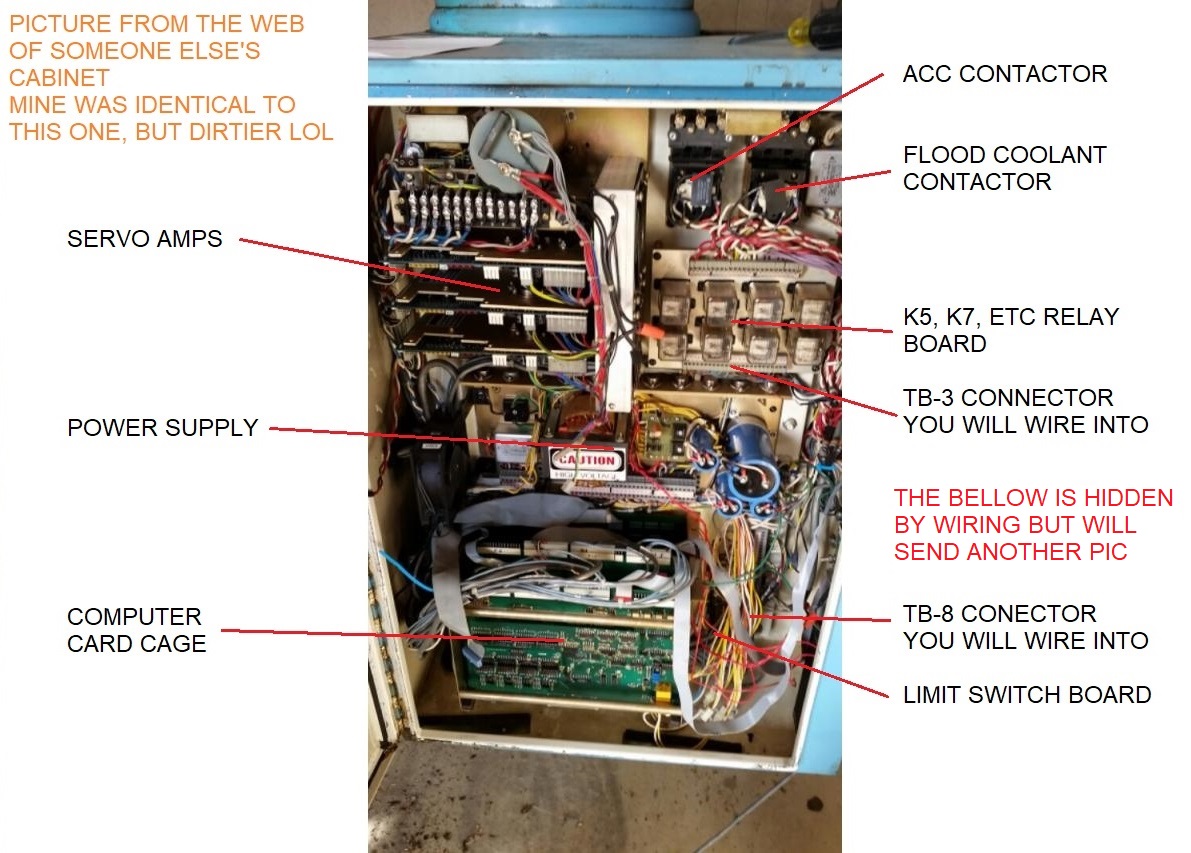
Here is a pic of a cabinet like mine. Mine was much dirtier, and I would have to find the pics from 2 years ago before tearing out the computer cage and power supply. But this pic on the web was much cleaner inside.

I am going to go try and make a few parts for my Dad and his projects. I will be back along and along to try and upload some more pics and info.

Later tonight I will send you a copy of my manual for the machine.

Will be back later,
Robert


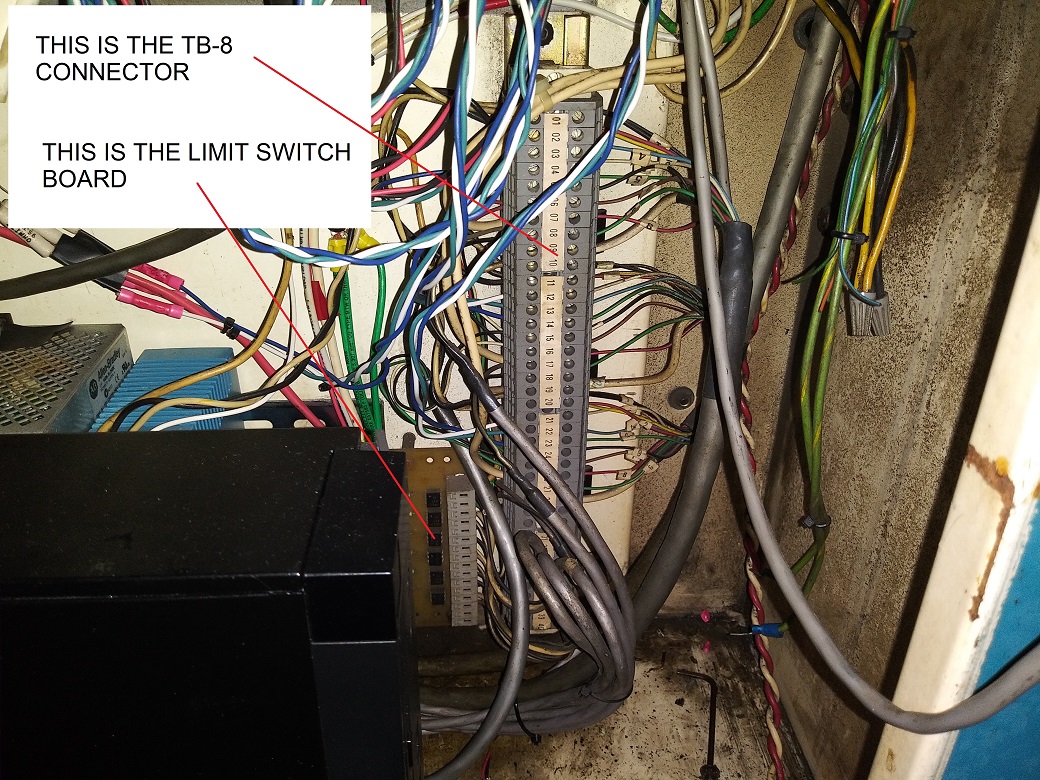
The below pics were taken last night of my cabinet. Excuse my wiring as I am going to clean everything up, I simply needed to get it back working asap.


Last edit: 6 years 3 months ago by CORBETT. Reason: To clarify my post for bottom pics

Please Log in or Create an account to join the conversation.

More
6 years 3 months ago #176808 by CORBETT
Replied by CORBETT on topic Hurco KMB-IS CNC update

Leith,

One other thing I did not mention is that you don't want to tear out any wiring and definitely not the relay board with wring coming off the TB-3 connector until I can send you schematics to understand everything.

Hurco put a lot of safety loops in by using the relays and that is why I wired directly into the TB-2 connector as it kept all of the downstream safety blocks in place so that it was mechanically safe. Most all people when retrofitting tear out all of the wiring and relays, but at the same time you loose the safety. I have an external Emergency Stop switch wired not only to LCNC but to the machine keeping the original emergency stop loop that Hurco implemented. This way if LCNC did flake out for some reason, I am still wired directly to the machine and can kill the servo amps, spindle, and everything else without worry that it will not stop. Plus this will enact the spindle brake just incase it's something bad happening at the spindle.

There is a ton of wiring that comes from the computer cage to multiple places in the machine, but most all connections are at the TB-3 and TB-8 that you will need to do. Most all of the other wiring is removed as it is simply wiring passing between the different computer cards and power supply.


Will be back later,
Robert

Please Log in or Create an account to join the conversation.

More
6 years 2 months ago - 6 years 2 months ago #176836 by CORBETT
Replied by CORBETT on topic Hurco KMB-IS CNC update
Leith,

Ok here is the schematic from hurco for the axis control. This of course is not the entire set of schematics, but this one page will give a lot to look at for figuring out how it was set up. When you have questions, don't hesitate to ask. It will take me a while to get the schematics together and plus I need to see if I can upload the manual through the forum or I may need to email you direct. File size will be the issue for putting up here.

Ok when you look at this schematic, you will see the TB-8 connector in the top middle. Some of the wiring on the left side of the connector is what will be taken out. I will show you what to remove and what to keep. Hopefully yours is still all intact and exact as this. If not, then get a picture and I will try and help walk you through it.


Talk to you later,
Robert


You can save the PDF file and open up to see a lot better than here on the forum.

Your browser does not support embedded PDFs. Please download the file here: Download PDF.

Last edit: 6 years 2 months ago by CORBETT. Reason: clarify about file
The following user(s) said Thank You: bill.advena

Please Log in or Create an account to join the conversation.

More
6 years 2 months ago #176842 by CORBETT
Replied by CORBETT on topic Hurco KMB-IS CNC update
Leith,

Ok this is a tangent, but I remember seeing one of the encoders installed on the black servo. I am sure it is one of BEI's friction fit encoders, and I have attached a schematic for it.

Originally Hurco had a different set of BEI/Duncan encoders, but if you had the original B control and wanted to upgrade to Hurco's BX control, such as what I had; then they removed the bolt on encoders which were 200ppr and installed these type that were 1000ppr. I am sure it is going to be pretty much the same as what I have as mine was upgraded and they are this type.

This messed me up for a bit as I had plugged 200ppr in LCNC when setting up only to remember that they were 1000ppr. This was bad at first for software stepping, but super excellent when I got it working through the Beckhoff EtherCAT hardware.


Back in a bit,
Robert


Same as before, you can download the PDF and see it better.

Your browser does not support embedded PDFs. Please download the file here: Download PDF.

The following user(s) said Thank You: bill.advena

Please Log in or Create an account to join the conversation.

More
6 years 2 months ago #176902 by _big_
Replied by _big_ on topic Hurco KMB-IS CNC update
Hi Robert,

Out for a couple days mountain climbing.

My cabinet looks very similar to yours. Biggest difference is the servo amps in the upper left corner.

And thanks again for all the helpful data, schematics, etc.

With a huge amount of help from you, I've formulated a plan of attack.

1. Read the MAX-400 instruction manual. For me this is the biggest unknown and key part of the whole thing. To some degree, everything revolves around the servo drives. Already noticed the 85 VAC input?? Kinda weird. But this means I want to try and use the existing power supplies.

2. Get the compressed air system fixed up. Haven't looked at it closely, but I did notice there is a broken gauge.

3. Look at getting the oiler working. Again, haven't looked at it closely. Never worked an oiler before. Adventure in the offing!

4. Take a look at the E-Switch. Hopefully the schematics help, but given my level of familiarity with this beast, its going to be a bit dicey to be be sure I know I've got it right. I'll probably take the belts off the drives for initial power up. Spin the motors that way at first. Test the E-Switch, etc.

5. Try to find the X and Y limit switches. I've seen the Z limit switches.

6. Study schematics and get an idea how the power supply works. Probably detach all the loads and then... apply power to the supply. I'm not so keen on applying power to the supply, but why not. Standing well out of the way. Once the smoke clears, measure the outputs and make sure they're in spec. Its probably a pretty simple linear supply. If some outputs are broken or out of spec, shouldn't be too hard to fix. Look at the electrolytics. May chose to pre-emptively replace the electrolytics. Might save an end mill down the road.

7. Armed with the knowledge of how the servo amps work, jumper up the control inputs such that no movement is commanded. Apply power to the servo amps and hope for the best.

If this goes well, I'm sorta at the point where I can begin to think about connecting up LinuxCNC. It would be nice to manually cause the servos to step... but not sure how to do that yet.

At one point I'd considered gutting the electronics box. But now I'm thinking of a more surgical approach. The old Hurco computer will definitely be removed, but hopefully I'll be able to reuse the servo amps, the power supply, the relays, not sure what else.

One question I have is I don't understand why the quill drive has both a VFD and manual speed changer? Seems like you need one or the other??

Leith
The following user(s) said Thank You: bill.advena

Please Log in or Create an account to join the conversation.

More
6 years 2 months ago #176914 by CORBETT
Replied by CORBETT on topic Hurco KMB-IS CNC update

Leith,

Nice, would like to be in the mountains again.

Ok let me respond real quick and I will respond better later.

Your numbered items

1) The servo amps take around 80-85volts and that was the norm for Servo-Dynamics amps. If you look up the Specs from Westamp the max the amps could take was 100V, and 92V continuous. Because of this, I am sure Hurco put in a safety factor using the 85V to not overload the amps as there would definitely be bigger machine shops that would be running the machine literally continuous. Time is money in machining and you have to keep the thing running to be profitable. My machine was $44,000 in 1983 from the paperwork, that was a ludicrous amount of money at the time... and still a lot of money today.

Ok so that you are aware the power supply that I pointed out in the control cabinet picture is NOT the power supply for the amps. That power supply is rather large and at the back of the machine in one of the compartments. I will have to look again at which one. But he power supply in the cabinet is way too small and you will see when you see the correct PS at the back.... it's pretty large.

Its been a long time since I read about the Electro-Craft Brushed DC motors, but from memory seems that the 80 volt range was optimal for the motors.... I can be wrong about this as it has been a long time since I have read about them. SO I am sure they were trying to balance out between optimal for the amps and motors.

On a tangent, you were speaking before about the problem with the motors having brushes. True that you can have brush maintenance and dust from them, but this really is only a issue for machine shops that run the machines every day. I doubt you will be cranking the machine up very many times a week. For me, depending on what projects my Dad wants to do, regulates the use. I may go a week working the machine everyday, but there are weeks that go by where I am on other projects not needing it. SO the real issue with the brushes is how much are you really using the machine. If you did change them out, then yes it is good to go brushless, but for me its a waste of money until you have something die and then change it.


2) Pretty sure gage is changeable without removing air block, but could be wrong. I will take a look at mine when I am back at the shop later today.


3) Yes, Oiler could be a hassle, I have been lucky and not have to re-build it yet. Will be waiting for your repair video :)


4) Ok I can save you a ton of time on the E-stop. It is literally 2 connections off the TB-3 connetor that make a loop with the E-stop. switch. Super simple.. I have the safety chain schematic for E-stop also... will upload later. Also, you will need the compressed air working for the E-stop chain to work. AS I said before, Hurco had a ton of safety implemented and it is needed for safety. The compressed air switch is to make sure you have air pressure at the brake for emergency stop of the spindle. This took me a few days to figure out without any help.


5) Ok I will get you a picture of where the X and Y proximity switch rails are located. On my machine they are the following: X as you face the machine is to the lower right under the table on the knee and the target is visible. The Y is at the back below the table and you will see the target off the table. Will get you pictures. Plus how to wire the 3 wire connection.


6) Ok don't take any wiring apart, let me show you what to detach and you should be good. There is a no need to remove anything unless its a safety reason during the retrofit.

LOL like the magic smoke reference. But honestly unless something is really really wrong you shouldn't get magic smoke LOL


7) Will get with you about how to "move" the table or quill but this is not for the average guy who does not understand what can go wrong. I will be detailed of how to do it making sure you understand as you can destroy one or all the axis if it takes off one way.


OK YES surgical approach is best. You will save a ton of time and all of the work done by Hurco as you will be re-wiring items that don't need re-wiring. You will have the machine up and running way way faster if you keep everything and resist the urge to gut it. I had to fight myself at the beginning and glad I did not gut the machine.

VFD could have been for someone using it with single phase input to get three phase to the motor. Plus most likely getting rid of the parajust board, as if I remember correctly they were single phase input with three phase output like a VFD can do.


Hopefully this helps.

Will be back later,
Robert

The following user(s) said Thank You: bill.advena

Please Log in or Create an account to join the conversation.

Time to create page: 0.095 seconds
Powered by Kunena Forum