
- Posts: 30
- Thank you received: 0
LinuxCNC + Orange Pi (allwincnc)
- Dolence
- Offline
- Junior Member
-

Less
More
5 years 3 months ago #216156
by Dolence
Replied by Dolence on topic LinuxCNC + Orange Pi (allwincnc)
Hey! This is how everything is going util now:
When I try to run a file it stops somewhere with joint following error on one of the axis. Usually it is the axis 1, but not aways. Also, I got this "unexpected realtime delay" message almost everytime I open AXIS. I'm using the default values for PERIOD on my HAL file. I have my files set to reflect my actual machine configuration, like the real travelling size for the axis, home position, and scale according to my screws (25 mm X and Y axis and 20 mm for Z) and 1/32 microsteps. I'm attaching those files.
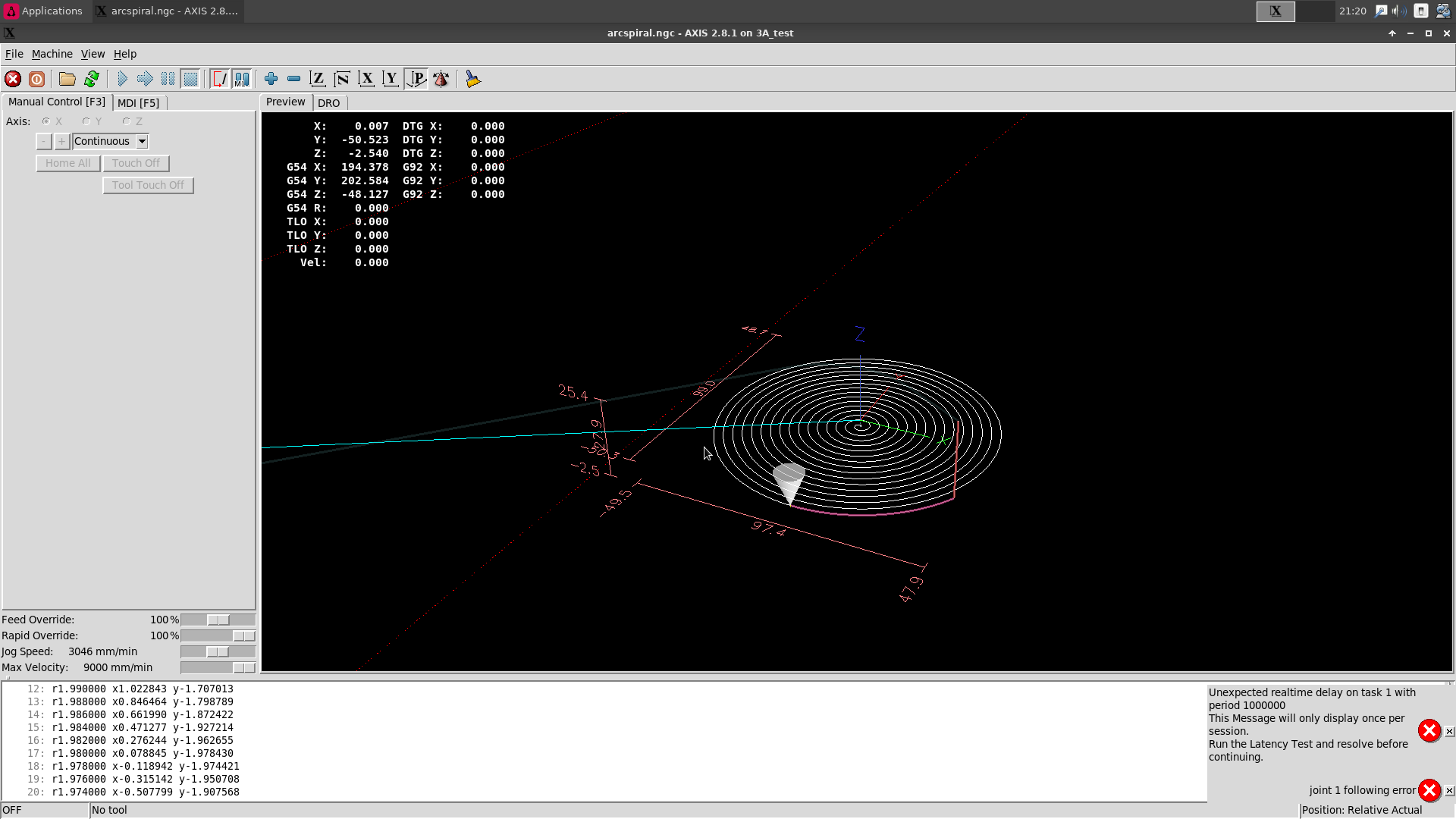
When I try to run a file it stops somewhere with joint following error on one of the axis. Usually it is the axis 1, but not aways. Also, I got this "unexpected realtime delay" message almost everytime I open AXIS. I'm using the default values for PERIOD on my HAL file. I have my files set to reflect my actual machine configuration, like the real travelling size for the axis, home position, and scale according to my screws (25 mm X and Y axis and 20 mm for Z) and 1/32 microsteps. I'm attaching those files.
Code:
[EMCMOT]
EMCMOT = motmod
COMM_TIMEOUT = 1.0
BASE_PERIOD = 200000
SERVO_PERIOD = 1000000
Please Log in or Create an account to join the conversation.
- Bari
- Offline
- Platinum Member
-

Less
More
- Posts: 639
- Thank you received: 234
5 years 3 months ago - 5 years 3 months ago #216158
by Bari
Replied by Bari on topic LinuxCNC + Orange Pi (allwincnc)
What does uname -r give for output?
Which board is this on? Which CPU #, core speed and number of cores? How much RAM?
Run the latency test for at least 5-10 minutes and post the scores.
Which board is this on? Which CPU #, core speed and number of cores? How much RAM?
Run the latency test for at least 5-10 minutes and post the scores.
Last edit: 5 years 3 months ago by Bari. Reason: more info
Please Log in or Create an account to join the conversation.
- Dolence
- Offline
- Junior Member
-
Less
More
- Posts: 30
- Thank you received: 0
5 years 3 months ago - 5 years 3 months ago #216160
by Dolence
It's an Orange Pi PC 1GB RAM H3 Quad Core. I think it's running at 1.37 GHz.
Something very strange hapenned when taking the screenshot. Before the capture the values are as in the first pic, but when saving the file it jumped to a higher value.
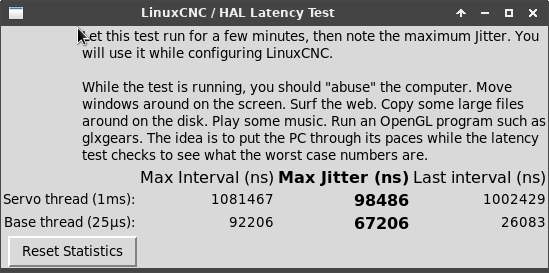
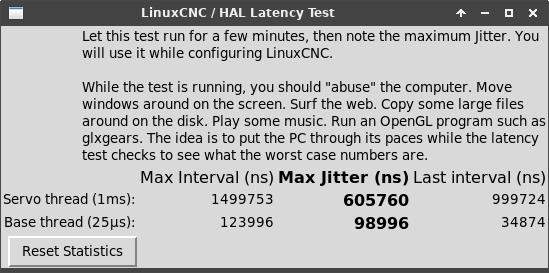
Replied by Dolence on topic LinuxCNC + Orange Pi (allwincnc)
Code:
orangepipc:~:% uname -r 5.10.21-rt34-sunxi
It's an Orange Pi PC 1GB RAM H3 Quad Core. I think it's running at 1.37 GHz.
Something very strange hapenned when taking the screenshot. Before the capture the values are as in the first pic, but when saving the file it jumped to a higher value.
Code:
orangepipc:~:% cpufreq-info cpufrequtils 008: cpufreq-info (C) Dominik Brodowski 2004-2009 Report errors and bugs to cpufreq@vger.kernel.org, please. analyzing CPU 0: driver: cpufreq-dt CPUs which run at the same hardware frequency: 0 1 2 3 CPUs which need to have their frequency coordinated by software: 0 1 2 3 maximum transition latency: 2.04 ms. hardware limits: 480 MHz - 1.37 GHz available frequency steps: 480 MHz, 648 MHz, 816 MHz, 960 MHz, 1.01 GHz, 1.10 GHz, 1.20 GHz, 1.30 GHz, 1.37 GHz available cpufreq governors: conservative, ondemand, userspace, powersave, per formance, schedutil current policy: frequency should be within 480 MHz and 1.37 GHz. The governor "performance" may decide which speed to use within this range. current CPU frequency is 1.37 GHz (asserted by call to hardware). cpufreq stats: 480 MHz:0.23%, 648 MHz:0.03%, 816 MHz:0.03%, 960 MHz:0.14%, 1.0 1 GHz:0.09%, 1.10 GHz:0.18%, 1.20 GHz:0.14%, 1.30 GHz:0.25%, 1.37 GHz:98.90% (7 22) analyzing CPU 1: driver: cpufreq-dt CPUs which run at the same hardware frequency: 0 1 2 3 CPUs which need to have their frequency coordinated by software: 0 1 2 3 maximum transition latency: 2.04 ms. hardware limits: 480 MHz - 1.37 GHz available frequency steps: 480 MHz, 648 MHz, 816 MHz, 960 MHz, 1.01 GHz, 1.10 GHz, 1.20 GHz, 1.30 GHz, 1.37 GHz available cpufreq governors: conservative, ondemand, userspace, powersave, per formance, schedutil current policy: frequency should be within 480 MHz and 1.37 GHz. The governor "performance" may decide which speed to use within this range. current CPU frequency is 1.37 GHz (asserted by call to hardware). cpufreq stats: 480 MHz:0.23%, 648 MHz:0.03%, 816 MHz:0.03%, 960 MHz:0.14%, 1.0 1 GHz:0.09%, 1.10 GHz:0.18%, 1.20 GHz:0.14%, 1.30 GHz:0.25%, 1.37 GHz:98.90% (7 22) analyzing CPU 2: driver: cpufreq-dt CPUs which run at the same hardware frequency: 0 1 2 3 CPUs which need to have their frequency coordinated by software: 0 1 2 3 maximum transition latency: 2.04 ms. hardware limits: 480 MHz - 1.37 GHz available frequency steps: 480 MHz, 648 MHz, 816 MHz, 960 MHz, 1.01 GHz, 1.10 GH[code][code][code]z, 1.20 GHz, 1.30 GHz, 1.37 GHz available cpufreq governors: conservative, ondemand, userspace, powersave, per formance, schedutil current policy: frequency should be within 480 MHz and 1.37 GHz. The governor "performance" may decide which speed to use within this range. current CPU frequency is 1.37 GHz (asserted by call to hardware). cpufreq stats: 480 MHz:0.23%, 648 MHz:0.03%, 816 MHz:0.03%, 960 MHz:0.14%, 1.0 1 GHz:0.09%, 1.10 GHz:0.18%, 1.20 GHz:0.14%, 1.30 GHz:0.25%, 1.37 GHz:98.90% (7 22) analyzing CPU 3: driver: cpufreq-dt CPUs which run at the same hardware frequency: 0 1 2 3 CPUs which need to have their frequency coordinated by software: 0 1 2 3 maximum transition latency: 2.04 ms. hardware limits: 480 MHz - 1.37 GHz available frequency steps: 480 MHz, 648 MHz, 816 MHz, 960 MHz, 1.01 GHz, 1.10 GHz, 1.20 GHz, 1.30 GHz, 1.37 GHz available cpufreq governors: conservative, ondemand, userspace, powersave, per formance, schedutil current policy: frequency should be within 480 MHz and 1.37 GHz. The governor "performance" may decide which speed to use within this range. current CPU frequency is 1.37 GHz (asserted by call to hardware). cpufreq stats: 480 MHz:0.23%, 648 MHz:0.03%, 816 MHz:0.03%, 960 MHz:0.14%, 1.0 1 GHz:0.09%, 1.10 GHz:0.18%, 1.20 GHz:0.14%, 1.30 GHz:0.25%, 1.37 GHz:98.90% (7 22)
Last edit: 5 years 3 months ago by Dolence.
Please Log in or Create an account to join the conversation.
- Bari
- Offline
- Platinum Member
-
Less
More
- Posts: 639
- Thank you received: 234
5 years 3 months ago #216162
by Bari
Replied by Bari on topic LinuxCNC + Orange Pi (allwincnc)
forum.linuxcnc.org/18-computer/39037-lin...cnc?start=140#207790
`isolcpus ...` can be added to the armbianEnv.txt or directly to the boot.cmd inside setenv bootargs "... here ..."isolcpus=1,2,3 idle=poll
`isolcpus ...` can be added to the armbianEnv.txt or directly to the boot.cmd inside setenv bootargs "... here ..."isolcpus=1,2,3 idle=poll
The following user(s) said Thank You: Dolence
Please Log in or Create an account to join the conversation.
- Dolence
- Offline
- Junior Member
-
Less
More
- Posts: 30
- Thank you received: 0
5 years 3 months ago #216166
by Dolence
Replied by Dolence on topic LinuxCNC + Orange Pi (allwincnc)
I have tried the isolcpu trick in both ways and even compiling boot.cmd with the end of the file instructions. Still the same. Could it be related to the SD card itself? I purchased it today. Should be working fine.
Please Log in or Create an account to join the conversation.
- Bari
- Offline
- Platinum Member
-
Less
More
- Posts: 639
- Thank you received: 234
5 years 3 months ago #216169
by Bari
Replied by Bari on topic LinuxCNC + Orange Pi (allwincnc)
This project still needs a good u-boot and rt kernel build.
Please Log in or Create an account to join the conversation.
Time to create page: 0.291 seconds