
- Posts: 173
- Thank you received: 27
Axis Position Logger
- partec
- Offline
- Elite Member
-

Less
More
2 years 7 months ago - 2 years 7 months ago #295905
by partec
Replied by partec on topic Axis Position Logger
yes I did, it was something like this:
for reverse engineering, move to various interesting practical positions with cam-align and then log the position with a button, save it together with a suitably numbered snapshot, store everything in the same folder, E.g.
after later importing a set of points into CAD, it is easier to process further using the Images illustration, for mechanics, 3D printing or electronics layout
forum.linuxcnc.org/21-axis/30986-axis-po...r?start=70#gallery-3
maybe we can use Cam-align with a Manual Log button and a matching trigger output
cleverly triggered Axis Position Logger
Spectacle screen grabber (smartly triggerable with shortcut and with area selected)
both can remain in the background after configuration so that no more tabs have to be switched
I'm currently preparing a small presentation, I'll post it here immediately
for reverse engineering, move to various interesting practical positions with cam-align and then log the position with a button, save it together with a suitably numbered snapshot, store everything in the same folder, E.g.
after later importing a set of points into CAD, it is easier to process further using the Images illustration, for mechanics, 3D printing or electronics layout
forum.linuxcnc.org/21-axis/30986-axis-po...r?start=70#gallery-3
maybe we can use Cam-align with a Manual Log button and a matching trigger output
cleverly triggered Axis Position Logger
Spectacle screen grabber (smartly triggerable with shortcut and with area selected)
both can remain in the background after configuration so that no more tabs have to be switched
I'm currently preparing a small presentation, I'll post it here immediately
Last edit: 2 years 7 months ago by partec.
Please Log in or Create an account to join the conversation.
- partec
- Offline
- Elite Member
-
Less
More
- Posts: 173
- Thank you received: 27
2 years 7 months ago - 2 years 7 months ago #295909
by partec
Replied by partec on topic Axis Position Logger
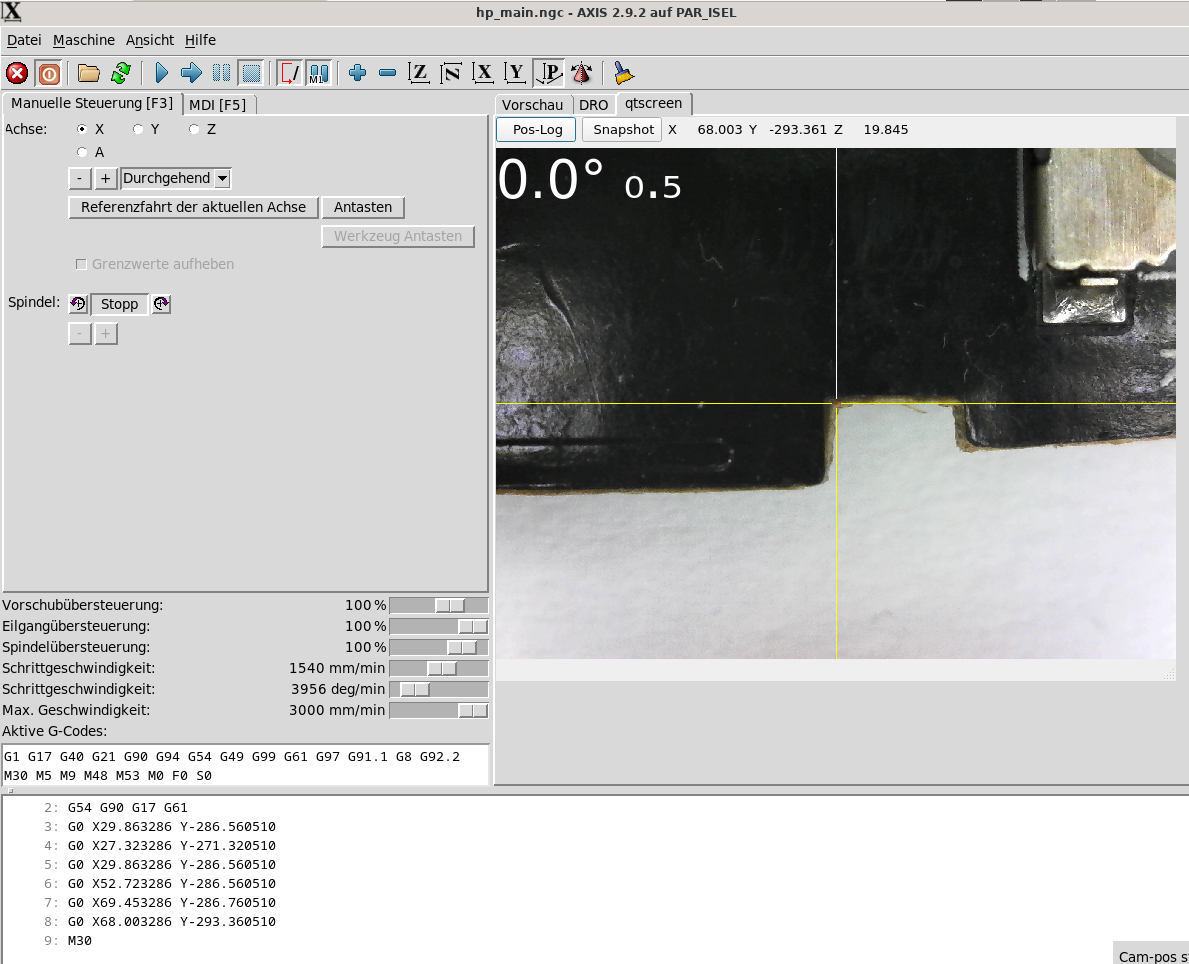
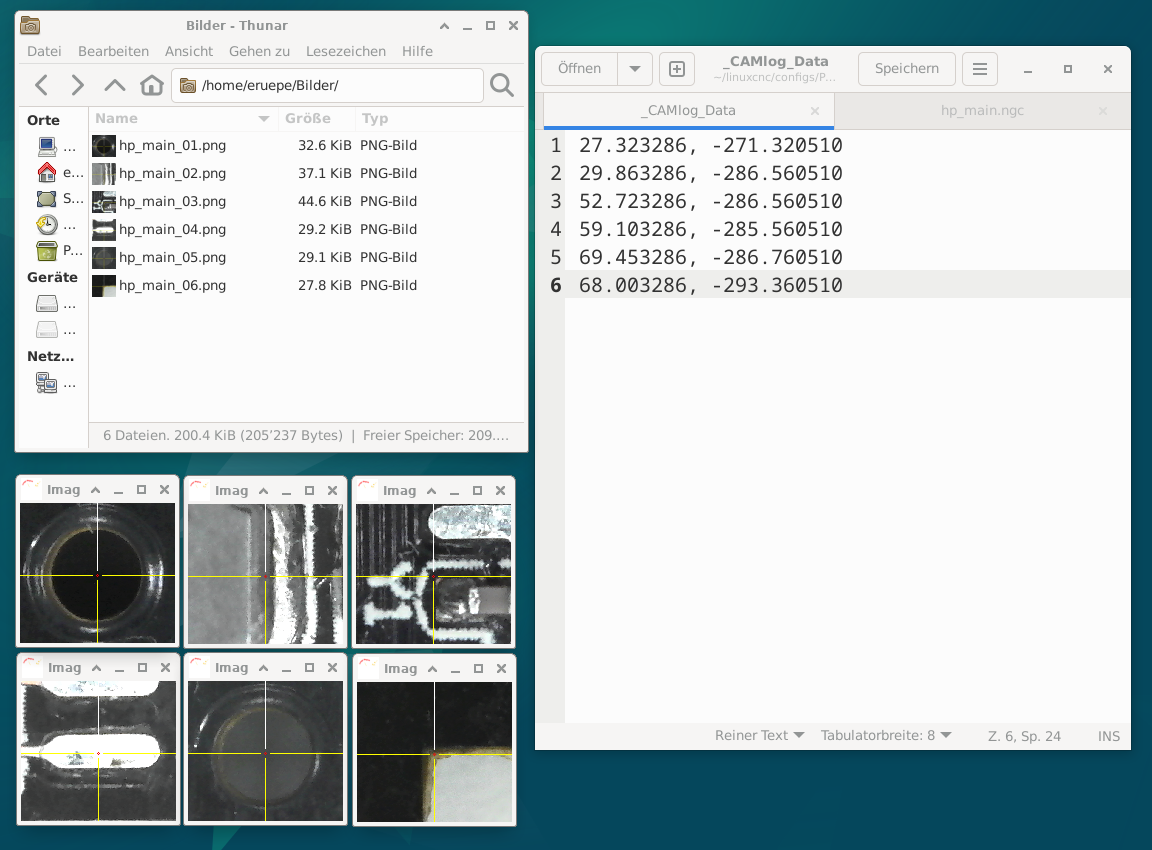
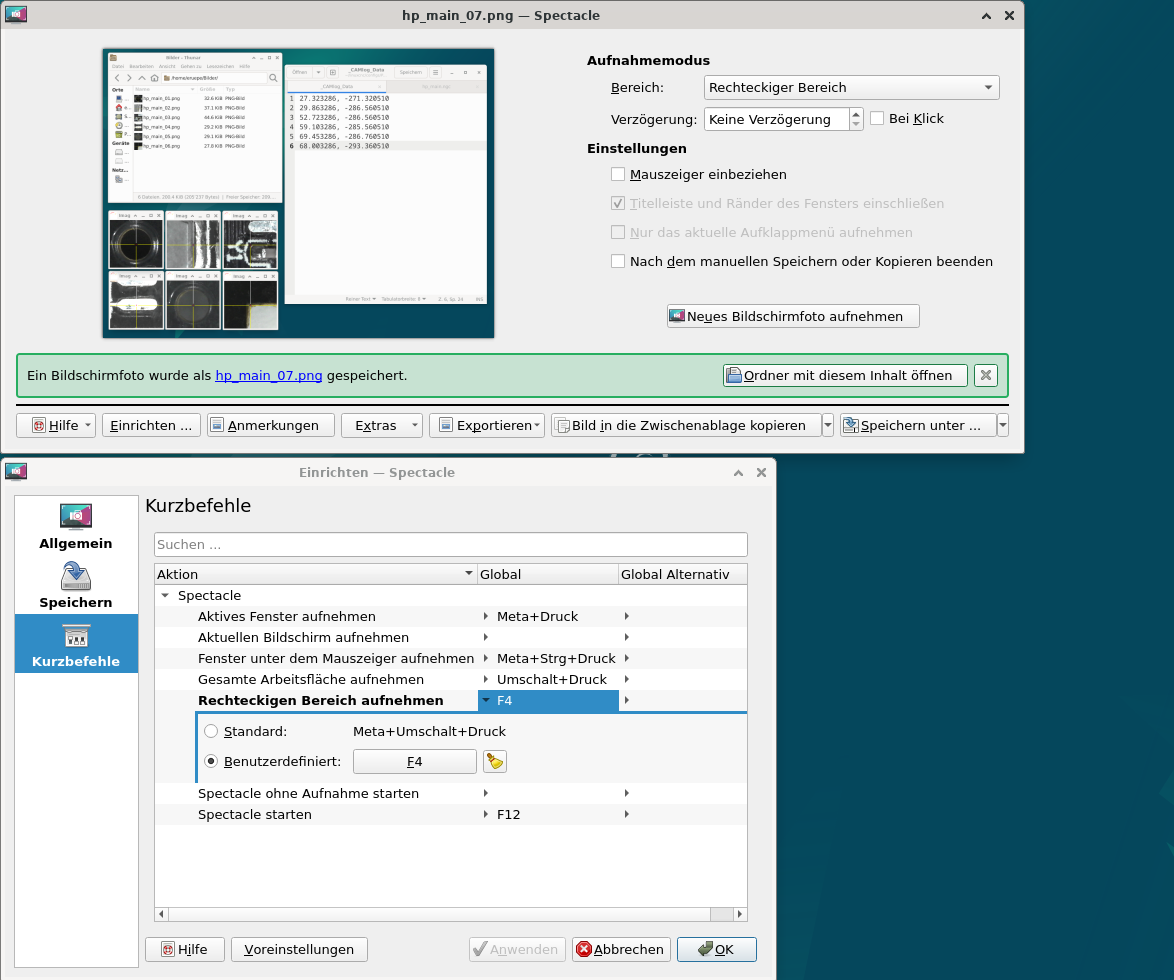
Last edit: 2 years 7 months ago by partec.
Please Log in or Create an account to join the conversation.
- partec
- Offline
- Elite Member
-
Less
More
- Posts: 173
- Thank you received: 27
2 years 7 months ago #295941
by partec
Replied by partec on topic Axis Position Logger
Spectacle is an excellent screen grabber tool, I think, and apparently remains active in the background until the system reboots. Is there any clever way we could use a Snapshot button in Cam-align to do an F4 shortcut, Aciera, please?
Please Log in or Create an account to join the conversation.
- Aciera
- Away
- Administrator
-

Less
More
- Posts: 4819
- Thank you received: 2177
2 years 7 months ago #295959
by Aciera
Replied by Aciera on topic Axis Position Logger
I'm a bit short on time today. Have a look at this, needs a bit of work still. It redefines the topleft button in the cam_align tab to call a subroutine that pulses 'motion.digital-out-00' which is connected to 'motion.digital-in-00' which in turn can be set up as a Log trigger in the Position Logger.
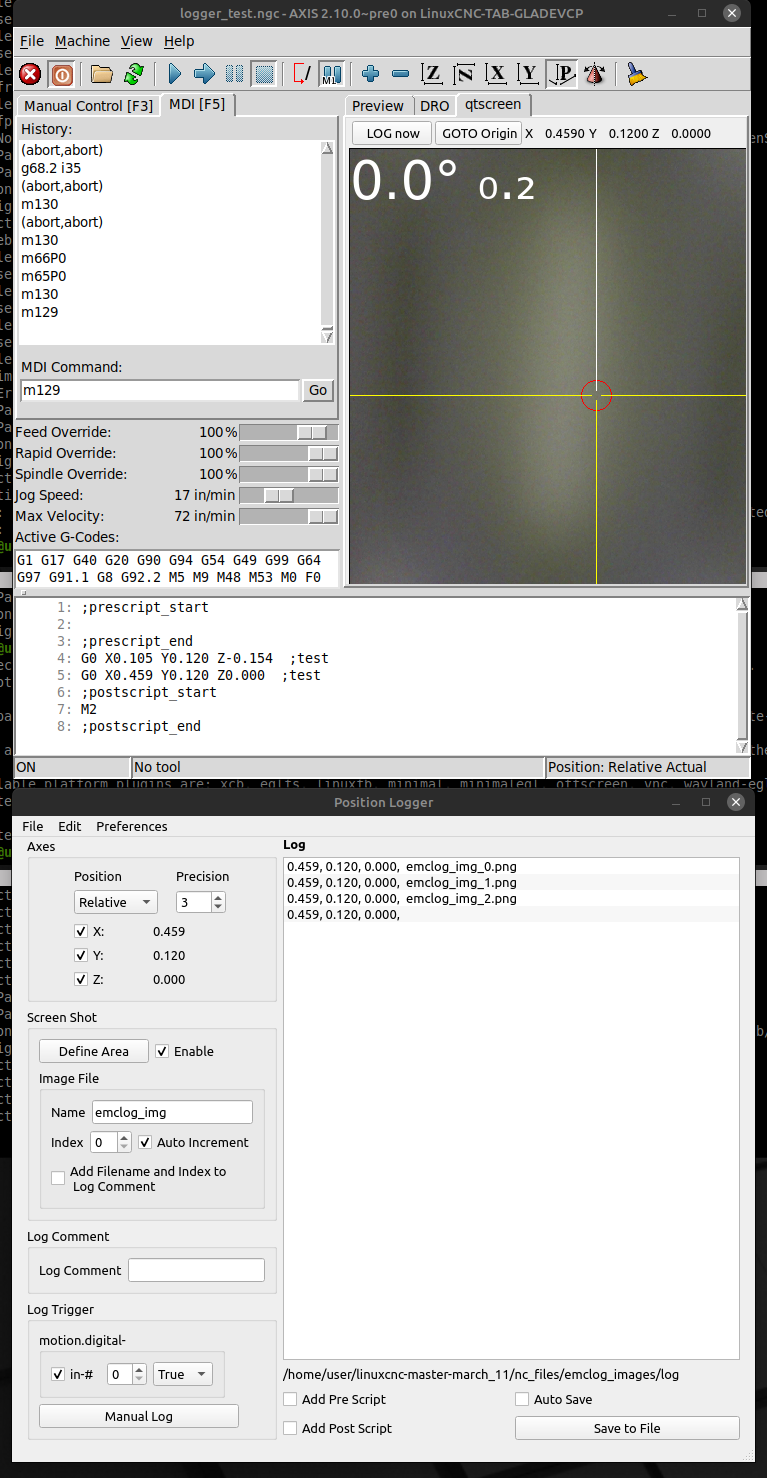
to test:
Copy the 3 folders from the zip to your configfolder
also you need to modify your ini:
This changes the behavior of the top left button in the cam_align tab
Also you need to add these to the [RS274NGC] section
And add this to the [HAL] section:
Executing MDI command: 'M129' should start a logger window.
- click on 'Define Area' and check 'Enable' in the 'Screen Shot' section
- setup Log Trigger for 'motion.digital-in-0'
Clicking on the topleft button in the cam_align tab should now save a screen shot to a new folder 'emclog_images' to the current project path (usually the folder 'nc_files').
Give it a go and tell me what you think.
Attachment not found
to test:
Copy the 3 folders from the zip to your configfolder
also you need to modify your ini:
This changes the behavior of the top left button in the cam_align tab
Code:
[MDI_COMMAND_LIST]
MDI_COMMAND = o<log> call, LOG now
MDI_COMMAND = G0x0y0z0
Also you need to add these to the [RS274NGC] section
Code:
USER_M_PATH = ./mcodes
SUBROUTINE_PATH = ./subroutines
And add this to the [HAL] section:
Code:
HALCMD = net logloop motion.digital-out-00 motion.digital-in-00
Executing MDI command: 'M129' should start a logger window.
- click on 'Define Area' and check 'Enable' in the 'Screen Shot' section
- setup Log Trigger for 'motion.digital-in-0'
Clicking on the topleft button in the cam_align tab should now save a screen shot to a new folder 'emclog_images' to the current project path (usually the folder 'nc_files').
Give it a go and tell me what you think.
The following user(s) said Thank You: partec
Please Log in or Create an account to join the conversation.
- partec
- Offline
- Elite Member
-
Less
More
- Posts: 173
- Thank you received: 27
2 years 7 months ago - 2 years 7 months ago #295960
by partec
Replied by partec on topic Axis Position Logger
Thank you, that looks really exciting, how can you just shake it all out of your sleeve like that, David, my goodness? I have to try this out carefully!
Last edit: 2 years 7 months ago by partec.
Please Log in or Create an account to join the conversation.
- Aciera
- Away
- Administrator
-
Less
More
- Posts: 4819
- Thank you received: 2177
2 years 7 months ago - 2 years 7 months ago #295964
by Aciera
Replied by Aciera on topic Axis Position Logger
Well, even with shameless copy/pasting from the internet it still takes a fair bit of work.
The version above had a bug when saving the images, should work better now:
Might have to move this to my github account.
[EDIT]
Some polishing:
- File open/save now with options (ngc/txt)
- Image file index auto increments now by default
- SpinBox value for Image file index now updates to value of next index
- autosave/-load some more settings
[EDIT2]
- fix crash when trying to save image on package installations
[EDIT3]
- fix Log Comment section reappearing on startup
The version above had a bug when saving the images, should work better now:
Might have to move this to my github account.
[EDIT]
Some polishing:
- File open/save now with options (ngc/txt)
- Image file index auto increments now by default
- SpinBox value for Image file index now updates to value of next index
- autosave/-load some more settings
[EDIT2]
- fix crash when trying to save image on package installations
[EDIT3]
- fix Log Comment section reappearing on startup
Last edit: 2 years 7 months ago by Aciera.
The following user(s) said Thank You: partec
Please Log in or Create an account to join the conversation.
Time to create page: 0.175 seconds