
- Posts: 196
- Thank you received: 11
Kinematics... again:/
- thang
- Offline
- Elite Member
-

Less
More
7 years 10 months ago - 7 years 10 months ago #122627
by thang
Replied by thang on topic Kinematics... again:/
Your kinematic is lacking somethings.
With this robot, there is at least 2 configs: elbow up and elbow down. Your robot changed config during move
Looking at pumakins.c as an example, how to keep config :
github.com/LinuxCNC/linuxcnc/blob/master...tics/pumakins.c#L140
I saw in kinematic, there is a flag "ifflag" the way you set this flag for elbow is not true.
With this robot, there is at least 2 configs: elbow up and elbow down. Your robot changed config during move
Looking at pumakins.c as an example, how to keep config :
github.com/LinuxCNC/linuxcnc/blob/master...tics/pumakins.c#L140
I saw in kinematic, there is a flag "ifflag" the way you set this flag for elbow is not true.
Last edit: 7 years 10 months ago by thang.
Please Log in or Create an account to join the conversation.
- chimeno
- Offline
- Elite Member
-
Less
More
- Posts: 295
- Thank you received: 125
7 years 10 months ago - 7 years 10 months ago #122651
by chimeno
Hi Thang,
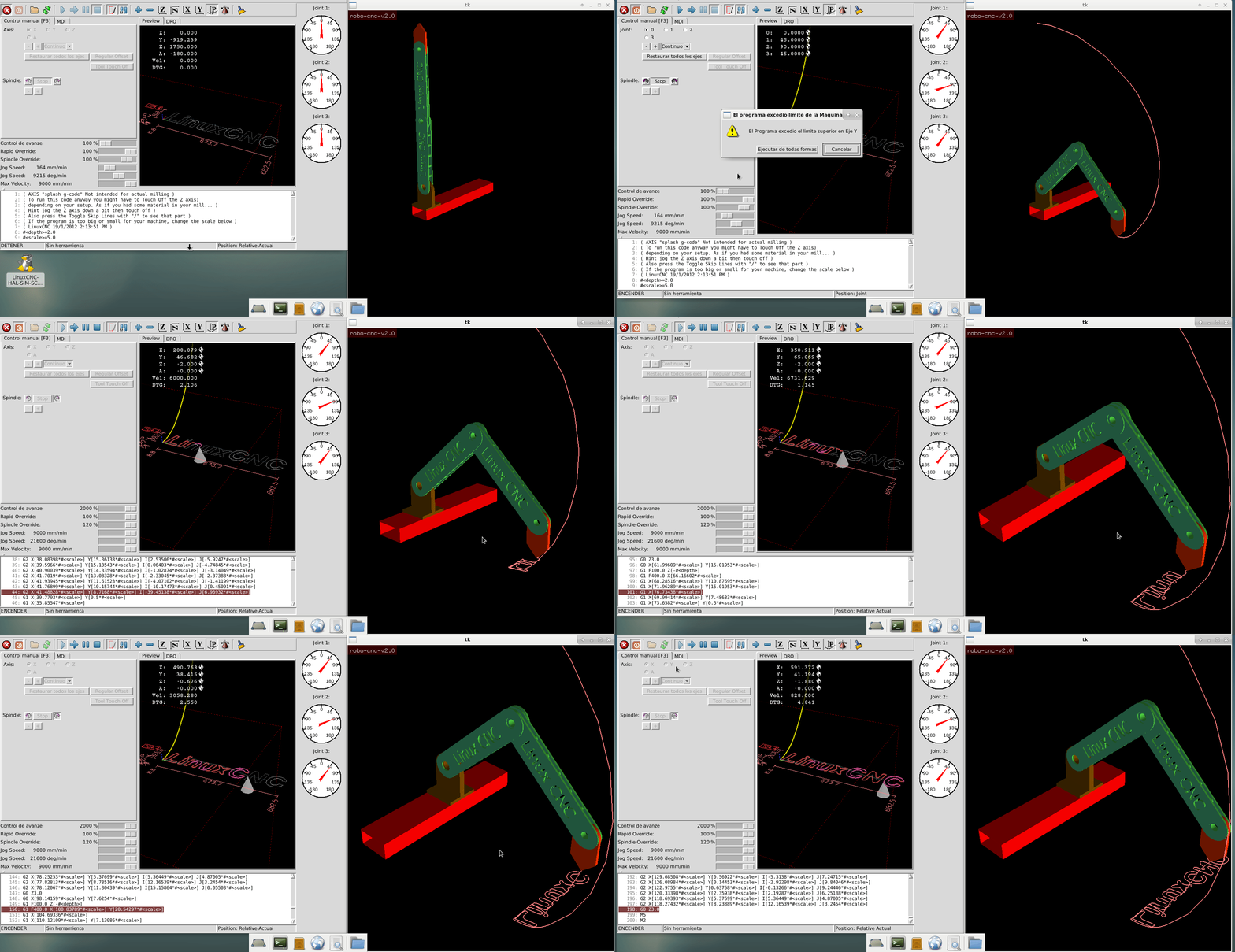
thank you very much for the help, modified the flag "if (* iflags)
q1 = q1; // q1 = -q1 "I'm learning little by little .. I attach the modified file and the screenshot to see the result, now I have to invert the Y axis, where would it be better to do this? in the cinematic model?, thanks Chimeno
Replied by chimeno on topic Kinematics... again:/
thang wrote: Your kinematic is lacking somethings.
With this robot, there is at least 2 configs: elbow up and elbow down. Your robot changed config during move
Looking at pumakins.c as an example, how to keep config :
github.com/LinuxCNC/linuxcnc/blob/master...tics/pumakins.c#L140
I saw in kinematic, there is a flag "ifflag" the way you set this flag for elbow is not true.
Hi Thang,
thank you very much for the help, modified the flag "if (* iflags)
q1 = q1; // q1 = -q1 "I'm learning little by little .. I attach the modified file and the screenshot to see the result, now I have to invert the Y axis, where would it be better to do this? in the cinematic model?, thanks Chimeno
Last edit: 7 years 10 months ago by chimeno.
Please Log in or Create an account to join the conversation.
- andypugh
- Offline
- Moderator
-

Less
More
- Posts: 19899
- Thank you received: 4655
7 years 10 months ago #122652
by andypugh
Replied by andypugh on topic Kinematics... again:/
I don't think the Y axis is wrong, as such. If you look at the Axis preview it is showing the tool cone _under_ the engraving.
It is as if the A axis is at 180 degrees, but it isn't.
It is as if the A axis is at 180 degrees, but it isn't.
The following user(s) said Thank You: chimeno
Please Log in or Create an account to join the conversation.
- Todd Zuercher
- Offline
- Platinum Member
-

Less
More
- Posts: 4793
- Thank you received: 1481
7 years 10 months ago #122655
by Todd Zuercher
Replied by Todd Zuercher on topic Kinematics... again:/
Are you sure it isn't your X axis that is backwards?
The following user(s) said Thank You: chimeno
Please Log in or Create an account to join the conversation.
- thang
- Offline
- Elite Member
-
Less
More
- Posts: 196
- Thank you received: 11
7 years 10 months ago #122683
by thang
If you set this, your robot can only use 1 config.
In your inverse kinematic, you used q1 = acos(cc), exactly there is one more solution that q1 = - acos(cc) ( most of time i use atan2 to caculate inverse kinematic). So we need to know which solution we should use, there is a method that is detect current config ( pumakins is using this).
So in your forward kinematic, we can find current robot config by something like:
cc = (rsq - D1*D1 - D2*D2) / (2*D1*D2);
p1 = acos(cc);
if ( abs(p1 - joint[1]) < 0.0000001)
*ifflag = 1;
In inverse kinematic :
if (!*iflags)
q1 = - q1;
When kinematic is already ok,we better leave it. I think you can invert Y axis in 3D file.
It happened to me too but i dont know how to change offset of it :blink: , This might happen because how we put coordinate on robot, that will make Axis A diverse default ( like follow clockwise is increase A)
Replied by thang on topic Kinematics... again:/
chimeno wrote:
Hi Thang,
thank you very much for the help, modified the flag "if (* iflags)
q1 = q1; // q1 = -q1 "I'm learning little by little .. I attach the modified file and the screenshot to see the result, now I have to invert the Y axis, where would it be better to do this? in the cinematic model?, thanks Chimeno
If you set this, your robot can only use 1 config.
In your inverse kinematic, you used q1 = acos(cc), exactly there is one more solution that q1 = - acos(cc) ( most of time i use atan2 to caculate inverse kinematic). So we need to know which solution we should use, there is a method that is detect current config ( pumakins is using this).
So in your forward kinematic, we can find current robot config by something like:
cc = (rsq - D1*D1 - D2*D2) / (2*D1*D2);
p1 = acos(cc);
if ( abs(p1 - joint[1]) < 0.0000001)
*ifflag = 1;
In inverse kinematic :
if (!*iflags)
q1 = - q1;
When kinematic is already ok,we better leave it. I think you can invert Y axis in 3D file.
andypugh wrote: I don't think the Y axis is wrong, as such. If you look at the Axis preview it is showing the tool cone _under_ the engraving.
It is as if the A axis is at 180 degrees, but it isn't.
It happened to me too but i dont know how to change offset of it :blink: , This might happen because how we put coordinate on robot, that will make Axis A diverse default ( like follow clockwise is increase A)
The following user(s) said Thank You: chimeno
Please Log in or Create an account to join the conversation.
- andypugh
- Offline
- Moderator
-
Less
More
- Posts: 19899
- Thank you received: 4655
7 years 10 months ago #122684
by andypugh
Replied by andypugh on topic Kinematics... again:/
I suspect it comes down to a joint axis being reversed. You need to keep your right-hand rule for axis vectors in mind.
Also: I think that "elbow up" will always be the required solution for this robot.
Also: I think that "elbow up" will always be the required solution for this robot.
The following user(s) said Thank You: chimeno
Please Log in or Create an account to join the conversation.
Time to create page: 0.361 seconds