Planning - Bridgeport Interact 1 linuxCNC Retrofit

More
10 years 8 months ago #70628 by csbrady
cncnoob, I like your layout, nice rendering. I am surprised that you included jog button since your machine has joy sticks that do the same thing and are more convenient.

For the overrides the 7i77 has 4, 8 bit analog inputs. You should take a look at my hal file to see how to connect those. You have to set the 7i77 SW mode to 2 when it is initialized. It's at the top of my hal file, but I don't recall the detail. If you have trouble finding it I can dig out the details. I thought about using an encoder, but want to know the position by looking at the knob.

Please Log in or Create an account to join the conversation.

More
10 years 8 months ago #70629 by andypugh

cncnoob1979 wrote: I'll read up on my 7i77 manual for the inputs section to see if what you are speaking of is contained there.

EDIT: Found it


Also:
linuxcnc.org/docs/html/man/man9/hostmot2.9.html

the "sserial_port_N=" sections.

Please Log in or Create an account to join the conversation.
More
10 years 8 months ago #70630 by cncnoob1979
csbrady,

Thanks! Yes I also have both of the Joysticks connected and working with the machine. I included the buttons because I wanted another place to control the axis movement. A bit of duplication perhaps.

I was pondering the idea of using an axis selection switch with my MPG as well [Placing the switch directly on the knee beside the MPG]. That way you can stand in the same location and move each axis with the single MPG without having to reach for the Pendant. However that may get too complicated, still just a thought.

I got my 610C EXE box working with the MPG, with your HAL file it was a breeze to install and understand. Not exactly the way you have it, I had to hard code in the HAL file - so far every time I try to include in the INI I break something.. Ill get it one day!

Andy,

Thanks for the links and helping me out. Ill be reaching out to you and csbrady very soon with questions on how I messed up everything and ask you to help dig me out!

BTW, the link you posted earlier- to your panel-, I really like how well you built your panel. Quality work!

Please Log in or Create an account to join the conversation.

More
10 years 8 months ago #70673 by csbrady
cncnoob, I just realized that you don't have a servo enable button on your control panel. The way your mill is wired you need to have a a button or a relay to turn on the servos. I looked at eliminating the button, but decided that a switch was simpler and probably better.

Please Log in or Create an account to join the conversation.

More
10 years 7 months ago #71067 by cncnoob1979


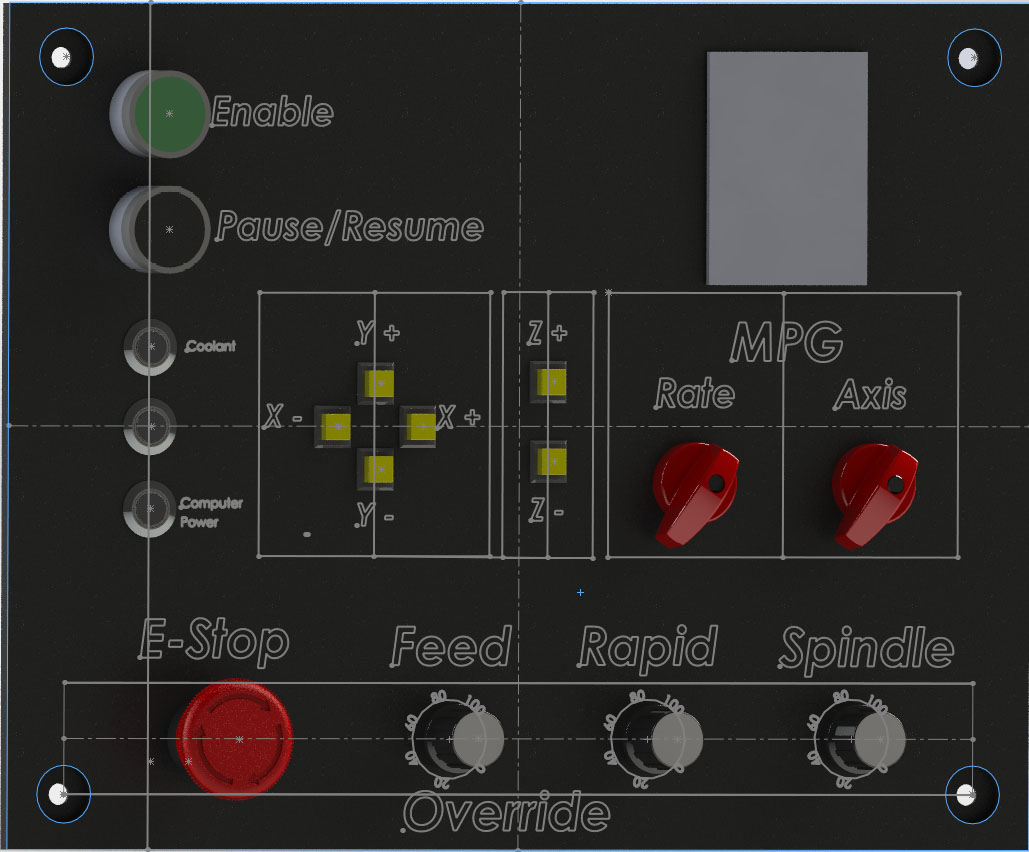
Here is my final render of how I want my panel to look.

csbrady,

I believe I will use my "enable" button for the servo enable. The other will be for start/pause. Do you think this will be sufficient?

Please Log in or Create an account to join the conversation.

More
10 years 7 months ago #71085 by csbrady
I get it now. I thought of the Enable button as a start button. It's a little unusual to have a single start/pause button but it should work well. I have start/step and pause/resume button. So far I have not found the step function useful.

Please Log in or Create an account to join the conversation.

Time to create page: 0.123 seconds
Powered by Kunena Forum
