Latency, error finishing read, and IRQ affinity

More
2 years 5 months ago #299531 by rodw

Is there any clear benefit or drawback to isolating extra cpus and then pinning the mesa ethernet to something other than the last one?

Also is there a way to configure which CPU LinuxCNC (I assume motmod?) pins to?
Probably eye candy because isolating more cores gives better looking  (faster) latency-histograms.
But with a Mesa card, the key paramater is the network latency, not the CPU latency.
The following user(s) said Thank You: Muftijaja

Please Log in or Create an account to join the conversation.

More
2 years 5 months ago #299543 by mozmck
PCW is right - LinuxCNC always pins itself to the highest numbered CPU. The only benefit to isolating other cores as far as I know is to isolate any cores that share cache with the highest numbered core. The script does this automatically.

Please Log in or Create an account to join the conversation.

More
2 years 5 months ago #300389 by Swag
I've gone through this thread and used the script, made the obvious mistakes of not having irqbalancer installed and having the wrong ip (10.10.10.1 instead of 10.10.10.11) in the script.  I've fixed all that, but I am still having a near immediate error when I start of Unexpected realtime delay on task 0 with period 1000000 followed by a hm2/hm2_7i76e.0: Smart Serial Port 0: Doit not cleared from previous servo thread....

I can move the machine around and run the spindle (modbus issues resolved with group admission change), but after a short while I get an error finishing read and the machine goes in to fault.

The hardware was all working with 2.8, so I don't think there is something that has died as it will all still work in 2.8, it's just this realtime delay issue.  I hate to bug anyone with this as I feel like I just haven't done enough due diligence, but this thread seems to be hitting all the high spots related to latency and I have not managed to resolve it.  Any help would be greatly appreciated.

Kind regards,

Sam

Please Log in or Create an account to join the conversation.

More
2 years 5 months ago #300431 by Swag
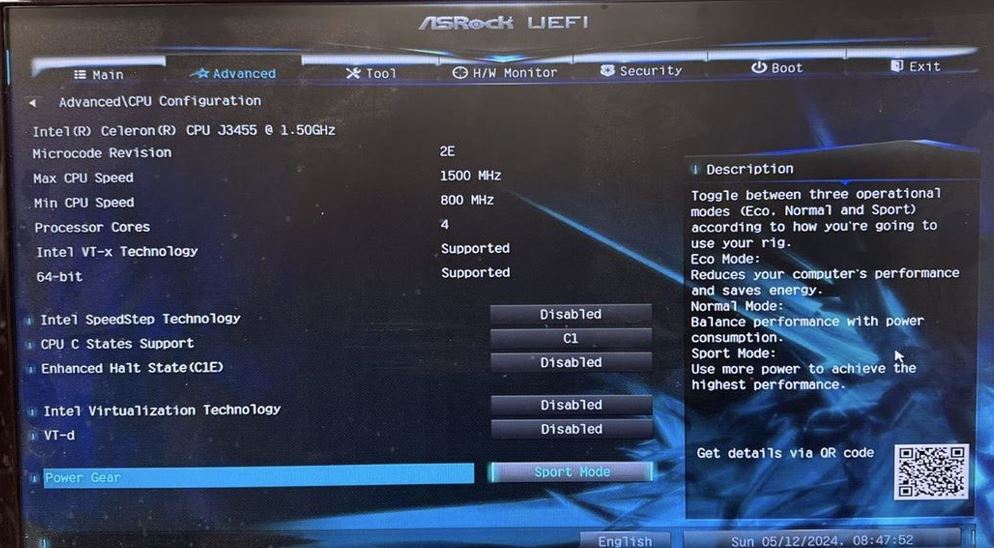
I've now gone through the BIOS and think I have everything set as it should be and there is no change. Also had it allocate a fixed RAM for the onboard graphics since it sort of felt like the error would happen more quickly if I resized the linuxcnc window, but I don't think that was anything more than coincidence. Ping looks fine. I think the latency seems fine.
Code:
p2user@P2CNC:~$ ping 10.10.10.10 PING 10.10.10.10 (10.10.10.10) 56(84) bytes of data. 64 bytes from 10.10.10.10: icmp_seq=1 ttl=64 time=0.175 ms 64 bytes from 10.10.10.10: icmp_seq=2 ttl=64 time=0.250 ms 64 bytes from 10.10.10.10: icmp_seq=3 ttl=64 time=0.111 ms 64 bytes from 10.10.10.10: icmp_seq=4 ttl=64 time=0.104 ms 64 bytes from 10.10.10.10: icmp_seq=5 ttl=64 time=0.103 ms 64 bytes from 10.10.10.10: icmp_seq=6 ttl=64 time=0.103 ms 64 bytes from 10.10.10.10: icmp_seq=7 ttl=64 time=0.105 ms 64 bytes from 10.10.10.10: icmp_seq=8 ttl=64 time=0.102 ms ^C --- 10.10.10.10 ping statistics --- 8 packets transmitted, 8 received, 0% packet loss, time 7146ms rtt min/avg/max/mdev = 0.102/0.131/0.250/0.050 ms

ip setup seems similar to others with working setups and the correct IP address is being used in the script.
Code:
p2user@P2CNC:~$ ip a 1: lo: <LOOPBACK,UP,LOWER_UP> mtu 65536 qdisc noqueue state UNKNOWN group default qlen 1000     link/loopback 00:00:00:00:00:00 brd 00:00:00:00:00:00     inet 127.0.0.1/8 scope host lo        valid_lft forever preferred_lft forever     inet6 ::1/128 scope host noprefixroute         valid_lft forever preferred_lft forever 2: enp2s0: <BROADCAST,MULTICAST,UP,LOWER_UP> mtu 1500 qdisc fq_codel state UP group default qlen 1000     link/ether 70:85:c2:ad:9e:e6 brd ff:ff:ff:ff:ff:ff     inet 10.10.10.11/8 brd 10.255.255.255 scope global noprefixroute enp2s0        valid_lft forever preferred_lft forever 3: enx0022cfe5777f: <BROADCAST,MULTICAST,UP,LOWER_UP> mtu 1500 qdisc fq_codel state UP group default qlen 1000     link/ether 00:22:cf:e5:77:7f brd ff:ff:ff:ff:ff:ff     inet 192.168.178.145/24 brd 192.168.178.255 scope global dynamic noprefixroute enx0022cfe5777f        valid_lft 862956sec preferred_lft 862956sec     inet6 2003:d3:f30:2b00:30fc:d47e:260c:1afb/64 scope global temporary dynamic         valid_lft 7152sec preferred_lft 1105sec     inet6 2003:d3:f30:2b00:222:cfff:fee5:777f/64 scope global dynamic mngtmpaddr noprefixroute         valid_lft 7152sec preferred_lft 1105sec     inet6 fe80::222:cfff:fee5:777f/64 scope link noprefixroute         valid_lft forever preferred_lft forever

Again this all works fine with debian 10 and linuxcnc 2.8.  I am kind of at a loss at this point, though I feel like this is some simple config problem that I am overlooking.


 

Please Log in or Create an account to join the conversation.

More
2 years 5 months ago #300433 by tommylight
Is the processor 4 core or 2 core 4 thread one? Set that to 2 and do some tests just in case. Also try 1, but that might make the PC slouchy.
In general, disable hyperthreading, power saving, virtualisation, TPM, turbo mode, pci-e agressive link management, C states.
In some cases disabling sound helps, also disable serial ports if any and modem.
Open a terminal, type
Sensors
Then start LinuxCNC, enable it and try to jog, then go to terminal and again type sensors, notice the processor temperature. If it goes above 60-70C, open the PC, remove CPU cooler, clean, repaste, mount the cooler. Test again.
The following user(s) said Thank You: Swag

Please Log in or Create an account to join the conversation.

More
2 years 5 months ago #300434 by Swag
It is four core, at least according to everything I have read.  I increased the servo-thread to 2000000 and halved the P values and that actually had an effect, but it still errored out after a while, it just took longer.  Temps are nil, 30° while running a program in LCNC.  I am going to test everything again under 2.8 and maybe try a SEEED Odyssey I have here.  
Code:
acpitz-acpi-0 Adapter: ACPI interface temp1:        +31.0°C  (crit = +100.0°C) coretemp-isa-0000 Adapter: ISA adapter Package id 0:  +31.0°C  (high = +105.0°C, crit = +105.0°C) Core 0:        +31.0°C  (high = +105.0°C, crit = +105.0°C) Core 1:        +31.0°C  (high = +105.0°C, crit = +105.0°C) Core 2:        +31.0°C  (high = +105.0°C, crit = +105.0°C) Core 3:        +30.0°C  (high = +105.0°C, crit = +105.0°C)

Please Log in or Create an account to join the conversation.

Time to create page: 0.198 seconds
Powered by Kunena Forum