
- Posts: 14
- Thank you received: 19
scurve trajectory planner
- FabianB
- Offline
- New Member
-

Less
More
1 year 8 months ago - 1 year 8 months ago #321220
by FabianB
Replied by FabianB on topic scurve trajectory planner
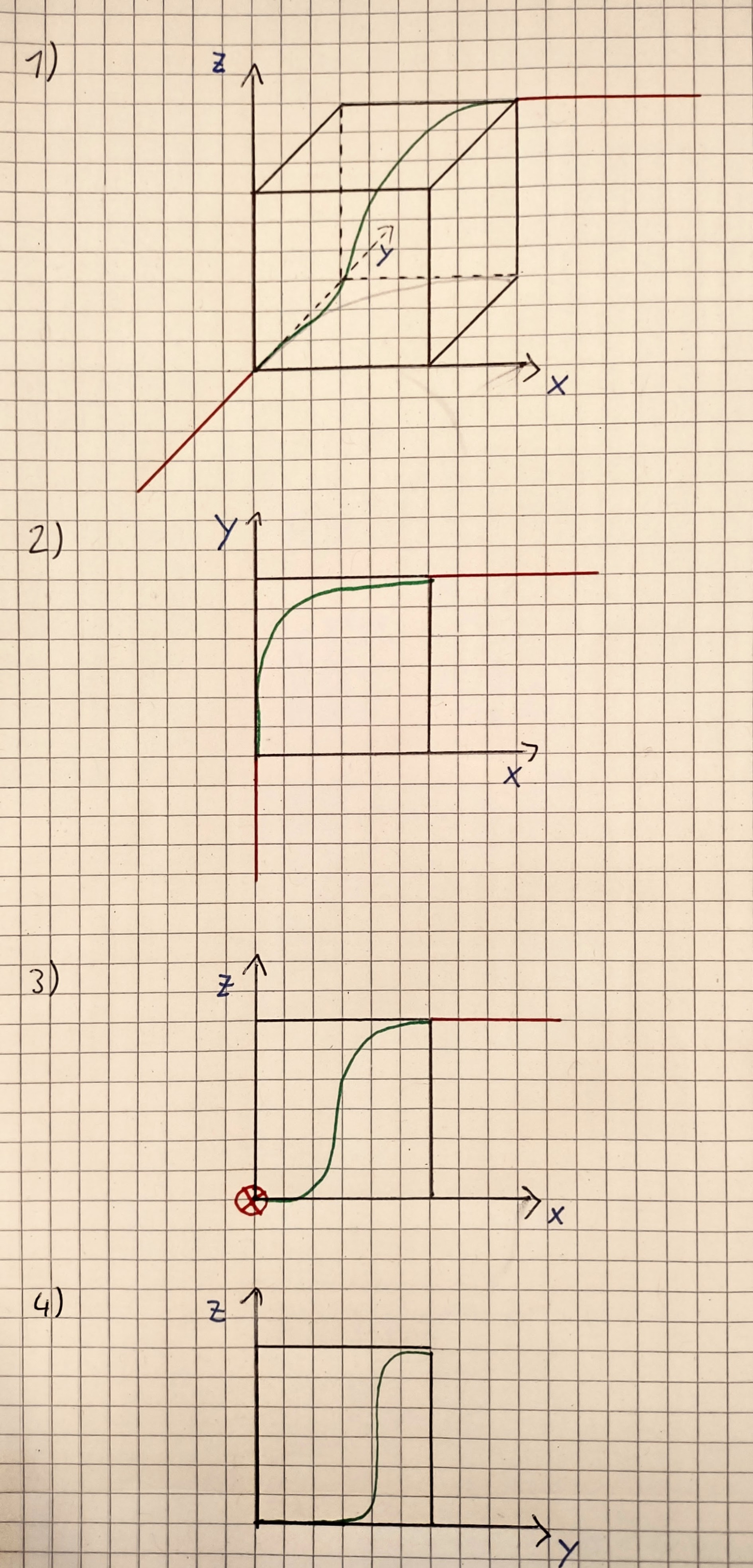
I tried to draw a picture to ilustrate the issue with the 2D clothoids stacked on each other to approximate a 3D clothoid.We want to connect a straight line in y with another line in x. The second one isI tried to draw a picture to ilustrate the issue with the 2D clothoids stacked on each other to approximate a 3D clothoid.We want to connect a straight line in y with another line in x. The second one is also shifted up in z. The 1) picture shows a 3D drawing of the situation. Pictures 2) and 3) show the xy and xz planes respectively with how the 2D clothoids would look like respectively.
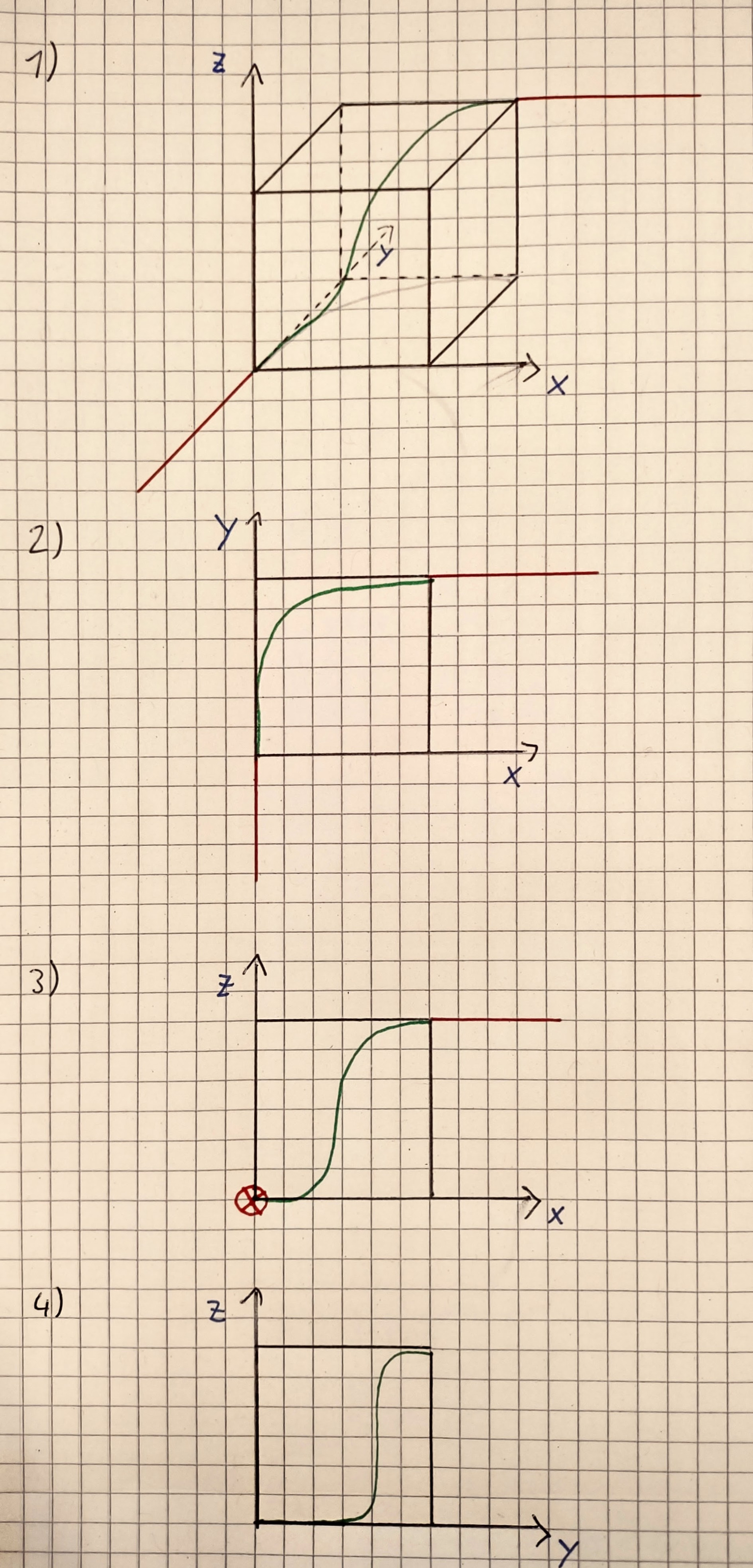
The 2 clothoids look fine by themself, the one in xy is also close to the correct one I guess. The issue is with the second one in xz. The clothoid optimizes curvature in this xz projection so you get linear increasing and decreasing curvature relative to arc length in this projection but not linear in total 3D arc length. In this example the difference is quite extreme because the curve is initially moving mainly in y and not in x. So the resulting curve does not behave as expected. Picture 4) shows the resulting curve in the yz plane, the tool is barely moving in z for quite some time (because the machine is mostly using in y and this direction got ignored for the clothoid calculation. Then it suddenly needs to move quite a lot in z and jerk is much higher than expected from the xz clothoid.
I hope I managed to explain this, it’s kind of hard to visualize 3D clothoids.
So in summary this approach leads to a smooth curve with fitting curvatures at the ends but in between the change in curvature and torsion is not linear and jerk might be higher than expected. The resulting connection curve also dependens on the orientation in the coordinate system. If the example was rotated for example by 45° the resulting clothoids would look differntly. This is of course kind of unintuitive.
So it does work to some extend but is not the best solution and there might be more extreme edge cases where this might go wrong.
The 2 clothoids look fine by themself, the one in xy is also close to the correct one I guess. The issue is with the second one in xz. The clothoid optimizes curvature in this xz projection so you get linear increasing and decreasing curvature relative to arc length in this projection but not linear in total 3D arc length. In this example the difference is quite extreme because the curve is initially moving mainly in y and not in x. So the resulting curve does not behave as expected. Picture 4) shows the resulting curve in the yz plane, the tool is barely moving in z for quite some time (because the machine is mostly using in y and this direction got ignored for the clothoid calculation. Then it suddenly needs to move quite a lot in z and jerk is much higher than expected from the xz clothoid.
I hope I managed to explain this, it’s kind of hard to visualize 3D clothoids.
So in summary this approach leads to a smooth curve with fitting curvatures at the ends but in between the change in curvature and torsion is not linear and jerk might be higher than expected. The resulting connection curve also dependens on the orientation in the coordinate system. If the example was rotated for example by 45° the resulting clothoids would look differntly. This is of course kind of unintuitive.
So it does work to some extend but is not the best solution and there might be more extreme edge cases where this might go wrong.
Last edit: 1 year 8 months ago by FabianB.
The following user(s) said Thank You: akb1212, tivoi, pommen, Grotius, Aciera
Please Log in or Create an account to join the conversation.
- automata
- Offline
- Premium Member
-

Less
More
- Posts: 105
- Thank you received: 93
1 year 8 months ago #321234
by automata
Replied by automata on topic scurve trajectory planner
Hi Grotius,
In the latest version of scurve, how do you set the max deviation parameter?
Right now, I am not able to change the filleting using the spline. Is there any way to enable spline filleting?
I am running the ../cmake/configs/axis_9/axis_scurve_9_mm.ini config.
My tpmod parameters are:
Parameters:
Owner Type Dir Value Name
4 float RW 0.5 tpmod.hal_blend_speed
4 s32 RW 1 tpmod.hal_blend_type
4 s32 RW 1 tpmod.hal_g0_transition_blend
4 s32 RW 20 tpmod.hal_look_ahead_lines
4 float RW 2500 tpmod.hal_max_jerk
No amount of fiddling with G64 is getting the splines to show up.
Am I missing something or some step?
Regards,
-automata
In the latest version of scurve, how do you set the max deviation parameter?
Right now, I am not able to change the filleting using the spline. Is there any way to enable spline filleting?
I am running the ../cmake/configs/axis_9/axis_scurve_9_mm.ini config.
My tpmod parameters are:
Parameters:
Owner Type Dir Value Name
4 float RW 0.5 tpmod.hal_blend_speed
4 s32 RW 1 tpmod.hal_blend_type
4 s32 RW 1 tpmod.hal_g0_transition_blend
4 s32 RW 20 tpmod.hal_look_ahead_lines
4 float RW 2500 tpmod.hal_max_jerk
No amount of fiddling with G64 is getting the splines to show up.
Am I missing something or some step?
Regards,
-automata
The following user(s) said Thank You: Grotius
Please Log in or Create an account to join the conversation.
- Grotius
- Offline
- Platinum Member
-

Less
More
- Posts: 2419
- Thank you received: 2349
1 year 8 months ago - 1 year 8 months ago #321249
by Grotius
Replied by Grotius on topic scurve trajectory planner
@Fabian,
Thank you for nice illustration. This indeed will not work.
Good you have seen the Frego paper is not suitable for our work!
For the new paper, i managed to code Equatation 39.
However Equatation 40, i dont understand the first greek character, and the name of this character.
@Automata,
Currently there is no filleting algo active in the source.
Latest update was to test scurve by Julian.
Also G93,94,95 work now.
Next to do is add filletizing algo. Should be nice if we can directly add a 3d clothoid.
Thank you for nice illustration. This indeed will not work.
Good you have seen the Frego paper is not suitable for our work!
For the new paper, i managed to code Equatation 39.
However Equatation 40, i dont understand the first greek character, and the name of this character.
@Automata,
Currently there is no filleting algo active in the source.
Latest update was to test scurve by Julian.
Also G93,94,95 work now.
Next to do is add filletizing algo. Should be nice if we can directly add a 3d clothoid.
Last edit: 1 year 8 months ago by Grotius.
The following user(s) said Thank You: Aciera
Please Log in or Create an account to join the conversation.
- Aciera
- Offline
- Administrator
-

Less
More
- Posts: 4819
- Thank you received: 2177
1 year 8 months ago - 1 year 8 months ago #321256
by Aciera
Replied by Aciera on topic scurve trajectory planner
The greek letter is 'kappa' and stands for curvatureHowever Equatation 40, i dont understand the first greek character, and the name of this character.
Last edit: 1 year 8 months ago by Aciera.
The following user(s) said Thank You: Grotius
Please Log in or Create an account to join the conversation.
- Grotius
- Offline
- Platinum Member
-
Less
More
- Posts: 2419
- Thank you received: 2349
1 year 8 months ago #321278
by Grotius
Replied by Grotius on topic scurve trajectory planner
Hi Arciera,
Thanks.
I wrote a email to "Min Wan" University in China.
He or she is one of the abstract creators of the 3d clothoid.
I asked for any source code. Or any code they have used for testing their algo that can help us.
Fingers crossed.
To me it looks like " means second derivate?
And the sign above the z and x i don't know.


Thanks.
I wrote a email to "Min Wan" University in China.
He or she is one of the abstract creators of the 3d clothoid.
I asked for any source code. Or any code they have used for testing their algo that can help us.
Fingers crossed.
To me it looks like " means second derivate?
And the sign above the z and x i don't know.
The following user(s) said Thank You: tommylight
Please Log in or Create an account to join the conversation.
- Aciera
- Offline
- Administrator
-
Less
More
- Posts: 4819
- Thank you received: 2177
1 year 8 months ago #321330
by Aciera
Replied by Aciera on topic scurve trajectory planner
The wavy line above the letter is a 'tilde'
So that is the second derivative of 'z-tilde' at 's0' and the second derivative of 'x-tilde' at 's0'.
'z-tilde' and 'x-tilde' are elements of 'P-tilde' which is the trajectory point after transformation:


So that is the second derivative of 'z-tilde' at 's0' and the second derivative of 'x-tilde' at 's0'.
'z-tilde' and 'x-tilde' are elements of 'P-tilde' which is the trajectory point after transformation:
The following user(s) said Thank You: Grotius
Please Log in or Create an account to join the conversation.
Time to create page: 0.733 seconds