
- Posts: 4819
- Thank you received: 2177
scurve trajectory planner
- Aciera
- Offline
- Administrator
-

Less
More
1 year 8 months ago #321622
by Aciera
Replied by Aciera on topic scurve trajectory planner
Actually you can move on to eq45 which shows how to calculate the six variables gamma_i,(2,3,4). However to calculate those 6 variables we first need to calculate gamma_1,1, gamma_2,1 and s_1 which must be calculated numerically with the 'Powell dogleg' method of which I know nothing about.
Please Log in or Create an account to join the conversation.
- Aciera
- Offline
- Administrator
-
Less
More
- Posts: 4819
- Thank you received: 2177
1 year 8 months ago - 1 year 8 months ago #321623
by Aciera
Replied by Aciera on topic scurve trajectory planner
Regarding 'Powell's dogleg' method, maybe these could be of interest, although I'm afraid I have no idea how to apply any of this:
cppget.org/least-squares-cpp?f=full#description
people.sc.fsu.edu/~jburkardt/cpp_src/minpack/minpack.html
cppget.org/least-squares-cpp?f=full#description
people.sc.fsu.edu/~jburkardt/cpp_src/minpack/minpack.html
Last edit: 1 year 8 months ago by Aciera.
Please Log in or Create an account to join the conversation.
- Grotius
- Offline
- Platinum Member
-

Less
More
- Posts: 2419
- Thank you received: 2349
1 year 8 months ago #321661
by Grotius
Replied by Grotius on topic scurve trajectory planner
github.com/dkogan/libdogleg
Dogleg runs.
You basicly provide the equatation in a callback function. Then it iterates until result is within treshold.
Startvalue a=1
Startvalue b= 1
Increment a= 1
Increment b = 1
10 = 3 + a x b
This will do
result = left hand - right hand
0 = 10 - 3 + 1 x 1
Finally
0 = 0
Dogleg runs.
You basicly provide the equatation in a callback function. Then it iterates until result is within treshold.
Startvalue a=1
Startvalue b= 1
Increment a= 1
Increment b = 1
10 = 3 + a x b
This will do
result = left hand - right hand
0 = 10 - 3 + 1 x 1
Finally
0 = 0
The following user(s) said Thank You: tommylight, HalaszAttila
Please Log in or Create an account to join the conversation.
- Grotius
- Offline
- Platinum Member
-
Less
More
- Posts: 2419
- Thank you received: 2349
1 year 8 months ago #321837
by Grotius
Replied by Grotius on topic scurve trajectory planner
Hi,
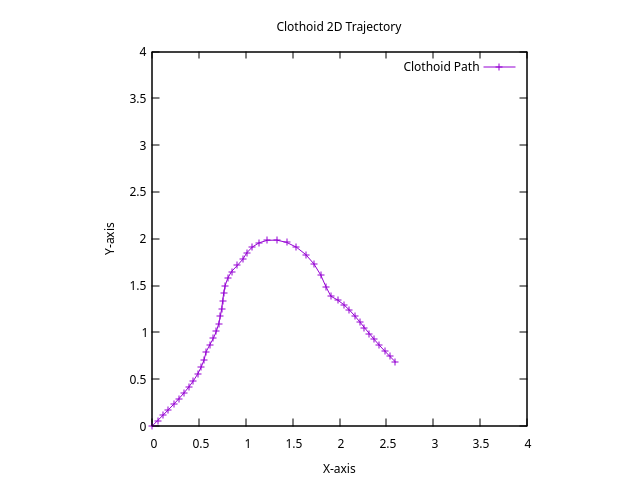
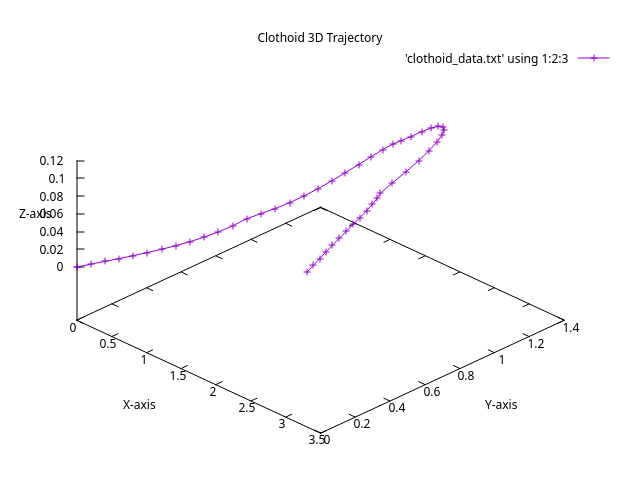
At this stage, we are able to plot something with gnu plot.
In the main.c there is a 2d & 3d example.
When having problems, i decided to revert to implement the 2d solution from eq.46, to get a more simpler overall calculation.
To focus on the 2d solution. The plot is not as should be.
It plots 4 connected clothoids. But the start angle of upcoming clothoid looks to be inverted.
The clothoid compound start, end angle seems to be ok. Start at 45 degrees, end at -45 degrees.
This 2d examples does not focus on the transformation equations. As these transformations can be seen completely seperate.
And it does not use the dogleg solver. It turns out without dogleg solver, initial guess values are most of time ok.
For 2d, there are 2 unknown variables. y21 & s1. In the sample i set a value for y21=1 & for s1=1, this seems to work ok.
Reviewing my code would be appreciated.

updated source
Here is the 2d plot.
At this stage, we are able to plot something with gnu plot.
In the main.c there is a 2d & 3d example.
When having problems, i decided to revert to implement the 2d solution from eq.46, to get a more simpler overall calculation.
To focus on the 2d solution. The plot is not as should be.
It plots 4 connected clothoids. But the start angle of upcoming clothoid looks to be inverted.
The clothoid compound start, end angle seems to be ok. Start at 45 degrees, end at -45 degrees.
This 2d examples does not focus on the transformation equations. As these transformations can be seen completely seperate.
And it does not use the dogleg solver. It turns out without dogleg solver, initial guess values are most of time ok.
For 2d, there are 2 unknown variables. y21 & s1. In the sample i set a value for y21=1 & for s1=1, this seems to work ok.
Reviewing my code would be appreciated.
updated source
Here is the 2d plot.
The following user(s) said Thank You: Aciera
Please Log in or Create an account to join the conversation.
- Aciera
- Offline
- Administrator
-
Less
More
- Posts: 4819
- Thank you received: 2177
1 year 8 months ago #321845
by Aciera
Replied by Aciera on topic scurve trajectory planner
Thanks for all the work!
At a first glance I'm a bit confused what you are doing in your test. Why are you using equations 17..20 and 44?
In my opinion the workflow should be like this.
1. eq 25, 26 or 29,30 depending on type of segments (line or arc)
2. eq 31, 32, 33 to calculate the transformation matrix T
3. eq 35 calculate the transformed derivatives
4. eq 39 calculate theta_1,0, _2,0, _1,4 and _2,4
5. eq 40 calculate kappa_1,0, _2,0, _1,4 and _2,4
6. eq 43,42 calculate c_1,0, _2,0, _1,4 and _2,4
7. dogleg to calculate gamma_1,1, _2,1 and s1
8. eq 45 to calculate the rest.
I'll have a more in depth look tomorrow.
At a first glance I'm a bit confused what you are doing in your test. Why are you using equations 17..20 and 44?
In my opinion the workflow should be like this.
1. eq 25, 26 or 29,30 depending on type of segments (line or arc)
2. eq 31, 32, 33 to calculate the transformation matrix T
3. eq 35 calculate the transformed derivatives
4. eq 39 calculate theta_1,0, _2,0, _1,4 and _2,4
5. eq 40 calculate kappa_1,0, _2,0, _1,4 and _2,4
6. eq 43,42 calculate c_1,0, _2,0, _1,4 and _2,4
7. dogleg to calculate gamma_1,1, _2,1 and s1
8. eq 45 to calculate the rest.
I'll have a more in depth look tomorrow.
The following user(s) said Thank You: Grotius
Please Log in or Create an account to join the conversation.
- Aciera
- Offline
- Administrator
-
Less
More
- Posts: 4819
- Thank you received: 2177
1 year 8 months ago #321851
by Aciera
Replied by Aciera on topic scurve trajectory planner
please, could you also put the 'dogleg' dependency on the repo?
The following user(s) said Thank You: Grotius
Please Log in or Create an account to join the conversation.
Time to create page: 0.143 seconds